1. ບົດແນະນຳ
Thank you for choosing the HARDELL Mini Cordless Rotary Tool. This versatile and compact tool is designed for various light-duty tasks such as sanding, polishing, drilling, carving, and engraving. Its cordless design and multiple speed settings provide flexibility and precision for your DIY projects and crafts. Please read this manual thoroughly before use to ensure safe and optimal operation.
2. ຂໍ້ມູນຄວາມປອດໄພ
- Always wear appropriate personal protective equipment, including safety glasses, during operation.
- ຮັກສາພື້ນທີ່ເຮັດວຽກໃຫ້ສະອາດ ແລະ ມີແສງສະຫວ່າງດີ. ພື້ນທີ່ວຸ້ນວາຍ ຫຼືບ່ອນມືດພາໃຫ້ເກີດອຸປະຕິເຫດ.
- ຫ້າມໃຊ້ເຄື່ອງມືໄຟຟ້າໃນບັນຍາກາດທີ່ລະເບີດ, ເຊັ່ນໃນທີ່ປະທັບຂອງຂອງແຫຼວ, ອາຍແກັສ, ຫຼືຂີ້ຝຸ່ນ.
- ຮັກສາເດັກນ້ອຍ ແລະຜູ້ຢືນຢູ່ຫ່າງໆ ໃນຂະນະທີ່ໃຊ້ເຄື່ອງມືໄຟຟ້າ. ສິ່ງລົບກວນສາມາດເຮັດໃຫ້ເຈົ້າສູນເສຍການຄວບຄຸມ.
- Avoid accidental starting. Ensure the switch is in the off-position before connecting to a battery pack, picking up or carrying the tool.
- ຢ່າບັງຄັບເຄື່ອງມືພະລັງງານ. ໃຊ້ເຄື່ອງມືພະລັງງານທີ່ຖືກຕ້ອງສໍາລັບຄໍາຮ້ອງສະຫມັກຂອງທ່ານ.
- ຖອດຊຸດແບັດເຕີລີ່ອອກຈາກເຄື່ອງມືໄຟຟ້າກ່ອນທີ່ຈະເຮັດການປັບປ່ຽນ, ປ່ຽນອຸປະກອນເສີມ, ຫຼືເກັບຮັກສາເຄື່ອງມືພະລັງງານ.
- ເກັບຮັກສາເຄື່ອງໃຊ້ໄຟຟ້າທີ່ບໍ່ໄດ້ໃຊ້ໄວ້ໃຫ້ໄກຈາກມືຂອງເດັກນ້ອຍ ແລະບໍ່ໃຫ້ບຸກຄົນທີ່ບໍ່ຄຸ້ນເຄີຍກັບເຄື່ອງມືໄຟຟ້າ ຫຼືຄໍາແນະນໍາເຫຼົ່ານີ້ເພື່ອໃຊ້ເຄື່ອງມືໄຟຟ້າ.
- ຮັກສາເຄື່ອງມືໄຟຟ້າ ແລະອຸປະກອນເສີມ. ກວດເບິ່ງຄວາມຜິດປົກກະຕິຫຼືການຜູກມັດຂອງຊິ້ນສ່ວນເຄື່ອນທີ່, ການແຕກຫັກຂອງຊິ້ນສ່ວນ, ແລະເງື່ອນໄຂອື່ນໆທີ່ອາດຈະສົ່ງຜົນກະທົບຕໍ່ການເຮັດວຽກຂອງເຄື່ອງມືໄຟຟ້າ.
- ໃຊ້ເຄື່ອງມືພະລັງງານ, ອຸປະກອນເສີມ, ແລະບິດເຄື່ອງມືຕາມຄໍາແນະນໍາເຫຼົ່ານີ້, ໂດຍຄໍານຶງເຖິງສະພາບການເຮັດວຽກແລະວຽກງານທີ່ຈະປະຕິບັດ.
- This rotary tool is not designed for heavy-duty tasks.
3. ເນື້ອໃນຊຸດ
The HARDELL Mini Cordless Rotary Tool kit includes the following items:
- HARDELL Mini Cordless Rotary Tool (Orange)
- ສາຍສາກ USB-C
- Assorted Accessories (35 pieces), including:
- ແຖບຊາຍ
- ແຜ່ນຂັດ
- Grinding heads
- ເຈາະ
- Engraving tips
- ລໍ້ຕັດ
- Collets (various sizes)
- Wrench for accessory changes

Image: The HARDELL Mini Cordless Rotary Tool shown with its included USB-C charging cable and various accessories, such as sanding bands, cutting discs, drill bits, and grinding heads.
4. ຜະລິດຕະພັນເກີນview
Familiarize yourself with the components of your HARDELL Mini Cordless Rotary Tool:

Image: Diagram showing the key parts of the rotary tool, including the Locking Collar, Spindle Lock Button, On/Off Button, Speed Control Button, Unique Cooling Device, and Type-C Charging Port.
- Locking Collar: Firmly fixes accessories in place.
- ປຸ່ມລັອກ spindle: Quick collet lock for fast accessory changes. Caution: Do not press this button when the device is running.
- ປຸ່ມເປີດ/ປິດ: Powers the tool on or off.
- ປຸ່ມຄວບຄຸມຄວາມໄວ (+/-): Adjusts the rotational speed. The "+" button increases speed, and the "-" button decreases speed.
- ໄຟ LED: Illuminates the work area for enhanced precision and visibility.
- ຜອດສາກໄຟ Type-C: For convenient charging using a USB-C cable.
- Unique Cooling Device: Designed to dissipate heat during operation.
ການຕັ້ງຄ່າຄວາມໄວ
The tool features 5-speed settings for various applications:
- ຄວາມໄວ 1: 5000 RPM (Recommended for polishing)
- ຄວາມໄວ 2: 8000 RPM (Recommended for sanding)
- ຄວາມໄວ 3: 11000 RPM (Recommended for carving)
- ຄວາມໄວ 4: 14000 RPM (Recommended for grinding)
- ຄວາມໄວ 5: 18000 RPM (Recommended for drilling)
5. ການຕິດຕັ້ງ ແລະ ການຕິດຕັ້ງອຸປະກອນເສີມ
Proper installation of accessories is crucial for safe and effective operation.
General Accessory Installation
- ກົດປຸ່ມລັອກ spindle ລົງແລະ unscrew ຫມາກແຫ້ງເປືອກແຂງ.
- Choose the suitable collet and insert it into the tool. Then, place the black nut over the collet. Install the accessory you need to use.
- Press the spindle lock button again, then tighten the nut to secure the accessory.

Image: Visual guide demonstrating the four steps to install various accessories into the rotary tool's collet.
Installing a Sanding Band
- Insert the sanding drum into the collet and tighten the nut.
- Loosen the screw of the sanding drum.
- Install the sanding band onto the drum.
- Press down the spindle lock button and tighten the screw of the sanding drum with the provided wrench.

Image: Visual instructions for attaching a sanding band to the rotary tool, showing the drum, band, and tightening process.
Installing an HSS Cutting Disc or Sanding Paper
- Insert the wheel mandrel into the collet and tighten the nut.
- Dismantle the screw of the wheel mandrel.
- Install the wheel mandrel and assemble the HSS cutting disc or sanding paper.
- Press down the spindle lock button and tighten the screw of the wheel mandrel with the provided wrench.
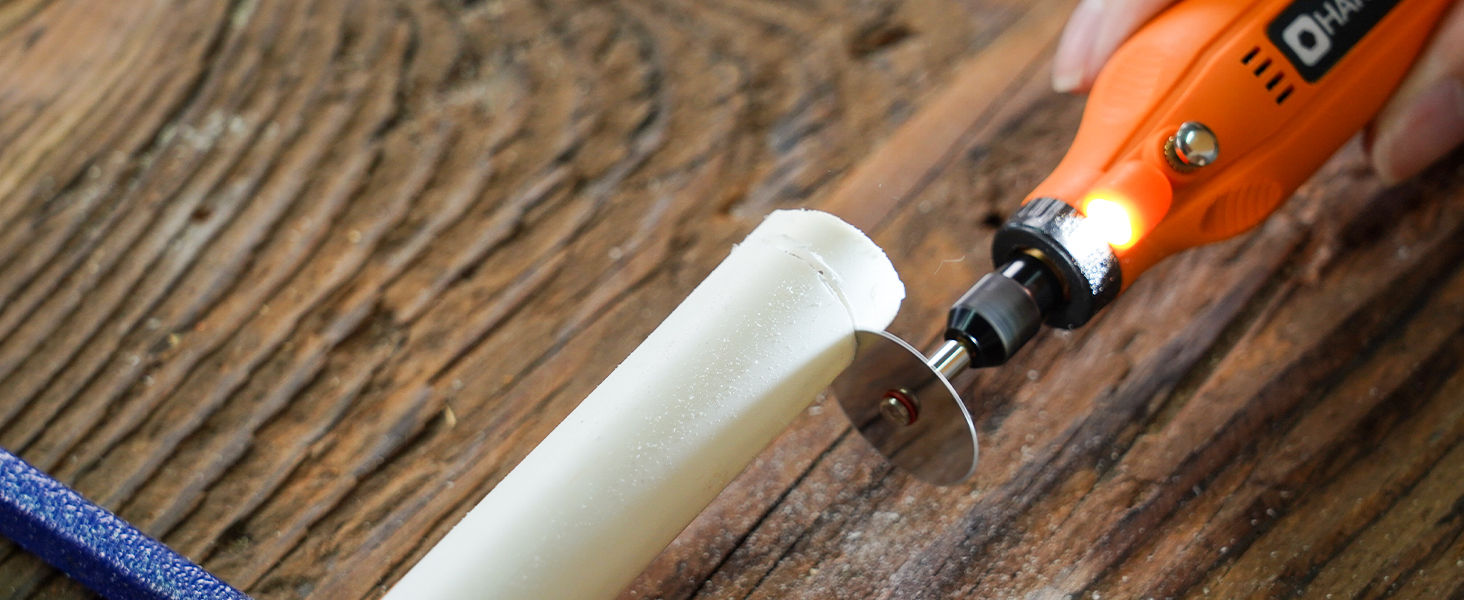
Image: Visual instructions for attaching an HSS cutting disc or sanding paper to the rotary tool, detailing the mandrel and securing steps.
6. ຄໍາແນະນໍາການດໍາເນີນງານ
- ເປີດ/ປິດ: Press the On/Off button to turn the tool on or off.
- ປັບຄວາມໄວ: Use the '+' and '-' buttons to cycle through the 5 available speed settings (5000 RPM to 18000 RPM). The LED indicators will show the current speed level.
- ໄຟ LED: The integrated LED light automatically illuminates when the tool is powered on, providing visibility for detailed work.
- ການດໍາເນີນງານ: Hold the tool firmly and apply gentle pressure to the workpiece. Allow the tool to do the work; excessive force can lead to poor results or damage to the tool/workpiece.

Image: A person using the HARDELL Mini Cordless Rotary Tool for carving a wooden piece, demonstrating its ergonomic design and precision.

ຮູບພາບ: A close-up view of the rotary tool in action, with its LED light brightly illuminating the precise point of contact on a workpiece, highlighting its utility in detailed tasks.
7. ຄໍາຮ້ອງສະຫມັກ
The HARDELL Mini Cordless Rotary Tool is ideal for a variety of light-duty projects, including but not limited to:
- Engraving on various materials
- Sanding small surfaces or edges
- Carving intricate designs
- Drilling small holes
- Grinding for shaping or smoothing
- Polishing for a smooth finish
- Trimming excess material

ຮູບພາບ: A collage showcasing the multi-purpose capabilities of the rotary tool, including sanding wood, carving glass, polishing beads, grinding metal, drilling shells, and cutting plastic.
8. ບໍາລຸງຮັກສາ
ການສາກໄຟເຄື່ອງມື
- Connect the provided USB-C charging cable to the charging port at the base of the tool.
- Plug the other end of the USB-C cable into a compatible power source (e.g., computer, car charger, power bank).
- The LED indicators will show the charging status. A full charge provides up to 100 minutes of continuous use under no-load conditions.
ການເຮັດຄວາມສະອາດແລະການເກັບຮັກສາ
- After each use, disconnect any accessories and gently wipe the tool body with a clean, dry cloth.
- Remove any dust or debris from the collet and spindle area.
- Store the tool and its accessories in a dry, clean place, preferably in its original carrying case, away from direct sunlight and extreme temperatures.
9. ການແກ້ໄຂບັນຫາ
- Tool does not turn on: Ensure the tool is fully charged. If the battery is low, connect it to a power source using the USB-C cable.
- ປະສິດທິພາບຫຼຸດລົງ: Check if the accessory is securely installed. Ensure the battery is adequately charged. The tool is designed for light-duty tasks; avoid using it for heavy-duty applications that may exceed its capacity.
- ການສັ່ນສະເທືອນ ຫຼືສຽງດັງເກີນໄປ: Ensure the accessory is correctly inserted and tightened. A loose or damaged accessory can cause vibration. Replace any worn or damaged accessories.
- ຄວາມຮ້ອນເກີນ: If the tool feels excessively hot, discontinue use and allow it to cool down. Ensure the cooling vents are not obstructed.
10. ຂໍ້ມູນຈໍາເພາະ
| ຄຸນສົມບັດ | ຂໍ້ມູນຈໍາເພາະ |
|---|---|
| ຍີ່ຫໍ້ | ຍາກ |
| ໝາຍເລກຕົວແບບ | DM12405ORANGEH-2 |
| ແຫຼ່ງພະລັງງານ | ພະລັງງານຫມໍ້ໄຟ (3.7V Lithium Ion) |
| ການຕັ້ງຄ່າຄວາມໄວ | 5 ສະປີດ (5000-18000 ຮອບຕໍ່ນາທີ) |
| ປະເພດການສາກໄຟ | USB-C |
| ນ້ໍາຫນັກລາຍການ | 0.3 lbs (7.4 ounces / 0.21 Kilograms) |
| ຄຸນນະສົມບັດພິເສດ | Compact, LED Light |
| ອົງປະກອບລວມ | 35 Accessories, USB-C Cable |
11. ການຮັບປະກັນແລະການສະຫນັບສະຫນູນ
For warranty information, technical support, or any questions regarding your HARDELL Mini Cordless Rotary Tool, please refer to the documentation included in your product packaging or contact HARDELL customer service directly. Contact details can typically be found on the manufacturer's webສະຖານທີ່ຫຼືຢູ່ໃນການຫຸ້ມຫໍ່ຜະລິດຕະພັນ.


