ແນະນຳ
This user manual provides comprehensive instructions for the Baseus Enercore Product Bundle, which includes a 67W Retractable USB C Charger and a 10000mAh Fast Charging Portable Power Bank. Please read this manual carefully before using the products to ensure safe and optimal performance.
ຂໍ້ມູນຄວາມປອດໄພ
- ຢ່າໃຫ້ອຸປະກອນຖືກອຸນຫະພູມສູງ, ແສງແດດໂດຍກົງ ຫຼື ຄວາມຊຸ່ມຊື່ນສູງ.
- ຫຼີກເວັ້ນການລຸດລົງ ຫຼື ວາງອຸປະກອນໃຫ້ມີຜົນກະທົບທີ່ເຂັ້ມແຂງ.
- Do not disassemble, repair, or modify the devices.
- ຮັກສາໃຫ້ໄກຈາກເດັກນ້ອຍ.
- Use only original or certified cables and adapters.
- ຖອດສາຍສາກຈາກປລັກສຽບໄຟເມື່ອບໍ່ໄດ້ໃຊ້.
- ຖ້າພາວເວີແບງບວມ, ຮົ່ວໄຫຼ, ຫຼື ມີກິ່ນຜິດປົກກະຕິ, ໃຫ້ຢຸດໃຊ້ທັນທີ.
ເນື້ອໃນຊຸດ
- 1 x Baseus Enercore 67W Retractable USB C Charger
- 1 x Baseus Enercore 10000mAh Fast Charging Portable Power Bank
- 1 x ຄູ່ມືຜູ້ໃຊ້ (ເອກະສານນີ້)

Image: The Baseus Enercore 67W Retractable USB C Charger (left) and the 10000mAh Portable Power Bank (right).
ສິນຄ້າເກີນview
Baseus Enercore 67W Retractable USB C Charger
This compact wall charger features a 67W power output, two USB-C ports, and a built-in retractable USB-C cable for convenient charging of multiple devices simultaneously.

Image: The 67W charger connected to a smartphone, illustrating its high-speed charging capability.

Image: The 67W charger with its retractable USB-C cable extended, charging a MacBook Pro.
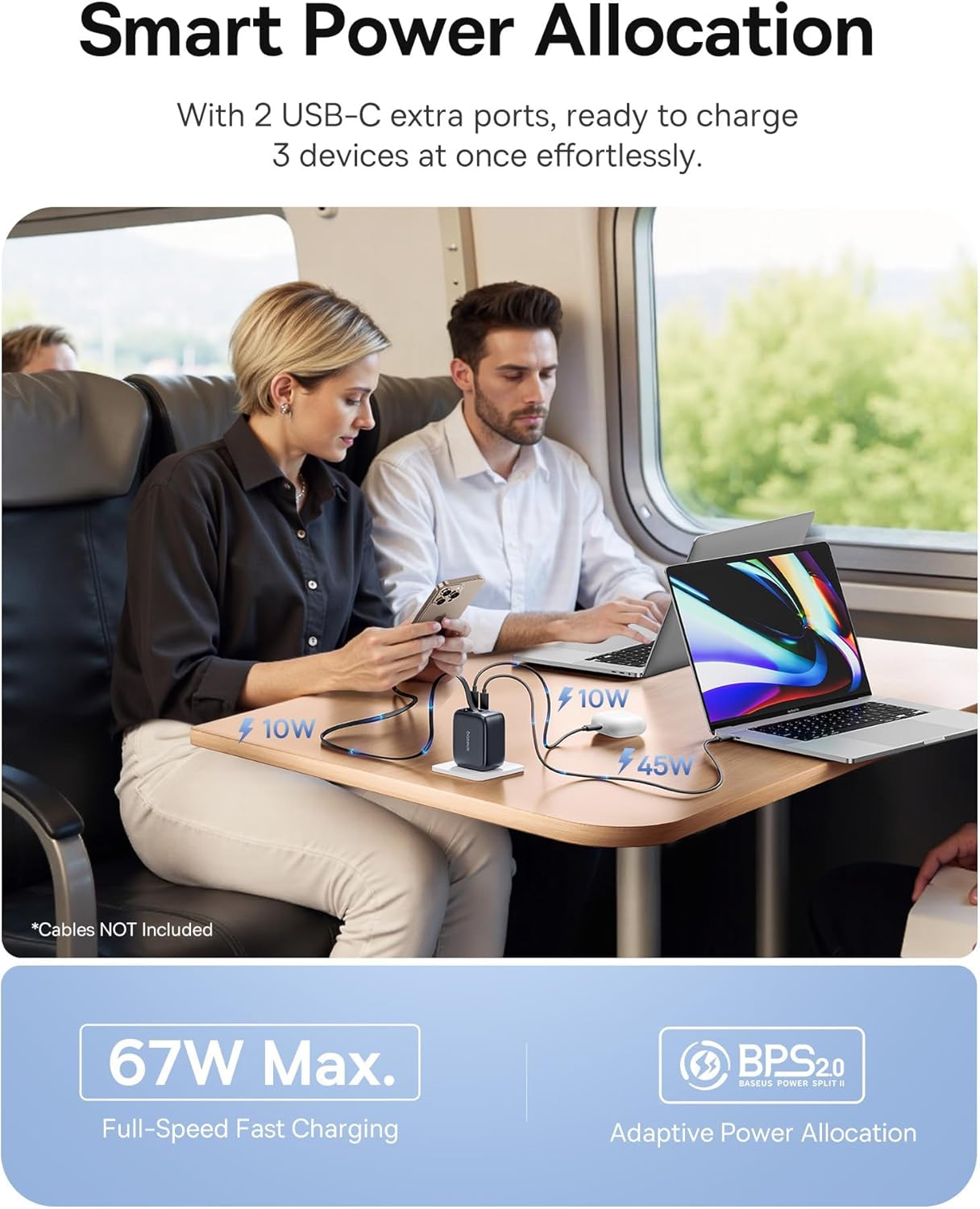
Image: The 67W charger in use, demonstrating its ability to charge three devices simultaneously with smart power allocation.

Image: Close-up of the 67W charger highlighting its foldable prongs and compact, travel-ready design.
Baseus Enercore 10000mAh Portable Power Bank
This portable power bank features a 10000mAh capacity, 45W fast charging, and an integrated retractable USB-C cable, making it ideal for on-the-go power needs.

Image: The 10000mAh power bank showcasing its integrated retractable USB-C cable for convenience.

ຮູບພາບ: ລະເບີດ view of the 10000mAh power bank's internal components and a size comparison to a soda can.

Image: The 10000mAh power bank connected to an iPhone, demonstrating its 45W fast charging capability.

Image: A close-up of the power bank's integrated smart digital display, showing the battery percentage.
ຕັ້ງຄ່າ
ການສາກໄຟ Power Bank ເບື້ອງຕົ້ນ
- Before first use, fully charge the Baseus Enercore Power Bank.
- Connect the power bank to the 67W charger or another compatible USB-C power source using the integrated retractable cable or a separate USB-C cable.
- The digital display will show the charging progress. Charging is complete when the display shows 100%.
ຄໍາແນະນໍາການດໍາເນີນງານ
Using the 67W Retractable USB C Charger
- ເຊື່ອມຕໍ່ກັບພະລັງງານ: Fold out the prongs and plug the charger into a standard wall outlet.
- ອຸປະກອນສາກໄຟ:
- For devices with a USB-C port, gently pull the integrated retractable USB-C cable from the charger and connect it to your device.
- For additional devices, use your own USB-C to USB-C or USB-C to Lightning cables and connect them to the available USB-C ports on the charger.
- ສາຍຖອດ: After use, gently pull the retractable cable slightly further out, then release it to allow it to retract back into the charger.
- Fold Prongs: Fold the prongs back into the charger for compact storage.
Using the 10000mAh Portable Power Bank
- ກວດເບິ່ງລະດັບຫມໍ້ໄຟ: Press the power button once to activate the digital display and check the remaining battery percentage.
- ອຸປະກອນສາກໄຟ:
- Gently pull the integrated retractable USB-C cable from the power bank and connect it to your device's USB-C port.
- ທະນາຄານພະລັງງານຈະເລີ່ມສາກໄຟອຸປະກອນຂອງທ່ານໂດຍອັດຕະໂນມັດ.
- Recharge Power Bank: When the power bank's battery is low, recharge it using a compatible USB-C charger (like the included 67W charger) and the integrated cable.
- ສາຍຖອດ: After use, gently pull the retractable cable slightly further out, then release it to allow it to retract back into the power bank.
ບໍາລຸງຮັກສາ
- ທໍາຄວາມສະອາດ: Use a soft, dry cloth to wipe the surface of the devices. Do not use liquid cleaners or aerosols.
- ການເກັບຮັກສາ: ເກັບຮັກສາອຸປະກອນໄວ້ໃນບ່ອນທີ່ເຢັນ, ແຫ້ງ, ຫ່າງຈາກແສງແດດໂດຍກົງ ແລະອຸນຫະພູມທີ່ຮຸນແຮງ.
- ການດູແລສາຍໄຟ: When retracting the cables, ensure they are not twisted or forced.
ການແກ້ໄຂບັນຫາ
| ບັນຫາ | ສາເຫດທີ່ເປັນໄປໄດ້ | ການແກ້ໄຂ |
|---|---|---|
| Device not charging from charger. | Charger not plugged in correctly; cable faulty; device incompatible. | Ensure charger is firmly plugged into outlet. Try a different cable. Verify device compatibility. |
| Power bank ບໍ່ໄດ້ສາກໄຟ. | Charging cable faulty; power source insufficient; power bank depleted. | Try a different USB-C cable and charger. Ensure the power source is active. Allow sufficient time for charging. |
| ສາຍທີ່ຫົດໄດ້ບໍ່ສາມາດຫົດໄດ້ຢ່າງລຽບງ່າຍ. | ສາຍເຄເບີ້ນບິດຫຼືຂັດຂວາງ. | Gently pull the cable out slightly further, then release it. Ensure no obstructions. Do not force. |
| ການສາກໄຟຊ້າ. | Cable not supporting fast charging; device not supporting fast charging; multiple devices connected. | Use a high-quality, fast-charging compatible cable. Ensure your device supports fast charging. Charging speed may decrease when multiple devices are connected. |
ຂໍ້ມູນຈໍາເພາະ
Baseus Enercore 67W Retractable USB C Charger
- ຕົວແບບ: CJ11 (part of bundle)
- ພະລັງງານອອກ: ສູງສຸດ 67W
- ພອດ: 2 x USB-C, 1 x Integrated Retractable USB-C Cable
- ຄຸນສົມບັດ: Foldable Prongs, Smart Power Allocation (BPS2.0)
Baseus Enercore 10000mAh Portable Power Bank
- ຕົວແບບ: (part of bundle)
- ຄວາມອາດສາມາດ: 10000mAh
- ພະລັງງານອອກ: Up to 45W PD Fast Charging
- ສາຍ: Built-in 45W Retractable USB-C Cable
- ຈໍສະແດງຜົນ: Integrated Smart Digital Display
- ຄວາມເຂົ້າກັນໄດ້: iPhone 16/15 Series, Samsung Galaxy series, Google Pixel, iPad, AirPods, Drone, GoPro, etc.
ການຮັບປະກັນແລະການສະຫນັບສະຫນູນ
Baseus products typically come with a limited warranty. For specific warranty terms and conditions, please refer to the warranty card included with your purchase or visit the official Baseus website. For technical support, troubleshooting assistance, or to inquire about replacement parts, please contact Baseus customer service through their official channels.
ທ່ານສາມາດຊອກຫາຂໍ້ມູນເພີ່ມເຕີມແລະລາຍລະອຽດການຕິດຕໍ່ກ່ຽວກັບການ ຮ້ານ Baseus ໃນ Amazon.


