ແນະນຳ
ຂອບໃຈສໍາລັບການຊື້asing the Mistral MHV9812DRW-SB 12-inch DC High Velocity Stand Fan. This manual provides important information for the safe operation, installation, and maintenance of your fan. Please read it thoroughly before use and retain it for future reference.
ຂໍ້ມູນຄວາມປອດໄພທີ່ສໍາຄັນ
ເພື່ອຫຼຸດຜ່ອນຄວາມສ່ຽງທີ່ຈະເກີດໄຟຟ້າ, ຊ໊ອກໄຟຟ້າ, ຫຼືບາດເຈັບ, ໃຫ້ສັງເກດການລະມັດລະວັງດ້ານຄວາມປອດໄພດັ່ງຕໍ່ໄປນີ້:
- ໃຫ້ແນ່ໃຈວ່າພັດລົມຖືກວາງຢູ່ເທິງພື້ນຜິວທີ່ມີລະດັບຄວາມຫມັ້ນຄົງເພື່ອປ້ອງກັນການບິດ.
- Do not insert fingers or any objects through the grille when the fan is operating.
- Unplug the fan from the power outlet before cleaning, moving, or performing any maintenance.
- ຢ່າໃຊ້ພັດລົມດ້ວຍສາຍໄຟ ຫຼືປລັກສຽບທີ່ເສຍຫາຍ. ຖ້າສາຍຫຼືປລັກເສຍຫາຍ, ໃຫ້ຕິດຕໍ່ພະນັກງານບໍລິການທີ່ມີຄຸນວຸດທິ.
- ຮັກສາພັດລົມໃຫ້ຫ່າງຈາກນ້ໍາແລະຄວາມຊຸ່ມ. ຢ່າໃຊ້ມັນຢູ່ໃນຫ້ອງນ້ໍາຫຼືສະພາບແວດລ້ອມທີ່ຊຸ່ມຊື່ນອື່ນໆ.
- ເຄື່ອງໃຊ້ນີ້ບໍ່ໄດ້ມີຈຸດປະສົງເພື່ອໃຊ້ໂດຍບຸກຄົນ (ລວມທັງເດັກນ້ອຍ) ທີ່ມີຄວາມສາມາດທາງຮ່າງກາຍ, ຄວາມຮູ້ສຶກ ຫຼືຈິດໃຈທີ່ຫຼຸດລົງ, ຫຼືຂາດປະສົບການ ແລະຄວາມຮູ້, ເວັ້ນເສຍແຕ່ວ່າພວກເຂົາໄດ້ຮັບການຊີ້ນໍາ ຫຼືຄໍາແນະນໍາກ່ຽວກັບການນໍາໃຊ້ເຄື່ອງໃຊ້ໂດຍບຸກຄົນທີ່ຮັບຜິດຊອບຄວາມປອດໄພຂອງເຂົາເຈົ້າ.
- ເດັກນ້ອຍຄວນໄດ້ຮັບການເບິ່ງແຍງເພື່ອຮັບປະກັນວ່າພວກເຂົາບໍ່ໄດ້ຫຼີ້ນກັບເຄື່ອງໃຊ້.
- Do not cover the fan or restrict airflow during operation.
- ໃຊ້ພຽງແຕ່ອະແດັບເຕີໄຟທີ່ໃຫ້ມາ.
ເນື້ອໃນຊຸດ
ກວດສອບວ່າອົງປະກອບທັງຫມົດແມ່ນມີຢູ່ໃນສະພາບທີ່ດີ:
- ສະພານຫົວພັດລົມ
- ເສົາຢືນທີ່ສາມາດປັບໄດ້
- ຖານ
- ການຄວບຄຸມໄລຍະໄກ
- ອະແດບເຕີ AC
- ຄູ່ມືຜູ້ໃຊ້ (ເອກະສານນີ້)
ການຕິດຕັ້ງແລະການປະກອບ
ປະຕິບັດຕາມຂັ້ນຕອນເຫຼົ່ານີ້ເພື່ອປະກອບພັດລົມຕັ້ງຂອງທ່ານ:
- ຕິດເສົາຢືນເຂົ້າກັບຖານ: Carefully insert the adjustable stand pole into the base. Ensure it is securely fastened according to the markings or locking mechanism.
- Attach the Fan Head: Connect the fan head assembly to the top of the stand pole. Ensure it clicks into place or is tightened securely.
- ປັບຄວາມສູງ: Loosen the height adjustment knob/collar on the stand pole, extend or retract the pole to your desired height, and then securely tighten the knob/collar. The fan is height adjustable from approximately 860mm to 1050mm.
- ຕໍາແຫນ່ງພັດລົມ: Place the assembled fan on a firm, level surface, ensuring there is adequate space around it for proper airflow.
- ເຊື່ອມຕໍ່ພະລັງງານ: Plug the AC adapter into the fan's power input, then plug the adapter into a standard 220-240V~, 50/60Hz electrical outlet.
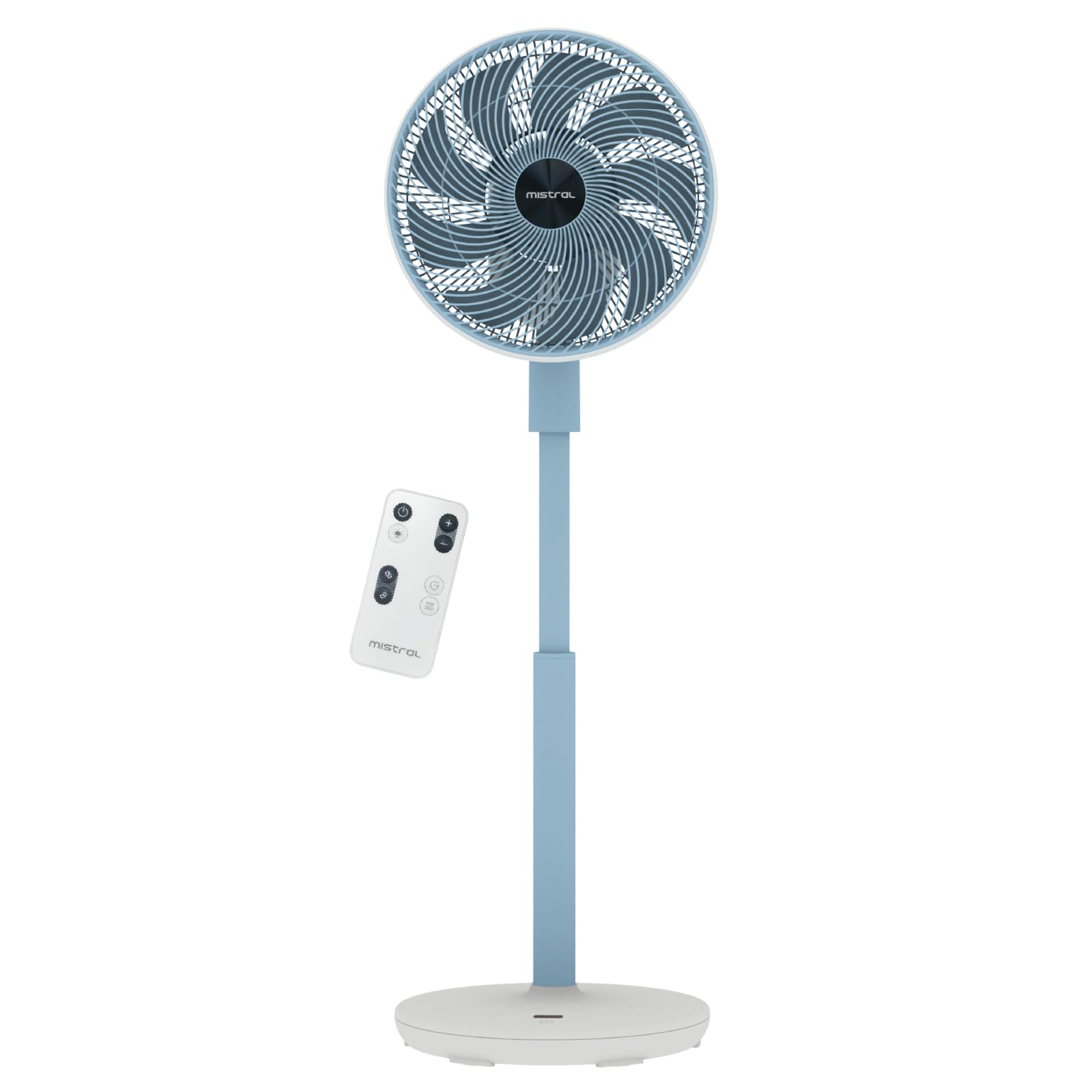
Image: The Mistral MHV9812DRW-SB stand fan in Sky Blue, illustrating its assembled form with the fan head tilted upwards, adjustable pole, and stable base. The image also shows icons for Wi-Fi and voice control features.
ຄໍາແນະນໍາການດໍາເນີນງານ
Your Mistral fan can be operated using the touch control panel on the unit, the included remote control, or via Wi-Fi voice control.
ແຜງຄວບຄຸມແລະຈໍ LED
The fan features an LED display and touch control panel on its base for direct operation. Refer to the specific icons on the panel for power, speed, mode, oscillation, and timer functions.
ການຄວບຄຸມໄລຍະໄກ
The remote control provides convenient access to all fan functions from a distance. Ensure batteries are correctly inserted (not included, typically AAA). Point the remote control towards the fan's receiver.
Wi-Fi ແລະການຄວບຄຸມດ້ວຍສຽງ
This fan supports Wi-Fi connectivity and voice control for smart home integration. Download the "Mayer Home" application (or specified app) from your device's app store and follow the in-app instructions to connect your fan to your home Wi-Fi network. Once connected, you can control the fan using the app or compatible voice assistants.
ຟັງຊັນພັດລົມ
- ເປີດ/ປິດ: ກົດປຸ່ມເປີດປິດໃນແຜງຄວບຄຸມ ຫຼືຣີໂໝດ.
- ການຕັ້ງຄ່າຄວາມໄວ: The fan offers 12 speed settings. Adjust using the speed control buttons.
- ຮູບແບບການເຮັດວຽກ: ເລືອກຈາກ 4 ຮູບແບບທີ່ແຕກຕ່າງກັນ:
- ທຳ ມະຊາດ: ຈຳລອງສາຍລົມທຳມະຊາດໂດຍການປ່ຽນຄວາມໄວພັດລົມ.
- ນອນ: ເຮັດວຽກດ້ວຍຄວາມໄວທີ່ຕ່ຳກວ່າ ແລະ ງຽບກວ່າ ເພື່ອການນອນຫຼັບທີ່ບໍ່ມີການລົບກວນ.
- ແອັກໂກ້: Adjusts fan speed based on ambient temperature for energy efficiency.
- ຮອບວຽນ: Provides a continuous, consistent airflow.
- ການສັ່ນ:
- Left-Right Oscillation: Choose between 45° or 90° horizontal oscillation.
- Up-Down Oscillation: Choose between 45° or 90° vertical oscillation.
- ໂມງຈັບເວລາ: ຕັ້ງພັດລົມໃຫ້ປິດອັດຕະໂນມັດຫຼັງຈາກໄລຍະເວລາທີ່ກໍານົດ, ສູງສຸດ 12 ຊົ່ວໂມງ.
- Moodlight: The fan includes a moodlight feature with 2 settings. Activate and adjust via the control panel or remote.
ການບໍາລຸງຮັກສາແລະການທໍາຄວາມສະອາດ
ການເຮັດຄວາມສະອາດປົກກະຕິຈະຊ່ວຍຮັກສາປະສິດທິພາບຂອງພັດລົມແລະຍືດອາຍຸຂອງມັນ.
- ຕັດການເຊື່ອມຕໍ່ພະລັງງານ: ຖອດພັດລົມອອກຈາກປລັກສຽບໄຟກ່ອນທຳຄວາມສະອາດທຸກຄັ້ງ.
- ອະນາໄມພື້ນຜິວພາຍນອກ: ເຊັດພື້ນຜິວພາຍນອກຂອງພັດລົມໃຫ້ອ່ອນໆ, ງamp ຜ້າ. ຢ່າໃຊ້ເຄື່ອງເຮັດຄວາມສະອາດຂັດຫຼືສານລະລາຍ.
- Clean Fan Grilles and Blades: Use a vacuum cleaner with a brush attachment or a soft cloth to remove dust from the front and rear grilles and fan blades. For thorough cleaning, the front grille may be removable (refer to specific assembly instructions if applicable, not detailed here).
- ການເກັບຮັກສາ: If storing the fan for an extended period, cover it to protect it from dust and store it in a cool, dry place.
ການແກ້ໄຂບັນຫາ
ຖ້າເຈົ້າພົບບັນຫາກັບພັດລົມຂອງເຈົ້າ, ໃຫ້ອ້າງອີງເຖິງບັນຫາທົ່ວໄປ ແລະວິທີແກ້ໄຂບັນຫາຕໍ່ໄປນີ້:
| ບັນຫາ | ສາເຫດທີ່ເປັນໄປໄດ້ | ການແກ້ໄຂ |
|---|---|---|
| ພັດລົມບໍ່ເປີດ. | No power supply; Power button not pressed; Remote control batteries depleted. | Ensure the power cord is securely plugged into a working outlet. Press the power button on the unit or remote. Replace remote control batteries. |
| ກະແສລົມອ່ອນແອ. | Fan speed too low; Grilles are blocked by dust. | Increase the fan speed setting. Clean the fan grilles and blades as per maintenance instructions. |
| ພັດລົມເຮັດໃຫ້ສຽງຜິດປົກກະຕິ. | ພັດລົມບໍ່ໄດ້ຢູ່ເທິງໜ້າດິນທີ່ຮາບພຽງ; ຊິ້ນສ່ວນທີ່ວ່າງ; ສິ່ງກີດຂວາງ. | Place the fan on a stable, level surface. Check for any loose components or foreign objects near the blades. Unplug and inspect. |
| ການຄວບຄຸມໄລຍະໄກບໍ່ເຮັດວຽກ. | Batteries depleted or incorrectly inserted; Obstruction between remote and fan. | Replace batteries, ensuring correct polarity. Remove any obstructions and ensure the remote is pointed at the fan's receiver. |
| ບັນຫາການເຊື່ອມຕໍ່ Wi-Fi. | Incorrect Wi-Fi password; Fan too far from router; Router issues. | Verify Wi-Fi password. Move the fan closer to the Wi-Fi router. Restart your router. Follow the app's troubleshooting guide for connection. |
ຖ້າບັນຫາຍັງຄົງຢູ່ຫຼັງຈາກພະຍາຍາມແກ້ໄຂເຫຼົ່ານີ້, ກະລຸນາຕິດຕໍ່ຝ່າຍຊ່ວຍເຫຼືອລູກຄ້າ.
ຂໍ້ມູນຈໍາເພາະ
| ຄຸນສົມບັດ | ລາຍລະອຽດ |
|---|---|
| ຕົວແບບ | MHV9812DRW-SB |
| ສະບັບtage | 220-240V ~, 50/60Hz |
| ວັດtage | 30W |
| ປະລິມານອາກາດ | 38.12 m³ / ນາທີ |
| ກະແສລົມສູງສຸດ | 6.9 m / s |
| ລະດັບສຽງ | 23dBA (Lowest Speed) | 45dBA (Highest Speed) |
| ຂະໜາດສິນຄ້າ (L*W*H) | 350 * 350 * 860-1050 mm |
| ນ້ຳໜັກສຸດທິ | 3.7 ກິໂລ |
| AC Adapter Input | 100-240V ~, 50/60Hz |
| AC Adapter Output | 12.0V 3.0A 36.0W |
| ປະເພດການຄວບຄຸມ | LED Display Touch Control Panel, Remote Control, Wi-Fi Voice Control |
| ການຕັ້ງຄ່າຄວາມໄວ | 12 ຄວາມໄວ |
| ຮູບແບບການເຮັດວຽກ | Natural, Sleep, Eco, Cycle |
| ການສັ່ນສະເທືອນ | Left-Right (45°/90°), Up-Down (45°/90°) |
| ໂມງຈັບເວລາ | 12 ຊົ່ວໂມງ |
| ຄຸນນະສົມບັດພິເສດ | Moodlight (2 settings) |
| ເຄື່ອງSafetyາຍຄວາມປອດໄພ | 240788-11 |
ການຮັບປະກັນແລະການສະຫນັບສະຫນູນ
ຂໍ້ມູນການຮັບປະກັນ
This Mistral MHV9812DRW-SB fan comes with a ຮັບປະກັນ 1 ປີ on the entire unit and an extended ຮັບປະກັນ 3 ປີ specifically for the motor. This warranty covers manufacturing defects under normal use. Please retain your proof of purchase for warranty claims.
The warranty does not cover damage resulting from misuse, accident, unauthorized modification, or failure to follow the instructions in this manual.
ການຊ່ວຍເຫຼືອລູກຄ້າ
For technical assistance, warranty claims, or general inquiries, please contact Mistral customer support through their official website or the retailer where the product was purchased. Please have your model number (MHV9812DRW-SB) and proof of purchase ready when contacting support.
Note: Contact information for specific regions may vary. Refer to the official Mistral webເວັບໄຊທ໌ສໍາລັບລາຍລະອຽດສະຫນັບສະຫນູນທີ່ທັນສະໄຫມທີ່ສຸດ.


