1. ບົດແນະນຳ
This manual provides detailed instructions for the operation and maintenance of your KEPLUG MX9 Sunrise Alarm Clock. This device combines a digital alarm clock, a sunrise simulation wake-up light, a dimmable bedside night light, and a white noise machine with 30 soothing sounds. Please read this manual thoroughly before use to ensure proper functionality and safety.
2. ຂໍ້ມູນຄວາມປອດໄພ
- ໃຫ້ແນ່ໃຈວ່າອຸປະກອນຖືກວາງຢູ່ເທິງພື້ນຜິວທີ່ຮາບພຽງ.
- ຢ່າປ່ອຍໃຫ້ອຸປະກອນຖືກນ້ໍາຫຼືຄວາມຊຸ່ມຊື່ນຫຼາຍເກີນໄປ.
- ໃຊ້ພຽງແຕ່ອະແດບເຕີໄຟຟ້າ ແລະ ສາຍໄຟທີ່ໃຫ້ມາເທົ່ານັ້ນ.
- ຮັກສາໃຫ້ໄກຈາກເດັກນ້ອຍ ແລະສັດລ້ຽງ.
- ຢ່າພະຍາຍາມຖອດປະກອບ ຫຼືສ້ອມແປງອຸປະກອນດ້ວຍຕົນເອງ. ຕິດຕໍ່ພະນັກງານທີ່ມີຄຸນວຸດທິສໍາລັບການບໍລິການ.
- ຖອດປລັກອຸປະກອນໃນເວລາມີພະຍຸຟ້າຜ່າ ຫຼືເມື່ອບໍ່ໄດ້ໃຊ້ເປັນເວລາດົນນານ.
3. ເນື້ອໃນຊຸດ
ກວດສອບວ່າລາຍການທັງຫມົດແມ່ນມີຢູ່ໃນຊຸດ:
- KEPLUG MX9 Sunrise Alarm Clock
- Power Adapter
- ສາຍໄຟ
- ຄູ່ມືຜູ້ໃຊ້ (ເອກະສານນີ້)
4. ຜະລິດຕະພັນເກີນview
Familiarize yourself with the main components and control buttons of your KEPLUG MX9 Sunrise Alarm Clock.

ຮູບພາບ 1: ດ້ານຫນ້າ view of the KEPLUG MX9 Sunrise Alarm Clock, showing the main light dome, digital time display, and control buttons at the base.
The device features a large light dome, a digital time display, and several touch-sensitive buttons for control:
- ປຸ່ມປຸກ: Used to set and activate alarms.
- ປຸ່ມເວລາ: Used to set the current time and 12/24-hour format.
- ເລື່ອນ/ປຸ່ມແສງ: Activates snooze during an alarm, or turns on/off and adjusts the night light.
- ປຸ່ມບວກ (+): Increases values (time, volume, brightness) or navigates options.
- ປຸ່ມລົບ (-): Decreases values (time, volume, brightness) or navigates options.
- Music Note Button: Selects soothing sounds or white noise.
5. ຕັ້ງຄ່າ
5.1 ການເຊື່ອມຕໍ່ພະລັງງານ
- Connect the power cable to the DC input port on the back of the alarm clock.
- ສຽບອະແດບເຕີໄຟເຂົ້າໄປໃນປລັກໄຟຟ້າມາດຕະຖານ.
- The digital display will illuminate, indicating the device is powered on.
5.2 ການກໍານົດເວລາປະຈຸບັນ
- ກົດຄ້າງໄວ້ ປຸ່ມເວລາ for 3 seconds to enter time setting mode. The hour digits will flash.
- ໃຊ້ ບວກ (+) or Minus (-) Buttons ເພື່ອປັບຊົ່ວໂມງ.
- ກົດ ປຸ່ມເວລາ ອີກເທື່ອ ໜຶ່ງ ເພື່ອຢືນຢັນຊົ່ວໂມງແລະຍ້າຍໄປທີ່ການຕັ້ງຄ່ານາທີ. ຕົວເລກນາທີຈະກະພິບ.
- ໃຊ້ ບວກ (+) or Minus (-) Buttons ເພື່ອປັບນາທີ.
- ກົດ ປຸ່ມເວລາ a third time to confirm the minutes and select 12-hour or 24-hour format.
- ໃຊ້ ບວກ (+) or Minus (-) Buttons ເພື່ອເລືອກຮູບແບບເວລາທີ່ທ່ານຕ້ອງການ.
- ກົດ ປຸ່ມເວລາ ເປັນຄັ້ງສຸດທ້າຍເພື່ອອອກຈາກໂໝດການຕັ້ງຄ່າເວລາ.
6. ຄໍາແນະນໍາການດໍາເນີນງານ
6.1 Setting an Alarm (Sunrise Simulation & Sound)
The KEPLUG MX9 allows you to set multiple alarms with customizable sunrise simulation and sound options.

Image 2: Illustration of the sunrise simulation feature, where the light gradually brightens over a set period, mimicking a natural sunrise.
- ກົດ ປຸ່ມປຸກ to select an alarm slot (e.g., Alarm 1, Alarm 2).
- ກົດຄ້າງໄວ້ ປຸ່ມປຸກ for 3 seconds to enter alarm setting mode. The alarm hour digits will flash.
- ໃຊ້ ບວກ (+) or Minus (-) Buttons ເພື່ອຕັ້ງໂມງປຸກທີ່ຕ້ອງການ.
- ກົດ ປຸ່ມປຸກ to confirm the hour and set the minutes.
- ໃຊ້ ບວກ (+) or Minus (-) Buttons ເພື່ອກໍານົດນາທີປຸກທີ່ຕ້ອງການ.
- ກົດ ປຸ່ມປຸກ to confirm minutes and set the sunrise duration (15-120 minutes). This is the time before the alarm sound when the light will gradually brighten.
- ໃຊ້ ບວກ (+) or Minus (-) Buttons to select the sunrise duration.
- ກົດ ປຸ່ມປຸກ to confirm duration and select the wake-up sound.
- ໃຊ້ ບວກ (+) or Minus (-) Buttons to cycle through the available wake-up sounds (e.g., nature sounds, melodies).
- ກົດ ປຸ່ມປຸກ to confirm the sound and set the alarm volume.
- ໃຊ້ ບວກ (+) or Minus (-) Buttons to adjust the alarm volume (7 levels).
- ກົດ ປຸ່ມປຸກ one last time to save the alarm settings and activate the alarm. An alarm icon will appear on the display.
6.2 Snooze ຟັງຊັນ
ເມື່ອມີສຽງປຸກ, ກົດປຸ່ມ ເລື່ອນ/ປຸ່ມແສງ to activate the snooze function. The alarm will pause for 9 minutes and then sound again. You can snooze multiple times.
6.3 Turning Off an Alarm
To turn off a sounding alarm, press any button other than the ເລື່ອນ/ປຸ່ມແສງ. To deactivate an alarm completely, press the ປຸ່ມປຸກ until the alarm icon disappears from the display.
6.4 Night Light / Bedside Lamp ຟັງຊັນ
The device can function as a dimmable night light with various colors.

Image 3: The alarm clock used as a bedside lamp, displaying various solid colors and mood lighting options.
- ກົດ ເລື່ອນ/ປຸ່ມແສງ once to turn on the light.
- ກົດ ເລື່ອນ/ປຸ່ມແສງ repeatedly to cycle through different solid colors (8 options) and RGB mood lights (4 options).
- To adjust the brightness of the selected light, press and hold the ເລື່ອນ/ປຸ່ມແສງ, ຫຼັງຈາກນັ້ນນໍາໃຊ້ ບວກ (+) or Minus (-) Buttons to increase or decrease brightness. Release the ເລື່ອນ/ປຸ່ມແສງ ເມື່ອເຮັດແລ້ວ.
- ກົດຄ້າງໄວ້ ເລື່ອນ/ປຸ່ມແສງ ອີກເທື່ອຫນຶ່ງເພື່ອປິດແສງສະຫວ່າງ.
6.5 White Noise Machine & Soothing Sounds
The device offers 30 soothing sounds for relaxation or sleep aid.

Image 4: Visual representation of the 30 smooth sounds for sleep, including white noise, nature sounds, and lullabies.
- ກົດ Music Note Button to turn on the sound machine. It will start playing the last selected sound.
- ກົດ Music Note Button repeatedly to cycle through the 30 available sounds.
- ໃຊ້ ບວກ (+) or Minus (-) Buttons ເພື່ອປັບລະດັບສຽງຂອງສຽງ.
- To set a timer for the sound playback, press and hold the Music Note Button. The timer options (e.g., 15 min, 30 min, 60 min, continuous) will appear. Use the ບວກ (+) or Minus (-) Buttons to select a duration. The sound will automatically turn off after the selected time.
- ກົດຄ້າງໄວ້ Music Note Button ອີກເທື່ອຫນຶ່ງເພື່ອປິດເຄື່ອງສຽງ.
6.6 Sunset Simulation (Sleep Aid)
The sunset simulation feature gradually dims the light and can play soothing sounds to help you fall asleep.
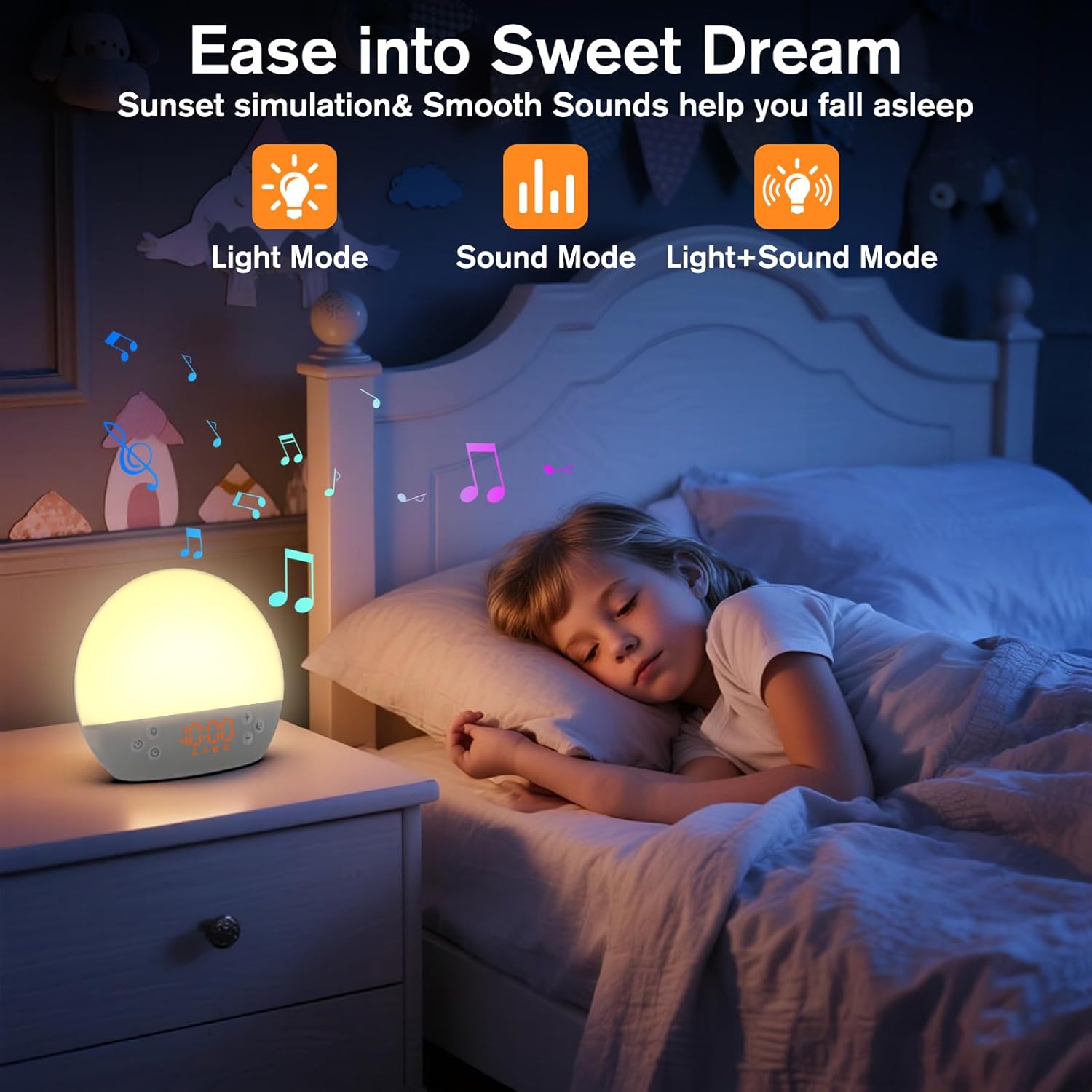
Image 5: The alarm clock in sunset simulation mode, providing a calming light and sound environment to aid sleep.
- To activate sunset simulation, press and hold the ປຸ່ມເວລາ until the sunset icon appears.
- ໃຊ້ ບວກ (+) or Minus (-) Buttons to set the duration of the sunset simulation (e.g., 15, 30, 60 minutes).
- ກົດ ປຸ່ມເວລາ to confirm the duration. You can then choose to have light only, sound only, or both light and sound.
- ໃຊ້ ບວກ (+) or Minus (-) Buttons to select the desired mode (Light Mode, Sound Mode, Light+Sound Mode).
- If Light+Sound Mode is selected, you can choose a specific soothing sound and adjust its volume.
- ກົດ ປຸ່ມເວລາ again to start the sunset simulation. The light will gradually dim, and sounds will fade out over the set duration.
6.7 ການປັບຄວາມສະຫວ່າງຂອງຈໍສະແດງຜົນ
The brightness of the digital time display can be adjusted to your preference.
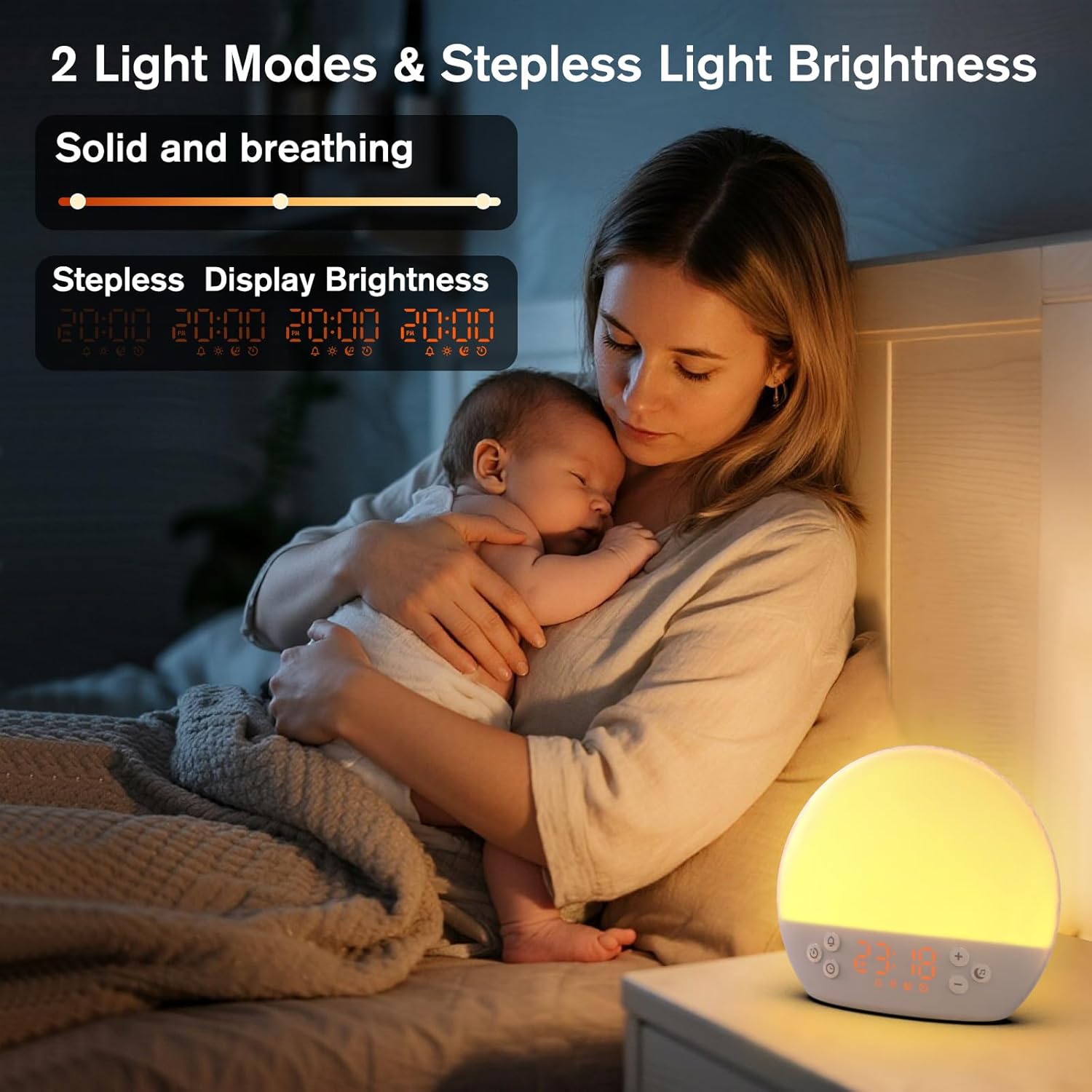
Image 6: The alarm clock demonstrating stepless display brightness adjustment, from very dim to bright.
ເພື່ອປັບຄວາມສະຫວ່າງຂອງຈໍສະແດງຜົນ, ໃຫ້ກົດປຸ່ມສັ້ນໆ ປຸ່ມເວລາ (do not hold). Each press will cycle through different brightness levels (e.g., bright, medium, dim, off). Select the level that suits your environment.
7. ບໍາລຸງຮັກສາ
- ທໍາຄວາມສະອາດ: Unplug the device before cleaning. Use a soft, dry cloth to wipe the surface. Do not use abrasive cleaners or solvents.
- ການເກັບຮັກສາ: ຖ້າບໍ່ໄດ້ໃຊ້ເປັນເວລາດົນ, ໃຫ້ຖອດປລັກອຸປະກອນອອກ ແລະ ເກັບຮັກສາໄວ້ໃນບ່ອນທີ່ເຢັນ ແລະ ແຫ້ງ.
8. ການແກ້ໄຂບັນຫາ
| ບັນຫາ | ສາເຫດທີ່ເປັນໄປໄດ້ | ການແກ້ໄຂ |
|---|---|---|
| ອຸປະກອນບໍ່ເປີດ. | Power cable not connected properly or power outlet is faulty. | ກວດສອບການເຊື່ອມຕໍ່ສາຍໄຟ. ລອງໃຊ້ປລັກໄຟອື່ນ. |
| ໂມງປຸກບໍ່ມີສຽງ. | Alarm not activated or volume is too low. | Ensure the alarm icon is visible on the display. Increase alarm volume during setup. |
| ແສງບໍ່ໄດ້ເປີດ. | Light function is off or brightness is set to minimum. | ກົດ ເລື່ອນ/ປຸ່ມແສງ to turn on. Adjust brightness using ບວກ (+) or Minus (-) Buttons while holding the ເລື່ອນ/ປຸ່ມແສງ. |
| Sounds are not playing. | Sound machine is off or volume is too low. | ກົດ Music Note Button to turn on. Increase volume using ບວກ (+) ປຸ່ມ. |
| Time display is too bright/dim. | Display brightness setting needs adjustment. | ຫຍໍ້ໆ ກົດເຂົ້າ ປຸ່ມເວລາ to cycle through display brightness levels. |
9. ຂໍ້ມູນຈໍາເພາະ
| ຄຸນສົມບັດ | ລາຍລະອຽດ |
|---|---|
| ຊື່ຕົວແບບ | MX9 |
| ຍີ່ຫໍ້ | KEPLUG |
| ວັດສະດຸ | ພາດສະຕິກ |
| ສີ | ສີຂາວ |
| ແຫຼ່ງພະລັງງານ | ໄຟຟ້າສາຍ |
| ນ້ໍາຫນັກລາຍການ | 258 ກຣາມ (9.1 ອອນສ໌) |
| ຂະໜາດສິນຄ້າ | 2.36 x 5.59 x 6.3 ນິ້ວ (6 x 14.2 x 16 cm) |
| ຈໍານວນແຫຼ່ງແສງສະຫວ່າງ | 2 |
| ຄຸນນະສົມບັດພິເສດ | ປະລິມານທີ່ສາມາດປັບໄດ້ |
| Sunrise Simulation Duration | 15-120 ນາທີ |
| ສຽງທີ່ຜ່ອນຄາຍ | 30 ທາງເລືອກ |
| ລະດັບສຽງເຕືອນ | 7 ລະດັບ |
10. ການຮັບປະກັນແລະການສະຫນັບສະຫນູນ
Your KEPLUG MX9 Sunrise Alarm Clock is covered by a standard manufacturer's warranty. For specific warranty details, please refer to the product packaging or contact KEPLUG customer support. If you encounter any issues not covered in the troubleshooting section, or require further assistance, please reach out to our customer service team through the retailer where you purchased the product or visit the official KEPLUG webສະຖານທີ່ສໍາລັບຂໍ້ມູນຕິດຕໍ່ສະຫນັບສະຫນູນ.


