1. ບົດແນະນຳ
This manual provides essential information for the safe and efficient use of your Azeyou M17QF27A Android Tablet. Please read this manual thoroughly before operating the device and retain it for future reference.
The Azeyou M17QF27A is an 11.97-inch Android tablet featuring a Unisoc T616 processor, 20GB RAM (8GB physical + 12GB virtual), 256GB internal storage expandable up to 1TB, a 1920x2000 FHD touch screen, dual cameras, Wi-Fi 5, Bluetooth 5.0, and an 8000mAh battery.
2. ເນື້ອໃນຊຸດ
ກວດສອບວ່າລາຍການທັງຫມົດແມ່ນມີຢູ່ໃນຊຸດຜະລິດຕະພັນຂອງທ່ານ:
- Azeyou M17QF27A Android Tablet
- ກໍລະນີປ້ອງກັນ
- ສາຍສາກ USB-C
- Power Adapter
- ຄູ່ມືຜູ້ໃຊ້ (ເອກະສານນີ້)
- SIM Ejector Tool (if applicable for cellular models)
3. ອຸປະກອນເກີນview
ເຮັດຄວາມຄຸ້ນເຄີຍກັບອົງປະກອບທາງກາຍະພາບຂອງແທັບເລັດຂອງທ່ານ.
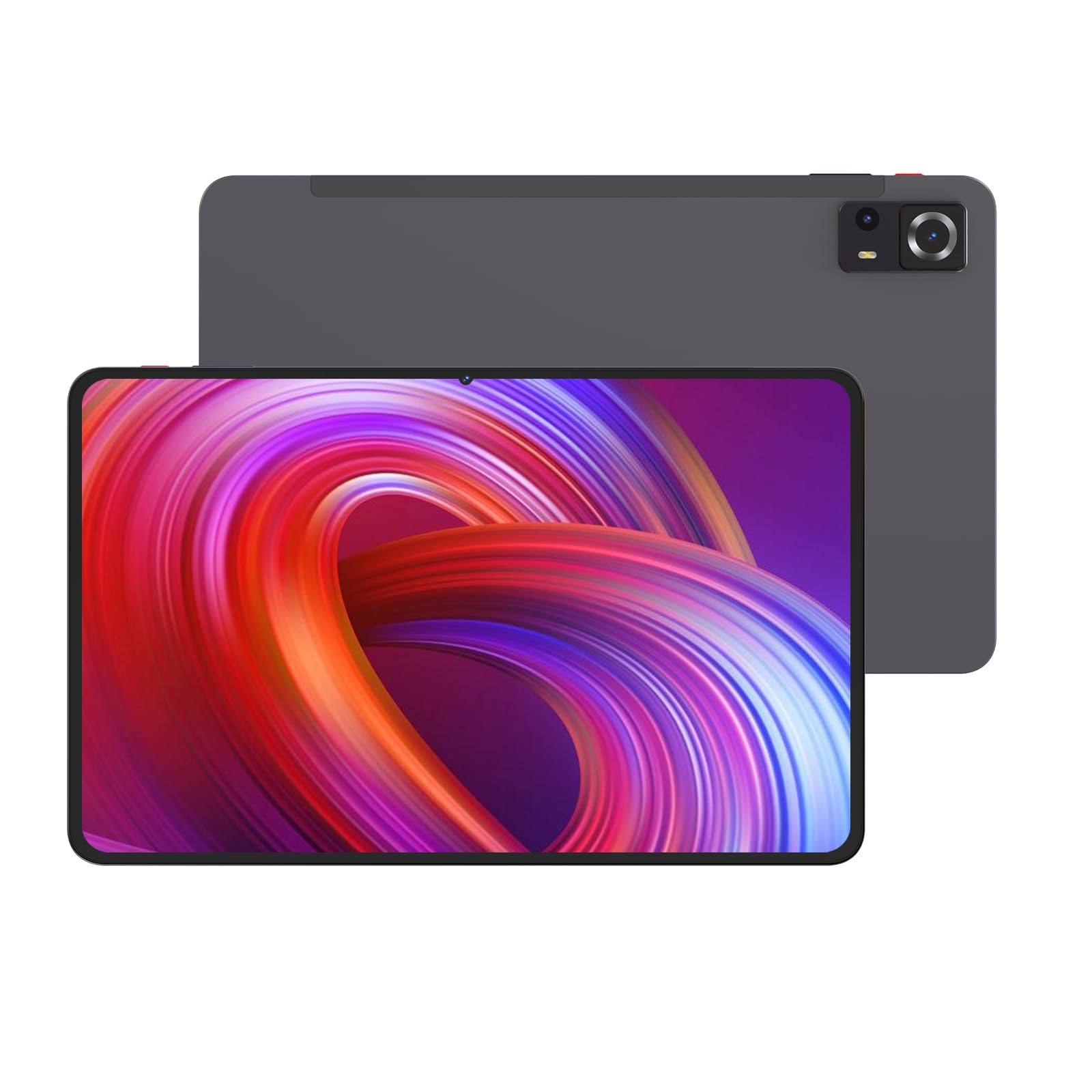
ຮູບພາບ 1: ດ້ານໜ້າ ແລະ ດ້ານຫຼັງ view of the Azeyou M17QF27A Android Tablet, showcasing the screen, cameras, and the included protective case.
3.1. ອົງປະກອບທາງກາຍະພາບ
- ກ້ອງໜ້າ: ຕັ້ງຢູ່ກາງດ້ານເທິງເມື່ອຖືແນວຕັ້ງ.
- ຈໍສະແດງຜົນ: 11.97-inch FHD Touch Screen.
- ປຸ່ມເປີດປິດ: Typically on the side, used to power on/off or wake/sleep the device.
- ປຸ່ມລະດັບສຽງ: ຕິດກັບປຸ່ມເປີດປິດ, ສຳລັບປັບລະດັບສຽງ.
- ຜອດ USB-C: ສໍາລັບການສາກໄຟແລະການໂອນຂໍ້ມູນ.
- Grilles ລໍາໂພງ: ສໍາລັບຜົນຜະລິດສຽງ.
- ກ້ອງຫຼັງ: Located on the back of the tablet.
- ຊ່ອງສຽບກາດ MicroSD: ສຳລັບການຂະຫຍາຍບ່ອນເກັບຂໍ້ມູນໄດ້ເຖິງ 1TB.
4. ຕັ້ງຄ່າ
4.1. ການສາກແບັດເຕີຣີ
Before first use, fully charge your tablet. Connect the USB-C charging cable to the tablet's USB-C port and the power adapter to a wall outlet. The battery indicator on the screen will show charging progress. A full charge typically takes several hours.
The tablet is equipped with an 8000mAh battery, providing an average battery life of approximately 6 hours under typical usage conditions.
4.2. ເປີດ / ປິດພະລັງງານ
- ເພື່ອເປີດເຄື່ອງ: Press and hold the Power button until the Azeyou logo appears on the screen.
- ປິດເຄື່ອງ: ກົດປຸ່ມເປີດປິດຄ້າງໄວ້ຈົນກວ່າຈະມີເມນູເປີດປິດ. ເລືອກ "ປິດເຄື່ອງ" ແລະຢືນຢັນ.
- ນອນ/ຕື່ນ: ກົດປຸ່ມເປີດປິດຊົ່ວຄາວເພື່ອເຮັດໃຫ້ແທັບເລັດນອນຫຼັບ ຫຼືປຸກມັນຂຶ້ນມາ.
4.3. ການຕິດຕັ້ງເບື້ອງຕົ້ນ
ເມື່ອເປີດເຄື່ອງທຳອິດ, ແທັບເລັດຈະແນະນຳທ່ານຜ່ານຂັ້ນຕອນການຕັ້ງຄ່າເບື້ອງຕົ້ນ:
- ເລືອກພາສາທີ່ທ່ານຕ້ອງການ.
- ເຊື່ອມຕໍ່ກັບເຄືອຂ່າຍ Wi-Fi. ນີ້ແມ່ນສິ່ງຈຳເປັນສຳລັບການດາວໂຫຼດອັບເດດ ແລະ ການເຂົ້າເຖິງການບໍລິການອອນລາຍ.
- Sign in with your Google account or create a new one. This is required for accessing the Google Play Store and other Google services.
- Review ແລະຍອມຮັບຂໍ້ກໍານົດແລະເງື່ອນໄຂ.
- ຕັ້ງຄ່າການລັອກໜ້າຈໍ (PIN, ຮູບແບບ, ລະຫັດຜ່ານ, ຫຼືການຮັບຮູ້ໃບໜ້າ).
- ກູ້ຄືນຂໍ້ມູນຈາກອຸປະກອນກ່ອນໜ້າ (ທາງເລືອກ).
5. ຄໍາແນະນໍາການດໍາເນີນງານ
5.1. ການນໍາທາງພື້ນຖານ
Your Azeyou tablet uses an Android 14 operating system with a touch-sensitive screen. Common gestures include:
- ແຕະ: ເພື່ອເລືອກລາຍການ, ເປີດແອັບ ຫຼືກົດປຸ່ມໃດໜຶ່ງ.
- ແຕະແລະຖື: ເພື່ອເຂົ້າເຖິງເມນູບໍລິບົດ ຫຼືຍ້າຍໄອຄອນ.
- ປັດ: To scroll through lists, switch between home screens, or navigate within apps.
- Pinch-to-Zoom: ເພື່ອຊູມເຂົ້າ ຫຼືອອກໃນຮູບພາບ, ແຜນທີ່, ຫຼື web ໜ້າ.
5.2. ການເຊື່ອມຕໍ່ Wi-Fi
ເພື່ອເຊື່ອມຕໍ່ກັບເຄືອຂ່າຍ Wi-Fi:
- ໄປທີ່ ການຕັ້ງຄ່າ > ເຄືອຂ່າຍ ແລະອິນເຕີເນັດ > Wi-Fi.
- ສະຫຼັບ Wi-Fi On.
- ເລືອກເຄືອຂ່າຍທີ່ທ່ານຕ້ອງການຈາກບັນຊີລາຍຊື່.
- ໃສ່ລະຫັດຜ່ານຖ້າຖືກເຕືອນແລະແຕະ ເຊື່ອມຕໍ່.
The tablet supports Wi-Fi 5 (802.11ac) for fast wireless connections.
5.3. ການເຊື່ອມຕໍ່ Bluetooth
To pair with a Bluetooth device (e.g., headphones, keyboard):
- ໄປທີ່ ການຕັ້ງຄ່າ > ອຸປະກອນທີ່ເຊື່ອມຕໍ່ > Bluetooth.
- ສະຫຼັບ Bluetooth On.
- ກວດໃຫ້ແນ່ໃຈວ່າອຸປະກອນ Bluetooth ຂອງທ່ານຢູ່ໃນໂໝດຈັບຄູ່.
- Select the device from the list of available devices and follow any on-screen prompts to complete pairing.
The tablet supports Bluetooth 5.0 for stable and efficient wireless connections.
5.4. ການຄຸ້ມຄອງການເກັບຮັກສາ
Your tablet comes with 256GB of internal storage. You can expand this storage up to 1TB using a microSD card. To insert a microSD card:
- ຊອກຫາຊ່ອງສຽບກາດ microSD ຢູ່ດ້ານຂ້າງຂອງແທັບເລັດ.
- Use the provided SIM ejector tool (or a paperclip) to open the tray.
- Place the microSD card into the tray with the gold contacts facing down.
- ຍູ້ຖາດກັບເຂົ້າໄປໃນຊ່ອງຄ່ອຍໆຈົນກ່ວາມັນກົດເຂົ້າໄປໃນບ່ອນ.
ເພື່ອຈັດການບ່ອນຈັດເກັບຂໍ້ມູນ, ໃຫ້ໄປທີ່ ການຕັ້ງຄ່າ > ການເກັບຮັກສາ.
5.5. ການນໍາໃຊ້ກ້ອງຖ່າຍຮູບ
ແທັບເລັດມີກ້ອງຖ່າຍຮູບຄູ່. ເພື່ອໃຊ້ກ້ອງຖ່າຍຮູບ:
- ເປີດ ກ້ອງຖ່າຍຮູບ app ຈາກຫນ້າຈໍເຮືອນຂອງທ່ານຫຼື app drawer.
- ແຕະປຸ່ມຊັດເຕີເພື່ອຖ່າຍຮູບ.
- ແຕະໄອຄອນວິດີໂອເພື່ອປ່ຽນໄປໃຊ້ໂໝດບັນທຶກວິດີໂອ.
- Use the camera switch icon to toggle between the front and rear cameras.
6. ບໍາລຸງຮັກສາ
6.1. ການເຮັດຄວາມສະອາດແທັບເລັດ
ເພື່ອທຳຄວາມສະອາດແທັບເລັດຂອງທ່ານ, ໃຫ້ປິດມັນ ແລະ ຖອດສາຍທັງໝົດອອກ. ໃຊ້ຜ້າອ່ອນໆທີ່ບໍ່ມີຂົນເຊັດເບົາໆ.ampened with water or a screen cleaner specifically designed for electronics. Avoid using harsh chemicals, abrasive materials, or excessive moisture.
6.2. ການປັບປຸງຊອບແວ
ກວດສອບ ແລະ ຕິດຕັ້ງການອັບເດດຊອບແວເປັນປະຈຳເພື່ອຮັບປະກັນປະສິດທິພາບ ແລະ ຄວາມປອດໄພທີ່ດີທີ່ສຸດ. ໄປທີ່ ການຕັ້ງຄ່າ > ລະບົບ > ອັບເດດລະບົບ.
6.3. ການດູແລຫມໍ້ໄຟ
ເພື່ອຍືດອາຍຸແບັດເຕີຣີ:
- ຫຼີກເວັ້ນອຸນຫະພູມທີ່ຮຸນແຮງ.
- ຢ່າປ່ອຍໃຫ້ຫມໍ້ໄຟຫມົດໄປເລື້ອຍໆ.
- ຖອດສາຍສາກອອກເມື່ອແບັດເຕີຣີເຕັມ.
- Reduce screen brightness and disable unnecessary features (e.g., Bluetooth, Wi-Fi) when not in use.
7. ການແກ້ໄຂບັນຫາ
| ບັນຫາ | ການແກ້ໄຂທີ່ເປັນໄປໄດ້ |
|---|---|
| ແທັບເລັດບໍ່ເປີດ. | ໃຫ້ແນ່ໃຈວ່າໄດ້ສາກໄຟແລ້ວ. ເຊື່ອມຕໍ່ສາຍສາກແລ້ວລໍຖ້າສອງສາມນາທີກ່ອນທີ່ຈະພະຍາຍາມເປີດເຄື່ອງອີກຄັ້ງ. |
| ບັນຫາການເຊື່ອມຕໍ່ Wi-Fi. | Check if Wi-Fi is enabled in settings. Restart your router and the tablet. Ensure you are entering the correct Wi-Fi password. |
| ແອັບກຳລັງຂັດຂ້ອງ ຫຼືຄ້າງ. | ປິດ ແລະເປີດແອັບຄືນໃໝ່. ລ້າງ cache ຂອງ app (ການຕັ້ງຄ່າ > ແອັບ > ເລືອກແອັບ > ການເກັບຮັກສາ & cache > ລຶບລ້າງແຄດ). ເປີດແທັບເລັດຄືນໃໝ່. |
| ການປະຕິບັດຊ້າ. | ປິດແອັບພື້ນຫຼັງທີ່ບໍ່ຈຳເປັນ. ລຶບ cache ແລະຊົ່ວຄາວ files. Consider uninstalling unused apps. Check for system updates. |
| ແບັດເຕີຣີໝົດໄວ. | Reduce screen brightness. Disable Wi-Fi, Bluetooth, and GPS when not in use. Close background apps. Check battery usage in settings to identify power-hungry apps. |
8. ຂໍ້ມູນຈໍາເພາະ
| ຄຸນສົມບັດ | ລາຍລະອຽດ |
|---|---|
| ຊື່ຕົວແບບ | M17QF27A |
| ຍີ່ຫໍ້ | Azeyou |
| ລະບົບປະຕິບັດການ | Android 14 |
| ໂຮງງານຜະລິດ | Unisoc T616 |
| RAM | 20GB (8GB ທາງກາຍະພາບ + 12GB virtual) |
| ການເກັບຮັກສາພາຍໃນ | 256GB |
| ການເກັບຮັກສາທີ່ຂະຫຍາຍໄດ້ | ສູງສຸດ 1TB ຜ່ານບັດ microSD |
| ຂະໜາດໜ້າຈໍ | 11.97 ນິ້ວ |
| ຄວາມລະອຽດໜ້າຈໍສູງສຸດ | 1920x2000 Pixels FHD |
| ກ້ອງຖ່າຍຮູບ | Dual Camera (Front and Rear) |
| ການເຊື່ອມຕໍ່ໄຮ້ສາຍ | Wi-Fi 5 (802.11ac), Bluetooth 5.0 |
| ຄວາມອາດສາມາດຫມໍ້ໄຟ | 8000mAh |
| ອາຍຸຫມໍ້ໄຟສະເລ່ຍ | ປະມານ 6 ຊົ່ວໂມງ |
| ຂະໜາດ (LxWxH) | 10.94 x 6.81 x 0.3 ນິ້ວ |
| ນ້ໍາຫນັກລາຍການ | 2.36 ປອນ |
| ສີ | Metal-Grey |
9. ການຮັບປະກັນແລະການສະຫນັບສະຫນູນ
For warranty information and technical support, please refer to the warranty card included in your package or visit the official Azeyou webເວັບໄຊ. ຮັກສາໃບຮັບເງິນການຊື້ຂອງທ່ານໄວ້ເປັນຫຼັກຖານການຊື້ສໍາລັບການຮ້ອງຂໍການຮັບປະກັນ.
For further assistance, you may contact Azeyou customer service through the contact details provided on their official support page.


