1. ບົດແນະນຳ
This manual provides essential information for the safe and efficient operation of your FASTWD Android 15 Tablet 11-inch. Please read this manual thoroughly before using the device and retain it for future reference. This tablet features an 11-inch 2K display, Android 15 operating system, Octa-Core processor, 36GB RAM, 256GB ROM (expandable up to 1TB), 4G LTE, and 5G WiFi connectivity.
2. ຂໍ້ມູນຄວາມປອດໄພ
- ຢ່າໃຫ້ແທັບເລັດຖືກອຸນຫະພູມສູງ, ແສງແດດໂດຍກົງ ຫຼື ຄວາມຊຸ່ມຊື່ນສູງ.
- ຫຼີກລ່ຽງການຕົກ ຫຼື ການກະທົບທີ່ຮຸນແຮງໃສ່ແທັບເລັດ.
- ໃຊ້ພຽງແຕ່ເຄື່ອງສາກ ແລະອຸປະກອນເສີມທີ່ໄດ້ຮັບການອະນຸມັດເພື່ອປ້ອງກັນຄວາມເສຍຫາຍ ແລະຮັບປະກັນຄວາມປອດໄພ.
- ເກັບຮັກສາຢາເມັດໃຫ້ຫ່າງຈາກນໍ້າ ແລະ ຂອງແຫຼວອື່ນໆ.
- ຢ່າພະຍາຍາມຖອດປະກອບ ຫຼື ສ້ອມແປງແທັບເລັດດ້ວຍຕົນເອງ. ຕິດຕໍ່ຝ່າຍສະໜັບສະໜູນລູກຄ້າເພື່ອຂໍຄວາມຊ່ວຍເຫຼືອ.
- ຖິ້ມແບັດເຕີລີ ແລະອຸປະກອນຕາມລະບຽບການທ້ອງຖິ່ນ.
3. ເນື້ອໃນຊຸດ
Upon opening your FASTWD Android 15 Tablet package, please verify that all the following items are included:
- FASTWD Tablet
- ແປ້ນພິມ Bluetooth
- ຫນູ
- ກໍລະນີປ້ອງກັນ
- ປາກກາສະໄຕລັດ
- ສາຍ Type-C
- ເຄື່ອງສາກ
- ຄູ່ມືຜູ້ໃຊ້

Image: The FASTWD Android 15 Tablet displayed with its full set of accessories, including the keyboard, mouse, protective case, stylus, and charging components.
4. ອຸປະກອນເກີນview
The FASTWD Android 15 Tablet features a sleek metal body with an 11-inch 2K INCell display. It is designed for both productivity and entertainment.
4.1 ລັກສະນະທາງກາຍະພາບ
- ຈໍສະແດງຜົນ: 11-inch 2K UHD INCell display with 120Hz refresh rate.
- ກ້ອງຖ່າຍຮູບ: 8MP front camera, 13MP rear camera with LED flash.
- ພອດ: ພອດ USB Type-C ສຳລັບການສາກໄຟ ແລະ ການໂອນຂໍ້ມູນ.
- ຊ່ອງໃສ່ບັດ: Dual SIM card slot, also supports MicroSD card expansion up to 1TB.
- ລໍາໂພງ: ສີ່ amplitude speakers for enhanced audio.

Image: A visual representation of the FASTWD tablet's slim design, 11-inch screen, and Type-C charging port.
5. ຕັ້ງຄ່າ
5.1 ການເປີດເຄື່ອງເບື້ອງຕົ້ນ
- Press and hold the Power button located on the side of the tablet until the FASTWD logo appears.
- ປະຕິບັດຕາມການເຕືອນໃນຫນ້າຈໍເພື່ອເລືອກພາສາ, ພາກພື້ນຂອງທ່ານແລະເຊື່ອມຕໍ່ກັບເຄືອຂ່າຍ Wi-Fi.
- ເຂົ້າສູ່ລະບົບດ້ວຍບັນຊີ Google ຂອງທ່ານ ຫຼືສ້າງອັນໃໝ່ເພື່ອເຂົ້າເຖິງ Google Play Store ແລະບໍລິການອື່ນໆ.
5.2 ການຕິດຕັ້ງແຜ່ນ SIM ແລະບັດ MicroSD
Your tablet supports dual SIM cards for 4G LTE connectivity and a MicroSD card for expanded storage.
- ຊອກຫາຖາດຊິມກາດ/MicroSD ຢູ່ດ້ານຂ້າງຂອງແທັບເລັດ.
- Use the provided SIM ejector tool to gently push into the small hole next to the tray until it pops out.
- Place your Nano-SIM card(s) and/or MicroSD card into the designated slots on the tray. Ensure they are correctly oriented.
- ສຽບຖາດໃສ່ແທັບເລັດຄືນໃໝ່ຢ່າງລະມັດລະວັງຈົນກວ່າມັນຈະກົດໃສ່ບ່ອນ.

ຮູບພາບ: A ລາຍລະອຽດ view of the tablet's SIM card tray, showing slots for two SIM cards and one MicroSD card.
6. ຄໍາແນະນໍາການດໍາເນີນງານ
The FASTWD tablet runs on Android 15, offering an intuitive and customizable user experience.
6.1 ການນໍາທາງພື້ນຖານ
- ເລື່ອນຂຶ້ນ: ເຂົ້າເຖິງລິ້ນຊັກແອັບ.
- ປັດລົງ: ເປີດແຜງການແຈ້ງເຕືອນ ແລະການຕັ້ງຄ່າດ່ວນ.
- ແຕະ: ເລືອກລາຍການ ຫຼືເປີດແອັບພລິເຄຊັນ.
- ຂ່າວຍາວ: ເຂົ້າເຖິງເມນູບໍລິບົດ ຫຼືຍ້າຍໄອຄອນ.
- Pinch-to-Zoom: Adjust zoom level in apps like browser or gallery.
6.2 ຄຸນສົມບັດ Android 15
Android 15 introduces several enhancements for privacy, security, and user experience:
- Improved Privacy Controls: Granular permissions for apps, allowing you to authorize access more precisely.
- ການເພີ່ມປະສິດທິພາບ AI: Intelligent AI features for improved performance and battery life.
- Gesture Navigation: New touch control gestures for a more fluid interaction.
- Global Dark Mode: System-wide dark theme for reduced eye strain and power consumption.
- Face Recognition Unlock: ປົດລັອກແທັບເລັດຂອງທ່ານໄດ້ຢ່າງປອດໄພໂດຍໃຊ້ການຮັບຮູ້ໃບໜ້າ.
- ການຄວບຄຸມຂອງພໍ່ແມ່: Manage screen time and app access for children.
- ໜ້າຈໍແຍກ: Use two applications simultaneously side-by-side.
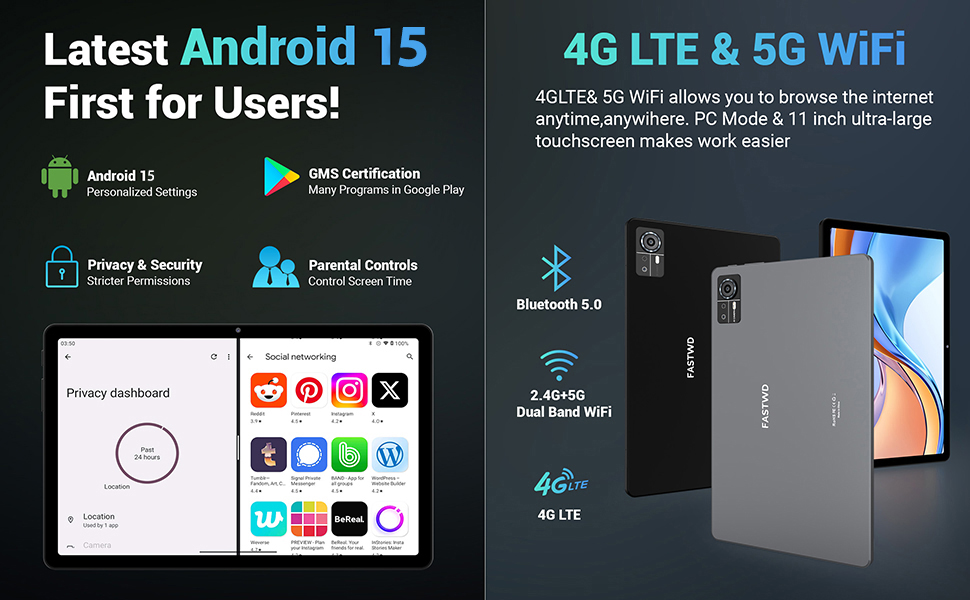
Image: A visual guide to key Android 15 features such as easy app pairing, storage management, quick Bluetooth connection, face recognition unlock, double-tap to wake, and parental control settings.
7. ການເຊື່ອມຕໍ່
Your FASTWD tablet offers versatile connectivity options for internet access and peripheral devices.
7.1 ການເຊື່ອມຕໍ່ Wi-Fi
- ໄປທີ່ ການຕັ້ງຄ່າ > ເຄືອຂ່າຍ ແລະອິນເຕີເນັດ > Wi-Fi.
- ສະຫຼັບ Wi-Fi On.
- ເລືອກເຄືອຂ່າຍທີ່ທ່ານຕ້ອງການຈາກບັນຊີລາຍຊື່ແລະໃສ່ລະຫັດຜ່ານຖ້າຫາກວ່າ prompted.
- The tablet supports dual-band 2.4G/5G Wi-Fi for stable and fast connections.
7.2 4G LTE Mobile Data
With a compatible SIM card installed, you can access 4G LTE mobile data.
- Ensure your SIM card is correctly installed (refer to Section 5.2).
- ໄປທີ່ ການຕັ້ງຄ່າ > ເຄືອຂ່າຍ ແລະອິນເຕີເນັດ > ເຄືອຂ່າຍມືຖື.
- ເປີດໃຊ້ ຂໍ້ມູນມືຖື and configure APN settings if required by your carrier.
7.3 ການຈັບຄູ່ Bluetooth
Connect Bluetooth accessories like the included keyboard and mouse.
- ໄປທີ່ ການຕັ້ງຄ່າ > ອຸປະກອນທີ່ເຊື່ອມຕໍ່ > Bluetooth.
- ສະຫຼັບ Bluetooth On.
- ເອົາອຸປະກອນເສີມ Bluetooth ຂອງທ່ານເຂົ້າໄປໃນໂໝດຈັບຄູ່.
- Select the accessory from the list of available devices and follow any on-screen prompts to complete pairing.
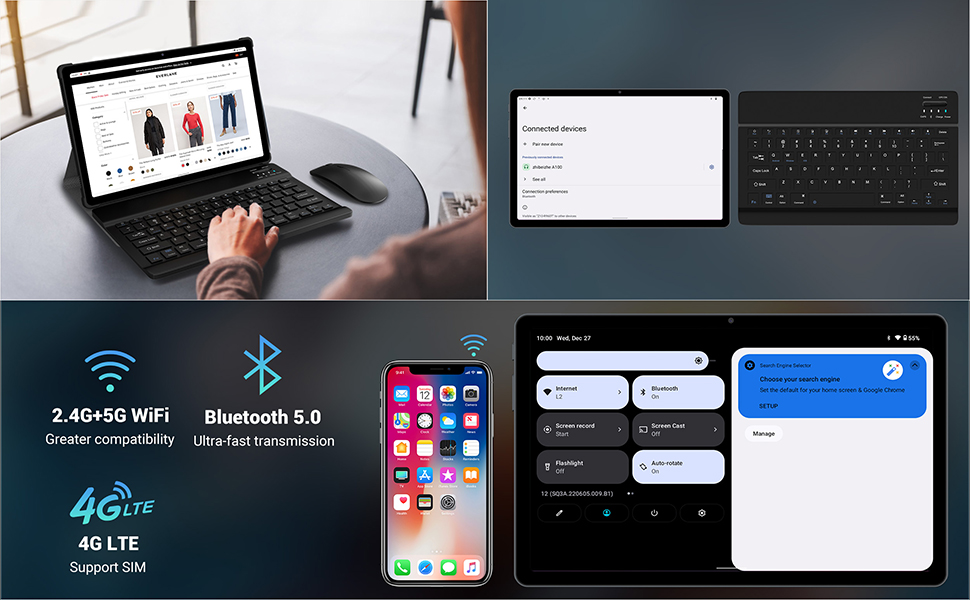
Image: The FASTWD tablet connected to its keyboard and mouse, illustrating its 2.4G+5G WiFi, Bluetooth 5.0, and 4G LTE SIM support for comprehensive connectivity.
8. ກ້ອງຖ່າຍຮູບ
The tablet is equipped with an 8MP front camera and a 13MP rear camera for photos and video calls.
- ເປີດ ກ້ອງຖ່າຍຮູບ ຄໍາຮ້ອງສະຫມັກ.
- ແຕະປຸ່ມຊັດເຕີເພື່ອຖ່າຍຮູບ.
- ສະຫຼັບລະຫວ່າງກ້ອງໜ້າ ແລະກ້ອງຫຼັງໂດຍໃຊ້ໄອຄອນສະຫຼັບກ້ອງຖ່າຍຮູບ.
- AI post-processing technology enhances photo quality, making images more realistic.

ຮູບພາບ: A ລາຍລະອຽດ view of the tablet's rear camera, highlighting its 13MP sensor and AI Camera branding.
9. ການຄຸ້ມຄອງຫມໍ້ໄຟ
The tablet features a 9580mAh battery for extended usage and supports 12W fast charging.
9.1 ການສາກແທັບເລັດ
- ເຊື່ອມຕໍ່ສາຍ Type-C ກັບຊ່ອງສາກໄຟຂອງແທັບເລັດ.
- Plug the other end of the cable into the provided charger, and then into a power outlet.
- ໄອຄອນແບັດເຕີຣີໃນໜ້າຈໍຈະສະແດງສະຖານະການສາກໄຟ.
9.2 ການເພີ່ມປະສິດທິພາບຫມໍ້ໄຟ
- ປັບຄວາມສະຫວ່າງໜ້າຈໍໃຫ້ຢູ່ໃນລະດັບທີ່ສະດວກສະບາຍ.
- ປິດແອັບພລິເຄຊັນທີ່ບໍ່ໄດ້ໃຊ້ທີ່ເຮັດວຽກຢູ່ໃນພື້ນຫຼັງ.
- ເປີດໃຊ້ໂໝດຕົວປະຢັດແບັດເຕີຣີໃນ ການຕັ້ງຄ່າ > ແບັດເຕີຣີ.
- ປິດໃຊ້ງານ Wi-Fi, Bluetooth, ຫຼື GPS ເມື່ອບໍ່ໄດ້ໃຊ້.

Image: The FASTWD tablet connected to a Type-C charger, illustrating its 9580 mAh battery and 12W fast charging capability.
10. ການເກັບຮັກສາ
The tablet comes with 256GB of internal storage (ROM) and supports expansion up to 1TB via a MicroSD card.
10.1 ການຈັດການບ່ອນເກັບຂໍ້ມູນ
- ເພື່ອກວດສອບການນຳໃຊ້ບ່ອນຈັດເກັບຂໍ້ມູນ, ໃຫ້ໄປທີ່ ການຕັ້ງຄ່າ > ການເກັບຮັກສາ.
- You can free up space by uninstalling unused apps, deleting old files, or moving media to a MicroSD card.
10.2 RAM Management
The tablet features 36GB RAM (12GB LPDDR4 + 24GB expandable virtual memory) for smooth multitasking.
- The system automatically manages RAM for optimal performance.
- You can activate additional virtual RAM in the settings if needed for demanding applications.
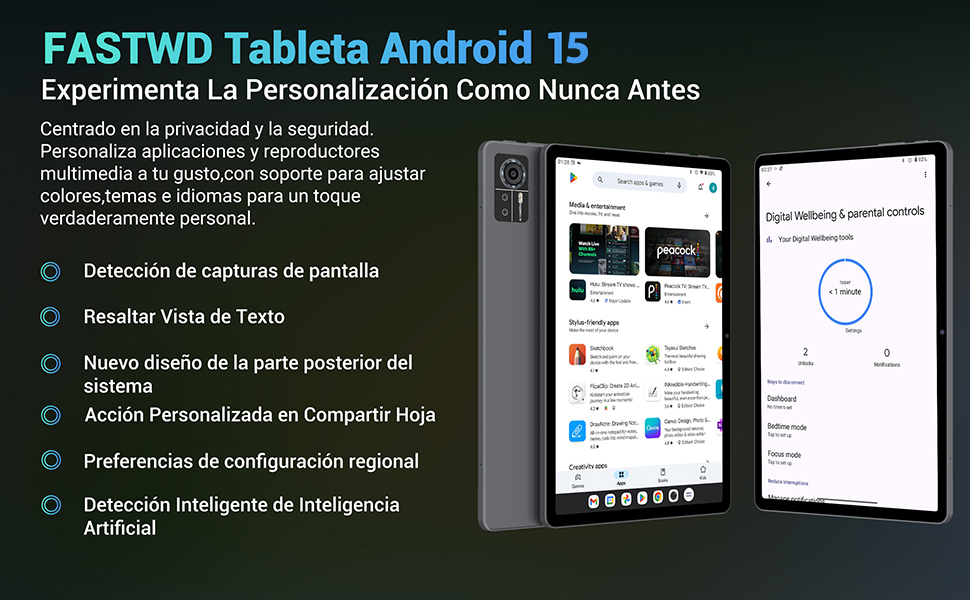
Image: An illustration highlighting the tablet's 36GB RAM (12+24GB), 256GB ROM, and 1TB MicroSD expansion capabilities, alongside its Octa-core processor.
11. ບໍາລຸງຮັກສາ
11.1 ການທໍາຄວາມສະອາດ
- ໃຊ້ຜ້າແພທີ່ອ່ອນໆ, ບໍ່ມີສານດ່າງເພື່ອເຮັດຄວາມສະອາດໜ້າຈໍ ແລະຕົວເຄື່ອງຂອງແທັບເລັດ.
- ຢ່າໃຊ້ສານເຄມີທີ່ຮຸນແຮງຫຼືວັດສະດຸຂັດ.
11.2 ການປັບປຸງຊອບແວ
- ກວດສອບການອັບເດດລະບົບເປັນປະຈຳໃນ ການຕັ້ງຄ່າ > ລະບົບ > ອັບເດດລະບົບ ເພື່ອຮັບປະກັນປະສິດທິພາບ ແລະຄວາມປອດໄພທີ່ດີທີ່ສຸດ.
12. ການແກ້ໄຂບັນຫາ
ຖ້າຫາກທ່ານພົບບັນຫາກັບຢາເມັດຂອງທ່ານ, ເບິ່ງວິທີແກ້ໄຂທົ່ວໄປດັ່ງຕໍ່ໄປນີ້:
| ບັນຫາ | ການແກ້ໄຂ |
|---|---|
| ແທັບເລັດບໍ່ເປີດ | ໃຫ້ແນ່ໃຈວ່າໄດ້ສາກໄຟແລ້ວ. ເຊື່ອມຕໍ່ສາຍສາກແລ້ວລໍຖ້າສອງສາມນາທີກ່ອນທີ່ຈະພະຍາຍາມເປີດເຄື່ອງອີກຄັ້ງ. ຖ້າບໍ່ຕອບສະໜອງ, ໃຫ້ເປີດປິດເປີດຄືນໃໝ່ໂດຍການກົດປຸ່ມເປີດປິດຄ້າງໄວ້ 10-15 ວິນາທີ. |
| Applications crash or freeze | Close background applications. Clear the cache of the problematic app (Settings > Apps > [App Name] > Storage & cache > Clear cache). Restart the tablet. |
| ການເຊື່ອມຕໍ່ Wi-Fi ບໍ່ດີ | Ensure you are within range of the Wi-Fi router. Restart your router and the tablet. Forget the network and reconnect. |
| ບໍ່ໄດ້ກວດພົບ SIM card | Ensure the SIM card is correctly inserted into the tray. Restart the tablet. Verify the SIM card is active with your mobile carrier. |
| ແບັດເຕີຣີໝົດໄວ | Reduce screen brightness. Disable unused connectivity features (Wi-Fi, Bluetooth, GPS). Close background apps. Check for apps consuming excessive battery in Settings > Battery. |
13. ຂໍ້ມູນຈໍາເພາະ
Detailed technical specifications for the FASTWD Android 15 Tablet 11-inch (Model M986):
| ຄຸນສົມບັດ | ຂໍ້ມູນຈໍາເພາະ |
|---|---|
| ຍີ່ຫໍ້ | FASTWD |
| ຊື່ຕົວແບບ | FASTWD Android 15 Tablet 11 Pulgadas |
| ລະບົບປະຕິບັດການ | Android 15 |
| ຄວາມໄວປະມວນຜົນ | 2 GHz Octa-Core |
| RAM | 36 GB (12GB LPDDR4 + 24GB expandable) |
| ບ່ອນຈັດເກັບຂໍ້ມູນພາຍໃນ (ROM) | 256 GB |
| ການເກັບຮັກສາທີ່ຂະຫຍາຍໄດ້ | Up to 1 TB via MicroSD card |
| ຂະໜາດໜ້າຈໍ | 11 Pulgadas (Inches) |
| ຄວາມລະອຽດໜ້າຈໍ | 2560 x 1440 pixels (2K UHD INCell) |
| ອັດຕາການໂຫຼດຂໍ້ມູນຄືນໃໝ່ | 120 Hz |
| ກ້ອງຫຼັງ | 13 MP |
| ກ້ອງໜ້າ | 8 MP |
| ຄວາມອາດສາມາດຫມໍ້ໄຟ | 9580 mAh |
| Battery Life (average) | 8 ຊົ່ວໂມງ (ການຫຼິ້ນວິດີໂອ) |
| ກຳລັງສາກໄຟ | 12W Fast Charging, Type-C Interface |
| ການເຊື່ອມຕໍ່ | 4G LTE (Cellular), 5G Wi-Fi (802.11ac), Bluetooth 5.0 |
| ຂະໜາດ | 29.7 x 19.6 x 4 cm |
| ນ້ຳໜັກ | 1.36 ກິໂລ |
| ຄຸນນະສົມບັດພິເສດ | Gaming Tablet, Face Recognition, Parental Control, GPS (Beidou, Galileo, Glonass, GPS) |
14. ການຮັບປະກັນແລະການສະຫນັບສະຫນູນ
FASTWD offers two years of premium after-sales service and long-term technical support for your tablet.
- ໄລຍະເວລາຮັບປະກັນ: 2 ປີນັບແຕ່ມື້ຊື້.
- ສະຫນັບສະຫນູນດ້ານວິຊາການ: For any issues or inquiries, please contact the FASTWD after-sales team through your Amazon purchase platform.
- Our support team aims to respond within 24 hours.