1. ບົດແນະນຳ
Welcome to the SteelSeries Arctis GameBuds ANC Wireless Gaming Earbuds. This manual provides essential information for setting up, operating, maintaining, and troubleshooting your new gaming earbuds. Please read these instructions carefully before use to ensure optimal performance and longevity of your device.
2. ຜະລິດຕະພັນເກີນview
The SteelSeries Arctis GameBuds ANC are designed for a versatile gaming experience across multiple platforms, offering active noise cancellation, dual wireless connectivity, and a comfortable fit.
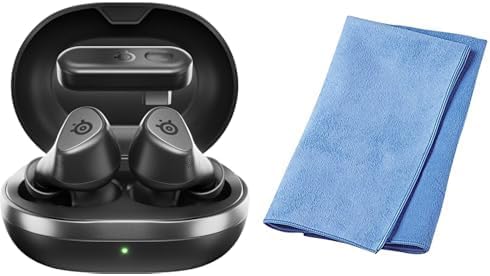
Image: The SteelSeries Arctis GameBuds ANC Wireless Gaming Earbuds are shown inside their open charging case, with a green indicator light visible. A folded blue cleaning cloth is positioned next to the case.
ເນື້ອໃນຊຸດ:
- SteelSeries Arctis GameBuds ANC Wireless Gaming Earbuds
- ກ່ອງສາກ
- ສາຍສາກ USB-C
- Wireless Dongle (USB-C)
- Sanwa Cleaning Cloth
- ຄູ່ມືເລີ່ມຕົ້ນດ່ວນ
3. ຕັ້ງຄ່າ
3.1 ການສາກໄຟເບື້ອງຕົ້ນ
- ວາງຫູຟັງໃສ່ຊ່ອງສາກໄຟ.
- Connect the charging case to a power source using the provided USB-C cable, or place it on a Qi-compatible wireless charging pad.
- The LED indicator on the case will show charging status. A full charge provides up to 40 hours of battery life (including case charges). Rapid charging is supported.
3.2 Connecting via 2.4GHz Wireless (Low Latency)
- Insert the USB-C wireless dongle into your PC, PlayStation (PS5/PS4), or Nintendo Switch.
- Ensure the earbuds are charged and removed from the case. They should automatically connect to the dongle.
- Confirm the connection through your device's audio settings.
3.3 ການເຊື່ອມຕໍ່ຜ່ານ Bluetooth 5.3
- ຖອດຫູຟັງເອຍບັດອອກຈາກເຄສສາກ.
- Activate Bluetooth pairing mode on the earbuds (refer to the Quick Start Guide for specific button presses).
- On your smartphone or other Bluetooth-enabled device, search for "Arctis GameBuds" in the Bluetooth settings and select to pair.
3.4 Software Installation (SteelSeries GG)
For advanced customization, including EQ settings and firmware updates, download and install the SteelSeries GG software on your PC. This software allows access to over 100 EQ presets and personalized audio profiles.
4. ຄໍາແນະນໍາການດໍາເນີນງານ
4.1 ເປີດ/ປິດ
- ເປີດ: Remove the earbuds from the charging case. They will automatically power on.
- ປິດພະລັງງານ: Place the earbuds back into the charging case. They will automatically power off and begin charging.
4.2 Active Noise Cancellation (ANC)
The earbuds feature Active Noise Cancellation to minimize ambient distractions. Control ANC through the touch controls on the earbuds or via the SteelSeries GG software.
4.3 ການຄວບຄຸມສຽງ
The earbuds are equipped with intuitive touch controls for managing audio playback and calls:
- ຫຼິ້ນ/ຢຸດ: ແຕະເທື່ອດຽວໃສ່ຫູຟັງຫູຟັງ.
- ເພງຕໍ່ໄປ: ແຕະສອງເທື່ອໃສ່ຫູຟັງເບື້ອງຂວາ.
- ຕິດຕາມກ່ອນ ໜ້າ ນີ້: ແຕະສາມເທື່ອຢູ່ຫູຟັງທາງຊ້າຍ.
- ປະລິມານຂຶ້ນ/ລົງ: Specific gestures or button presses may be customizable via SteelSeries GG.
4.4 ການນຳໃຊ້ໄມໂຄຣໂຟນ
The integrated microphones allow for clear communication during gaming or calls. Ensure the earbuds are properly seated for optimal microphone performance.
5. ບໍາລຸງຮັກສາ
5.1 ການທໍາຄວາມສະອາດ
Regularly clean your earbuds and charging case to maintain hygiene and performance. Use the provided Sanwa cleaning cloth or a soft, dry, lint-free cloth. Avoid using abrasive materials or harsh chemicals.
5.2 ການເກັບຮັກສາ
When not in use, store the earbuds in their charging case to protect them from dust and damage, and to ensure they remain charged.
5.3 ການຕໍ່ຕ້ານນ້ໍາແລະຝຸ່ນ
The earbuds are rated IP55 for dust and water resistance, meaning they are protected against limited dust ingress and low-pressure water jets from any direction. This rating does not imply full waterproofing; avoid submerging the earbuds in water.
6. ການແກ້ໄຂບັນຫາ
6.1 ບັນຫາການເຊື່ອມຕໍ່
- No Connection (2.4GHz): Ensure the wireless dongle is securely plugged into your device. For optimal performance, place the dongle in a USB port close to your line of sight, potentially using a USB-C extension cable if interference occurs.
- ການຈັບຄູ່ Bluetooth ລົ້ມເຫລວ: Ensure the earbuds are in pairing mode and your device's Bluetooth is enabled. Try unpairing and re-pairing the earbuds.
- ການຕັດການເຊື່ອມຕໍ່ເປັນໄລຍະໆ: Check for potential interference from other wireless devices. Ensure the earbuds are fully charged.
6.2 Audio Quality Problems
- Low Volume/Poor Sound: Adjust EQ settings via the SteelSeries GG software. Ensure the earbuds are properly seated in your ears.
- ANC White Noise: Some users may experience a subtle white noise with ANC enabled. This is often normal for ANC technology. If it is excessive, ensure a proper earbud fit.
6.3 ແບັດເຕີຣີແລະການສາກໄຟ
- ຫູຟັງບໍ່ສາກ: Ensure the charging contacts on both the earbuds and the case are clean and free of debris. Verify the charging cable is functional and the power source is active.
- ໂໝດນອນອັດຕະໂນມັດ: If earbuds enter sleep mode unexpectedly during low volume playback, adjust the auto-sleep settings in the SteelSeries GG software.
6.4 ບັນຫາການອັບເດດຊອບແວ
- ການອັບເດດເຟີມແວລົ້ມເຫລວ: Ensure a stable internet connection and that the earbuds are connected to your PC via the dongle or Bluetooth during the update process. Note that some operating systems, such as certain versions of macOS, may have compatibility issues with the SteelSeries GG update utility.
7. ຂໍ້ມູນຈໍາເພາະ
| ຍີ່ຫໍ້ | SteelSeries |
| ຕົວແບບ | Arctis GameBuds ANC (61680) |
| ການເຊື່ອມຕໍ່ | 2.4GHz Wireless (via USB-C dongle), Bluetooth 5.3 |
| ຄວາມເຂົ້າກັນໄດ້ | PC, PlayStation 5, PlayStation 4, Nintendo Switch, Smartphones |
| ຊີວິດຫມໍ້ໄຟ | ສູງສຸດເຖິງ 40 ຊົ່ວໂມງ (ພ້ອມກ່ອງໃສ່ສາກ) |
| ກຳລັງສາກໄຟ | USB-C, Qi Wireless Charging, Rapid Charging |
| ຄວາມທົນທານ | IP55 ທົນທານຕໍ່ຝຸ່ນແລະນ້ໍາ |
| ຄຸນສົມບັດສຽງ | Active Noise Cancellation (ANC), Hi-Fi Audio, 100+ EQ Settings via SteelSeries GG |
| ສີ | ດຳ |
8. ຂໍ້ມູນການຮັບປະກັນ
SteelSeries products are covered by a manufacturer's warranty. For detailed information regarding warranty terms, conditions, and duration, please refer to the warranty card included with your product or visit the official SteelSeries webເວັບໄຊ. ຮັກສາຫຼັກຖານການຊື້ຂອງທ່ານສໍາລັບການຮ້ອງຂໍການຮັບປະກັນ.
9. ສະຫນັບສະຫນູນ
For further assistance, technical support, or to access the latest drivers and firmware updates, please visit the official SteelSeries support webເວັບໄຊ:
ທ່ານຍັງສາມາດຊອກຫາຄຳຖາມທີ່ຖືກຖາມເລື້ອຍໆ ແລະ ເວທີສົນທະນາຊຸມຊົນໄດ້ໃນໜ້າສະໜັບສະໜູນ.


