ແນະນຳ
Welcome to your new NIMO 15.6" FHD Laptop N151. This manual provides essential information to help you get started, operate, maintain, and troubleshoot your device. Please read through these instructions carefully to ensure optimal performance and longevity of your laptop.
ຕັ້ງຄ່າ
1. Unboxing ແລະການກວດກາເບື້ອງຕົ້ນ
ເອົາລາຍການທັງຫມົດອອກຈາກການຫຸ້ມຫໍ່ຢ່າງລະມັດລະວັງ. ໃຫ້ແນ່ໃຈວ່າມີອົງປະກອບຕໍ່ໄປນີ້:
- 1 x Nimo N151 Laptop
- 1 x ເຄື່ອງສາກໄຟໄວ Type-C 65W PD
- 1 x ຄູ່ມືຜູ້ໃຊ້ (ເອກະສານນີ້)
- Windows 11 Home (ຕິດຕັ້ງໄວ້ລ່ວງໜ້າ)
ກວດເບິ່ງແລັບທັອບສໍາລັບຄວາມເສຍຫາຍທາງຮ່າງກາຍ. ຖ້າອົງປະກອບໃດຂາດຫາຍໄປຫຼືເສຍຫາຍ, ຕິດຕໍ່ສະຫນັບສະຫນູນລູກຄ້າທັນທີ.
2. Charging the Laptop
Before first use, fully charge your laptop. Connect the provided Type-C 65W PD Fast Charger to the Type-C charging port on your laptop and then to a power outlet. The charge LED indicator will illuminate.

Image: The NIMO laptop connected to its Type-C PD fast charger, illustrating the charging process.
3. ການເປີດເຄື່ອງ ແລະການຕັ້ງຄ່າເບື້ອງຕົ້ນ
Press the power button located on the keyboard. The laptop will boot up and guide you through the initial Windows 11 Home setup process. Follow the on-screen instructions to configure your language, region, network, and user account.
ການປະຕິບັດແລັບທັອບຂອງທ່ານ
ຈໍສະແດງຜົນ
Your NIMO laptop features a 15.6-inch Full HD (1920x1080) Anti-Glare IPS display. This display offers clear visuals and reduced eye strain, suitable for various tasks from work to entertainment.

Image: The NIMO laptop's 15.6-inch FHD IPS display, highlighting its narrow bezels and vibrant visual capabilities.
Keyboard and Fingerprint Sensor
The laptop is equipped with a backlit keyboard for comfortable typing in various lighting conditions and a numeric keypad for efficient data entry. A fingerprint sensor is integrated for secure and quick login.

Image: Close-up of the NIMO laptop's backlit keyboard, showcasing the fingerprint sensor and numeric keypad.
Webກ້ອງ
2MP webcam is integrated for video calls and online meetings.
ພອດແລະການເຊື່ອມຕໍ່
The NIMO N151 offers a variety of ports for versatile connectivity:
- ພອດ USB 3.0: ສໍາລັບການໂອນຂໍ້ມູນຄວາມໄວສູງ.
- ພອດ USB 2.0: ສໍາລັບການເຊື່ອມຕໍ່ອຸປະກອນຕໍ່ພ່ວງ.
- HDMI Port: ສໍາລັບການເຊື່ອມຕໍ່ກັບຈໍສະແດງຜົນພາຍນອກ.
- ພອດປະເພດ C: One for charging (PD Fast Charger) and one for multifunction use.
- ຊ່ອງໃສ່ Micro SD Card: ສໍາລັບການຂະຫຍາຍການເກັບຮັກສາຫຼືການໂອນ files.
- Headphone Combo Jack: ສໍາລັບການປ້ອນ/ອອກສຽງ.
- Kensington Lock Slot: ສໍາລັບຄວາມປອດໄພທາງດ້ານຮ່າງກາຍ.
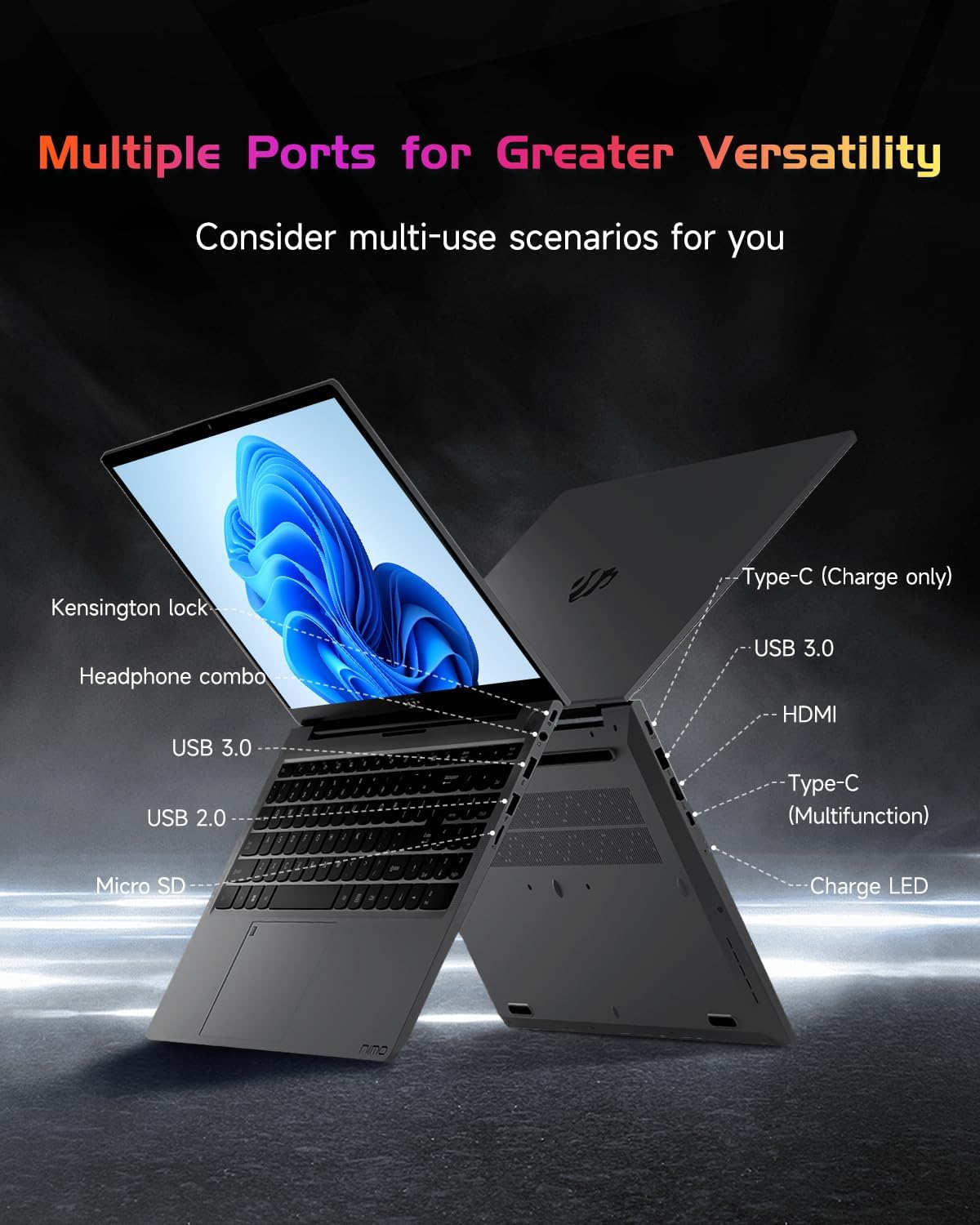
ຮູບພາບ: ດ້ານ profile of the NIMO laptop, displaying its array of ports for diverse connectivity needs.
Stay connected with integrated Wi-Fi 6 for fast wireless internet and Bluetooth 5.2 for connecting wireless accessories.
ໂຮງງານຜະລິດແລະປະສິດທິພາບ
Powered by the Intel Alder Lake-N100 12th Gen processor, the NIMO N151 delivers reliable performance for multitasking, streaming, and everyday computing tasks. It comes with 16GB DDR4 RAM and a 256GB PCIe SSD for fast startups and seamless operation.

Image: A visual representation of the Intel Alder Lake-N100 12th Gen processor, highlighting its role in the laptop's performance.
ລະບົບປະຕິບັດການ
The laptop comes pre-installed with Windows 11 Home, offering a modern and intuitive user experience.
ບໍາລຸງຮັກສາ
ການດູແລທົ່ວໄປ
- ຮັກສາແລັບທັອບໃນສະພາບແວດລ້ອມທີ່ສະອາດ ແລະແຫ້ງຫ່າງຈາກອຸນຫະພູມທີ່ຮຸນແຮງ.
- Avoid spilling liquids on the keyboard or screen.
- ໃຊ້ຜ້າອ່ອນໆທີ່ບໍ່ມີຂົນເພື່ອທຳຄວາມສະອາດໜ້າຈໍ ແລະ ພາຍນອກ. ຢ່າໃຊ້ສານເຄມີທີ່ຮຸນແຮງ.
- ຮັບປະກັນການລະບາຍອາກາດທີ່ເຫມາະສົມໂດຍການບໍ່ຕັນຊ່ອງລະບາຍອາກາດ.
ການດູແລຫມໍ້ໄຟ
ເພື່ອຍືດອາຍຸການໃຊ້ງານຂອງແບັດເຕີຣີ, ໃຫ້ຫຼີກລ່ຽງການສາກແບັດເຕີຣີໃຫ້ໝົດເລື້ອຍໆ. ແນະນຳໃຫ້ຮັກສາການສາກແບັດເຕີຣີໃຫ້ຢູ່ລະຫວ່າງ 20% ຫາ 80% ເມື່ອເປັນໄປໄດ້.
ການແກ້ໄຂບັນຫາ
ບັນຫາທົ່ວໄປແລະການແກ້ໄຂ
- ແລັບທັອບບໍ່ເປີດ: Ensure the charger is properly connected and the battery has sufficient charge. Try holding the power button for 10-15 seconds to perform a hard reset.
- ໜ້າ ຈໍຫວ່າງເປົ່າ: ເຊື່ອມຕໍ່ຈໍພາບພາຍນອກເພື່ອກວດເບິ່ງວ່າຈໍສະແດງຜົນເປັນບັນຫາຫຼືບໍ່. ຣີສະຕາດແລັບທັອບ.
- ບັນຫາການເຊື່ອມຕໍ່ Wi-Fi: ກວດເບິ່ງວ່າ Wi-Fi ຖືກເປີດໃຊ້ຢູ່ໃນການຕັ້ງຄ່າ Windows. ຣີສະຕາດເຣົາເຕີ ແລະແລັບທັອບຂອງເຈົ້າ.
- ປະສິດທິພາບຊ້າ: Close unnecessary applications, check for malware, and ensure Windows is up to date.
For persistent issues, refer to the online support resources or contact NIMO customer service.
ຂໍ້ມູນຈໍາເພາະ
| ຄຸນສົມບັດ | ລາຍລະອຽດ |
|---|---|
| ຍີ່ຫໍ້ | ນິໂມ |
| ຊື່ຕົວແບບ | Nimo N151 |
| ຂະໜາດໜ້າຈໍ | 15.6 ນິ້ວ |
| ຄວາມລະອຽດໜ້າຈໍ | 1920 x 1080 ພິກເຊລ (FHD) |
| ໂຮງງານຜະລິດ | Intel Pentium Quad Core N100 (up to 3.4 GHz) |
| RAM | 16 GB DDR4 |
| ຄວາມໄວຄວາມຈໍາ | 3200 MHz |
| ຮາດດິດ | 256 GB SSD (PCIe) |
| Graphics Coprocessor | ຮູບພາບປະສົມປະສານ |
| ລະບົບປະຕິບັດການ | ໜ້າຫຼັກ Windows 11 |
| ປະເພດໄຮ້ສາຍ | 802.11a/b/g/n/ac (Wi-Fi 6) |
| Bluetooth | Bluetooth 5.2 |
| ພອດ USB 2.0 | 1 |
| ພອດ USB 3.0 | 3 |
| ອາຍຸຫມໍ້ໄຟສະເລ່ຍ | 5 ຊົ່ວໂມງ |
| ນ້ໍາຫນັກລາຍການ | 3.8 ປອນ |
| ຂະໜາດສິນຄ້າ | 14.07 x 8.98 x 0.76 ນິ້ວ |
| ຄຸນນະສົມບັດພິເສດ | Backlit Keyboard, Fingerprint Reader, HD Audio, Memory Card Slot, Numeric Keypad |
ການຮັບປະກັນແລະການສະຫນັບສະຫນູນ
Your NIMO laptop is covered by a ການຮັບປະກັນຂອງຜູ້ຜະລິດ 2 ປີ, ensuring peace of mind for your purchase. Additionally, NIMO offers a 90-Day Hassle-Free Return Policy.
For technical assistance, warranty claims, or returns, please contact NIMO customer support through their official channels. Refer to the contact information provided with your product or on the NIMO webເວັບໄຊ.
ວິດີໂອຜະລິດຕະພັນ
Watch these official videos for a comprehensive overview and demonstration of your NIMO laptop's features.
NIMO 15.6 ການແນະນຳແລັບທັອບທີ່ສົມບູນແບບ
Video: A detailed introduction to the NIMO 15.6" FHD Laptop, showcasing ການອອກແບບ ແລະ ໜ້າທີ່ຫຼັກຂອງມັນ.
NIMO Laptop: Perfect for Work and Study, Anytime, Anywhere
Video: This video highlights the NIMO laptop's versatility for both work and study environments, emphasizing its portability.
NIMO 15.6 FHD Laptop for Students Home Work
Video: A demonstration of the NIMO 15.6" FHD Laptop's suitability for students and home-based work tasks.
Efficiency Meets Convenience: Nimo Laptop
Video: This video showcases the NIMO laptop's efficiency and convenient features for daily use.
NIMO Laptop UGC
Video: User-generated content featuring the NIMO laptop, demonstrating real-world usage scenarios.
NIMO 15.6 FHD Laptop Promotion Video
Video: A promotional video for the NIMO 15.6" FHD Laptop, showcasing ຄຸນນະສົມບັດແລະຜົນປະໂຫຍດຂອງມັນ.


