1. ບົດແນະນຳ
This manual provides essential information for the safe and efficient operation of your GAOMON 8000 BTU Portable Air Conditioner. Please read all instructions carefully before use and retain this manual for future reference.
2. ຄໍາແນະນໍາຄວາມປອດໄພ
To reduce the risk of fire, electric shock, or injury, always follow basic precautions, including the following:
- ໃຫ້ແນ່ໃຈວ່າເຄື່ອງໄດ້ຖືກວາງຢູ່ເທິງພື້ນຜິວທີ່ຮາບພຽງ, ຄົງທີ່.
- ຫ້າມໃຊ້ອຸປະກອນດ້ວຍສາຍໄຟ ຫຼືປລັກສຽບທີ່ເສຍຫາຍ.
- ຫ້າມປິດທາງເຂົ້າຫຼືຊ່ອງອອກອາກາດ. ຮັກສາການເກັບກູ້ຢ່າງຫນ້ອຍ 12 ນິ້ວຮອບຫນ່ວຍ.
- ຢ່າເອົາສິ່ງຂອງເຂົ້າໄປໃນຊ່ອງລະບາຍອາກາດ.
- ຖອດປລັກເຄື່ອງອອກກ່ອນທຳຄວາມສະອາດ ຫຼືໃຫ້ບໍລິການ.
- ຮັກສາເດັກນ້ອຍ ແລະສັດລ້ຽງຢູ່ຫ່າງຈາກໜ່ວຍບໍລິການໃນລະຫວ່າງການປະຕິບັດງານ.
- ເຄື່ອງໃຊ້ນີ້ບໍ່ໄດ້ມີຈຸດປະສົງເພື່ອໃຊ້ໂດຍບຸກຄົນ (ລວມທັງເດັກນ້ອຍ) ທີ່ມີຄວາມສາມາດທາງຮ່າງກາຍ, ຄວາມຮູ້ສຶກ ຫຼືຈິດໃຈທີ່ຫຼຸດລົງ, ຫຼືຂາດປະສົບການ ແລະຄວາມຮູ້, ເວັ້ນເສຍແຕ່ວ່າພວກເຂົາໄດ້ຮັບການຊີ້ນໍາ ຫຼືຄໍາແນະນໍາກ່ຽວກັບການນໍາໃຊ້ເຄື່ອງໃຊ້ໂດຍບຸກຄົນທີ່ຮັບຜິດຊອບຄວາມປອດໄພຂອງເຂົາເຈົ້າ.
3. ຜະລິດຕະພັນເກີນview
ເຮັດຄວາມຄຸ້ນເຄີຍກັບອົງປະກອບຂອງເຄື່ອງປັບອາກາດແບບພົກພາຂອງເຈົ້າ.

ຮູບພາບ 3.1: ດ້ານໜ້າ ແລະ ດ້ານຫຼັງ view of the portable air conditioner with labels for its main components. Key components include the LED Digital Control Panel Display, Easy to Carry Handles, Air Exhaust Vent, Continuous Drainage Hole, Condenser Filter, 360 Degree Caster, Auto Air Outlet/Louver, and Evaporator filter.
ຄຸນນະສົມບັດທີ່ສໍາຄັນ:
- ຟັງຊັນ 4-in-1: Cool, Fan, Dehumidifier, and Sleep modes.
- ຄວາມເຢັນທີ່ມີປະສິດທິພາບ: 8000 BTU (ASHRAE) / 5000 BTU (sACC) cooling capacity for rooms up to 350 sq.ft.
- ການຫຼຸດຄວາມຊຸ່ມ: Removes up to 50 liters (50 pints) of moisture per day.
- ລະບົບລະເຫີຍດ້ວຍຕົນເອງ: Reduces the need for manual drainage.
- ການປະຕິບັດການສຽງຫນ້ອຍ: Approximately 42 decibels.
- ການຄວບຄຸມທີ່ເປັນມິດກັບຜູ້ໃຊ້: LED display and remote control.
- ໂມງຈັບເວລາໂປຣແກຣມໄດ້: ຈັບເວລາ 1 ຫາ 24 ຊົ່ວໂມງ.
- ການພົກພາ: Equipped with 360-degree casters and handles for easy movement.
- ການກັ່ນຕອງລ້າງໄດ້: Easy to clean mesh filter for improved air quality.

ຮູບພາບ 3.2: Visual representation of the unit's four primary functions: Cooling, Dehumidification, Fan, and Sleep mode, highlighting its versatility.
4. ການຕິດຕັ້ງແລະການຕິດຕັ້ງ
The unit comes with a window installation kit for quick setup.
- Prepare the Exhaust Hose: ເຊື່ອມຕໍ່ສາຍຕໍ່ທໍ່ໃສ່ສົ້ນໜຶ່ງຂອງທໍ່ລະບາຍອາກາດ.
- ຄັດຕິດ Window Kit Adapter: ເຊື່ອມຕໍ່ອະແດບເຕີຊຸດປ່ອງຢ້ຽມກັບສົ້ນອື່ນຂອງທໍ່ລະບາຍອາກາດ.
- Adjust Window Kit: Extend the adjustable length of the window kit to fit your window opening.
- ເຊື່ອມຕໍ່ກັບໜ່ວຍ AC: Attach the hose connector to the exhaust air outlet on the back of the air conditioner.
- Insert into Window: Extend the exhaust hose and insert the window kit adapter into the adjusted window kit.
- ເປີດ: ສຽບຫົວ ໜ່ວຍ ເຂົ້າໄປໃນປະຕູໄຟຟ້າທີ່ມີພື້ນຖານ.
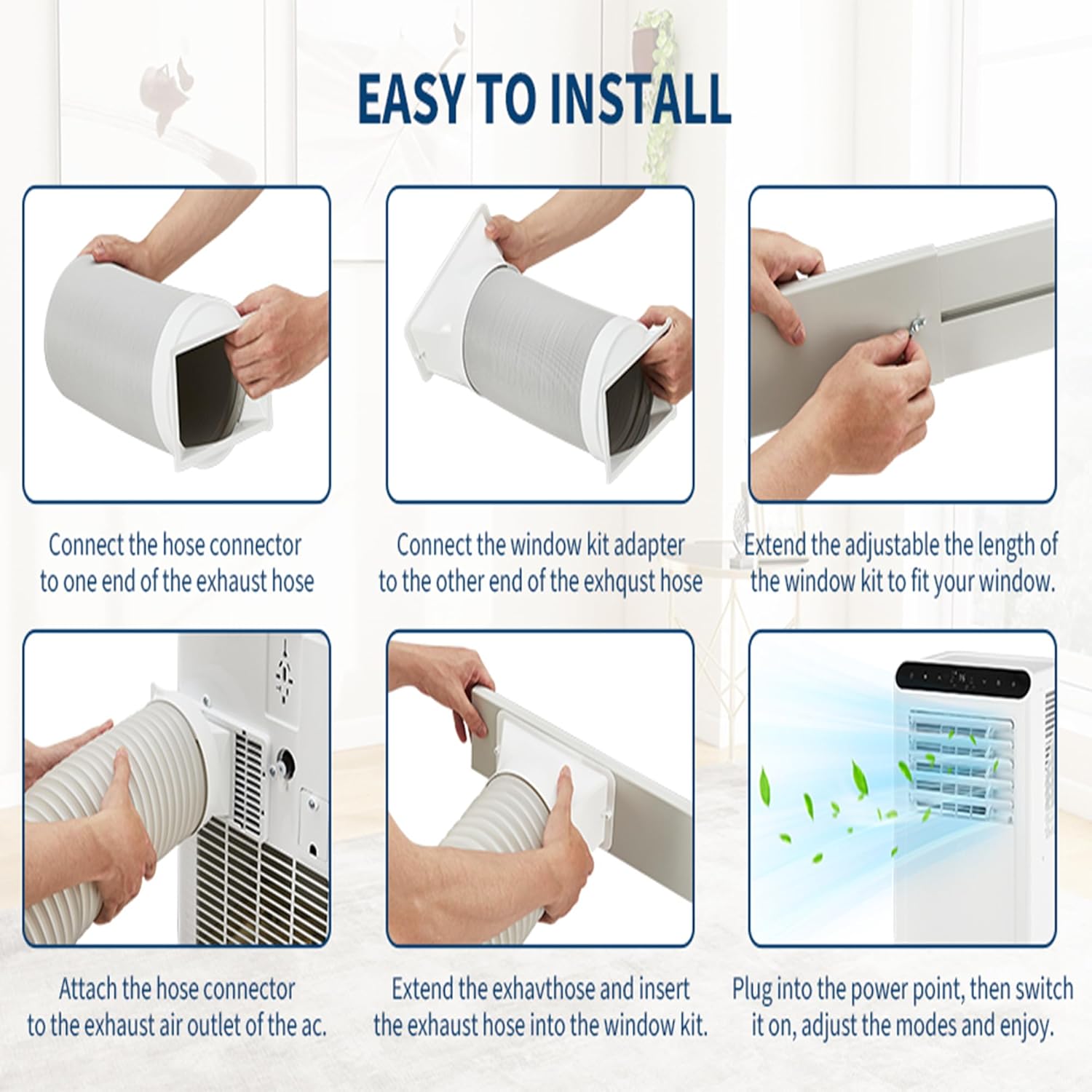
ຮູບພາບ 4.1: Step-by-step visual instructions for installing the exhaust hose and window kit.
5. ຄໍາແນະນໍາການດໍາເນີນງານ
Your portable air conditioner can be operated using the LED control panel on the unit or the included remote control.
ແຜງຄວບຄຸມ ແລະໄລຍະໄກ:

ຮູບພາບ 5.1: The LED display on the unit and the remote control for convenient operation.
ຮູບແບບການເຮັດວຽກ:
- ແບບເຢັນ: Select this mode for cooling. Adjust the temperature between 62°F and 86°F (17°C and 30°C).
- ແບບພັດລົມ: Circulates air without cooling. Choose between two fan speeds (High/Low).
- ໂໝດເຄື່ອງດູດຄວາມຊຸ່ມ (ແຫ້ງ): Removes excess moisture from the air. The unit will operate in dehumidification mode, and the fan speed cannot be adjusted.
- ຮູບແບບການນອນ: Press the Sleep button. The unit will operate quietly with the centrifugal fan set to low speed. This mode is designed for energy efficiency and a restful environment.
ຟັງຊັນຈັບເວລາ:
Set the unit to automatically turn on or off after a specified period (1-24 hours) using the Timer button on the control panel or remote.
6. ບໍາລຸງຮັກສາ
ການບໍາລຸງຮັກສາເປັນປົກກະຕິຮັບປະກັນປະສິດທິພາບທີ່ດີທີ່ສຸດແລະອາຍຸຍືນຂອງເຄື່ອງປັບອາກາດຂອງທ່ານ.
ທໍາຄວາມສະອາດການກັ່ນຕອງ:
The unit features a washable mesh filter. Regularly clean the filter to maintain air quality and cooling efficiency. Refer to the detailed instructions in the full user manual for filter removal and cleaning procedures.
ການລະບາຍນໍ້າ:
The self-evaporation system minimizes the need for manual drainage. However, in highly humid conditions, the water collection tank may fill. If the water volume exceeds the limit, the unit will stop operating and indicate that drainage is required. Connect a drain hose to the continuous drainage hole for continuous operation in high humidity, or manually drain the tank as needed.
7. ການແກ້ໄຂບັນຫາ
ກ່ອນທີ່ຈະຕິດຕໍ່ຫາຝ່າຍສະໜັບສະໜູນລູກຄ້າ, ໃຫ້ອ້າງອີງເຖິງບັນຫາ ແລະ ວິທີແກ້ໄຂທົ່ວໄປຕໍ່ໄປນີ້:
| ບັນຫາ | ສາເຫດທີ່ເປັນໄປໄດ້ | ການແກ້ໄຂ |
|---|---|---|
| ຫນ່ວຍບໍລິການບໍ່ເປີດ | ບໍ່ມີການສະຫນອງພະລັງງານ; ສາຍໄຟບໍ່ໄດ້ສຽບຢ່າງເຕັມສ່ວນ; ເຄື່ອງຕັດວົງຈອນປິດ. | ກວດສອບປລັກສຽບໄຟ; ໃຫ້ແນ່ໃຈວ່າສຽບແມ່ນປອດໄພ; ຣີເຊັດຕົວຕັດວົງຈອນ. |
| Unit stops operating and indicates drainage | Water tank is full (in high humidity conditions). | Drain the water tank or connect a continuous drain hose. |
| ຄວາມເຢັນບໍ່ພຽງພໍ | Air filter clogged; Room size too large; Doors/windows open; Exhaust hose not properly installed. | Clean air filter; Ensure room size is within capacity; Close all doors and windows; Verify exhaust hose installation. |
| ໜ່ວຍ ງານມີສຽງລົບກວນ | Unit not on a level surface; Fan speed set too high. | Place unit on a level surface; Reduce fan speed. |
8. ຂໍ້ມູນຈໍາເພາະ
Detailed technical specifications for the GAOMON Portable Air Conditioner.

ຮູບພາບ 8.1: Visual representation of the unit's dimensions and other key specifications.
- ຍີ່ຫໍ້: GAOMON
- ໝາຍເລກຕົວແບບ: 337DHYKY
- ຄວາມອາດສາມາດເຮັດຄວາມເຢັນ (ASHRAE): 8000 BTU/H
- Cooling Capacity (sACC): 5000 BTU/H
- ພື້ນທີ່ຄອບຄຸມ: ເຖິງ 350 sq.ft
- ຄວາມອາດສາມາດ dehumidification: 50 Pints/ມື້
- ລະດັບສຽງລົບກວນ: 42 Decibels
- ສະບັບtage: 115 ໂວນ
- ວັດtage: 740 ວັດ
- ຕູ້ເຢັນ: R-32
- ຂະໜາດສິນຄ້າ (D x W x H): 13.4 x 11.8 x 27.2 ນິ້ວ (340 x 300 x 694 ມມ)
- ນ້ໍາຫນັກລາຍການ: 42 ປອນ (18.5 ກິໂລ)
- ການບໍລິໂພກພະລັງງານປະຈໍາປີ: 584 ກິໂລວັດຊົ່ວໂມງຕໍ່ປີ
- ອົງປະກອບລວມ: Portable AC Unit, Exhaust Hose, Window Installation Kit, Remote Control, User Manual
9. ການຮັບປະກັນແລະການສະຫນັບສະຫນູນ
For warranty information and customer support, please refer to the warranty card included with your product or contact GAOMON customer service directly. Keep your purchase receipt as proof of purchase.


