1. ຕັ້ງຄ່າ
1.1 Unboxing ແລະການຕັ້ງຄ່າເບື້ອງຕົ້ນ
Your Ulefone Armor X16 package contains the following items:
- 1x Ulefone Armor X16 Rugged Phone
- 1x AC Power Charger, 33W
- 1x Type-C to Type-C Data Cable (100cm)
- 1x Protective Film (Pre-installed)
- 1x ປ້ອງກັນຫນ້າຈໍແກ້ວ Tempered
- 1x SIM Needle, Lanyard
- 1x Multi-language User Manual

Image: Ulefone Armor X16 package contents, showing the phone, charger, data cable, screen protector, SIM needle, lanyard, and user manual.
Video: An unboxing demonstration of the Ulefone Armor X16, showcasing the phone and its included accessories.
1.2 ການຕິດຕັ້ງແຜ່ນ SIM ແລະບັດ MicroSD
The Ulefone Armor X16 supports a 3-card slot configuration (Nano-SIM + Nano-SIM + microSD). To install your SIM and/or microSD card:
- ຊອກຫາຖາດຊິມກາດຢູ່ດ້ານຂ້າງຂອງອຸປະກອນ.
- Use the provided SIM needle to gently eject the tray.
- Place your Nano-SIM cards and/or microSD card into the designated slots on the tray.
- ໃສ່ຖາດໃສ່ໂທລະສັບຄືນໃໝ່ຢ່າງລະມັດລະວັງຈົນກວ່າມັນຈະກົດໃສ່ບ່ອນ.

Image: The Ulefone Armor X16 displaying the triple card slot for two Nano-SIM cards and one microSD card.
1.3 ການສາກອຸປະກອນ
Before first use, fully charge your Ulefone Armor X16 using the provided 33W AC Power Charger and Type-C to Type-C Data Cable. The device supports 33W PD Fast Charging.

Image: The Ulefone Armor X16 connected to a 33W fast charger, illustrating its 10360mAh battery capacity.
2. ຄໍາແນະນໍາການດໍາເນີນງານ
2.1 Power On/Off/Restart
- ເປີດ: Press and hold the Power button until the Ulefone logo appears.
- ປິດພະລັງງານ: ກົດປຸ່ມເປີດປິດຄ້າງໄວ້, ຈາກນັ້ນເລືອກ 'ປິດເຄື່ອງ' ຈາກຕົວເລືອກ.
- ຣີສະຕາດ: ກົດປຸ່ມເປີດປິດຄ້າງໄວ້, ຈາກນັ້ນເລືອກ 'ຣີສະຕາດ' ຈາກຕົວເລືອກຕ່າງໆ.
2.2 ຈໍສະແດງຜົນແລະການໂຕ້ຕອບຜູ້ໃຊ້
The Armor X16 features a 6.56-inch Fluid Display with 720 x 1612 resolution and a 90Hz refresh rate, providing a smooth visual experience. With 910 nits max brightness, the screen is easily readable outdoors.
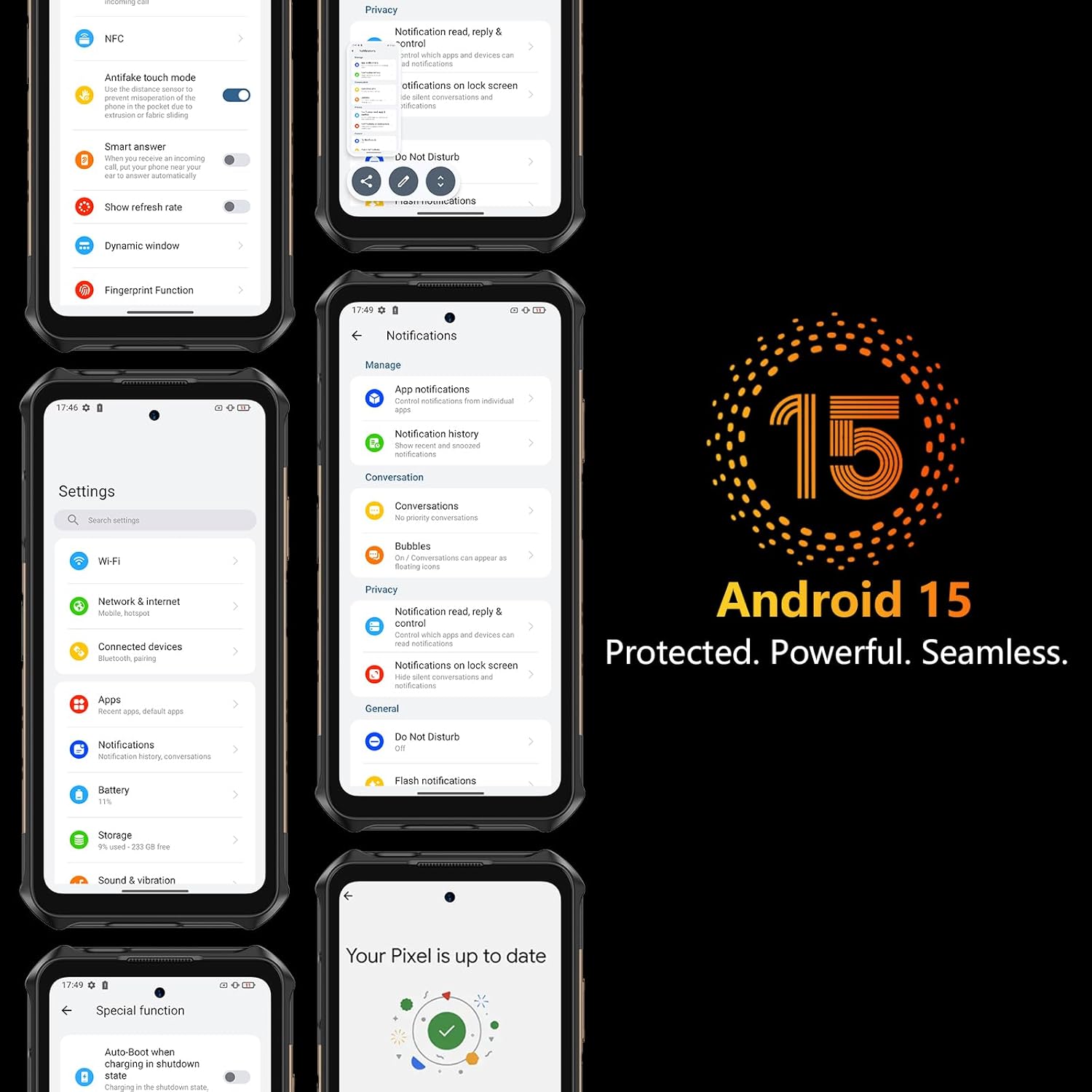
Image: The Ulefone Armor X16 highlighting its 6.56-inch 90Hz display with 910 nits brightness and 720x1612 resolution.
2.3 ລະບົບປະຕິບັດການ Android 15
The device runs on Android 15 OS, offering enhanced privacy features like advanced theft detection and Private Space for sensitive data. It also supports efficient multitasking with app pairing and optimized large-screen controls.

Image: Multiple screenshots of the Ulefone Armor X16's Android 15 interface, demonstrating its features and privacy settings.
2.4 ການປະຕິບັດແລະການເກັບຮັກສາ
Powered by the MediaTek Helio G91 Octa-core processor and Mali-G52 MC2 GPU, the Armor X16 delivers efficient and lag-free performance. It comes with up to 12GB RAM (6GB physical + 6GB dynamic) and 128GB ROM, expandable up to 2TB via a microSD card (not included).
Image: Visual representation of the Ulefone Armor X16's MediaTek Helio G91 processor, 12GB RAM (6GB+6GB Dynamic), and 128GB ROM with 2TB expandable storage.
2.5 ຄຸນສົມບັດກ້ອງຖ່າຍຮູບ
The Armor X16 is equipped with a versatile camera system:
- ກ້ອງຫຼັກ 48MP: Features an OV48B sensor and f/1.9 aperture for clear photos.
- ກ້ອງຖ່າຍຮູບອິນຟາເຣດກາງຄືນ 20MP: Utilizes a Sony IMX350 sensor and f/1.8 lens with Ulefone NightElf 2.0 algorithm for visibility in darkness.
- ກ້ອງ Macro 2MP: ສໍາລັບການສັກຢາໃກ້ຊິດລາຍລະອຽດ.
- ກ້ອງໜ້າ 16MP: ສໍາລັບການ selfies ແລະການໂທວິດີໂອ.
- ກ້ອງຖ່າຍຮູບໃຕ້ນ້ໍາ: Supports photography underwater.

Image: The Ulefone Armor X16's quad-camera system, detailing the 48MP main, 20MP night vision, 2MP macro, and 16MP front cameras, with examples of their capabilities.
2.6 ການເຊື່ອມຕໍ່
The device supports Global 4G LTE Bands (FDD-LTE: B1/2/3/4/5/7/8/12/13/17/18/19/20/25/26/28A/28B/32/66/71; TDD-LTE: B34/38/39/40/41; WCDMA: B1/2/4/5/6/8/19; GSM: B2/3/5/8; CDMA: BC0/BC1/BC10). It also includes NFC, GPS+GLONASS+BEIDOU+Galileo+QZSS, Bluetooth 5.2, and Wi-Fi.
2.7 ລັກສະນະພິເສດ
- ແບດເຕີຣີ້ມາດຕະຖານ 10360mAh: Provides extended usage with 555 hours standby, 56 hours talk time, 42 hours music playback, and 13 hours video playback.
- ໄຟສາຍໃນຕົວ: A powerful 133 lumens flashlight with adjustable brightness, activated via a one-key lighting function.
Video: A demonstration of the Ulefone Armor X31 Series flashlight, showcasing its brightness and utility in dark environments. The Armor X16 features a similar powerful flashlight.
- AI Assistant - Google Gemini: Your AI assistant for questions, brainstorming, and real-time help.
- AI Recorder: Captures voice and video calls, providing instant transcripts and summaries.
- Widevine L1 Certified: Enjoy high-definition streaming on platforms like Amazon Prime Video and Netflix.
- ກະແຈແບບກຳນົດເອງ: Programmable button for quick access to preferred functions.
- Jack ຫູຟັງ 3.5 ມມ: ສໍາລັບການເຊື່ອມຕໍ່ສຽງມີສາຍ.
- Gloves Mode: Allows for touch screen operation while wearing gloves.
- IR Blaster: For controlling compatible infrared devices.
- Headset-free FM: Listen to FM radio without needing a headset.
- Face Unlock + Fingerprint ID: ການກວດສອບຄວາມຖືກຕ້ອງທາງຊີວະວິທະຍາທີ່ປອດໄພ ແລະສະດວກ.

Image: The Ulefone Armor X16 highlighting its built-in flashlight, Face Unlock, Fingerprint ID, and Gloves Mode for enhanced usability.
3. ບໍາລຸງຮັກສາ
3.1 Rugged Protection
The Ulefone Armor X16 is built to withstand harsh environments, boasting IP69K, IP68, and MIL-STD-810H certifications. This means it is resistant to:
- ນ້ໍາ: Protected against powerful water jets and submersion.
- ຂີ້ຝຸ່ນ: Fully sealed against dust ingress.
- ຢອດ: Engineered to survive drops and impacts.
- ອຸນຫະພູມສູງສຸດ: Designed to operate in a wide range of temperatures.
Video: A durability test of the Ulefone Armor X16 Pro, demonstrating its resistance to drops, water, and other harsh conditions.
3.2 ທໍາຄວາມສະອາດແລະດູແລ
To maintain your device's performance and appearance:
- ເຊັດໜ້າຈໍ ແລະ ຕົວເຄື່ອງດ້ວຍຜ້າອ່ອນໆ.amp cloth. Avoid abrasive materials.
- ໃຫ້ແນ່ໃຈວ່າການປົກຫຸ້ມຂອງພອດທັງຫມົດຖືກປິດຢ່າງປອດໄພເພື່ອຮັກສານ້ໍາແລະຝຸ່ນ.
- ຫຼີກເວັ້ນການເປີດເຜີຍອຸປະກອນກັບອຸນຫະພູມທີ່ຮຸນແຮງເປັນເວລາດົນນານ.
3.3 ການດູແລຫມໍ້ໄຟ
ເພື່ອຍືດອາຍຸແບັດເຕີຣີ:
- ຫຼີກລ້ຽງການປະຈຸຫມໍ້ໄຟຢ່າງເຕັມທີ່ເລື້ອຍໆ.
- ໃຊ້ເຄື່ອງສາກໄຟຕົ້ນສະບັບເພື່ອໃຫ້ໄດ້ປະສິດທິພາບການສາກທີ່ດີທີ່ສຸດ.
- Do not expose the device to high temperatures while charging.
4. ການແກ້ໄຂບັນຫາ
If you encounter any issues with your Ulefone Armor X16, consider the following general troubleshooting steps:
- Device Lagging or Freezing: Close background applications, uninstall unused apps, or restart the device.
- ບັນຫາເຄືອຂ່າຍ: Check your SIM card installation, ensure mobile data is enabled, or try restarting the device.
- ບັນຫາການສາກໄຟ: Verify the charger and cable are properly connected and undamaged. Try a different power outlet.
- ໜ້າຈໍບໍ່ຕອບສະໜອງ: Perform a forced restart by holding the Power button for an extended period.
Video: A general troubleshooting guide for Android phones, demonstrating steps to resolve lagging or freezing issues by closing background apps, uninstalling applications, and restarting the device.
5. ຂໍ້ມູນຈໍາເພາະ
| ຄຸນສົມບັດ | ຂໍ້ມູນຈໍາເພາະ |
|---|---|
| ຊື່ຕົວແບບ | ເກາະ X16 |
| ລະບົບປະຕິບັດການ | Android 15.0 |
| ຕົວແບບ CPU | MediaTek Helio G91 |
| ຄວາມໄວ CPU | 2 GHz |
| RAM ຂະຫນາດທີ່ຕິດຕັ້ງ | 12 GB (6GB physical + 6GB dynamic) |
| ຄວາມອາດສາມາດເກັບຮັກສາຫນ່ວຍຄວາມຈໍາ | 128 GB (ຂະຫຍາຍໄດ້ເຖິງ 2TB) |
| ຂະໜາດໜ້າຈໍ | 6.56 ນິ້ວ |
| ຄວາມລະອຽດ | 720 x 1612 |
| ອັດຕາການໂຫຼດຂໍ້ມູນຄືນໃໝ່ | 90 Hz |
| ຄວາມອາດສາມາດຫມໍ້ໄຟ | 10360 ລ້ານamp ຊົ່ວໂມງ |
| ເວລາລົມໂທລະສັບ | 56 ຊົ່ວໂມງ |
| ຄຸນສົມບັດກ້ອງຖ່າຍຮູບອື່ນໆ | 48MP Rear Camera + 20MP Night Vision Camera + 2MP Macro Camera, 16MP Front Camera |
| ເຕັກໂນໂລຊີການເຊື່ອມຕໍ່ | Bluetooth, NFC, USB, Wi-Fi |
| GPS | True (GPS+GLONASS+BEIDOU+Galileo+QZSS) |
| ຄຸນນະສົມບັດພິເສດ | 10360mAh Battery, 12GB RAM, 128GB ROM, 48MP Rear Camera+20MP Night Vision Camera, AI Assistant-Google Gemini, Widevine L1 Certified, Built-in 133 Lumens Flashlight, Custom Key, 3.5mm Headphone Jack, Underwater Camera, Gloves Mode, IR Blaster, Headset-free FM, Face Unlock+Fingerprint ID |
| ຂະໜາດສິນຄ້າ | 6.81 x 3.27 x 0.67 ນິ້ວ |
| ນ້ໍາຫນັກລາຍການ | 13.9 ອອນສ໌ (394 ກຣາມ) |
| Ruggedness Rating | IP69K, IP68, MIL-STD-810H |
6. ການຮັບປະກັນແລະການສະຫນັບສະຫນູນ
6.1 ຂໍ້ມູນການຮັບປະກັນ
Your Ulefone Armor X16 comes with a standard manufacturer's warranty. Please refer to the warranty card included in your package for specific terms and conditions, including coverage duration and claim procedures. Keep your proof of purchase for warranty claims.
6.2 ສະຫນັບສະຫນູນລູກຄ້າ
For any technical assistance, product inquiries, or support needs, please contact Ulefone customer service. Contact details can be found in the user manual included in your product packaging or on the official Ulefone webເວັບໄຊ. ກະລຸນາມີຕົວແບບຜະລິດຕະພັນຂອງທ່ານແລະຈໍານວນ serial ກຽມພ້ອມໃນເວລາທີ່ຕິດຕໍ່ຫາສະຫນັບສະຫນູນ.


