1. ບົດແນະນຳ
ຂອບໃຈສໍາລັບການຊື້asing the SENCOR SPT 3907 Bluetooth Radio Player. This compact and versatile device offers multiple audio playback options, including CD, Bluetooth, USB, and FM radio. This manual provides essential information for safe and efficient use of your new player. Please read it thoroughly before operation and retain it for future reference.
2. ຄໍາແນະນໍາຄວາມປອດໄພ
- ແຫຼ່ງພະລັງງານ: ຮັບປະກັນການສະຫນອງພະລັງງານ voltage matches the rating indicated on the unit. Use only the provided power cable.
- ນ້ໍາແລະຄວາມຊຸ່ມ: ຢ່າເຮັດໃຫ້ເຄື່ອງຖືກຝົນ, ຄວາມຊຸ່ມຊື່ນ, ຫຼືຂອງແຫຼວທີ່ຕົກ/ກະແຈກກະຈາຍ. ຫ້າມວາງສິ່ງຂອງທີ່ເຕັມໄປດ້ວຍຂອງແຫຼວ, ເຊັ່ນ vases, ໃສ່ເຄື່ອງ.
- ການລະບາຍອາກາດ: ຫ້າມປິດຊ່ອງລະບາຍອາກາດໃດໆ. ຮັບປະກັນພື້ນທີ່ພຽງພໍຮອບຫນ່ວຍສໍາລັບການໄຫຼຂອງອາກາດທີ່ເຫມາະສົມ.
- ຄວາມຮ້ອນ: ຮັກສາເຄື່ອງໃຫ້ຫ່າງຈາກແຫຼ່ງຄວາມຮ້ອນເຊັ່ນ: radiators, ເຄື່ອງບັນທຶກຄວາມຮ້ອນ, ເຕົາ, ຫຼືອຸປະກອນອື່ນໆ (ລວມທັງ. amplifiers) ທີ່ຜະລິດຄວາມຮ້ອນ.
- ທໍາຄວາມສະອາດ: ຖອດປລັກໜ່ວຍອອກຈາກປລັກສຽບໃສ່ຝາກ່ອນທຳຄວາມສະອາດ. ໃຊ້ຜ້າອ່ອນ, ແຫ້ງ. ຢ່າໃຊ້ເຄື່ອງເຮັດຄວາມສະອາດຂອງແຫຼວຫຼືເຄື່ອງເຮັດຄວາມສະອາດ aerosol.
- ການບໍລິການ: ຢ່າພະຍາຍາມບໍລິການຜະລິດຕະພັນນີ້ດ້ວຍຕົນເອງ. ອ້າງເຖິງການບໍລິການທັງtoົດໃຫ້ກັບພະນັກງານບໍລິການທີ່ມີຄຸນວຸດທິ.
- ແບັດເຕີຣີ: ເມື່ອໃຊ້ແບັດເຕີຣີ, ໃຫ້ແນ່ໃຈວ່າຂົ້ວທີ່ຖືກຕ້ອງ. ຢ່າປະສົມແບັດເຕີຣີເກົ່າ ແລະ ແບັດເຕີຣີໃໝ່ ຫຼື ແບັດເຕີຣີປະເພດຕ່າງໆເຂົ້າກັນ. ເອົາແບັດເຕີຣີອອກຖ້າບໍ່ໄດ້ໃຊ້ເຄື່ອງເປັນເວລາດົນ.
3. ເນື້ອໃນຊຸດ
ກວດສອບວ່າລາຍການທັງຫມົດແມ່ນມີຢູ່ໃນຊຸດ:
- SENCOR SPT 3907 Radio Player
- ການຄວບຄຸມໄລຍະໄກ
- ສາຍໄຟຟ້າ AC
- ເອກະສານ (ຄູ່ມືສະບັບນີ້)
4. ຄຸນລັກສະນະຂອງຜະລິດຕະພັນ
The SENCOR SPT 3907 is designed for versatile audio entertainment:
- ພະລັງງານອອກ: 4W RMS for clear sound.
- ເຄື່ອງຫຼີ້ນ CD: Supports CD-R/RW discs with programmable playback for up to 20 songs.
- ການເຊື່ອມຕໍ່ Bluetooth: Bluetooth V2.1 + EDR for wireless audio streaming from compatible devices.
- ການຫລີ້ນ USB: USB connection for MP3 file playback with programmable playback for up to 99 songs.
- ວິທະຍຸ FM: Stereo FM radio receiver with digital tuning and 30 station presets.
- AUX-IN: 3.5mm auxiliary input for connecting external audio sources.
- ຈໍສະແດງຜົນ: Backlight LCD display for easy navigation.
- ການຄວບຄຸມໄລຍະໄກ: Full-function remote control for convenient operation.
- ຕົວເລືອກພະລັງງານ: Operates on AC 100-240V or D/LR20 batteries for portability.
- ຟັງຊັນເພີ່ມເຕີມ: Repeat and random playback modes.
5. ການຄວບຄຸມແລະຫນ້າທີ່
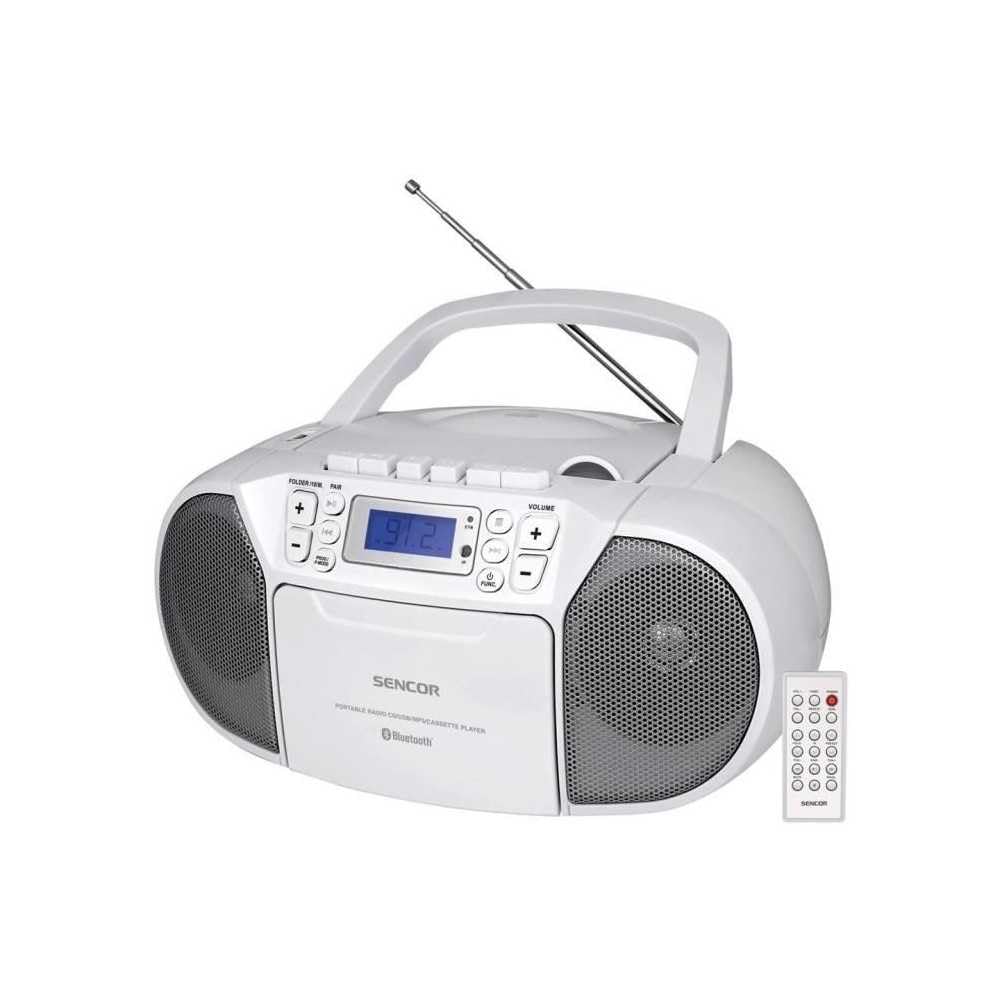
ດ້ານໜ້າ view of the SENCOR SPT 3907 unit, highlighting the control buttons, LCD screen, CD tray, and speakers. The remote control is also visible.
ແຜງຄວບຄຸມດ້ານໜ້າ:
- ປຸ່ມພະລັງງານ: ເປີດ ຫຼືປິດເຄື່ອງ.
- ປຸ່ມ MODE: Switches between CD, Bluetooth, USB, FM Radio, and AUX-IN modes.
- ປຸ່ມປັບລະດັບສຽງ +/-: ປັບລະດັບສຽງອອກ.
- PLAY/PAUSE (►/▮▮) Button: Starts or pauses playback in CD, Bluetooth, or USB mode.
- SKIP (◀◀ / ►►) Buttons: ຂ້າມໄປຫາເພງ/ສະຖານີກ່ອນໜ້າ ຫຼື ຕໍ່ໄປ.
- ປຸ່ມຢຸດ (■): ຢຸດການຫຼິ້ນ.
- FOLDER / PAIR Button: Navigates folders in USB mode; initiates Bluetooth pairing.
- ປຸ່ມ FUNC: Accesses additional functions (e.g., program, repeat, random).
- ຈໍ LCD: ສະແດງໂໝດປະຈຸບັນ, ໝາຍເລກເພງ, ຄວາມຖີ່ ແລະ ຂໍ້ມູນອື່ນໆ.
- ຊ່ອງ CD: ສໍາລັບການໃສ່ CDs ສຽງ.
- ພອດ USB: ສໍາລັບການເຊື່ອມຕໍ່ອຸປະກອນເກັບຮັກສາ USB.
- Jack AUX-IN: ສໍາລັບການເຊື່ອມຕໍ່ອຸປະກອນສຽງພາຍນອກ.
- ຫູຟັງ Output: ສໍາລັບການຟັງສ່ວນຕົວ.
ການຄວບຄຸມແຜງດ້ານຫຼັງ:
- ການປ້ອນຂໍ້ມູນພະລັງງານ AC: ເຊື່ອມຕໍ່ສາຍໄຟ AC.
- ເສົາອາກາດ FM: Extendable telescopic antenna for FM reception.
ການຄວບຄຸມໄລຍະໄກ:
The remote control duplicates most of the front panel functions for convenient operation from a distance. Refer to the remote control diagram in the included documentation for specific button layouts.
6. ຕັ້ງຄ່າ
6.1 ການເຊື່ອມຕໍ່ພະລັງງານ
The SENCOR SPT 3907 can be powered by AC mains or batteries.
ໄຟຟ້າ AC:
- ໃຫ້ແນ່ໃຈວ່າເຄື່ອງຖືກປິດ.
- Connect the supplied AC power cable to the AC input jack on the rear of the unit.
- Plug the other end of the AC power cable into a standard wall outlet (AC 100-240V, 50/60Hz).
ພະລັງງານຫມໍ້ໄຟ:
- ເປີດຝາປິດຝາປິດທີ່ຕັ້ງຢູ່ດ້ານລຸ່ມຂອງ ໜ່ວຍ.
- Insert 6 x D/LR20 size batteries (not included), ensuring correct polarity (+/-) as indicated inside the compartment.
- ປິດຝາປິດຊ່ອງໃສ່ຫມໍ້ໄຟຢ່າງປອດໄພ.
Note: When the AC power cable is connected, battery power is automatically disconnected. Remove batteries if the unit will not be used for an extended period to prevent leakage.
6.2 ການຕິດຕັ້ງເສົາອາກາດ
For optimal FM radio reception, fully extend the telescopic FM antenna located on the rear of the unit. Adjust its position for the best signal.
7. ຄໍາແນະນໍາການດໍາເນີນງານ
7.1 ເປີດ/ປິດ ແລະເລືອກໂໝດ
- ກົດ ພະລັງງານ button to turn the unit on. The LCD display will light up.
- ກົດ ໂໝດ button repeatedly to cycle through available modes: CD, Bluetooth, USB, FM Radio, AUX-IN. The selected mode will be shown on the LCD display.
- ກົດ ພະລັງງານ ກົດປຸ່ມອີກເທື່ອຫນຶ່ງເພື່ອປິດເຄື່ອງ.
7.2 ການຫຼິ້ນ CD
- ກົດ ໂໝດ ປຸ່ມເພື່ອເລືອກຮູບແບບຊີດີ.
- ເປີດຝາປິດຊ່ອງ CD.
- Place a CD (CD-R/RW compatible) with the label side facing up onto the spindle.
- Close the CD compartment cover. The unit will read the disc, and the total number of tracks will appear on the display.
- ກົດ ຫຼິ້ນ/ຢຸດຊົ່ວຄາວ ປຸ່ມເພື່ອເລີ່ມຕົ້ນການຫຼິ້ນ
- ໃຊ້ ຂ້າມ (◀◀ / ►►) ປຸ່ມເພື່ອຂ້າມເພງ.
- ກົດ ຢຸດ (■) ປຸ່ມເພື່ອຢຸດການຫລີ້ນການຫລີ້ນ.
- ການຫຼິ້ນໂຄງການ: ໃນຂະນະທີ່ຢູ່ໃນໂໝດ STOP, ໃຫ້ກົດປຸ່ມ FUNC ເພື່ອເຂົ້າສູ່ໂໝດໂປຣແກຣມ. ໃຊ້ ຂ້າມ buttons to select tracks and FUNC again to confirm. Up to 20 CD songs can be programmed.
7.3 ການດໍາເນີນງານ Bluetooth
- ກົດ ໂໝດ button to select Bluetooth mode. The display will show 'BT' and flash, indicating it's in pairing mode.
- ໃນອຸປະກອນທີ່ເປີດໃຊ້ Bluetooth ຂອງທ່ານ (ເຊັ່ນ: ໂທລະສັບສະຫຼາດ, ແທັບເລັດ), ເປີດໃຊ້ Bluetooth ແລະຄົ້ນຫາອຸປະກອນທີ່ມີຢູ່.
- Select 'SPT 3907' from the list of devices. Once paired, the 'BT' indicator on the display will stop flashing and remain solid.
- Start playing audio on your connected device. The sound will be streamed through the SENCOR SPT 3907.
- ໃຊ້ ຫຼິ້ນ/ຢຸດຊົ່ວຄາວ ແລະ ຂ້າມ buttons on the unit or remote control to manage playback.
7.4 ການຫຼິ້ນ USB
- ໃສ່ແຟລດໄດຣຟ໌ USB (ມີ MP3) files) into the USB port.
- ກົດ ໂໝດ button to select USB mode. The unit will automatically read the files.
- ກົດ ຫຼິ້ນ/ຢຸດຊົ່ວຄາວ ປຸ່ມເພື່ອເລີ່ມຕົ້ນການຫຼິ້ນ
- ໃຊ້ ຂ້າມ (◀◀ / ►►) ປຸ່ມເພື່ອຂ້າມເພງ.
- ກົດ ຕູ້ເຢັນ ປຸ່ມເພື່ອນຳທາງລະຫວ່າງໂຟນເດີຕ່າງໆໃນໄດຣຟ໌ USB.
- ການຫຼິ້ນໂຄງການ: ໃນຂະນະທີ່ຢູ່ໃນໂໝດ STOP, ໃຫ້ກົດປຸ່ມ FUNC ເພື່ອເຂົ້າສູ່ໂໝດໂປຣແກຣມ. ໃຊ້ ຂ້າມ buttons to select tracks and FUNC again to confirm. Up to 99 MP3 songs can be programmed.
7.5 ການດໍາເນີນງານວິທະຍຸ FM
- ກົດ ໂໝດ button to select FM Radio mode. The current frequency will appear on the display.
- ຂະຫຍາຍເສົາອາກາດ telescopic ສໍາລັບການຮັບທີ່ດີກວ່າ.
- ການປັບອັດຕະໂນມັດ: ກົດຄ້າງໄວ້ ຂ້າມ (◀◀ / ►►) ກົດປຸ່ມເປັນເວລາສອງສາມວິນາທີເພື່ອສະແກນສະຖານີຕໍ່ໄປທີ່ມີໂດຍອັດຕະໂນມັດ.
- ຄູ່ມືການປບັຄູ່ມື: ຫຍໍ້ໆ ກົດເຂົ້າ ຂ້າມ (◀◀ / ►►) buttons to fine-tune the frequency step-by-step.
- ສະຖານີທີ່ຕັ້ງໄວ້ລ່ວງໜ້າ: To save a station, tune to the desired frequency, then press the FUNC ປຸ່ມ. ໃຊ້ ຂ້າມ buttons to select a preset number (P01-P30), then press FUNC ອີກເທື່ອຫນຶ່ງເພື່ອຢືນຢັນ.
- ເພື່ອຈື່ສະຖານີທີ່ຕັ້ງໄວ້ລ່ວງໜ້າ, ໃຫ້ກົດທີ່ປຸ່ມ FUNC ກົດປຸ່ມຊ້ຳໆເພື່ອຮອບວຽນຜ່ານສະຖານີທີ່ບັນທຶກໄວ້.
7.6 ການເຊື່ອມຕໍ່ AUX-IN
- Connect one end of a 3.5mm audio cable (not included) to the AUX-IN jack on the SENCOR SPT 3907.
- ເຊື່ອມຕໍ່ປາຍອີກດ້ານໜຶ່ງຂອງສາຍເຂົ້າກັບຊ່ອງສຽບຫູຟັງ ຫຼື ຊ່ອງສຽບສຽງຂອງອຸປະກອນສຽງພາຍນອກຂອງທ່ານ (ເຊັ່ນ: ເຄື່ອງຫຼິ້ນ MP3, ໂທລະສັບສະຫຼາດ).
- ກົດ ໂໝດ ປຸ່ມເພື່ອເລືອກໂໝດ AUX-IN.
- Start playback on your external device. The audio will be played through the SENCOR SPT 3907.
- ປັບລະດັບສຽງໂດຍໃຊ້ ປະລິມານ +/- buttons on the unit or remote control, and also on your external device.
8. ບໍາລຸງຮັກສາ
8.1 ການທໍາຄວາມສະອາດຫນ່ວຍງານ
Wipe the exterior of the unit with a soft, dry cloth. Do not use abrasive cleaners, waxes, or solvents as they may damage the finish. Ensure the unit is unplugged from the power source before cleaning.
8.2 ການດູແລເລນ CD
If the CD player experiences reading errors, the lens may need cleaning. Use a commercially available CD lens cleaner disc. Do not touch the lens directly.
8.3 ການທົດແທນຫມໍ້ໄຟ
When the unit operates on batteries and the sound becomes distorted or the unit stops functioning, replace all batteries with new D/LR20 batteries, ensuring correct polarity.
9. ການແກ້ໄຂບັນຫາ
| ບັນຫາ | ສາເຫດທີ່ເປັນໄປໄດ້ | ການແກ້ໄຂ |
|---|---|---|
| ບໍ່ມີພະລັງງານ | ສາຍໄຟບໍ່ໄດ້ເຊື່ອມຕໍ່; ແບັດເຕີຣີໝົດ ຫຼືໃສ່ບໍ່ຖືກຕ້ອງ. | ກວດສອບການເຊື່ອມຕໍ່ພະລັງງານ AC; ປ່ຽນແບັດເຕີຣີ, ຮັບປະກັນວ່າຂົ້ວທີ່ຖືກຕ້ອງ. |
| ບໍ່ມີສຽງ | ລະດັບສຽງຕໍ່າເກີນໄປ; ເລືອກໂໝດບໍ່ຖືກຕ້ອງ; ເຊື່ອມຕໍ່ຫູຟັງແລ້ວ. | Increase volume; Select correct mode (CD, BT, USB, FM, AUX); Disconnect headphones. |
| CD ບໍ່ຫຼິ້ນ / ຂ້າມ | ຊີດີເປື້ອນ ຫຼື ມີຮອຍຂີດຂ່ວນ; ໃສ່ຊີດີບໍ່ຖືກຕ້ອງ; ເລນຊີດີເປື້ອນ. | ທຳຄວາມສະອາດ ຫຼື ປ່ຽນແຜ່ນຊີດີ; ໃສ່ແຜ່ນຊີດີໂດຍໃຫ້ດ້ານທີ່ມີປ້າຍຢູ່ທາງເທິງ; ໃຊ້ນ້ຳຢາທຳຄວາມສະອາດເລນແຜ່ນຊີດີ. |
| Bluetooth ບໍ່ເຊື່ອມຕໍ່ | Unit not in pairing mode; Device too far; Bluetooth not enabled on external device. | Ensure unit is in BT pairing mode; Move device closer; Enable Bluetooth on your device. |
| ການຮັບ FM ບໍ່ດີ | ແອນເຕນນາບໍ່ໄດ້ຍືດອອກ ຫຼື ບໍ່ໄດ້ວາງຕຳແໜ່ງຢ່າງຖືກຕ້ອງ; ສັນຍານອ່ອນ. | ຂະຫຍາຍອອກຢ່າງເຕັມສ່ວນແລະປັບສາຍອາກາດ telescopic; ລອງຍ້າຍໜ່ວຍໄປບ່ອນອື່ນ. |
10. ຂໍ້ມູນຈໍາເພາະ
| ຄຸນສົມບັດ | ຂໍ້ມູນຈໍາເພາະ |
|---|---|
| ຕົວແບບ | SPT3907 |
| ພະລັງງານຜົນຜະລິດ | 4W RMS |
| ສື່ທີ່ຮອງຮັບ | CD-R, CD-RW, Bluetooth, MP3, USB |
| ລຸ້ນ Bluetooth | V2.1 + EDR |
| ການຕັ້ງຄ່າວິທະຍຸ FM | 30 ສະຖານີ |
| ການເຊື່ອມຕໍ່ | Auxiliary (3.5mm), USB |
| ແຫຼ່ງພະລັງງານ | AC 100-240V, 50/60Hz; 6 x D/LR20 batteries |
| ນ້ໍາຫນັກລາຍການ | 1 ກິໂລ 960 g |
| ຂະໜາດ | (Not specified in provided data) |
11. ການຮັບປະກັນແລະການສະຫນັບສະຫນູນ
SENCOR products are manufactured to high-quality standards and are warranted against manufacturing defects. For specific warranty terms and conditions, please refer to the warranty card included with your purchase or visit the official SENCOR website. For technical support, service, or inquiries, please contact your local SENCOR distributor or authorized service center.