1. ບົດແນະນຳ
This manual provides essential information for the proper use and maintenance of your TECLAST T65 Android 15 Tablet. Please read it thoroughly before using the device to ensure optimal performance and longevity.

2. ສິ່ງທີ່ຢູ່ໃນກ່ອງ
ກວດສອບວ່າລາຍການທັງຫມົດແມ່ນມີຢູ່ໃນຊຸດ:
- Android 15 T65 tablet x 1
- ເຄື່ອງສາກໄຟ x 1
- ສາຍສາກ x 1
- ຄູ່ມືການສອນ x 1
- Ejection pin x 1
3. ຄຸນລັກສະນະຂອງຜະລິດຕະພັນ
3.1 ຈໍສະແດງຜົນ ແລະສາຍຕາ
- ຈໍສະແດງຜົນ IPS ຂະໜາດ 13.4 ນິ້ວ: ຂະຫຍາຍ viewing area with narrow bezels for an immersive experience.
- 1920x1200 HD Resolution: Delivers clear and detailed visuals.
- TDDI Technology: Reduces touch layers for brighter images and faster response.
- ອັດຕາການໂຫຼດຫນ້າຈໍຄືນສູງ 120Hz: Ensures smooth animations and agile touch response.
- Widevine L1 ສະຫນັບສະຫນູນ: Enables streaming of 1080P content from platforms like Netflix and YouTube.
- ໂໝດປົກປ້ອງຕາ: Includes Reading Mode, Eye Protection Mode, and Dark Mode for comfortable viewing.

3.2 ການປະຕິບັດແລະການເກັບຮັກສາ
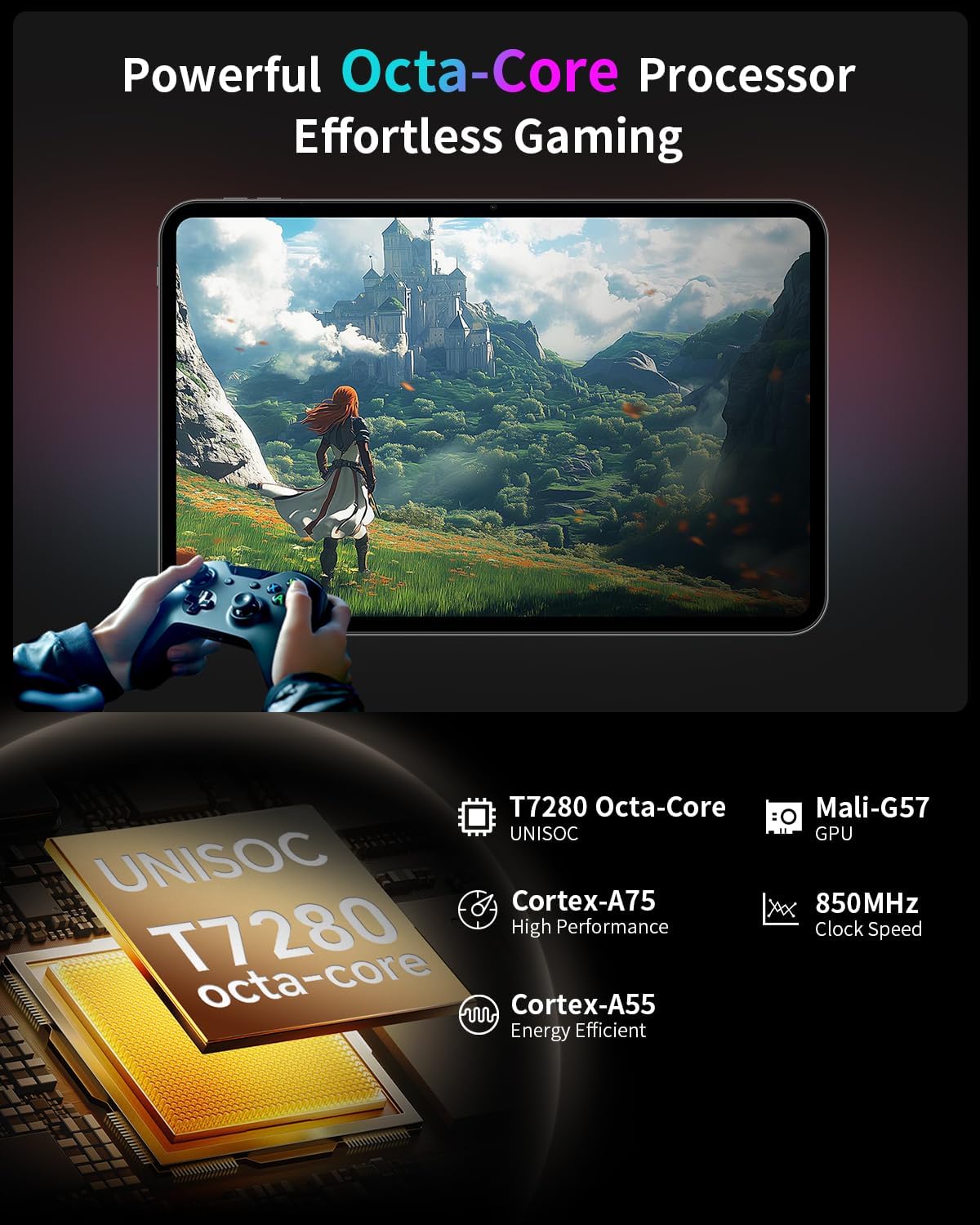
- ໂປເຊດເຊີ Octa-Core: Features a Unisoc T7280 CPU with A75 and A55 cores, clocking up to 2.2GHz for efficient performance.
- Mali-G57 GPU: Integrated graphics coprocessor for enhanced visual processing.
- 20GB (8GB+12GB Expansion) RAM: ສະຫນອງ ample memory for multitasking.
- ໜ່ວຍຄວາມຈຳພາຍໃນ 128GB: Sufficient space for applications and media.
- ການເກັບຮັກສາທີ່ຂະຫຍາຍໄດ້: ຮອງຮັບສູງສຸດ 1TB ຜ່ານບັດ TF (microSD) (ຂາຍແຍກຕ່າງຫາກ).
3.3 Operating System and User Experience
- Android 15 (GMS Certified): Offers a smooth, fast, and secure operating experience with enhanced privacy features.
- AI Intelligent Optimization: Improves system efficiency.
- ຄຸນນະສົມບັດການຜະລິດຕະພັນ: Includes split-screen function, Quick Sidebar for fast app launch, and Assistive Control for quick system navigation.
- ການຄວບຄຸມຂອງພໍ່ແມ່: Built-in Google Family Link for managing screen time, app usage, and device location for children.

3.4 ການເຊື່ອມຕໍ່ ແລະ ແບັດເຕີຣີ
- ແບດເຕີຣີ້ມາດຕະຖານ 8000mAh: Provides extended usage, up to 8 hours of video playback.
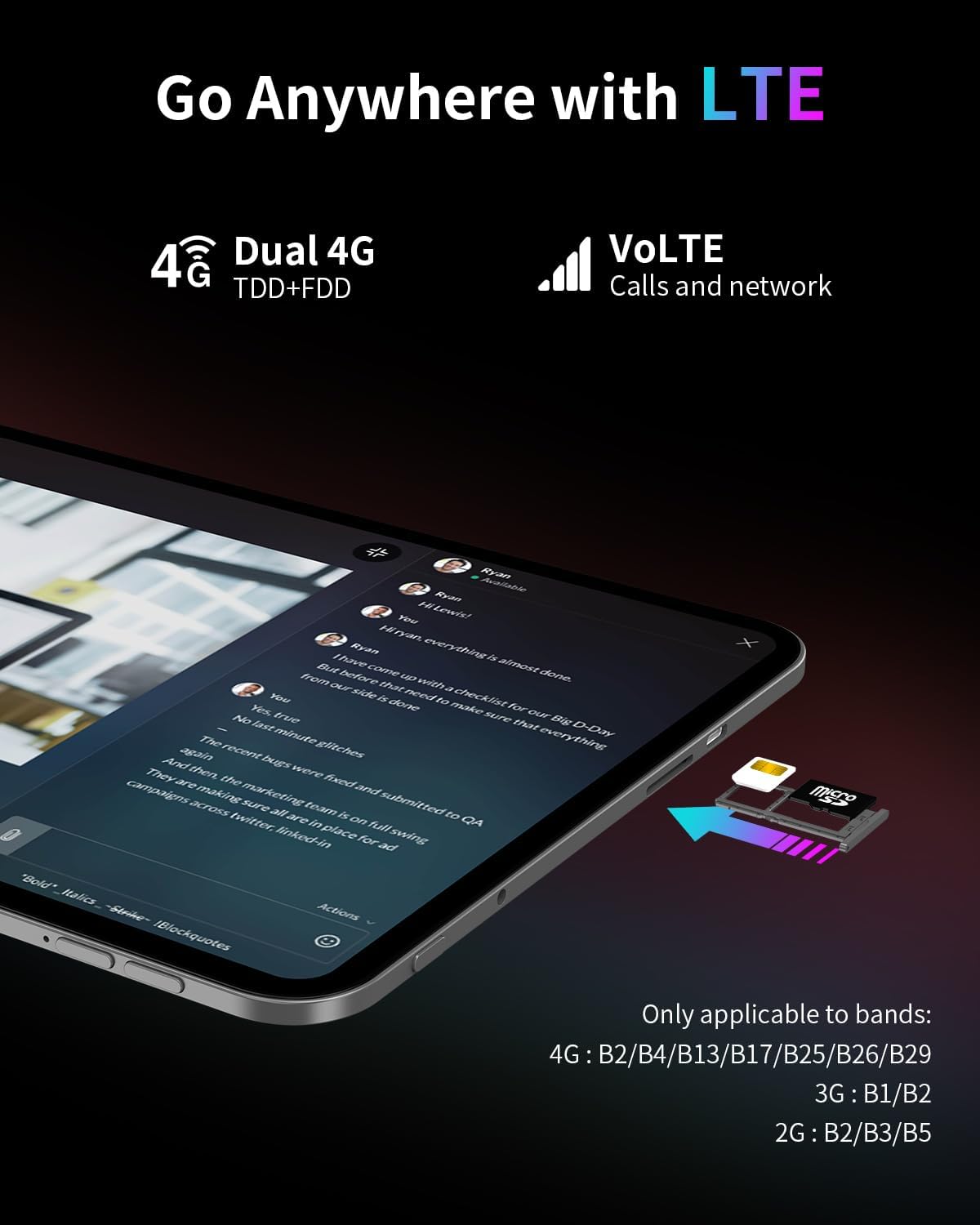
- ການເຊື່ອມຕໍ່ 4G LTE: Supports mobile data for on-the-go internet access (bands: 4G: B2/B4/B13/B17/B25/B26/B29; 3G: B1/B2; 2G: B2/B3/B5).
- Dual-Band Wi-Fi (2.4GHz+5GHz): Supports 802.11a/b/g/n/ac for stable wireless internet.
- Bluetooth 5.0: ສໍາລັບການເຊື່ອມຕໍ່ອຸປະກອນເສີມໄຮ້ສາຍ.
- GPS: Supports BeiDou, GPS, GLONASS, and GALILEO for accurate navigation.
- ໜ້າທີ່ຂອງ OTG: Allows connection of USB peripherals.
- USB Type-C: ສໍາລັບການສາກໄຟແລະການໂອນຂໍ້ມູນ.
3.5 ສຽງ
- SWEET 4 Sound System: Enhanced audio output.
- Smart K Intelligent Ampຊິບ Lifier: Improves sound clarity.
- Jack ຫູຟັງ 3.5 ມມ: ສໍາລັບການເຊື່ອມຕໍ່ສຽງມີສາຍ.
4. ຕັ້ງຄ່າ
4.1 ການເປີດເຄື່ອງເບື້ອງຕົ້ນ
- Press and hold the power button located on the side of the tablet until the TECLAST logo appears.
- ປະຕິບັດຕາມການເຕືອນໃນຫນ້າຈໍເພື່ອເລືອກພາສາຂອງທ່ານ, ເຊື່ອມຕໍ່ກັບເຄືອຂ່າຍ Wi-Fi, ແລະຕັ້ງຄ່າບັນຊີ Google ຂອງທ່ານ.
4.2 ການໃສ່ SIM/TF Card
- ຊອກຫາຊ່ອງໃສ່ຊິມກາດ/TF ຢູ່ດ້ານຂ້າງຂອງແທັບເລັດ.
- Use the provided ejection pin to gently press into the small hole next to the tray until it pops out.
- Place your Nano-SIM card(s) and/or TF card into the tray, ensuring correct orientation as indicated on the tray.
- ລະມັດລະວັງໃສ່ຖາດເຂົ້າໄປໃນຊ່ອງສຽບ.
4.3 ການສາກແທັບເລັດ
- Connect the charging cable to the USB Type-C port on the tablet.
- Plug the other end of the cable into the provided charger, and then into a power outlet.
- ໄອຄອນແບັດເຕີຣີໃນໜ້າຈໍຈະສະແດງສະຖານະການສາກໄຟ.
5. ຄໍາແນະນໍາການດໍາເນີນງານ
5.1 ການນໍາທາງພື້ນຖານ
- ທ່າທາງສໍາຜັດ: ແຕະເພື່ອເລືອກ, ປັດເພື່ອເລື່ອນ, ແຕະເພື່ອຊູມ.
- ໜ້າຈໍຫຼັກ: ເຂົ້າເຖິງແອັບ, ວິດເຈັດ ແລະການແຈ້ງເຕືອນ.
- Quick Sidebar: Swipe inward from the edge of the screen to access frequently used apps and system controls.
- Assistive Control: A virtual button providing quick access to system functions.
5.2 ການຕັ້ງຄ່າການສະແດງ
- ການປັບຄວາມສະຫວ່າງ: Drag the brightness slider in the quick settings panel or navigate to Settings > Display.
- ອັດຕາການໂຫຼດຂໍ້ມູນຄືນໃໝ່: The tablet automatically adjusts to 120Hz for smoother visuals. This can be managed in Display settings.
- ໂໝດປົກປ້ອງຕາ: Activate Reading Mode, Eye Protection Mode, or Dark Mode from quick settings or Display settings to reduce eye strain.
5.3 ການເຊື່ອມຕໍ່
- Wi-Fi: ໄປທີ່ການຕັ້ງຄ່າ > ເຄືອຂ່າຍ ແລະອິນເຕີເນັດ > Wi-Fi ເພື່ອເຊື່ອມຕໍ່ກັບເຄືອຂ່າຍທີ່ມີຢູ່.
- ຂໍ້ມູນມືຖື: Ensure a SIM card is inserted and mobile data is enabled in Settings > Network & internet > Mobile network.
- Bluetooth: ຈັບຄູ່ກັບອຸປະກອນ Bluetooth ຜ່ານການຕັ້ງຄ່າ > ອຸປະກອນທີ່ເຊື່ອມຕໍ່ > Bluetooth.
- GPS: ບໍລິການສະຖານທີ່ສາມາດຈັດການໄດ້ໃນການຕັ້ງຄ່າ > ສະຖານທີ່.
5.4 ການຄວບຄຸມຂອງຜູ້ປົກຄອງ
To set up parental controls, navigate to Settings > Digital Wellbeing & parental controls. You can use Google Family Link to manage screen time, monitor app usage, and set content restrictions for children's profiles.
6. ບໍາລຸງຮັກສາ
6.1 ການທໍາຄວາມສະອາດ
- ໃຊ້ຜ້າແພທີ່ອ່ອນໆ, ບໍ່ມີສານດ່າງເພື່ອເຮັດຄວາມສະອາດໜ້າຈໍ ແລະຕົວເຄື່ອງຂອງແທັບເລັດ.
- ຫຼີກລ່ຽງການໃຊ້ສານເຄມີທີ່ຮຸນແຮງ, ເຄື່ອງຂັດຂັດ, ຫຼືສີດ aerosol.
- ສໍາລັບ smudges stubborn, ເລັກນ້ອຍ dampໃສ່ຜ້າດ້ວຍນ້ໍາຫຼືການແກ້ໄຂເຮັດຄວາມສະອາດຫນ້າຈໍ.
6.2 ການດູແລຫມໍ້ໄຟ
- ຫຼີກເວັ້ນການເປີດເຜີຍແທັບເລັດກັບອຸນຫະພູມທີ່ຮຸນແຮງ.
- ຢ່າປະແທັບເລັດໃຫ້ສາກໄຟເຕັມ ຫຼື ປ່ອຍໄຟໃຫ້ໝົດເປັນເວລາດົນ.
- ໃຊ້ສະເພາະສາຍສາກ ແລະສາຍສາກຕົ້ນສະບັບທີ່ໃຫ້ມາກັບອຸປະກອນເທົ່ານັ້ນ.
6.3 ການປັບປຸງຊອບແວ
ກວດສອບ ແລະຕິດຕັ້ງການອັບເດດຊອບແວເປັນປະຈໍາເພື່ອຮັບປະກັນປະສິດທິພາບທີ່ດີທີ່ສຸດ, ຄວາມປອດໄພ, ແລະການເຂົ້າເຖິງຄຸນສົມບັດໃຫມ່. ໄປທີ່ Settings > System > System update.
7. ການແກ້ໄຂບັນຫາ
7.1 ບັນຫາທົ່ວໄປ ແລະການແກ້ໄຂ
- ແທັບເລັດເປີດບໍ່ໄດ້:
- Ensure the battery is charged. Connect the charger and wait a few minutes before attempting to power on again.
- Press and hold the power button for at least 10-15 seconds to perform a forced restart. - ໜ້າຈໍບໍ່ຕອບສະໜອງ:
- Restart the tablet.
- Ensure the screen is clean and free of moisture or debris. - ບັນຫາການເຊື່ອມຕໍ່ Wi-Fi:
- Restart the tablet and your Wi-Fi router.
- Forget the network in Wi-Fi settings and reconnect.
- Ensure you are within range of the Wi-Fi signal. - Apps are crashing or freezing:
- Close and reopen the app.
- Clear the app's cache and data in Settings > Apps.
- ໃຫ້ແນ່ໃຈວ່າແອັບຯໄດ້ຖືກອັບເດດເປັນເວີຊັນລ່າສຸດ.
- Restart the tablet. - ແບັດເຕີຣີໝົດໄວ:
- ຫຼຸດຜ່ອນຄວາມສະຫວ່າງຫນ້າຈໍ.
- Close unused apps running in the background.
- Disable Wi-Fi, Bluetooth, or GPS when not in use.
- Check for apps consuming excessive battery in Settings > Battery.
7.2 ຣີເຊັດເປັນຄ່າໂຮງງານ
ຄຳເຕືອນ: ການຣີເຊັດເປັນຄ່າໂຮງງານຈະລຶບຂໍ້ມູນທັງໝົດໃນແທັບເລັດຂອງທ່ານ. ສໍາຮອງຂໍ້ມູນທີ່ສໍາຄັນກ່ອນທີ່ຈະດໍາເນີນການ.
To perform a factory reset, go to Settings > System > Reset options > Erase all data (factory reset).
8. ຂໍ້ມູນຈໍາເພາະ
| ຄຸນສົມບັດ | ຂໍ້ມູນຈໍາເພາະ |
|---|---|
| ຊື່ຕົວແບບ | T65 |
| ຍີ່ຫໍ້ | TECLAST |
| ລະບົບປະຕິບັດການ | Android 15 |
| ຂະໜາດໜ້າຈໍ | 13.4 ນິ້ວ |
| ຄວາມລະອຽດໜ້າຈໍ | 1920 x 1200 ພິກເຊລ |
| ອັດຕາການໂຫຼດຂໍ້ມູນຄືນໃໝ່ | 120Hz |
| ໂຮງງານຜະລິດ | Unisoc T7280 Octa-Core (2.2 GHz) |
| Graphics Coprocessor | ມາລີ-G57 |
| RAM | 20GB (8GB LPDDR4 + 12GB Expansion) |
| ຂະໜາດຄວາມຈຳ Flash | 128 GB |
| ການເກັບຮັກສາທີ່ຂະຫຍາຍໄດ້ | ບັດ TF ສູງສຸດ 1TB (ຂາຍແຍກຕ່າງຫາກ) |
| ປະເພດໄຮ້ສາຍ | 802.11a/b/g/n/ac (Dual-Band Wi-Fi) |
| Bluetooth | Bluetooth 5.0 |
| ການເຊື່ອມຕໍ່ໂທລະສັບມືຖື | 4G LTE (B2/B4/B13/B17/B25/B26/B29), 3G (B1/B2), 2G (B2/B3/B5) |
| GPS | 4-Mode Satellite Positioning (BeiDou, GPS, GLONASS, GALILEO) |
| ຄວາມອາດສາມາດຫມໍ້ໄຟ | 8000mAh |
| ອາຍຸຫມໍ້ໄຟສະເລ່ຍ | 8 ຊົ່ວໂມງ (ການຫຼິ້ນວິດີໂອ) |
| ຫລັງ Webຄວາມລະອຽດກ້ອງ | 13 MP |
| ນ້ໍາຫນັກລາຍການ | 1.59 ປອນ (ປະມານ 720g) |
| ຂະໜາດສິນຄ້າ | 12 x 7.9 x 0.33 ນິ້ວ (ປະມານ 30.5 x 20.1 x 0.84 ຊມ) |
| ສີ | ສີເທົາ |
9. ການຮັບປະກັນແລະການສະຫນັບສະຫນູນ
9.1 ຂໍ້ມູນການຮັບປະກັນ
Please refer to the warranty card included in your product packaging for detailed warranty terms and conditions. Keep your proof of purchase for warranty claims.
9.2 ສະຫນັບສະຫນູນລູກຄ້າ
For any questions, technical assistance, or issues with your TECLAST T65 tablet, please contact TECLAST customer support. Most inquiries are answered within 24 hours.
You can typically find contact information on the official TECLAST website or through the seller's platform where you purchased the product.


