1. ບົດແນະນຳ
Thank you for choosing the EASYLONGER ES270 CPAP Battery. This portable power bank is designed to provide reliable and uninterrupted power for your CPAP machine, making it ideal for air travel, camping, and as a backup power source during outages. With its 99.9Wh capacity, it is airline-approved for carry-on luggage. The ES270 also features PD 100W fast charging for laptops and other devices, along with built-in wireless charging.
This manual provides essential information on how to set up, operate, maintain, and troubleshoot your ES270 CPAP Battery. Please read it thoroughly before use to ensure safe and optimal performance.
2. ຜະລິດຕະພັນເກີນview
2.1 ເນື້ອໃນຊຸດ
ເມື່ອເປີດຊຸດ, ກະລຸນາກວດສອບວ່າທຸກລາຍການທີ່ລະບຸໄວ້ຂ້າງລຸ່ມນີ້ແມ່ນຢູ່ ແລະຢູ່ໃນສະພາບດີ:
- 1 × EASYLONGER ES270 CPAP Battery Pack
- 4 × CPAP Charge Cables (compatible with ResMed AirMini, AirSense 11, AirSense 10, AirCurve 10, AirCurve 11, S9, Philips DreamStation, DreamStation 2)
- 1 × USB-C to C Cable
- 1 × User Guide (this manual)
2.2 ຮູບແບບອຸປະກອນ
The EASYLONGER ES270 features a compact design with multiple input and output ports for versatile charging. The front panel includes a digital display for real-time status updates.

ຮູບພາບ: ທາງຫນ້າ view of the EASYLONGER ES270 CPAP Battery, showing the digital display, USB-C input/output, USB-A output, and DC input/output ports.

Image: The EASYLONGER ES270 battery alongside its included accessories, including the user manual, USB-C cable, and four different CPAP charging cables.
3. ຕັ້ງຄ່າ
3.1 ການສາກໄຟເບື້ອງຕົ້ນ
Before first use, it is recommended to fully charge your EASYLONGER ES270 battery. Refer to Section 4.1 for detailed charging instructions.
3.2 Connecting to CPAP Machine
Identify the correct CPAP charge cable from the included set that matches your CPAP machine model. Connect one end of the cable to the DC OUT port on the ES270 and the other end to your CPAP machine's power input.
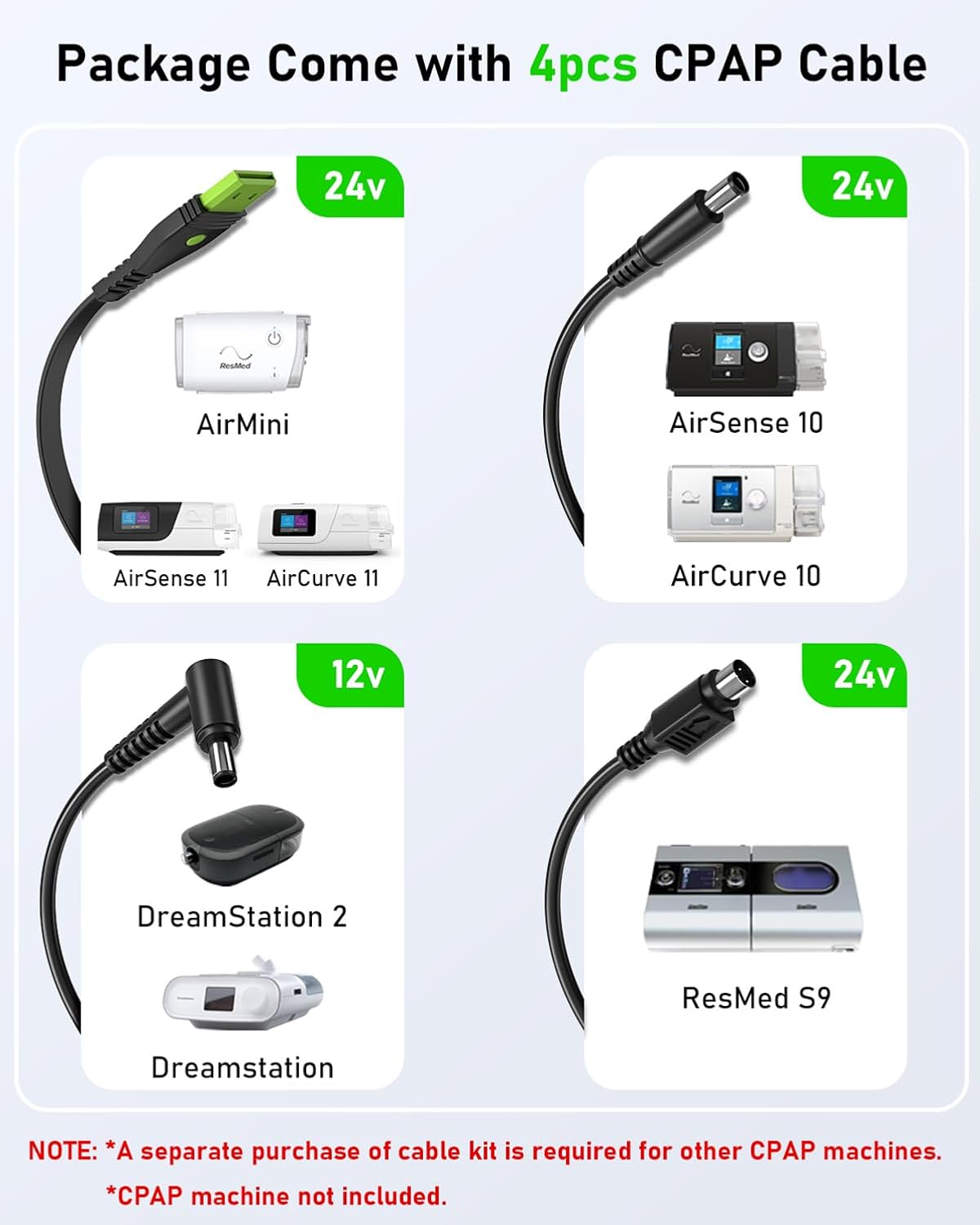
Image: A visual guide showing the four included CPAP cables and their compatibility with various ResMed (AirMini, AirSense 10/11, AirCurve 10/11, S9) and Philips DreamStation models. Note: A separate purchase of a cable kit is required for other CPAP machines.
4. ຄໍາແນະນໍາການດໍາເນີນງານ
4.1 Charging the ES270 Battery
The ES270 can be recharged using multiple methods:
- ການປ້ອນເຂົ້າ USB-C: Use a PD 60W or higher adapter (not included) with the USB-C to C cable. Full recharge takes approximately 1.5-2 hours.
- ການປ້ອນຂໍ້ມູນ DC: Use a 72W adapter (not included) with the DC input port. Full recharge takes approximately 1.4 hours.
- ແຜງແສງອາທິດ: Connect a compatible solar panel (not included) to the USB-C or DC input port. Recharge time varies based on solar intensity.
- ເຄື່ອງສາກລົດ: Use a compatible car charger (not included) with the USB-C or DC input port.
Note: USB-C IN and DC IN ports cannot be used simultaneously for charging.

Image: Illustration showing three methods to charge the ES270: via USB-C with a 60W+ adapter, via DC input with a 72W+ adapter, and via solar panel. Adapters and solar panel are not included.
4.2 Powering CPAP Machines
The ES270 is designed to power various CPAP machines. For optimal runtime, especially with high-power CPAP machines, it is recommended to turn off humidification and heated tubing features.

Image: A man using the EASYLONGER ES270 to power a CPAP machine on an airplane, highlighting its portability and airline approval for air travel.
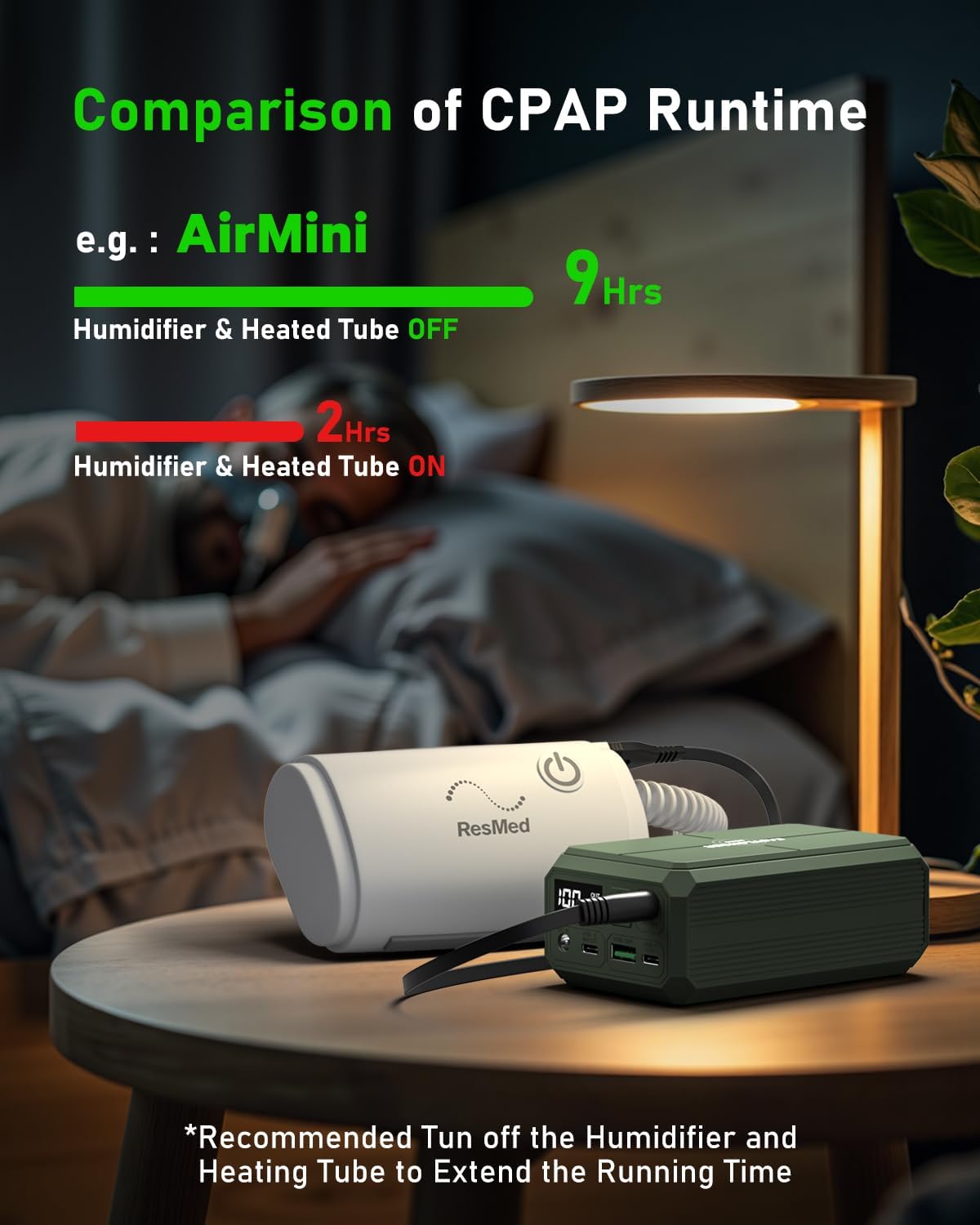
Image: A comparison illustrating CPAP runtime with the humidifier and heated tube off (9 hours) versus on (2 hours), emphasizing the importance of disabling these features for extended battery life.
4.3 Pass-Through Function
The ES270 supports pass-through charging, allowing it to power your CPAP device while simultaneously being recharged. This feature ensures uninterrupted operation during short power outages, maintaining your sleep quality.

Image: Two scenarios demonstrating the pass-through function: one showing USB-C input to DC output, and another showing DC input to DC output, both allowing continuous CPAP operation while the battery charges.
4.4 Fast Charging for Laptops and Other Devices
The ES270 features a PD 100W USB-C output port, capable of fast charging compatible laptops, tablets, and smartphones. The DC OUT port also provides up to 84W max output.
- USB-C OUT (100W Max): Ideal for MacBook Pro 14" (0% to 50% in 30 minutes), iPad Pro, and other USB-C powered devices.
- USB-A OUT: For charging smartphones, smartwatches, AirPods, and Bluetooth speakers.

Image: A person using the EASYLONGER ES270 to fast charge a MacBook Pro 14" via the USB-C port, illustrating its 100W fast charging capability for laptops.
4.5 ການສາກໄຟໄຮ້ສາຍ
The ES270 includes a built-in wireless charging pad. Simply place your Qi-compatible smartphone on the designated charging area on top of the battery to initiate wireless charging. The digital display will show the charging status.

Image: A person using the wireless charging feature of the EASYLONGER ES270 to charge a smartphone while working on a laptop outdoors, demonstrating convenience and versatility.
5. ບໍາລຸງຮັກສາ
To ensure the longevity and optimal performance of your EASYLONGER ES270 CPAP Battery, follow these maintenance guidelines:
- ທໍາຄວາມສະອາດ: ໃຊ້ຜ້າອ່ອນແລະແຫ້ງເພື່ອທຳຄວາມສະອາດດ້ານນອກຂອງອຸປະກອນ. ຫຼີກລ່ຽງການໃຊ້ນ້ຳຢາທຳຄວາມສະອາດທີ່ມີສານຂັດ ຫຼື ຕົວລະລາຍ.
- ການເກັບຮັກສາ: Store the battery in a cool, dry place away from direct sunlight and extreme temperatures. If storing for extended periods, charge the battery to approximately 50-70% every 3-6 months to maintain battery health.
- ອຸນຫະພູມ: Avoid exposing the device to temperatures below 0°C (32°F) or above 45°C (113°F) during operation or storage.
- ການຈັດການ: Do not drop, puncture, or disassemble the battery. This can cause damage and void the warranty.
6. ການແກ້ໄຂບັນຫາ
If you encounter issues with your EASYLONGER ES270, refer to the following common problems and solutions:
| ບັນຫາ | ສາເຫດທີ່ເປັນໄປໄດ້ | ການແກ້ໄຂ |
|---|---|---|
| ອຸປະກອນບໍ່ໄດ້ສາກໄຟ | Charging cable or adapter faulty; incorrect adapter used; battery fully charged. | Ensure charging cable is securely connected. Use a compatible PD 60W+ USB-C adapter or 72W+ DC adapter. Check digital display for charge status. |
| CPAP machine not powering on | Incorrect CPAP cable; battery low; CPAP machine power requirements too high (e.g., humidifier on). | Verify correct CPAP cable is used and securely connected. Ensure ES270 has sufficient charge. Turn off humidification and heated tubing on CPAP machine. |
| ການສາກໄຟໄຮ້ສາຍບໍ່ເຮັດວຽກ | Phone not Qi-compatible; phone not placed correctly; foreign objects on charging pad. | Ensure your device supports Qi wireless charging. Reposition phone on the charging pad. Remove any metal objects or thick cases. |
| ຈໍສະແດງຜົນດິຈິຕອນບໍ່ເຮັດວຽກ | Device off; internal malfunction. | Press the power button to activate the display. If issue persists, contact customer support. |
ຖ້າບັນຫາຍັງຄົງຢູ່ຫຼັງຈາກພະຍາຍາມແກ້ໄຂເຫຼົ່ານີ້, ກະລຸນາເບິ່ງພາກສ່ວນການຮັບປະກັນ ແລະການຊ່ວຍເຫຼືອສໍາລັບການຊ່ວຍເຫຼືອເພີ່ມເຕີມ.
7. ຂໍ້ມູນຈໍາເພາະ
Detailed technical specifications for the EASYLONGER ES270 CPAP Battery:
- ຂະໜາດຜະລິດຕະພັນ: ຂະ ໜາດ 5.1 × 2.9 × 1.9 ນີ້ວ (13 × 7.4 × 4.8 cm)
- ນ້ໍາຫນັກລາຍການ: 2.4 ປອນ (1.09 ກິໂລ)
- ໝາຍເລກຕົວແບບ: GP13
- ຄວາມອາດສາມາດຫມໍ້ໄຟ: 99.9Wh (27000 Milliamp ຊົ່ວໂມງ)
- ປະເພດຕົວເຊື່ອມຕໍ່: DC, USB Type C
- ສະບັບtage: 12V, 24V (DC Output)
- ຄຸນນະສົມບັດພິເສດ: Digital Display, Fast Charging (PD 100W), Over Charging Protection, Short Circuit Protection, Wireless Charging
- ຜູ້ຜະລິດ: Dongguan Yihang Electronic Co., Ltd
8. ຂໍ້ມູນຄວາມປອດໄພ
The EASYLONGER ES270 is equipped with an advanced Built-in Battery Management System (BMS) that provides comprehensive protection against various electrical hazards:
- ການປ້ອງກັນລັດວົງຈອນ
- ການປົກປ້ອງກະແສໄຟຟ້າເກີນ
- ການປ້ອງກັນການໄຫຼເກີນ
- ການປົກປ້ອງຄ່າເກີນ
- ການປົກປ້ອງອຸນຫະພູມ
ຂໍ້ຄວນລະວັງຄວາມປອດໄພທົ່ວໄປ:
- ຢ່າໃຫ້ແບັດເຕີຣີຖືກນ້ຳ, ໄຟ ຫຼື ຄວາມຮ້ອນສູງເກີນໄປ.
- ຢ່າພະຍາຍາມຖອດປະກອບ, ສ້ອມແປງ, ຫຼືດັດແປງອຸປະກອນ.
- ຮັກສາໃຫ້ໄກຈາກເດັກນ້ອຍ.
- Dispose of the battery according to local regulations. Do not dispose of with household waste.
9. ການຮັບປະກັນແລະການສະຫນັບສະຫນູນ
For detailed information regarding the product warranty, return policy, and customer support, please refer to the specific warranty card or contact information provided within the physical user guide included in your product package. You may also visit the official EASYLONGER webເວັບໄຊທ໌ສຳລັບຊັບພະຍາກອນສະໜັບສະໜູນທີ່ທັນສະໄໝທີ່ສຸດ.


