ແນະນຳ
This manual provides detailed instructions for the setup, operation, maintenance, and troubleshooting of your Azeyou 12 Inch Android 15 Tablet, model T12. Please read this manual thoroughly to ensure proper use and to maximize your device's performance and longevity.
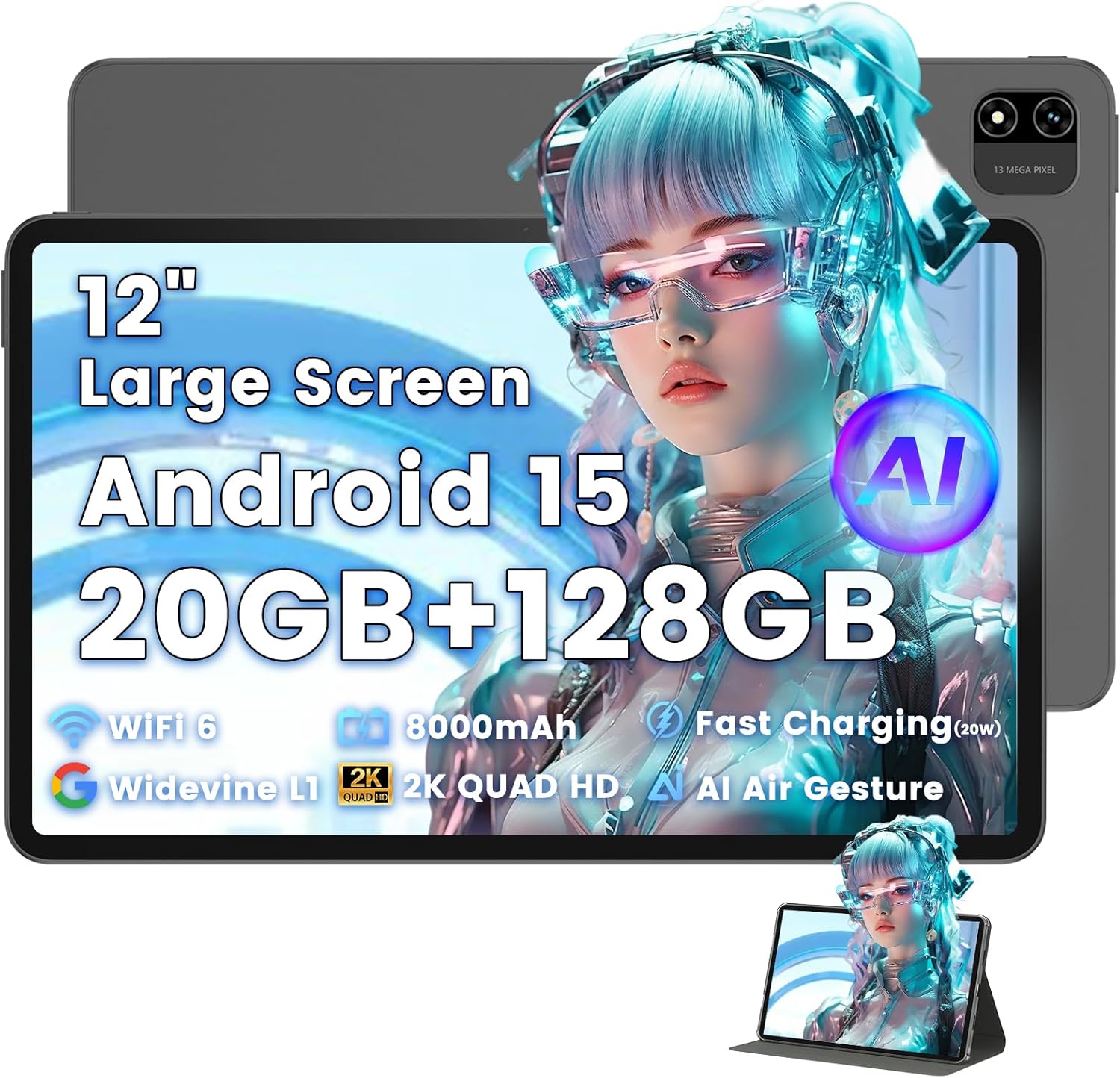
Image: The Azeyou T12 tablet, shown with its protective case, highlighting its large display and sleek design.
ແມ່ນຫຍັງຢູ່ໃນກ່ອງ
ກວດສອບວ່າລາຍການທັງຫມົດແມ່ນມີຢູ່ໃນຊຸດ:
- 1x Azeyou Tablet (T12)
- ສາຍສາກໄຟ 1x (ປະເພດ-C)
- 1x ຄູ່ມືຜູ້ໃຊ້
- ກ່ອງໃສ່ແທັບເລັດ 1x
ຕັ້ງຄ່າ
1. ການສາກໄຟເບື້ອງຕົ້ນ
Before first use, fully charge the tablet. Connect the provided Type-C charging cable to the tablet's charging port and the other end to a compatible 20W Power Delivery (PD) charger. The battery indicator on the screen will show charging status.

Image: An infographic detailing key features of the Azeyou T12 tablet, including its Android 15 operating system, AI octa-core processor, Wi-Fi 6, Bluetooth 5.0, dual cameras, storage capacity, Widevine L1 support, parental control, split-screen function, and 8000mAh battery.
2. ເປີດ ແລະ ປິດ
- ເພື່ອເປີດເຄື່ອງ: Press and hold the Power button located on the side of the tablet until the Azeyou logo appears.
- ປິດເຄື່ອງ: Press and hold the Power button until the power options appear on the screen, then select "Power Off".
- ເພື່ອເລີ່ມຕົ້ນໃໝ່: ກົດປຸ່ມເປີດປິດຄ້າງໄວ້ຈົນກວ່າຕົວເລືອກພະລັງງານຈະປາກົດ, ຈາກນັ້ນເລືອກ "ຣີສະຕາດ".
3. ຕົວຊ່ວຍສ້າງການຕິດຕັ້ງເບື້ອງຕົ້ນ
ເມື່ອເປີດເຄື່ອງຄັ້ງທຳອິດ, ແທັບເລັດຈະນຳພາທ່ານຜ່ານຂັ້ນຕອນການຕັ້ງຄ່າເບື້ອງຕົ້ນ:
- ການເລືອກພາສາ: ເລືອກພາສາທີ່ເຈົ້າມັກ.
- ການເຊື່ອມຕໍ່ Wi-Fi: ເລືອກເຄືອຂ່າຍ Wi-Fi ຂອງທ່ານແລະໃສ່ລະຫັດຜ່ານເພື່ອເຊື່ອມຕໍ່ກັບອິນເຕີເນັດ.
- ບັນຊີ Google: Sign in with your Google account or create a new one. This is necessary for downloading apps from the Google Play Store and syncing data.
- ວັນທີ ແລະເວລາ: ຕັ້ງວັນທີ ແລະ ເວລາທີ່ຖືກຕ້ອງ ຫຼື ອະນຸຍາດໃຫ້ເຄືອຂ່າຍຕັ້ງຄ່າມັນໂດຍອັດຕະໂນມັດ.
- ຄວາມປອດໄພ: Set up a screen lock (PIN, pattern, password, or face unlock).
4. ການໃສ່ບັດ TF (ທາງເລືອກ)
The tablet supports storage expansion up to 1TB via a TF (microSD) card. Locate the TF card slot, gently insert the card until it clicks into place. Ensure the tablet is powered off before inserting or removing the TF card.

Image: A visual representation of the tablet's memory and storage, indicating 20GB RAM (6GB physical + 14GB virtual), 128GB internal storage, and support for up to 1TB TF card expansion, alongside popular application icons.
ຄໍາແນະນໍາການດໍາເນີນງານ
1. Basic Navigation and Gestures
- ແຕະ: ເລືອກລາຍການ ຫຼືເປີດແອັບ.
- ແຕະແລະຖື: ເຂົ້າເຖິງເມນູບໍລິບົດ ຫຼືຍ້າຍໄອຄອນ.
- ປັດ: ເລື່ອນຜ່ານໜ້າຈໍ ຫຼືລາຍການຕ່າງໆ.
- Pinch-to-Zoom: ຊູມເຂົ້າ ຫຼືອອກໃນຮູບພາບ ແລະ web ໜ້າ.
2. ຄຸນສົມບັດການສະແດງ
The Azeyou T12 features an 11.97-inch 2K FHD (2000x1200) display with a 90Hz refresh rate for smooth visuals.
- ການປັບຄວາມສະຫວ່າງ: Swipe down from the top of the screen to access the Quick Settings panel and adjust the brightness slider.
- ການກັ່ນຕອງແສງສີຟ້າ: The tablet includes a built-in blue light filter that automatically adjusts brightness to reduce eye strain. This can be managed in Display Settings.
- Widevine L1: Enjoy high-definition content from streaming services like Netflix and Prime Video due to Widevine L1 certification.

Image: A visual representation of the tablet's display specifications, emphasizing its 12-inch screen, 16:10 aspect ratio, 2000x1200 resolution, and 90Hz refresh rate, with a child watching content on the screen.

Image: An illustration demonstrating the tablet's Widevine L1 certification for HD streaming and its quad-speaker system for rich, immersive audio, surrounded by logos of popular streaming services.
3. ປະສິດທິພາບ ແລະການເຮັດວຽກຫຼາຍຢ່າງ
The tablet is equipped with an A733 octa-core processor and 20GB RAM (6GB physical + 14GB virtual) for smooth operation.
- ໂໝດແຍກໜ້າຈໍ: To use two apps simultaneously, open one app, then swipe up from the bottom of the screen and hold to access recent apps. Tap the app icon at the top of the window and select "Split screen". Choose a second app to open in the other half of the screen.
- ການຈັດການແອັບ: Close background apps from the recent apps menu to optimize performance.
4. AI Smart Features
The A733 octa-core processor includes an AI chip that enables several intelligent functions:
- AI Posture Reminder: The tablet can monitor your sitting posture and provide gentle reminders to encourage better habits, especially useful for online learning or extended use.
- AI Gesture Control: Navigate the tablet without touching the screen. Use simple hand movements in front of the camera to flip pages, pause videos, or browse content.
- ການປັບປຸງຮູບພາບ AI: The AI engine can enhance low-resolution photos and videos in real-time, improving clarity, detail, and overall visual quality.

Image: A collage demonstrating the tablet's AI capabilities, including an AI Posture Reminder for healthy habits, AI Gesture Control for touch-free navigation, and AI Image Enhancement for improved photo and video quality.
5. ກ້ອງຖ່າຍຮູບ
The tablet features a 5MP front camera and a 13MP rear camera with autofocus and flash.
- ກ້ອງໜ້າ: Ideal for video calls, online classes, and selfies.
- ກ້ອງຫຼັງ: Suitable for capturing photos and videos. Features autofocus and flash for improved image quality.
- ປົດລັອກດ້ວຍໜ້າ: Utilize the front camera for quick and secure access to your device.

Image: A graphic highlighting the tablet's 5MP front camera and 13MP AI rear camera, showcasing features like AI-enhanced photos and Face Unlock for secure access.
6. ການເຊື່ອມຕໍ່
- Wi-Fi 6: Connect to high-speed Wi-Fi networks for stable streaming and low-latency online activities. Access Wi-Fi settings via the Quick Settings panel or the Settings app.
- Bluetooth 5.0: Pair with wireless keyboards, headphones, and other Bluetooth accessories. Enable Bluetooth in Quick Settings or the Settings app.
- Type-C Port: Used for charging, fast data transfer, and audio output with compatible Type-C headphones.

Image: A visual representation of the tablet's connectivity features, including Wi-Fi 6, Bluetooth 5.0, and support for Type-C headsets, illustrating seamless integration with various devices and networks.
7. ການຄຸ້ມຄອງຫມໍ້ໄຟ
ແບດເຕີຣີ້ 8000 mAh ສະຫນອງການນໍາໃຊ້ທີ່ຍາວນານ. ເພື່ອເພີ່ມປະສິດທິພາບອາຍຸຫມໍ້ໄຟ:
- ຫຼຸດຄວາມສະຫວ່າງໜ້າຈໍ.
- ປິດ Wi-Fi ແລະ Bluetooth ເມື່ອບໍ່ໄດ້ໃຊ້ງານ.
- ປິດແອັບພລິເຄຊັນພື້ນຫຼັງທີ່ບໍ່ຈໍາເປັນ.
- Use power-saving modes available in Battery Settings.
8. ການຄວບຄຸມຂອງຜູ້ປົກຄອງ
The tablet includes a parental control mode to manage screen time, restrict content, and control app access for children. This feature can be configured in the tablet's settings under 'Digital Wellbeing & parental controls'.

Image: A screenshot of the Android 15 interface on the tablet, highlighting features such as HD streaming, parental control, and split-screen functionality, with various app icons visible.
ບໍາລຸງຮັກສາ
1. ການເຮັດຄວາມສະອາດແທັບເລັດ
- ໃຊ້ຜ້າແພທີ່ອ່ອນໆ, ບໍ່ມີສານດ່າງເພື່ອເຮັດຄວາມສະອາດໜ້າຈໍ ແລະຕົວເຄື່ອງຂອງແທັບເລັດ.
- ສໍາລັບ smudges stubborn, ເລັກນ້ອຍ dampen ຜ້າທີ່ມີນ້ໍາຫຼືເຄື່ອງເຮັດຄວາມສະອາດຫນ້າຈໍທີ່ຖືກອອກແບບມາສໍາລັບເອເລັກໂຕຣນິກ.
- ຫຼີກເວັ້ນການນໍາໃຊ້ສານເຄມີທີ່ຮຸນແຮງ, ວັດສະດຸຂັດ, ຫຼືຄວາມຊຸ່ມຊື່ນຫຼາຍເກີນໄປ.
2. ການປັບປຸງຊອບແວ
ກວດສອບ ແລະຕິດຕັ້ງການອັບເດດຊອບແວເປັນປະຈໍາເພື່ອຮັບປະກັນປະສິດທິພາບທີ່ດີທີ່ສຸດ, ຄວາມປອດໄພ, ແລະການເຂົ້າເຖິງຄຸນສົມບັດໃຫມ່. ໄປທີ່ ການຕັ້ງຄ່າ > ລະບົບ > ການປັບປຸງລະບົບ.
3. ການຄຸ້ມຄອງການເກັບຮັກສາ
To maintain performance, periodically manage your tablet's storage:
- ລຶບແອັບຯທີ່ບໍ່ຈໍາເປັນແລະ files.
- ລຶບຂໍ້ມູນ cache ສໍາລັບແອັບຯໃນ ການຕັ້ງຄ່າ > ແອັບ ແລະການແຈ້ງເຕືອນ > [ຊື່ແອັບ] > ບ່ອນເກັບຂໍ້ມູນ ແລະແຄດ.
- Utilize cloud storage or transfer large files to an external TF card or computer.
ການແກ້ໄຂບັນຫາ
If you encounter issues with your Azeyou T12 tablet, refer to the following common solutions:
- ແທັບເລັດບໍ່ເປີດ:
- ໃຫ້ແນ່ໃຈວ່າໄດ້ສາກໄຟແລ້ວ. ເຊື່ອມຕໍ່ສາຍສາກແລ້ວລໍຖ້າສອງສາມນາທີກ່ອນທີ່ຈະພະຍາຍາມເປີດເຄື່ອງ.
- ດໍາເນີນການບັງຄັບໃຫ້ປິດເປີດຄືນໃໝ່ໂດຍການກົດປຸ່ມເປີດປິດເປັນເວລາ 10-15 ວິນາທີ.
- ປະສິດທິພາບຊ້າ ຫຼື ຄ້າງ:
- ປິດແອັບພລິເຄຊັນພື້ນຫຼັງທີ່ບໍ່ຈໍາເປັນ.
- Clear app cache and data.
- ຣີສະຕາດແທັບເລັດ.
- ກວດສອບການອັບເດດລະບົບທີ່ມີຢູ່.
- ບັນຫາການເຊື່ອມຕໍ່ Wi-Fi:
- Ensure Wi-Fi is enabled on the tablet.
- ຣີສະຕາດເຣົາເຕີ Wi-Fi ຂອງທ່ານ.
- ລືມເຄືອຂ່າຍໃນການຕັ້ງຄ່າ Wi-Fi ແລະເຊື່ອມຕໍ່ຄືນໃໝ່.
- ແອັບຂັດຂ້ອງ ຫຼື ບໍ່ຕອບສະໜອງ:
- Force close the app (Settings > Apps & notifications > [App Name] > Force stop).
- ລຶບລ້າງແຄສ ແລະຂໍ້ມູນຂອງແອັບ.
- ຖອນການຕິດຕັ້ງ ແລະຕິດຕັ້ງແອັບຯຄືນໃໝ່.
- ກວດໃຫ້ແນ່ໃຈວ່າແອັບໄດ້ຖືກອັບເດດເປັນເວີຊັນຫຼ້າສຸດຂອງມັນ.
- ໜ້າຈໍບໍ່ຕອບສະໜອງ:
- Perform a forced restart.
- ໃຫ້ແນ່ໃຈວ່າຫນ້າຈໍສະອາດແລະບໍ່ມີສິ່ງເສດເຫຼືອ.
ຂໍ້ມູນຈໍາເພາະ
- ຊື່ຕົວແບບ:
- ແທັບເລັດ T12
- ລະບົບປະຕິບັດການ:
- Android 15
- ໜ່ວຍປະມວນຜົນ:
- A733 Octa-Core Processor (Unisoc)
- RAM:
- 20GB (6GB Physical + 14GB Virtual)
- ການເກັບຮັກສາພາຍໃນ (ROM):
- 128GB
- ການເກັບຮັກສາທີ່ຂະຫຍາຍໄດ້:
- ສູງສຸດ 1TB ຜ່ານບັດ TF
- ຂະໜາດໜ້າຈໍ:
- 11.97 ນິ້ວ
- ຄວາມລະອຽດໜ້າຈໍ:
- ຄວາມລະອຽດ 2000x1200 FHD
- ອັດຕາການໂຫຼດຂໍ້ມູນຄືນໃໝ່:
- 90Hz
- Graphics Coprocessor:
- Imagination Technologies BXM-4-64 MC1
- ກ້ອງຫຼັງ:
- 13MP ມີ Autofocus ແລະ Flash
- ກ້ອງໜ້າ:
- 5MP
- ຄວາມອາດສາມາດຫມໍ້ໄຟ:
- 8000mAh
- ການສາກໄຟ:
- 20W Power Delivery (PD) Fast Charging via Type-C
- ການເຊື່ອມຕໍ່ແບບໄຮ້ສາຍ:
- Wi-Fi 6 (802.11a/b/g/n/ac), Bluetooth 5.0
- ສຽງ:
- Quad-Speakers, Type-C Audio Output
- ຂະໜາດ (LxWxH):
- 11 x 7 x 0.3 ນິ້ວ
- ນ້ໍາຫນັກລາຍການ:
- 3.1 ປອນ
- ສີ:
- ສີເທົາ
- ຄຸນນະສົມບັດພິເສດ:
- AI Posture Reminder, AI Gesture Control, AI Image Enhancement, Widevine L1, Parental Control, Split-Screen Mode, Face Unlock
ການຮັບປະກັນແລະການສະຫນັບສະຫນູນ
ຂໍ້ມູນການຮັບປະກັນ
Azeyou products typically come with a standard manufacturer's warranty. Please refer to the warranty card included in your product packaging or visit the official Azeyou website for specific warranty terms and conditions. The warranty generally covers manufacturing defects but does not cover damage caused by misuse, accidents, or unauthorized modifications.
ການຊ່ວຍເຫຼືອລູກຄ້າ
For technical assistance, troubleshooting beyond this manual, or warranty claims, please contact Azeyou customer support. Contact details can usually be found on the official Azeyou website or on the product packaging. When contacting support, please have your tablet's model number (T12) and purchase information ready.
ທ່ານສາມາດໄປຢ້ຽມຢາມໄດ້ Azeyou Store on Amazon ສໍາລັບຂໍ້ມູນເພີ່ມເຕີມຜະລິດຕະພັນແລະຊັບພະຍາກອນສະຫນັບສະຫນູນ.


