1. ບົດແນະນຳ
Thank you for choosing the DEPSTECH DS650-DL Dual-Lens Articulating Industrial Endoscope. This device is designed for detailed visual inspection in hard-to-reach areas, featuring a dual-lens system with 210° bidirectional rotation, a 4.5-inch IPS monitor, and 1080P high-definition imaging. It is an essential tool for home maintenance, vehicle inspection, and machinery checks.
Please read this manual thoroughly before use to ensure proper operation and to maximize the product's lifespan.
2. ຂໍ້ມູນຄວາມປອດໄພ
- Do not use the endoscope in environments with flammable or explosive gases.
- The probe is IP67 waterproof, but the main unit is not. Avoid exposing the main unit to water or excessive moisture.
- ຢ່າພະຍາຍາມຖອດປະກອບ ຫຼື ດັດແປງອຸປະກອນ. ການເຮັດແບບນີ້ຈະເຮັດໃຫ້ການຮັບປະກັນເປັນໂມຄະ ແລະ ອາດຈະເຮັດໃຫ້ເກີດຄວາມເສຍຫາຍໄດ້.
- ຮັກສາອຸປະກອນໃຫ້ໄກຈາກເດັກນ້ອຍ.
- Avoid direct eye exposure to the LED lights.
- The device features overheat protection. If the temperature exceeds 70°C, a warning will display. If it exceeds 80°C, the device will automatically shut down to prevent damage. Allow the device to cool down before resuming operation.
3. ເນື້ອໃນຊຸດ
ກວດສອບວ່າທຸກລາຍການແມ່ນຢູ່ໃນສະພາບທີ່ດີໃນເວລາທີ່ເປີດຊຸດ.
- DEPSTECH DS650-DL Endoscope Unit
- ຕູ້ເກັບມ້ຽນ
- ຄູ່ມືຜູ້ໃຊ້
- ສາຍໄຟແບບ Type-C
- ກາດໜ່ວຍຄວາມຈຳ 32GB (ຕິດຕັ້ງໄວ້ລ່ວງໜ້າ ຫຼື ມີໃຫ້ແຍກຕ່າງຫາກ)

Image: Contents of the DEPSTECH DS650-DL package.
4. ຕັ້ງຄ່າ
4.1 ການສາກອຸປະກອນ
Before first use, fully charge the endoscope unit. Connect the provided Type-C charging cable to the charging port on the device and to a suitable USB power adapter (not included).
4.2 ການໃສ່ແຜ່ນຄວາມ ຈຳ
If the 32GB memory card is not pre-installed, locate the TF card slot on the side of the monitor unit. Insert the memory card with the contacts facing down until it clicks into place.
4.3 ການເປີດ/ປິດ
Press and hold the power button (usually located near the monitor) for a few seconds to turn the device on or off. The IPS monitor will display the startup screen.
5. ການດໍາເນີນງານ
5.1 ຄວາມເຂົ້າໃຈກ່ຽວກັບການຄວບຄຸມ

ຮູບພາບ: ຫຼາຍກວ່າview of the endoscope controls and ports.
- OK/Confirm Button: ຢືນຢັນການເລືອກໃນເມນູ.
- Up/Zoom In Button: ເລື່ອນຂຶ້ນໃນເມນູ ຫຼື ຊູມເຂົ້າໃນຮູບພາບ.
- Down/Zoom Out Button: Navigates down in menus or zooms out on the image.
- ປຸ່ມໝຸນ 180°: Rotates the real-time image on the screen by 180 degrees.
- Lens Switch Button: Toggles between front camera, side camera, and dual-view ໂໝດ.
- ປຸ່ມຮູບ/ວິດີໂອ: Short press to take a photo, long press to start/stop video recording.
- Power Button/LED Adjustment: Short press to adjust LED brightness (3 levels), long press to power on/off.
- Articulating Angle Dial: Controls the 210° bidirectional rotation of the probe tip.
- ສະລັອດຕິງບັດ TF: ສໍາລັບການໃສ່ກາດຫນ່ວຍຄວາມຈໍາ.
- Type-C Port: ສໍາລັບການສາກໄຟແລະການໂອນຂໍ້ມູນ.
- ປຸ່ມຣີເຊັດ: ຕັ້ງຄ່າອຸປະກອນຄືນໃໝ່ (ໃຊ້ເຂັມໝຸດເພື່ອກົດ).
5.2 Using the Dual-Lens and Articulation
The DS650-DL features both a front camera and a side camera, allowing for a wider inspection range. The probe tip can be articulated up to 210° in two directions for comprehensive viewing.
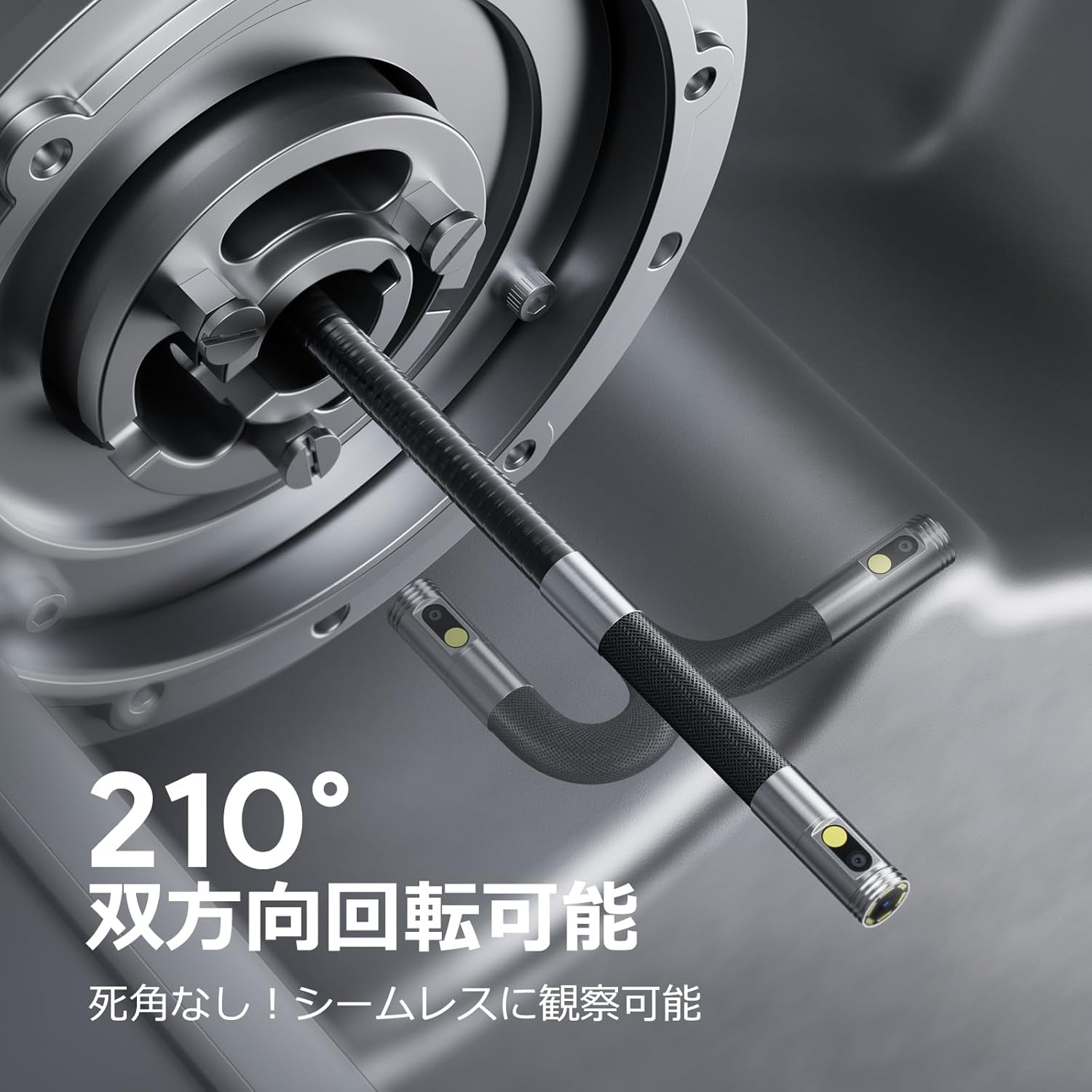
Image: Endoscope probe demonstrating 210° bidirectional articulation.
- ໃຊ້ ປຸ່ມສະຫຼັບເລນ to cycle between the front camera, side camera, or a split-screen dual-view ໂໝດ.
- ໝຸນ Articulating Angle Dial to precisely adjust the direction of the probe tip. This allows you to navigate around obstacles and view areas from multiple angles without repositioning the entire cable.
5.3 ການຈັບພາບ ແລະ ວິດີໂອ
The device supports capturing both still images and video recordings directly to the inserted 32GB memory card.

Image: Monitor display showing photo and video capture features.
- ເພື່ອຖ່າຍຮູບ: ກົດສັ້ນ ປຸ່ມຮູບ/ວິດີໂອ.
- ເພື່ອບັນທຶກວິດີໂອ: ກົດຄ້າງໄວ້ ປຸ່ມຮູບ/ວິດີໂອ to start recording. Long press again to stop recording.
- ຈັບໄດ້ files are saved to the 32GB memory card. You can store approximately 10,000 images or 50 videos.
5.4 ການປັບຄວາມສະຫວ່າງຂອງ LED
The probe is equipped with high-brightness LED lights to illuminate dark inspection areas. Short press the Power Button/LED Adjustment button to cycle through 3 levels of LED brightness.

Image: IP67 waterproof probe with adjustable LED illumination.
5.5 ການໂອນຂໍ້ມູນ
You can transfer captured images and videos to a computer via the Type-C cable or by directly accessing the memory card.

Image: High-speed data transfer from endoscope to PC.
6. ບໍາລຸງຮັກສາ
- ທໍາຄວາມສະອາດ Probe: After use, especially in dirty or wet environments, gently wipe the probe with a soft, damp cloth. Ensure no debris remains on the camera lenses.
- ການເຮັດຄວາມສະອາດຈໍພາບ: Use a soft, dry cloth to clean the IPS monitor. Avoid abrasive cleaners or solvents.
- ການເກັບຮັກສາ: Store the endoscope in its provided storage case in a cool, dry place, away from direct sunlight and extreme temperatures. This prevents damage from improper storage and moisture.
- ການດູແລຫມໍ້ໄຟ: ເພື່ອຍືດອາຍຸແບັດເຕີລີ, ຫຼີກເວັ້ນການປ່ອຍອຸປະກອນໃຫ້ເຕັມທີ່ເລື້ອຍໆ. ສາກໄຟເປັນປະຈຳ, ເຖິງແມ່ນວ່າບໍ່ໄດ້ໃຊ້ເປັນເວລາດົນກໍຕາມ.
7. ການແກ້ໄຂບັນຫາ
| ບັນຫາ | ສາເຫດທີ່ເປັນໄປໄດ້ | ການແກ້ໄຂ |
|---|---|---|
| ອຸປະກອນບໍ່ເປີດ. | ແບັດເຕີຣີຕໍ່າ; ອຸປະກອນເຮັດວຽກຜິດປົກກະຕິ. | ສາກອຸປະກອນໃຫ້ເຕັມ. ຖ້າບັນຫາຍັງຄົງຢູ່, ໃຫ້ຕິດຕໍ່ຝ່າຍຊ່ວຍເຫຼືອ. |
| ບໍ່ມີຮູບພາບໃນຫນ້າຈໍ. | Cable not connected properly; camera lens obstructed. | Ensure the probe cable is securely connected. Check for obstructions on the lens. |
| ຮູບພາບມົວຫຼືບໍ່ຈະແຈ້ງ. | Lens is dirty; focus distance incorrect. | Clean the camera lens. Ensure the object is within the optimal focal range (3-10cm). |
| ບໍ່ສາມາດບັນທຶກຮູບພາບ/ວິດີໂອໄດ້. | ກາດໜ່ວຍຄວາມຈຳເຕັມ ຫຼື ໃສ່ບໍ່ຖືກຕ້ອງ. | Check if the 32GB memory card is inserted correctly. Delete old fileຫຼື ປ່ຽນບັດໃໝ່ຖ້າບັດເຕັມ. |
| Device shuts down automatically. | ການປ້ອງກັນຄວາມຮ້ອນເກີນໄປ. | Allow the device to cool down. Avoid using in excessively hot environments. |
8. ຂໍ້ມູນຈໍາເພາະ
| ຄຸນສົມບັດ | ລາຍລະອຽດ |
|---|---|
| ຍີ່ຫໍ້ | DEPSTECH |
| ໝາຍເລກຕົວແບບ | DS650 DJ |
| ຈໍສະແດງຜົນ | 4.5-inch IPS LCD Monitor |
| ຄວາມລະອຽດກ້ອງ | 1080P |
| ເສັ້ນຜ່າສູນກາງ Probe | 8.5ມມ |
| Articulation Angle | 210° Bidirectional |
| ປະເພດສາຍ | 1.5M Semi-rigid |
| ການປະເມີນກັນນ້ໍາ | IP67 (Probe ເທົ່ານັ້ນ) |
| ແສງໄຟ | ໄຟ LED ທີ່ສາມາດປັບໄດ້ |
| ການເກັບຮັກສາ | 32GB Micro SD Card (ລວມ) |
| ລວມແບັດເຕີຣີ | ແມ່ນແລ້ວ |
| ຂະໜາດແພັກເກັດ | 43.1 x 21.4 x 7.4 cm |
| ນ້ໍາຫນັກຊຸດ | 1.33 ກິໂລ |
9. ການຮັບປະກັນແລະການສະ ໜັບ ສະ ໜູນ
9.1 ການຮັບປະກັນຂອງຜູ້ຜະລິດ
This DEPSTECH product comes with a ການຮັບປະກັນຂອງຜູ້ຜະລິດ 24 ເດືອນ. Your order number serves as your proof of purchase for warranty claims. Please retain it.
9.2 ສະຫນັບສະຫນູນລູກຄ້າ
For any questions, technical assistance, or warranty inquiries, please contact our professional support team:
ອີເມວ: support.jp@depstech.com
We aim to respond to all inquiries within 24 hours (excluding weekends and public holidays, where responses will be provided on the next business day).

Image: DEPSTECH customer support and warranty information.