1. ບົດແນະນຳ
This user manual provides detailed instructions for the FOXWELL BT630 Bluetooth Battery Monitor with Shunt and the FOXWELL BT100 12V Car Battery Tester. These devices are designed to help you monitor and assess the health of various battery types, ensuring reliable performance for your vehicles and power systems. Please read this manual thoroughly before using the products to ensure correct operation and safety.
2. ຂໍ້ມູນຄວາມປອດໄພ
Always observe the following safety precautions to prevent injury or damage to the devices and batteries:
- Wear appropriate eye protection when working with batteries.
- ຮັບປະກັນການລະບາຍອາກາດທີ່ເຫມາະສົມໃນພື້ນທີ່ເຮັດວຽກ.
- ຫຼີກລ່ຽງການສຳຜັດກັບກົດແບັດເຕີຣີ. ຖ້າສຳຜັດກັບມັນ, ໃຫ້ລ້າງອອກທັນທີດ້ວຍນ້ຳ ແລະ ໄປພົບແພດ.
- ຫ້າມບໍ່ໃຫ້ສາຍໄຟລັດວົງຈອນຂອງແບັດເຕີລີ່.
- Keep the devices away from moisture, extreme temperatures, and flammable materials.
- Disconnect the battery monitor before performing any maintenance on the battery or electrical system.
3. ຜະລິດຕະພັນເກີນview
3.1 FOXWELL BT630 Bluetooth Battery Monitor with Shunt
The BT630 is a high-current Bluetooth battery monitor designed for real-time tracking of battery metrics. It supports a wide voltage range from 10V to 120V and current up to 600A, making it suitable for RVs, EVs, marine systems, off-grid setups, and portable power stations. It connects to a dedicated app via Bluetooth to display critical data.
3.2 FOXWELL BT100 12V Car Battery Tester
The BT100 is a compact and easy-to-use 12V car battery tester. It provides quick and accurate readings for various battery health parameters, including voltage, CCA rating, internal resistance, state of charge, and state of health. It is compatible with a wide range of 12V battery types.

Figure 1: FOXWELL BT100 12V Car Battery Tester. This image shows the BT100 device with its display and two battery clamps, one red for positive and one black for negative, ready for connection to a 12V battery.
4. ການຕິດຕັ້ງແລະການຕິດຕັ້ງ
4.1 FOXWELL BT630 Installation
The BT630 requires installation of a shunt to accurately measure current flow. Follow these steps:
- ກໍານົດອົງປະກອບ: The BT630 system includes the main monitor unit, a shunt, and connecting cables.
- Shunt Placement: Install the shunt on the negative side of your battery bank. Ensure it is securely mounted in a dry, well-ventilated area.
- ສາຍໄຟ: Connect the main negative cable from your battery bank to the 'BATTERY' terminal on the shunt. Connect the negative cable from your load/charger to the 'LOAD' terminal on the shunt.
- ຕິດຕາມກວດກາການເຊື່ອມຕໍ່: Connect the small gauge wires from the BT630 monitor to the shunt's communication terminals and the battery's positive terminal for voltage sensing. Refer to the wiring diagram provided with your BT630 for precise connections.
- ເປີດ: Once all connections are secure, the BT630 will power on and begin monitoring.

Figure 2: FOXWELL BT630 Internal Safety Protection. This image displays the internal components of the BT630, emphasizing its robust design with honeycomb ventilation and highlighted areas indicating various safety protection mechanisms against electrical hazards.
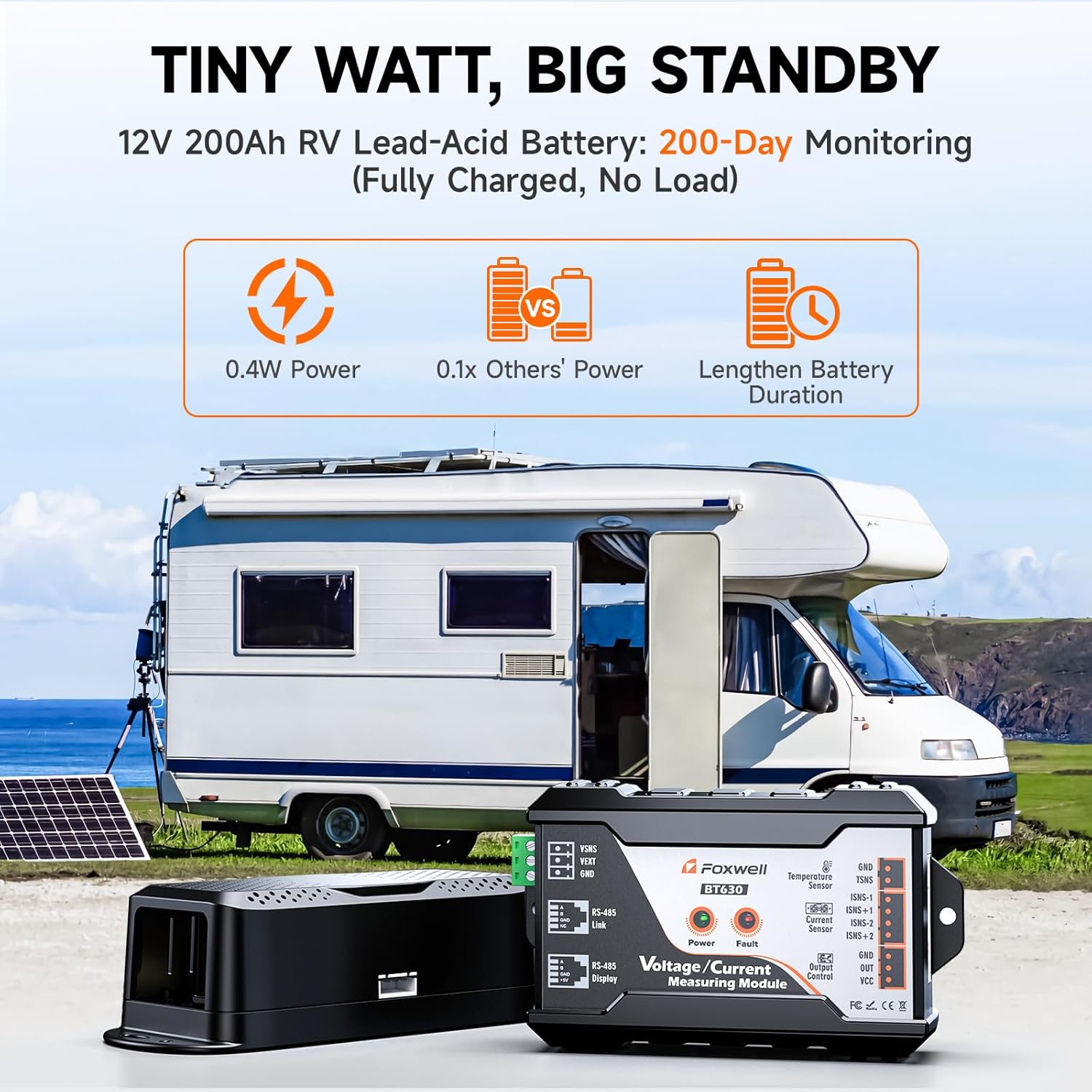
Figure 3: FOXWELL BT630 RV Application. This image illustrates the BT630 battery monitor connected to a 12V 200Ah RV lead-acid battery system, with a solar panel in the background, demonstrating its low power consumption and suitability for extended monitoring in mobile and off-grid setups.
4.2 FOXWELL BT100 Connection
Connecting the BT100 is straightforward:
- ສະອາດ Terminals: ໃຫ້ແນ່ໃຈວ່າຂົ້ວຂອງແບັດເຕີຣີສະອາດ ແລະ ບໍ່ມີການກັດກ່ອນ ເພື່ອໃຫ້ສາມາດອ່ານຄ່າໄດ້ຖືກຕ້ອງ.
- ເຊື່ອມຕໍ່ Clamps: ຄັດຕິດ cl ສີແດງamp ໄປທີ່ຈຸດບວກ (+) ຫມໍ້ໄຟແລະ cl ສີດໍາamp to the negative (-) battery terminal. Ensure a secure connection.
- ເປີດ: The BT100 will power on automatically once connected to the battery.

Figure 4: FOXWELL BT100 Battery Type Compatibility. This image shows the BT100 tester surrounded by various battery types including AGM Flat Plate, GEL, FLOODED, EFB, and AGM Spiral, indicating its broad compatibility for testing different 12V battery chemistries in cars, motorcycles, boats, and light trucks.
5. ຄໍາແນະນໍາການດໍາເນີນງານ
5.1 Using the FOXWELL BT630 App
The BT630 operates via a dedicated mobile application. Download the 'FOXWELL BMS' app from your device's app store.
- ການຈັບຄູ່: ເປີດແອັບ ແລະ ປະຕິບັດຕາມຄຳແນະນຳໃນໜ້າຈໍເພື່ອຈັບຄູ່ກັບອຸປະກອນ BT630 ຂອງທ່ານຜ່ານ Bluetooth.
- ການຕິດຕາມເວລາຈິງ: The app will display real-time metrics including: SOC% (State of Charge), ສະບັບtage, ປະຈຸບັນ, ຄວາມອາດສາມາດທີ່ຍັງເຫຼືອ, ພະລັງງານ, ອຸນຫະພູມ, ເວລາແລ່ນໂດຍປະມານ, ແລະ Charge/Discharge History.
- Data Graphs: View historical data and trends through clear graphical representations.
- Alerts and Protection: Configure customizable alerts for over/under-voltage, charge/discharge overcurrent, overpower, over-temperature, low-temperature, and low SOC. The system can also trigger a power cutoff (requires an external relay, not included).
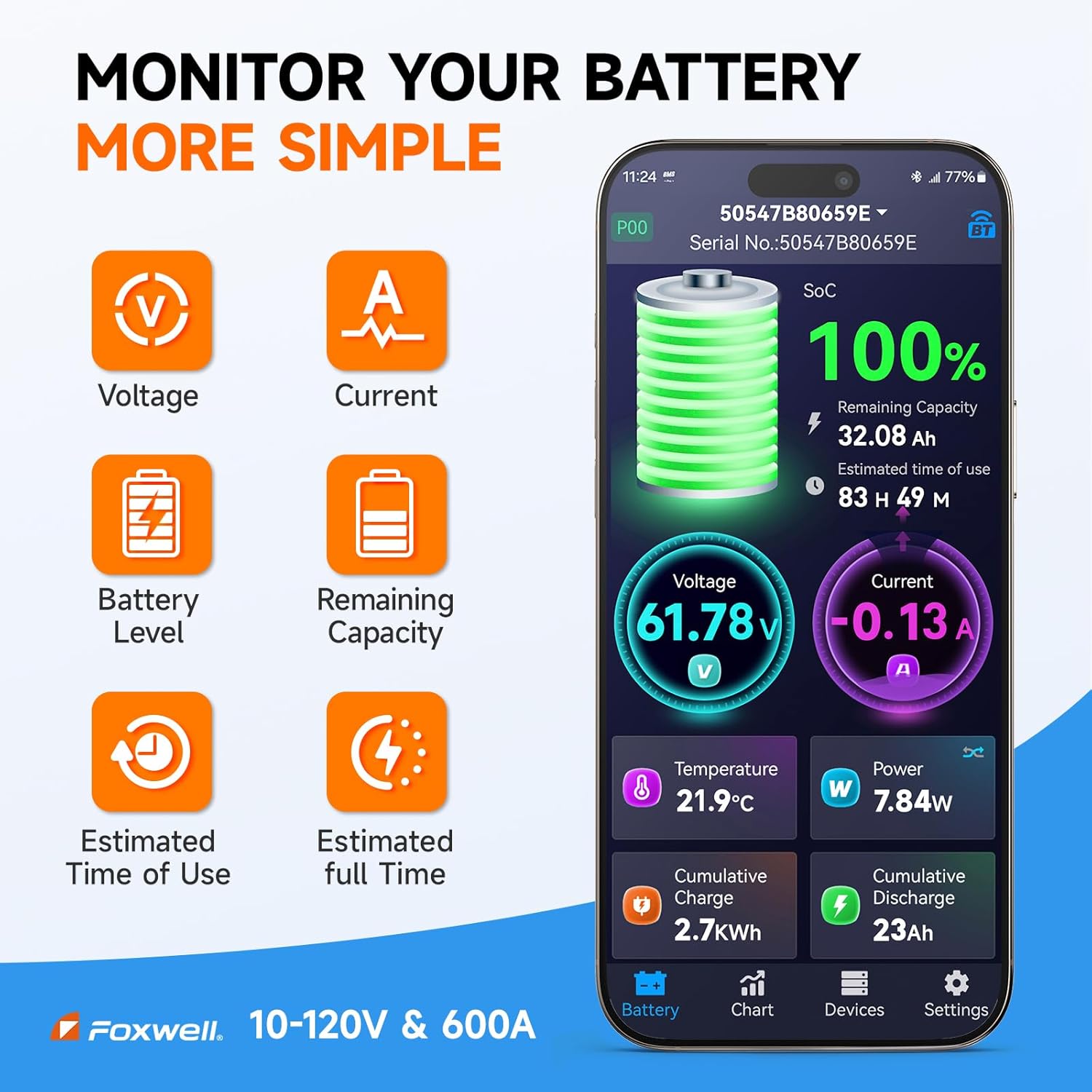
Figure 5: FOXWELL BT630 App Interface. This image displays the mobile application interface for the BT630, showing real-time battery monitoring data such as State of Charge (SoC), Voltage, Current, Remaining Capacity, Temperature, and Power, along with estimated time of use.
5.2 Performing Tests with FOXWELL BT100
Once connected, the BT100 will display the main menu. Use the navigation buttons (ESC, UP, DOWN, ENTER) to select and perform tests.
- ການທົດສອບຫມໍ້ໄຟ: Select 'Battery Test' from the menu.
- ປະເພດຫມໍ້ໄຟ: Choose the correct battery type (e.g., Regular Flooded, AGM Flat Plate, AGM Spiral, GEL, EFB) from the options.
- CCA Input: Enter the Cold Cranking Amps (CCA) rating of your battery, usually found on the battery label.
- ຜົນໄດ້ຮັບ: The BT100 will perform the test and display results including: ສະບັບtage ທົດສອບ, Rating CCA, ວັດແທກ CCA, ຄວາມຕ້ານທານພາຍໃນ, ລັດຮັບຜິດຊອບ (SOC), ແລະ ສຸຂະພາບຂອງລັດ (SOH).
- ແປ: The device will indicate the battery status (e.g., 'Good Battery', 'Replace Battery', 'Charge & Retest').

Figure 6: FOXWELL BT100 Test Functions. This image shows the BT100 held in a hand, with icons around it illustrating its various testing capabilities: Voltage Test, Rating CCA, Measured CCA, Internal Resistance, State of Charge, and State of Health.
6. ບໍາລຸງຮັກສາ
6.1 ການເບິ່ງແຍງທົ່ວໄປ
- Keep both devices clean and dry. Use a soft, damp ຜ້າສໍາລັບການທໍາຄວາມສະອາດ.
- ເກັບຮັກສາໄວ້ໃນບ່ອນທີ່ເຢັນ, ແຫ້ງໃນເວລາທີ່ບໍ່ໄດ້ໃຊ້.
- ຫຼີກເວັ້ນການລຸດລົງ ຫຼື ວາງອຸປະກອນໃຫ້ມີຜົນກະທົບທີ່ເຂັ້ມແຂງ.
6.2 BT630 Calibration
The BT630 features dual calibration for precision:
- Auto Calibration (SOC): The system uses an intelligent algorithm and a long-term model database to automatically adjust SOC readings, minimizing errors.
- Manual Calibration (Voltage, Current, Temperature): If you suspect inaccuracies, you can perform manual calibration through the app. Use a high-precision multimeter to measure the actual voltage, current, or temperature, and input these values into the app for fine-tuning.
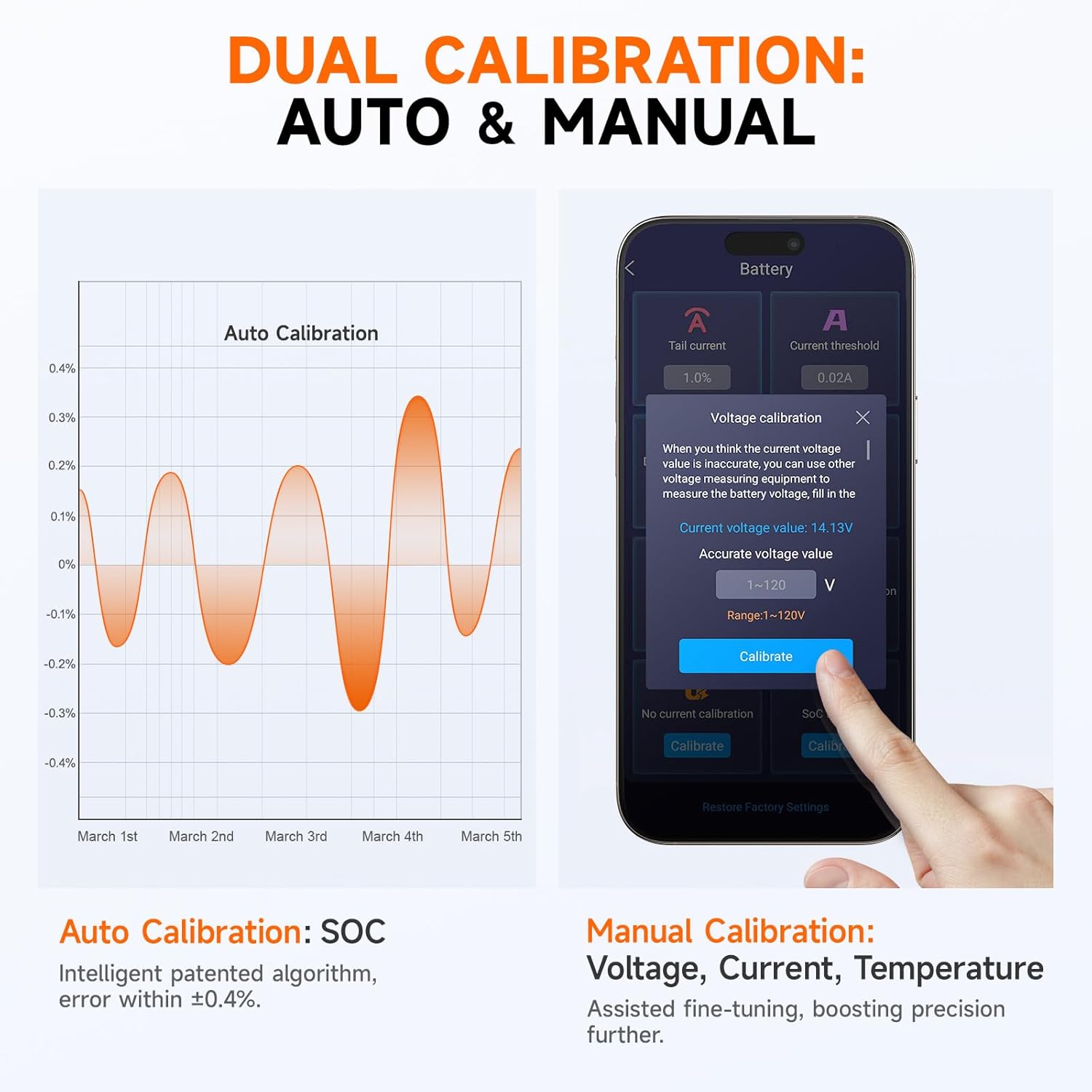
Figure 7: FOXWELL BT630 Dual Calibration. This image illustrates the dual calibration capabilities of the BT630, showing an 'Auto Calibration' graph for State of Charge (SOC) and a screenshot of the app interface for 'Manual Calibration' of Voltage, Current, and Temperature, allowing users to fine-tune readings for enhanced accuracy.
7. ການແກ້ໄຂບັນຫາ
- BT630 Not Connecting via Bluetooth: Ensure the BT630 is powered on and within range of your mobile device. Check your phone's Bluetooth settings and restart both the app and the BT630 if necessary.
- Inaccurate BT630 Readings: Perform a manual calibration as described in Section 6.2. Ensure all wiring connections to the shunt and battery are secure and correct.
- BT100 Not Powering On: ກວດສອບວ່າ clamps are securely connected to the correct battery terminals and that the battery has sufficient voltage (above 8V typically).
- BT100 'Charge & Retest' Message: This indicates the battery's charge is too low for an accurate test. Charge the battery fully and retest.
8. ຂໍ້ມູນຈໍາເພາະ
8.1 FOXWELL BT630 Bluetooth Battery Monitor
- ສະບັບtage ຊ່ວງ: 10V - 120V
- ຊ່ວງປັດຈຸບັນ: ເຖິງ 600A
- ການບໍລິໂພກພະລັງງານ: Ultra-low 0.4W
- ຄວາມຖືກຕ້ອງຂອງ Shunt: ±0.4% ຜິດພາດ
- ການເຊື່ອມຕໍ່: Bluetooth
- ຄວາມຍາວສາຍ: 40ft shielded cable (typical)
- ການປົກປ້ອງ: 8-layer safety protection (over/under-voltage, overcurrent, overpower, over-temperature, low-temperature, low SOC)
8.2 FOXWELL BT100 12V Car Battery Tester
- ສະບັບtage: 12V
- ໄລຍະການທົດສອບ: CCA, Voltage, Internal Resistance, SOC, SOH
- ຈໍສະແດງຜົນ: LCD ກັບ backlight
- ຄວາມເຂົ້າກັນໄດ້: Flooded, AGM Flat Plate, AGM Spiral, GEL, EFB batteries
9. ການຮັບປະກັນແລະການສະຫນັບສະຫນູນ
For warranty information and technical support, please refer to the warranty card included with your product or visit the official FOXWELL website. You may also contact FOXWELL customer service directly for assistance with product operation, troubleshooting, or repair.


