1. ບົດແນະນຳ
This manual provides essential information for the safe and efficient use of your Azeyou A733 Android 15 Tablet. Please read this manual thoroughly before operating the device to ensure proper functionality and to prevent damage. Keep this manual for future reference.

Image: The Azeyou A733 Android 15 Tablet, showcasing its 12-inch display and core specifications.
2. ຂໍ້ມູນຄວາມປອດໄພ
- ຢ່າໃຫ້ແທັບເລັດຖືກອຸນຫະພູມສູງ, ແສງແດດໂດຍກົງ ຫຼື ຄວາມຊຸ່ມຊື່ນສູງ.
- ຫຼີກລ່ຽງການຕົກ ຫຼື ເຮັດໃຫ້ແທັບເລັດໄດ້ຮັບຜົນກະທົບຢ່າງຮຸນແຮງ.
- ໃຊ້ແຕ່ເຄື່ອງສາກ ແລະອຸປະກອນເສີມທີ່ຜູ້ຜະລິດອະນຸມັດ.
- Do not attempt to disassemble or repair the tablet yourself. Refer to authorized service personnel.
- Keep the tablet away from children and pets to prevent accidental damage or injury.
3. ເນື້ອໃນຊຸດ
ກວດສອບວ່າລາຍການທັງຫມົດແມ່ນມີຢູ່ໃນຊຸດຜະລິດຕະພັນຂອງທ່ານ:
- Azeyou A733 Android 15 Tablet
- ສາຍສາກໄຟ USB Type-C
- ອະແດັບເຕີພະລັງງານ (ເຄື່ອງສາກໄວ 20W)
- ຄູ່ມືຜູ້ໃຊ້ (ເອກະສານນີ້)
- SIM Ejector Tool (if applicable for models with cellular support)
4. ອຸປະກອນເກີນview
ເຮັດຄວາມຄຸ້ນເຄີຍກັບອົງປະກອບທາງກາຍະພາບຂອງແທັບເລັດຂອງທ່ານ.

ຮູບພາບ: ຂ້າງ view of the Azeyou A733 tablet, illustrating the placement of buttons and ports.
- ປຸ່ມເປີດປິດ: ຕັ້ງຢູ່ດ້ານຂ້າງ, ໃຊ້ເພື່ອເປີດ/ປິດແທັບເລັດ ຫຼືປຸກ/ນອນໜ້າຈໍ.
- ປຸ່ມລະດັບສຽງ: ປັບລະດັບສຽງ.
- ພອດ USB Type-C: ສໍາລັບການສາກໄຟແລະການໂອນຂໍ້ມູນ.
- Grilles ລໍາໂພງ: Located on the sides for audio output.
- ກ້ອງໜ້າ: For video calls and selfies (5MP).
- ກ້ອງຫຼັງ: For taking photos and videos (13MP).
- ໄມໂຄຣໂຟນ: ສໍາລັບການປ້ອນຂໍ້ມູນດ້ວຍສຽງ.
- ສະລັອດຕິງບັດ TF: ສຳລັບບ່ອນເກັບຂໍ້ມູນທີ່ຂະຫຍາຍໄດ້ເຖິງ 1TB.
5. ຕັ້ງຄ່າ
5.1 ການສາກໄຟເບື້ອງຕົ້ນ
Before first use, fully charge your tablet. Connect the provided USB Type-C cable to the tablet's Type-C port and the power adapter, then plug the adapter into a wall outlet. The tablet supports 20W fast charging.
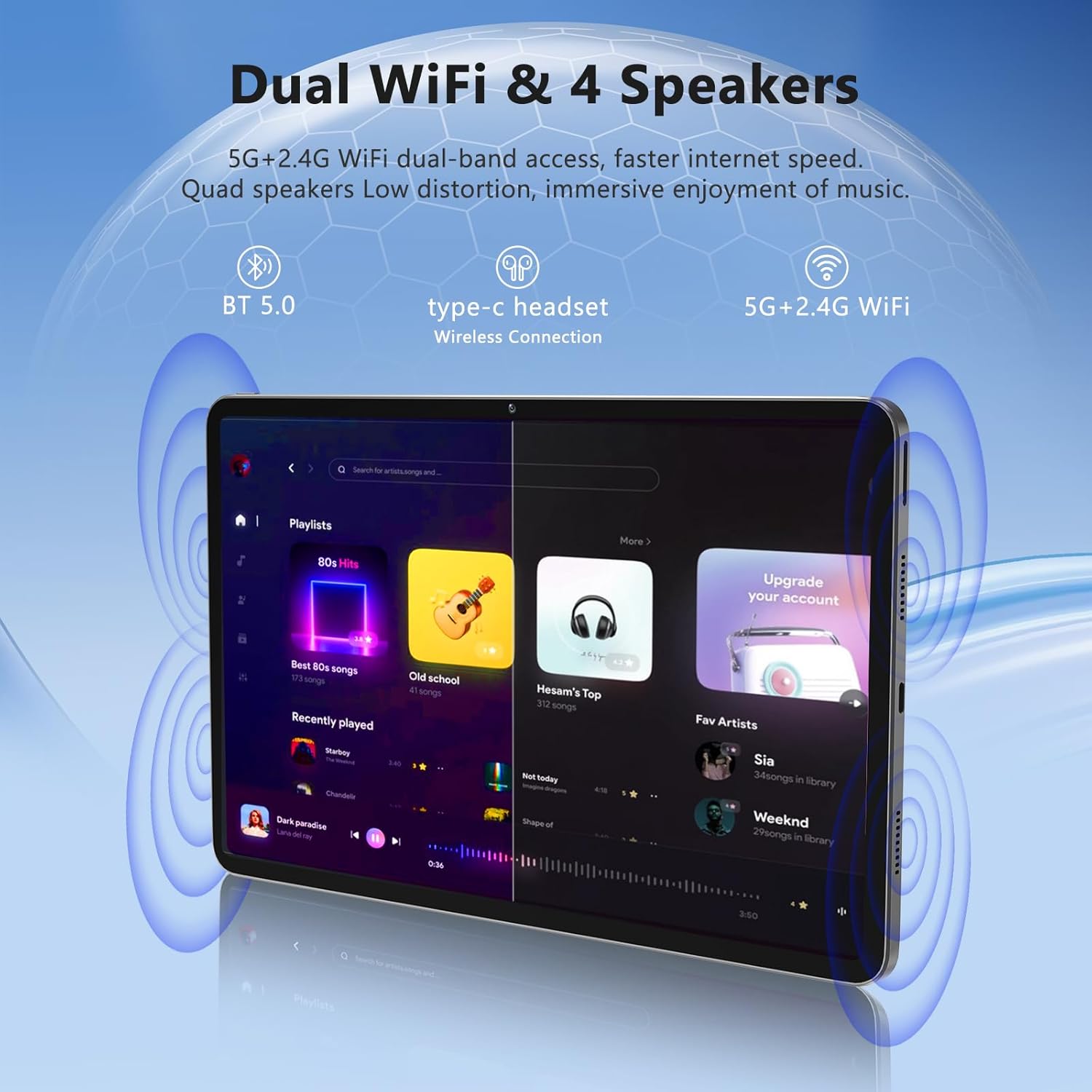
Image: The Azeyou A733 tablet connected to a charger, illustrating its fast charging feature.
5.2 ເປີດ/ປິດ
- ເພື່ອເປີດເຄື່ອງ: Press and hold the Power button until the Azeyou logo appears.
- ປິດເຄື່ອງ: Press and hold the Power button until the power options appear on screen, then select "Power off."
- ເພື່ອເລີ່ມຕົ້ນໃໝ່: Press and hold the Power button until the power options appear, then select "Restart."
5.3 ຕົວຊ່ວຍສ້າງການຕິດຕັ້ງເບື້ອງຕົ້ນ
ເມື່ອເປີດເຄື່ອງຄັ້ງທຳອິດ, ແທັບເລັດຈະນຳພາທ່ານຜ່ານຂັ້ນຕອນການຕັ້ງຄ່າເບື້ອງຕົ້ນ:
- ເລືອກພາສາທີ່ທ່ານຕ້ອງການ.
- ເຊື່ອມຕໍ່ກັບເຄືອຂ່າຍ Wi-Fi.
- ເຂົ້າສູ່ລະບົບດ້ວຍບັນຊີ Google ຂອງທ່ານ ຫຼືສ້າງອັນໃໝ່.
- Review ແລະຍອມຮັບຂໍ້ກໍານົດແລະເງື່ອນໄຂ.
- ຕັ້ງຄ່າການລັອກໜ້າຈໍ (PIN, ຮູບແບບ, ຫຼືລະຫັດຜ່ານ).
5.4 ບ່ອນເກັບຂໍ້ມູນທີ່ສາມາດຂະຫຍາຍໄດ້
ເພື່ອຂະຫຍາຍພື້ນທີ່ເກັບຂໍ້ມູນ, ໃຫ້ໃສ່ກາດ TF (microSD) ເຂົ້າໄປໃນຊ່ອງທີ່ກຳນົດໄວ້. ແທັບເລັດຮອງຮັບການຂະຫຍາຍໄດ້ສູງສຸດ 1TB.

Image: Visual representation of the tablet's memory configuration, including 20GB RAM, 128GB ROM, and 1TB expandable storage.
6. ປະຕິບັດການແທັບເລັດ
6.1 ການນໍາທາງພື້ນຖານ
The Azeyou A733 tablet uses touch gestures for navigation:
- ແຕະ: ເລືອກລາຍການ ຫຼືເປີດແອັບ.
- ປັດ: ເລື່ອນຜ່ານໜ້າຈໍ ຫຼືລາຍການຕ່າງໆ.
- ເມື່ອເຂົ້າຕາຈົນ: ຊູມເຂົ້າ ຫຼືອອກໃນຮູບພາບ ແລະ web ໜ້າ.
- ຂ່າວຍາວ: ເຂົ້າເຖິງເມນູບໍລິບົດ ຫຼືຍ້າຍໄອຄອນ.
6.2 ການເຊື່ອມຕໍ່ Wi-Fi
ເພື່ອເຊື່ອມຕໍ່ກັບເຄືອຂ່າຍ Wi-Fi:
- ໄປທີ່ ການຕັ້ງຄ່າ > ເຄືອຂ່າຍ ແລະອິນເຕີເນັດ > Wi-Fi.
- ສະຫຼັບ Wi-Fi On.
- ເລືອກເຄືອຂ່າຍທີ່ທ່ານຕ້ອງການຈາກບັນຊີລາຍຊື່.
- ໃສ່ລະຫັດຜ່ານຖ້າຖືກຖາມ, ຈາກນັ້ນແຕະ ເຊື່ອມຕໍ່.
The tablet supports Wi-Fi 6 for faster and more stable connections.

ຮູບພາບ: ແທັບເລັດສະແດງasing its dual Wi-Fi capabilities and quad speakers for enhanced audio experience.
6.3 ການເຊື່ອມຕໍ່ Bluetooth
To pair with a Bluetooth device (e.g., headphones, keyboard, mouse):
- ໄປທີ່ ການຕັ້ງຄ່າ > ອຸປະກອນທີ່ເຊື່ອມຕໍ່ > Bluetooth.
- ສະຫຼັບ Bluetooth On.
- ກວດໃຫ້ແນ່ໃຈວ່າອຸປະກອນ Bluetooth ຂອງທ່ານຢູ່ໃນໂໝດຈັບຄູ່.
- ເລືອກອຸປະກອນຈາກລາຍການ ແລະ ປະຕິບັດຕາມການກະຕຸ້ນເຕືອນໃນໜ້າຈໍເພື່ອເຮັດການຈັບຄູ່ໃຫ້ສຳເລັດ.
6.4 ການຈັດການແອັບ
Your Azeyou A733 tablet is GMS certified, allowing full access to the Google Play Store for downloading and managing applications.
- ຕິດຕັ້ງແອັບ: Open the Play Store app, search for your desired app, and tap ຕິດຕັ້ງ.
- ຖອນການຕິດຕັ້ງແອັບ: Long-press an app icon on the home screen or app drawer, then drag it to "Uninstall" or select "App info" and choose "Uninstall."
6.5 ການໃຊ້ກ້ອງຖ່າຍຮູບ
ແທັບເລັດມີກ້ອງໜ້າ 5MP ແລະ ກ້ອງຫຼັງ 13MP.
- ເປີດ ກ້ອງຖ່າຍຮູບ ແອັບ.
- ແຕະໄອຄອນສະຫຼັບກ້ອງຖ່າຍຮູບເພື່ອສະຫຼັບລະຫວ່າງກ້ອງໜ້າ ແລະກ້ອງຫຼັງ.
- ແຕະປຸ່ມຊັດເຕີເພື່ອຖ່າຍຮູບ ຫຼືເລີ່ມ/ຢຸດການບັນທຶກວິດີໂອ.
ຮູບພາບ: ລາຍລະອຽດ view of the tablet's 13MP rear camera and 5MP front camera, illustrating their positions and use.
6.6 Split-Screen Function
ເພື່ອໃຊ້ສອງແອັບພ້ອມກັນ:
- ເປີດແອັບທຳອິດ.
- Tap the recent apps button (usually a square icon).
- Long-press the icon of the first app at the top of its card.
- Select "Split screen."
- Choose the second app from the recent apps list or app drawer.
6.7 AI Air Gesture
The tablet supports AI Air Gesture for hands-free control. Specific gestures and their functions can be configured in ການຕັ້ງຄ່າ > ການຄວບຄຸມອັດສະລິຍະ (or similar menu name).
6.8 Sitting Posture Detection
This feature helps users maintain a healthy sitting posture by providing alerts or guidance. Access and configure this feature in ການຕັ້ງຄ່າ > Digital Wellbeing & ການຄວບຄຸມຂອງພໍ່ແມ່ or a dedicated health/posture app.

Image: Demonstrations of AI air gesture for tablet control and the sitting posture detection system.
6.9 Media Playback (Widevine L1)
The tablet is Widevine L1 certified, enabling high-definition (HD) content streaming on platforms such as Netflix, Amazon Prime Video, Hulu, and HBO.

Image: The tablet displaying logos of popular streaming services, signifying its Widevine L1 certification for HD playback.
7. ບໍາລຸງຮັກສາ
7.1 ການທໍາຄວາມສະອາດ
Use a soft, lint-free cloth to clean the tablet screen and body. Avoid using harsh chemicals or abrasive materials.
7.2 ການດູແລຫມໍ້ໄຟ
The 8000mAh battery provides extended usage. To prolong battery life:
- ຫຼີກລ້ຽງການປະຈຸຫມໍ້ໄຟຢ່າງເຕັມທີ່ເລື້ອຍໆ.
- Do not leave the tablet charging for excessively long periods after it's full.
- Keep the tablet within a moderate temperature range.

Image: An infographic detailing the 8000mAh battery and its estimated performance across various activities.
7.3 ການປັບປຸງຊອບແວ
ກວດສອບ ແລະ ຕິດຕັ້ງການອັບເດດຊອບແວເປັນປະຈຳເພື່ອຮັບປະກັນປະສິດທິພາບ ແລະ ຄວາມປອດໄພທີ່ດີທີ່ສຸດ. ໄປທີ່ ການຕັ້ງຄ່າ > ລະບົບ > ອັບເດດລະບົບ.
7.4 ການຄຸ້ມຄອງການເກັບຮັກສາ
To manage your 128GB internal storage (expandable to 1TB):
- ໄປທີ່ ການຕັ້ງຄ່າ > ການເກັບຮັກສາ ກັບ view ການນຳໃຊ້ ແລະສ້າງພື້ນທີ່ຫວ່າງ.
- Regularly clear cache data from apps.
- ຍ້າຍຂະຫນາດໃຫຍ່ files to an inserted TF card.
8. ການແກ້ໄຂບັນຫາ
8.1 ບັນຫາທົ່ວໄປ
- ແທັບເລັດບໍ່ເປີດ: ໃຫ້ແນ່ໃຈວ່າໄດ້ສາກໄຟແລ້ວ. ເຊື່ອມຕໍ່ກັບສາຍສາກຢ່າງໜ້ອຍ 30 ນາທີກ່ອນທີ່ຈະພະຍາຍາມເປີດເຄື່ອງ.
- ແອັບຂັດຂ້ອງ ຫຼືຄ້າງ: Close and reopen the app. If the issue persists, clear the app's cache (Settings > Apps > [App Name] > Storage & cache > Clear cache). Restart the tablet.
- ບັນຫາການເຊື່ອມຕໍ່ Wi-Fi: ຣີສະຕາດເລົາເຕີ Wi-Fi ແລະແທັບເລັດຂອງທ່ານ. ລືມເຄືອຂ່າຍໃນການຕັ້ງຄ່າແທັບເລັດ ແລະເຊື່ອມຕໍ່ຄືນໃໝ່.
- ປະສິດທິພາບຊ້າ: ປິດແອັບພື້ນຫຼັງທີ່ບໍ່ຈຳເປັນ. ລຶບ cache ແລະຊົ່ວຄາວ files. Consider performing a factory reset if performance issues persist after other troubleshooting steps.
8.2 ຣີເຊັດເປັນຄ່າໂຮງງານ
ການຣີເຊັດເປັນຄ່າໂຮງງານຈະລຶບຂໍ້ມູນທັງໝົດອອກຈາກແທັບເລັດຂອງເຈົ້າ ແລະກູ້ມັນຄືນເປັນຄ່າໂຮງງານເດີມຂອງມັນ. ສໍາຮອງຂໍ້ມູນທີ່ສໍາຄັນກ່ອນທີ່ຈະດໍາເນີນການ.
- ໄປທີ່ ການຕັ້ງຄ່າ > ລະບົບ > ຣີເຊັດຕົວເລືອກ.
- ເລືອກ ລຶບຂໍ້ມູນທັງໝົດ (ຣີເຊັດເປັນຄ່າໂຮງງານ).
- ຢືນຢັນການຕັດສິນໃຈຂອງທ່ານແລະປະຕິບັດຕາມຄໍາແນະນໍາໃນຫນ້າຈໍ.
9. ຂໍ້ມູນຈໍາເພາະ

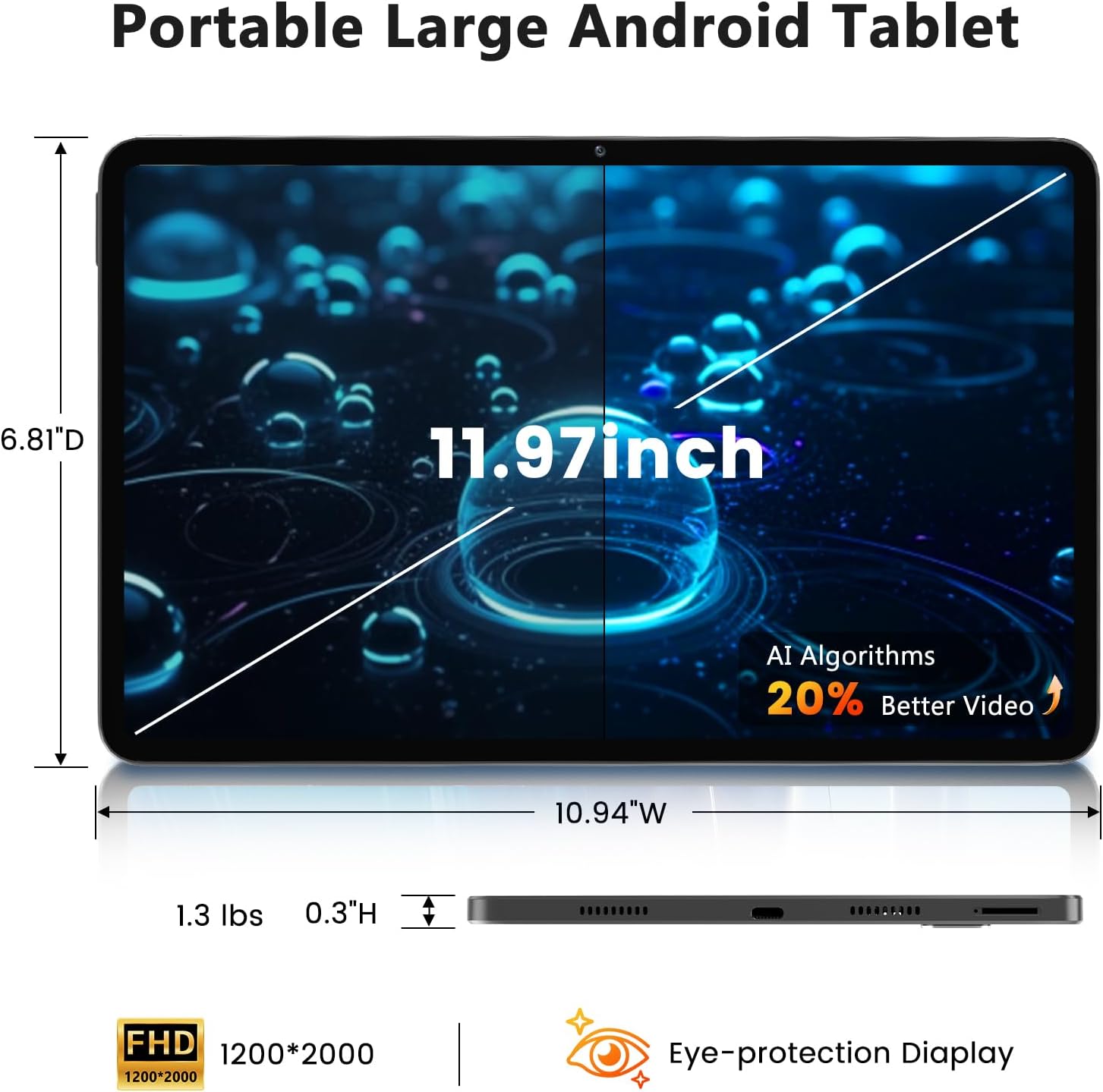
Image: A visual representation of the tablet's physical dimensions and weight.
| ຄຸນສົມບັດ | ຂໍ້ມູນຈໍາເພາະ |
|---|---|
| ຍີ່ຫໍ້ | Azeyou |
| ຕົວແບບ | A733 |
| ລະບົບປະຕິບັດການ | Android 15 |
| ໂຮງງານຜະລິດ | A733 Octa-Core |
| RAM | 20GB (6GB Physical + 14GB Virtual) |
| ບ່ອນຈັດເກັບຂໍ້ມູນພາຍໃນ (ROM) | 128GB |
| ການເກັບຮັກສາທີ່ຂະຫຍາຍໄດ້ | Up to 1TB via TF card (not included) |
| ຂະໜາດໜ້າຈໍ | 11.97 ນິ້ວ |
| ຄວາມລະອຽດໜ້າຈໍ | 1200 x 2000 Pixels (2K Display) |
| ກ້ອງຫຼັງ | 13 MP |
| ກ້ອງໜ້າ | 5 MP |
| ຄວາມອາດສາມາດຫມໍ້ໄຟ | 8000mAh |
| ກຳລັງສາກໄຟ | 20W Fast Charge, Type-C Port |
| ການເຊື່ອມຕໍ່ໄຮ້ສາຍ | WiFi 6 (802.11ax), Bluetooth 5.0 |
| ຂະໜາດ (LxWxH) | 11.97 x 6.81 x 0.3 ນິ້ວ |
| ນ້ໍາຫນັກລາຍການ | 3.15 ປອນ |
| ຄຸນນະສົມບັດພິເສດ | GMS Certified, Widevine L1, Dual Speakers, AI Air Gesture, Sitting Posture Detection, Split-screen function |
10. ການຮັບປະກັນແລະການສະຫນັບສະຫນູນ
Your Azeyou A733 Tablet comes with a standard manufacturer's warranty. Please refer to the warranty card included in your package for specific terms and conditions, including warranty duration and coverage details.
For technical support, troubleshooting assistance, or warranty claims, please contact Azeyou customer service through the retailer where the product was purchased or visit the official Azeyou support website (ຖ້າມີ).
ກະລຸນາກຽມໝາຍເລກຮຸ່ນຜະລິດຕະພັນ (A733) ແລະ ຂໍ້ມູນການຊື້ຂອງທ່ານໃຫ້ພ້ອມເມື່ອຕິດຕໍ່ຝ່າຍຊ່ວຍເຫຼືອ.


