ແນະນຳ
Thank you for choosing the GOBOULT Soniq Over Ear Bluetooth Headphones. These headphones are designed to provide a superior audio experience with features like 70 hours of playtime, 40mm bass drivers, Zen™ ENC microphone, Type-C fast charging, and dual device pairing. This manual will guide you through the setup, operation, and maintenance of your new headphones to ensure optimal performance.
ແມ່ນຫຍັງຢູ່ໃນກ່ອງ
ກະລຸນາກວດສອບເນື້ອໃນຂອງຊຸດເພື່ອໃຫ້ແນ່ໃຈວ່າລາຍການທັງຫມົດມີຢູ່:
- Soniq Headphone
- ສາຍໄຟແບບ Type-C
- ຄູ່ມືຜູ້ໃຊ້
- ເບາະຫູ (ຕິດຕັ້ງລ່ວງໜ້າ)
- ບັດຮັບປະກັນ
ຄຸນສົມບັດຜະລິດຕະພັນຫຼາຍກວ່າview
The GOBOULT Soniq headphones come equipped with several advanced features:
- ຂະຫຍາຍເວລາຫຼິ້ນ: ການຫຼິ້ນສຽງສູງສຸດ 70 ຊົ່ວໂມງດ້ວຍການສາກຄັ້ງດຽວ.
- ໂໝດ EQ ທີ່ສາມາດປັບແຕ່ງໄດ້: ປັບສຽງ profiles for bass boost, balanced audio, or vocal clarity.
- ການຍົກເລີກສິ່ງລົບກວນສິ່ງແວດລ້ອມ (ENC): ເພີ່ມຄວາມຊັດເຈນຂອງການໂທໂດຍການຫຼຸດຜ່ອນສຽງລົບກວນພື້ນຫຼັງ.
- ການຈັບຄູ່ອຸປະກອນຄູ່: Seamlessly connect and switch between two devices simultaneously.
- Powerful Audio Drivers: 40mm bass-boosted drivers for rich sound.
- Latest Bluetooth Technology: Bluetooth 5.4 for faster pairing and stable connections.
- ການອອກແບບທີ່ສະດວກສະບາຍ: Lightweight build with cushioned earcups for prolonged wear.
- ຄວາມຕ້ານທານນ້ໍາ: IPX5 rating for splash, rain, and sweat protection.
- Tactile Controls: Easy-to-use physical buttons for volume, playback, and mode switching.
- AI Voice Assistant Support: Compatible with Google Assistant and Siri.

ຮູບພາບ: ຫຼາຍກວ່າview of key features including 70H battery, EQ modes, ENC, dual pairing, 40mm drivers, and Bluetooth 5.4.

Image: Close-up of the GOBOULT Soniq headphone earcup highlighting the 40mm power-packed bass neodymium drivers with BoomX™ Technology and Memory Foam.
ຄູ່ມືການຕິດຕັ້ງ
1. ການສາກຫູຟັງ
Before first use, fully charge your GOBOULT Soniq headphones. Use the provided Type-C charging cable to connect the headphones to a compatible USB power source.
- ການສາກເຕັມໃຫ້ເວລາຫຼິ້ນໄດ້ເຖິງ 70 ຊົ່ວໂມງ.
- Fast charging feature: 10 minutes of charge provides approximately 8 hours of playtime.
- ໄຟ LED ຈະສະແດງສະຖານະການສາກໄຟ ແລະ ປິດ ຫຼື ປ່ຽນສີເມື່ອສາກເຕັມແລ້ວ.

Image: GOBOULT Soniq headphones connected via Type-C cable, illustrating 70 hours playtime and fast charging capability.
2. ເປີດ / ປິດພະລັງງານ
To power on, press and hold the Power button for approximately 3 seconds until the LED indicator lights up. To power off, press and hold the Power button again for 3 seconds until the LED indicator turns off.
3. ການຈັບຄູ່ Bluetooth
ປະຕິບັດຕາມຂັ້ນຕອນເຫຼົ່ານີ້ເພື່ອຈັບຄູ່ຫູຟັງຂອງທ່ານກັບອຸປະກອນທີ່ເປີດໃຊ້ Bluetooth:
- ກວດໃຫ້ແນ່ໃຈວ່າຫູຟັງໄດ້ສາກເຕັມແລ້ວ ແລະປິດແລ້ວ.
- ກົດປຸ່ມເປີດປິດຄ້າງໄວ້ 5-7 ວິນາທີ ຈົນກວ່າໄຟ LED ຈະກະພິບສີແດງ ແລະສີຟ້າສະລັບກັນ, ສະແດງເຖິງໂໝດການຈັບຄູ່.
- ໃນອຸປະກອນຂອງທ່ານ (ໂທລະສັບສະຫຼາດ, ແທັບເລັດ, ແລັບທັອບ), ເປີດໃຊ້ Bluetooth ແລະຊອກຫາອຸປະກອນທີ່ມີຢູ່.
- Select "GOBOULT Soniq" from the list of found devices.
- ເມື່ອເຊື່ອມຕໍ່ແລ້ວ, ໄຟ LED ຈະກະພິບສີຟ້າຊ້າໆ ຫຼື ຍັງຄົງເປັນສີຟ້າຄົງທີ່.

Image: GOBOULT Soniq headphones highlighting Bluetooth 5.4 for fast and stable connection.
ຄໍາແນະນໍາການດໍາເນີນງານ
1. ການຄວບຄຸມພື້ນຖານ
The headphones feature tactile buttons for easy control:
- ປຸ່ມເປີດປິດ: ກົດຄ້າງໄວ້ເພື່ອເປີດ/ປິດ. ກົດສັ້ນເພື່ອຫຼິ້ນ/ຢຸດຊົ່ວຄາວ.
- ປະລິມານຂຶ້ນ (+): ກົດສັ້ນເພື່ອເພີ່ມລະດັບສຽງ. ກົດຄ້າງໄວ້ສຳລັບເພງຕໍ່ໄປ.
- ປະລິມານລົງ (-): ກົດສັ້ນເພື່ອຫຼຸດລະດັບສຽງ. ກົດຄ້າງໄວ້ສຳລັບເພງກ່ອນໜ້າ.
- Multi-function Button (often combined with Power or a dedicated button): Answer/End calls, activate voice assistant.

Image: Close-up of the right earcup showing tactile button controls for volume and play/pause.
2. ໂໝດ EQ
Customize your audio experience with multiple EQ modes. Press the dedicated EQ button (or a specific combination, refer to quick start guide if available) to cycle through modes:
- ໂໝດເພີ່ມສຽງເບສ: Enhances low frequencies for a deeper bass sound.
- ໂໝດສົມດຸນ: ໃຫ້ສຽງທີ່ເປັນກາງແບບມືອາຊີບfile suitable for various genres.
- ໂໝດສຽງ: ປັບປຸງຄວາມຖີ່ລະດັບກາງເພື່ອໃຫ້ສຽງຮ້ອງທີ່ຊັດເຈນຂຶ້ນ.
- ໂໝດເກມ: Reduces latency for a more synchronized gaming audio experience (60ms ultra-low latency).
- ໂໝດດົນຕີ: ມາດຕະຖານສຽງ profile ສຳລັບການຟັງເພງທົ່ວໄປ.
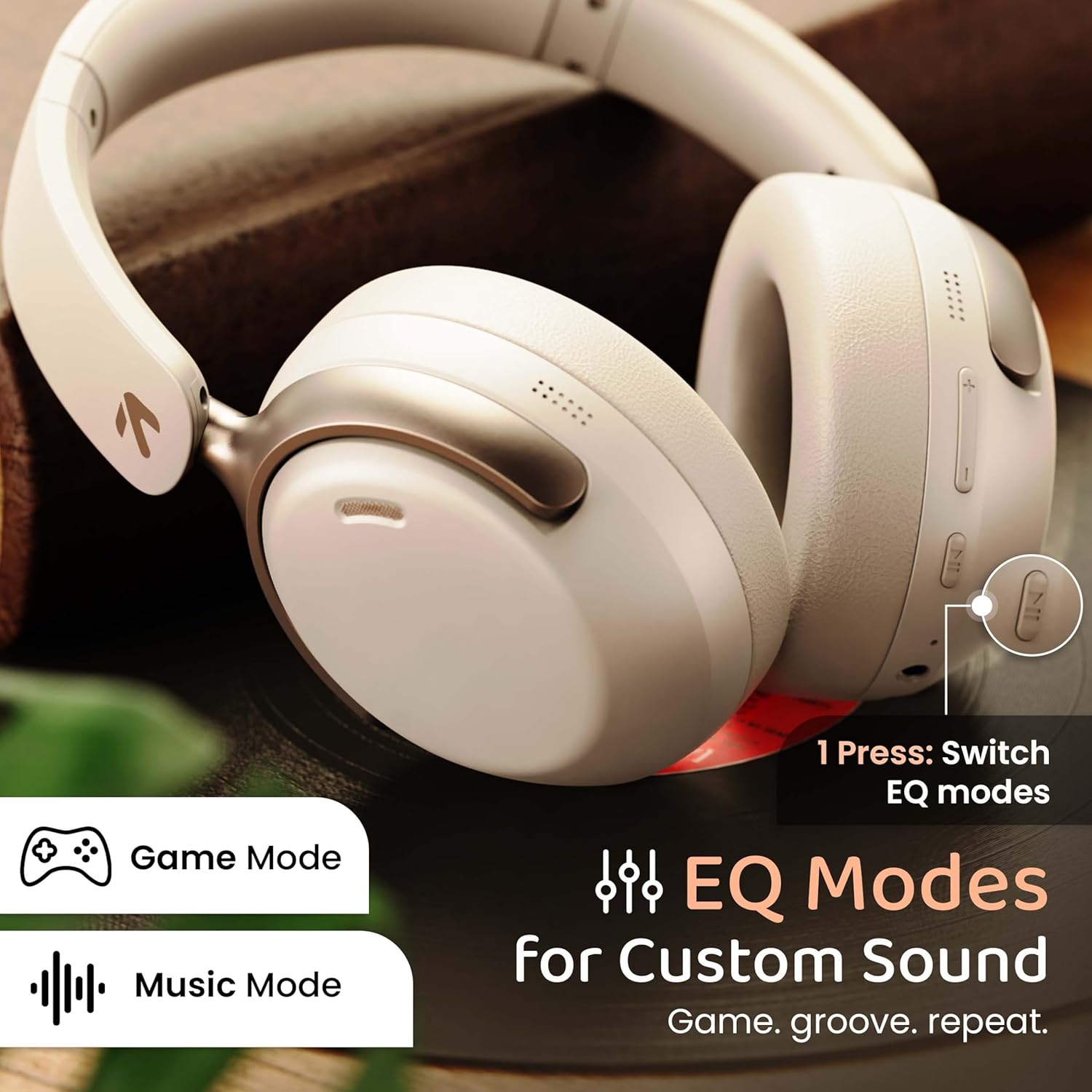
Image: GOBOULT Soniq headphones illustrating the EQ modes for custom sound, including Game Mode and Music Mode.

Image: GOBOULT Soniq headphones highlighting Combat™ Gaming Mode with 60ms ultra-low latency, tailored for mobile gaming and real-time sound accuracy.
3. ການຈັບຄູ່ອຸປະກອນຄູ່
The headphones support dual device pairing, allowing you to connect to two devices simultaneously and switch between them seamlessly.
- Pair the headphones with the first device as described in the "Bluetooth Pairing" section.
- ປິດໃຊ້ງານ Bluetooth ໃນອຸປະກອນທໍາອິດ.
- ຈັບຄູ່ຫູຟັງກັບອຸປະກອນທີສອງ.
- ເປີດໃຊ້ Bluetooth ຄືນໃໝ່ໃນອຸປະກອນທຳອິດ. ຫູຟັງຄວນເຊື່ອມຕໍ່ກັບອຸປະກອນທັງສອງໂດຍອັດຕະໂນມັດ.
- Audio will play from the device currently active. To switch, pause audio on the first device and start playing on the second.

Image: GOBOULT Soniq headphones demonstrating dual device connectivity with a laptop and a smartphone.
4. ໂໝດມີສາຍ (AUX)
For a wired connection, use a standard 3.5mm AUX cable (not included) to connect the headphones to your audio source. In wired mode, the headphones operate passively, and the built-in microphone will not function.

Image: GOBOULT Soniq headphones showing the option for wireless mode and an optional wired mode via AUX cable, noting that the mic is off in wired mode.
5. ການຍົກເລີກສິ່ງລົບກວນສິ່ງແວດລ້ອມ (ENC) ສໍາລັບການໂທ
The Zen™ ENC microphone technology helps reduce ambient noise during calls, ensuring clearer conversations. This feature is automatically active during phone calls.

Image: Close-up of the GOBOULT Soniq headphone earcup highlighting the Zen™ ENC Mic for processed calling, ambient noise isolation, enhanced call experience, and sharper voice clarity.
6. ຜູ້ຊ່ວຍສຽງ
Activate your device's voice assistant (Google Assistant or Siri) by pressing the multi-function button (or specific button, refer to quick start guide) for approximately 2 seconds.

Image: GOBOULT Soniq headphones with icons for Google Assistant and Siri, indicating personalized AI assistant support.
ການບໍາລຸງຮັກສາແລະການດູແລ
- ທໍາຄວາມສະອາດ: ເຊັດຫູຟັງດ້ວຍຜ້າອ່ອນ, ແຫ້ງ. ຢ່າໃຊ້ເຄື່ອງເຮັດຄວາມສະອາດຂັດຫຼືສານລະລາຍ.
- ຄວາມຕ້ານທານນ້ໍາ: The headphones are IPX5 water resistant, meaning they are protected against splashes, rain, and sweat. Do not submerge them in water or expose them to strong jets of water.
- ການເກັບຮັກສາ: ເມື່ອບໍ່ໃຊ້, ໃຫ້ເກັບຮັກສາຫູຟັງໄວ້ໃນບ່ອນເຢັນ, ແຫ້ງ, ຫ່າງຈາກແສງແດດໂດຍກົງ ແລະ ອຸນຫະພູມທີ່ຮ້າຍກາດ. ການອອກແບບທີ່ສາມາດພັບໄດ້ຊ່ວຍໃຫ້ມີການເກັບຮັກສາທີ່ຫນາແຫນ້ນ.
- ການດູແລຫມໍ້ໄຟ: ເພື່ອຍືດອາຍຸແບັດເຕີຣີ, ຫຼີກເວັ້ນການຖອດຫູຟັງອອກເຕັມທີ່ເລື້ອຍໆ. ໄລ່ໃຫ້ເຂົາເຈົ້າເປັນປົກກະຕິ, ເຖິງແມ່ນວ່າບໍ່ໄດ້ຢູ່ໃນການນໍາໃຊ້ຢ່າງຕໍ່ເນື່ອງ.
Image: GOBOULT Soniq headphones illustrating IPX5 water resistance, indicating protection against splash, rain, and sweat.

Image: GOBOULT Soniq headphones showcasing their adjustable headband, foldable design, and movable earcups for maximum comfort and portability.
ການແກ້ໄຂບັນຫາ
| ບັນຫາ | ການແກ້ໄຂທີ່ເປັນໄປໄດ້ |
|---|---|
| ຫູຟັງບໍ່ເປີດ. | Ensure the headphones are charged. Connect to a power source using the Type-C cable. |
| ບໍ່ສາມາດຈັບຄູ່ກັບອຸປະກອນໄດ້. |
|
| ບໍ່ມີສຽງ ຫຼືສຽງຕໍ່າ. |
|
| ໄມໂຄຣໂຟນບໍ່ເຮັດວຽກໃນໂໝດໃຊ້ສາຍ. | The built-in microphone is not active when using the AUX wired connection. This is normal operation. |
| ການເຊື່ອມຕໍ່ແບບບໍ່ຢຸດຢັ້ງ. |
|
ຂໍ້ມູນຈໍາເພາະ
| ຄຸນສົມບັດ | ລາຍລະອຽດ |
|---|---|
| ຊື່ຕົວແບບ | AirBass |
| ເຕັກໂນໂລຊີການເຊື່ອມຕໍ່ | Bluetooth, Wired, Wireless |
| ເຕັກໂນໂລຊີການສື່ສານໄຮ້ສາຍ | Bluetooth 5.4 |
| ຊ່ວງ Bluetooth | 10 ແມັດ |
| ຂະໜາດໄດເວີສຽງ | ຂະ ໜາດ 40 ມີລີແມັດ |
| ປະເພດໄດເວີສຽງ | ໄດນາມິກໄດເວີ |
| ຊີວິດຫມໍ້ໄຟ | 40 ຊົ່ວໂມງ |
| ພອດສາກໄຟ | ຊ່ອງສຽບສາກໄຟໄວ Type-C |
| ການຄວບຄຸມສິ່ງລົບກວນ | ການຍົກເລີກສິ່ງລົບກວນສິ່ງແວດລ້ອມ (ENC) |
| ລະດັບຄວາມຕ້ານທານນ້ໍາ | IPX5 (ກັນຝົນ, ຝົນ, ເຫື່ອ) |
| ຄວາມຍືດຍຸ່ນສຽງ | 60 ມິນລິວິນາທີ (ໂໝດເກມ) |
| ຮູບຮ່າງຫູຫູ | ເກີນຫູ |
| ວັດສະດຸ | Memory Foam (Ear Cushions) |
| ນ້ໍາຫນັກລາຍການ | 227 ກຣາມ |
| ຂະໜາດສິນຄ້າ (LxWxH) | 17 x 5.5 x 19 ຊັງຕີແມັດ |
| ປະເພດການຄວບຄຸມ | Button, Google Assistant |
| impedance | 32 ໂອມ |
| ຄວາມອ່ອນໄຫວ | 118 dB |
ການຮັບປະກັນແລະການສະຫນັບສະຫນູນ
Your GOBOULT Soniq Over Ear Bluetooth Headphones come with a ການຮັບປະກັນຜູ້ຜະລິດ 1 ປີ from the date of purchase. This warranty covers manufacturing defects and ensures the reliability of your product.
For warranty claims, technical support, or any inquiries, please refer to the contact information provided on the warranty card included in your package or visit the official GOBOULT support webເວັບໄຊ.
ກະລຸນາເກັບຮັກສາໃບຮັບເງິນການຊື້ຂອງທ່ານເປັນຫຼັກຖານຂອງການຊື້ສໍາລັບການຢັ້ງຢືນການຮັບປະກັນ.