1. ບົດແນະນຳ
This manual provides detailed instructions for the safe and efficient use of your Gembird TWST-01-W Transparent Bluetooth Earbuds. These earbuds feature a unique transparent design, offering up to 4 hours of listening time per charge. Key functionalities include automatic music muting for incoming calls, an LCD battery indicator, and a color-changing backlight. Please read this manual thoroughly before operating the device.
2. ເນື້ອໃນຊຸດ
ໃຫ້ແນ່ໃຈວ່າທຸກລາຍການທີ່ມີລາຍຊື່ຂ້າງລຸ່ມນີ້ມີຢູ່ໃນຊຸດຂອງທ່ານ:
- Gembird TWST-01-W Transparent Bluetooth Earbuds (Left and Right)
- ກ່ອງສາກ
- ສາຍສາກ ຫຼື ຕົວເຊື່ອມຕໍ່
- ຄູ່ມືການສອນ
3. ຜະລິດຕະພັນເກີນview
Familiarize yourself with the components of your Gembird TWST-01-W earbuds.

ຮູບທີ 3.1: The Gembird TWST-01-W Transparent Bluetooth Earbuds shown within their charging case. The case features a clear design, revealing the internal components and an LCD display indicating battery levels for both earbuds (L and R) and the case itself.
ຄຸນນະສົມບັດທີ່ສໍາຄັນ:
- ການອອກແບບໂປ່ງໃສ: Unique clear housing for both earbuds and charging case.
- ການຟັງແບບຂະຫຍາຍ: Up to 4 hours of continuous listening per charge.
- ການຄຸ້ມຄອງການໂທ: Automatically mutes music for incoming calls.
- ຕົວຊີ້ວັດຫມໍ້ໄຟ: LCD display on the charging case shows battery levels.
- ແສງຫຼັງແບບໄດນາມິກ: Charging case features a color-changing backlight.
- ການຄວບຄຸມການສໍາພັດ: Intuitive touch-sensitive controls for various functions.
- ກັນນ້ຳ: ອອກແບບມາໃຫ້ທົນທານຕໍ່ການສີດນ້ຳ ແລະ ເຫື່ອ.
4. ຕັ້ງຄ່າ
4.1 ການສາກໄຟເບື້ອງຕົ້ນ
ກ່ອນທີ່ຈະໃຊ້ຄັ້ງທຳອິດ, ໃຫ້ສາກຫູຟັງຫູຟັງ ແລະ ຊ່ອງສາກໃຫ້ເຕັມ.
- ວາງຫູຟັງເອຍບັດທັງສອງໃສ່ໃນກ່ອງສາກ.
- ເຊື່ອມຕໍ່ສາຍສາກກັບຜອດສາກໄຟຢູ່ໃນກໍລະນີ ແລະກັບແຫຼ່ງໄຟ USB.
- The LCD display on the case will show the charging status. Allow sufficient time for a full charge.

ຮູບທີ 4.1: ຂ້າງ view of the Gembird TWST-01-W charging case, highlighting its transparent construction and the integrated LCD battery display. The charging port is typically located at the bottom or rear of the case.
4.2 ການຈັບຄູ່ Bluetooth
ເພື່ອເຊື່ອມຕໍ່ຫູຟັງຂອງທ່ານກັບອຸປະກອນ:
- ກວດໃຫ້ແນ່ໃຈວ່າໄດ້ສາກຫູຟັງເອຍບັດແລ້ວ ແລະວາງໃສ່ກ່ອງສາກ.
- ເປີດກ່ອງສາກໄຟ. ຫູຟັງຈະເຂົ້າສູ່ໂໝດຈັບຄູ່ໂດຍອັດຕະໂນມັດ (ສະແດງດ້ວຍໄຟກະພິບຢູ່ເທິງຫູຟັງ).
- ໃນອຸປະກອນຂອງທ່ານ (ໂທລະສັບສະຫຼາດ, ແທັບເລັດ, ແລະອື່ນໆ), ໄປທີ່ການຕັ້ງຄ່າ Bluetooth ແລະເປີດ Bluetooth.
- ຊອກຫາ available devices and select "Gembird TWST-01-W" from the list.
- ເມື່ອເຊື່ອມຕໍ່ແລ້ວ, ຫູຟັງຫູຟັງຈະຊີ້ບອກການຈັບຄູ່ສຳເລັດຜົນ (ເຊັ່ນ: ການເຕືອນດ້ວຍສຽງ ຫຼືແສງສະໝໍ່າສະເໝີ).
- ສໍາລັບການນໍາໃຊ້ຕໍ່ໄປ, ຫູຟັງເອຍບັດຈະເຊື່ອມຕໍ່ກັບອຸປະກອນທີ່ຈັບຄູ່ສຸດທ້າຍໂດຍອັດຕະໂນມັດເມື່ອເອົາອອກຈາກເຄສ.
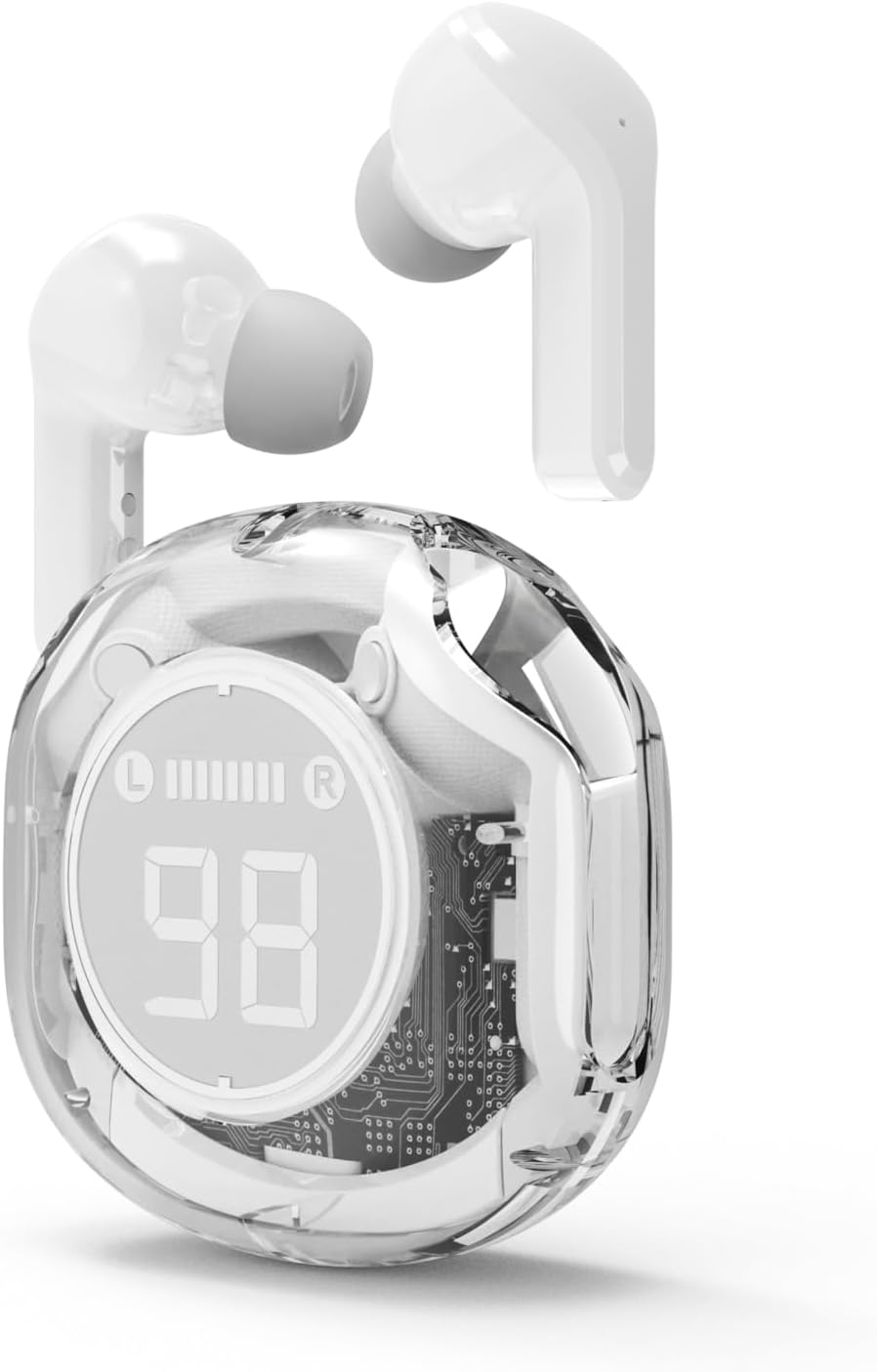
ຮູບທີ 4.2: The Gembird TWST-01-W Transparent Bluetooth Earbuds shown outside their charging case, ready for use or pairing. The transparent design of the earbuds themselves is visible.
5. ຄໍາແນະນໍາການດໍາເນີນງານ
The Gembird TWST-01-W earbuds utilize touch controls. Specific gestures may vary slightly; refer to the quick start guide included in your package for precise commands.
| ຟັງຊັນ | Action (Touch Control) |
|---|---|
| ເປີດເຄື່ອງ | ເອົາອອກຈາກກ່ອງສາກໄຟ. |
| ປິດເຄື່ອງ | ໃສ່ກັບຄືນໃສ່ກ່ອງສາກໄຟ. |
| ຫຼິ້ນ/ຢຸດດົນຕີ | ແຕະເທື່ອດຽວໃສ່ຫູຟັງຫູຟັງ. |
| ຕິດຕາມຕໍ່ໄປ | ແຕະສອງເທື່ອໃສ່ຫູຟັງເບື້ອງຂວາ. |
| ເພງກ່ອນໜ້າ | ແຕະສອງເທື່ອໃສ່ຫູຟັງທາງຊ້າຍ. |
| ຕອບ/ວາງສາຍ | ແຕະເທື່ອດຽວໃສ່ຫູຟັງຫູຟັງລະຫວ່າງສາຍໂທເຂົ້າ. |
| ປະຕິເສດການໂທ | ກົດຫູຟັງອັນໃດອັນໜຶ່ງຄ້າງໄວ້ 2 ວິນາທີໃນລະຫວ່າງສາຍໂທເຂົ້າ. |
| ເປີດໃຊ້ຜູ້ຊ່ວຍສຽງ | Triple tap on either earbud (functionality depends on device support). |
Note: Touch control sensitivity and specific functions may vary. Experiment to find the optimal touch points.
6. ການສາກໄຟ
6.1 ກຳລັງສາກຫູຟັງ
To charge the earbuds, simply place them into their designated slots within the charging case. Ensure the charging contacts align. The LCD display on the case will show the individual battery levels of the left (L) and right (R) earbuds.
6.2 ການສາກໄຟ Case
When the charging case battery is low, connect the provided charging cable to the case's charging port and to a standard USB power adapter (not included) or a computer's USB port. The LCD display will show the charging progress of the case. The color-changing backlight indicates active charging.
A full charge for the case typically takes a few hours. The earbuds provide up to 4 hours of listening time, and the fully charged case can provide multiple additional charges, extending total playback time.
7. ບໍາລຸງຮັກສາ
7.1 ການທໍາຄວາມສະອາດ
- ໃຊ້ຜ້າແພທີ່ອ່ອນ, ແຫ້ງ, ບໍ່ມີເສັ້ນດ່າງເພື່ອທຳຄວາມສະອາດຫູຟັງຫູຟັງ ແລະ ກ່ອງສາກ.
- ຢ່າໃຊ້ເຄື່ອງເຮັດຄວາມສະອາດຂັດ, ເຫຼົ້າ, ຫຼືສານລະລາຍສານເຄມີ.
- ຄ່ອຍໆທຳຄວາມສະອາດຈຸດສາກໄຟຢູ່ທັງຫູຟັງ ແລະ ກ່ອງເພື່ອຮັບປະກັນການເຊື່ອມຕໍ່ທີ່ຖືກຕ້ອງ.
7.2 ການເກັບຮັກສາ
- ເກັບຮັກສາຫູຟັງເອຍບັດໃສ່ໃນກະເປົ໋າສາກໄຟຂອງເຂົາເຈົ້າເມື່ອບໍ່ໄດ້ໃຊ້ເພື່ອປົກປ້ອງພວກມັນ ແລະ ສືບຕໍ່ສາກໄຟ.
- ຫຼີກລ້ຽງການເກັບຮັກສາໄວ້ໃນອຸນຫະພູມທີ່ສຸດ (ຮ້ອນຫຼືເຢັນ) ຫຼືໃນສະພາບແວດລ້ອມທີ່ມີຄວາມຊຸ່ມຊື່ນສູງ.
7.3 ການຕໍ່ຕ້ານນ້ໍາ
The earbuds are water resistant, meaning they can withstand splashes and sweat. They are not designed for submersion in water. Do not use them while swimming or showering. Ensure the earbuds are dry before placing them back into the charging case to prevent damage.
8. ການແກ້ໄຂບັນຫາ
ຖ້າເຈົ້າພົບບັນຫາ, ລອງໃຊ້ວິທີແກ້ໄຂຕໍ່ໄປນີ້:
| ບັນຫາ | ການແກ້ໄຂ |
|---|---|
| ຫູຟັງບໍ່ຈັບຄູ່ |
|
| ບໍ່ມີສຽງຈາກຫູຟັງອັນໜຶ່ງ |
|
| ບັນຫາການສາກໄຟ |
|
| ຄຸນະພາບສຽງບໍ່ດີ |
|
9. ຂໍ້ມູນຈໍາເພາະ
| ຄຸນສົມບັດ | ລາຍລະອຽດ |
|---|---|
| ຕົວແບບ | TWST-01-W |
| ຍີ່ຫໍ້ | ແກ້ວປະເສີດ |
| ວັດສະດຸ | ພາດສະຕິກ |
| ນ້ຳໜັກ | 80 g |
| ປະເພດຫມໍ້ໄຟ | Lithium Ion (1 AAAA battery included) |
| ເວລາຟັງ | ສູງສຸດເຖິງ 4 ຊົ່ວໂມງຕໍ່ການສາກໄຟ |
| ວິທີການຄວບຄຸມ | ແຕະ |
| ລຳໂພງເສັ້ນຜ່າສູນກາງ | 5 ຊຕມ |
| ການຕໍ່ຕ້ານນ້ໍາ | Water resistant (splash and sweat proof) |
| ການເຊື່ອມຕໍ່ | Bluetooth (USB for charging) |
| ການນໍາໃຊ້ທີ່ແນະນໍາ | ພາຍໃນ |
10. ການຮັບປະກັນແລະການສະຫນັບສະຫນູນ
Your Gembird TWST-01-W Transparent Bluetooth Earbuds come with a ການຮັບປະກັນສາມປີ against manufacturing defects. This warranty covers defects in materials and workmanship under normal use.
For warranty claims or technical support, please contact your retailer or the official Gembird support channels. Keep your proof of purchase for warranty validation.


