1. ບົດແນະນຳ
This manual provides detailed instructions for the setup, operation, and maintenance of your XBJ K6 Mini Portable Projector. Please read this manual thoroughly before using the device to ensure proper functionality and to maximize your viewປະສົບການ. ຮັກສາຄູ່ມືນີ້ໄວ້ສໍາລັບການອ້າງອີງໃນອະນາຄົດ.
2. ສິ່ງທີ່ຢູ່ໃນກ່ອງ
- XBJ K6 Portable Projector
- ສາຍໄຟ
- ການຄວບຄຸມໄລຍະໄກ
- ຄູ່ມືຜູ້ໃຊ້ (ເອກະສານນີ້)
3. ຜະລິດຕະພັນເກີນview
The XBJ K6 Mini Portable Projector is designed for versatile entertainment and presentation. It features 1080P support with 4K decoding, electric focus, auto keystone correction, and a 360° rotatable stand. Integrated with a Smart Android System, WiFi 6, and Bluetooth 5.2, it offers seamless connectivity and access to various applications.

Figure 3.1: XBJ K6 Mini Portable Projector front view ທີ່ມີລັກສະນະທີ່ສໍາຄັນ.
4. ຄໍາແນະນໍາການຕິດຕັ້ງ
4.1 ການຈັດວາງ
Position the projector on a stable, flat surface. The 360° rotatable stand allows for flexible projection angles, including walls, ceilings, or tents. Ensure there are no obstructions in front of the lens.

Figure 4.1: Projector placement flexibility with 360° rotating stand.
4.2 ການເຊື່ອມຕໍ່ພະລັງງານ
- ເຊື່ອມຕໍ່ສາຍໄຟເຂົ້າກັບພອດປ້ອນຂໍ້ມູນພະລັງງານຂອງໂປເຈັກເຕີ.
- ສຽບປາຍສາຍໄຟອີກດ້ານໜຶ່ງໃສ່ບ່ອນສຽບໄຟຟ້າທີ່ເໝາະສົມ.
- ກົດປຸ່ມເປີດປິດຢູ່ໂປເຈັກເຕີ ຫຼືຣີໂໝດຄວບຄຸມເພື່ອເປີດອຸປະກອນ.
4.3 ການປັບໂຟກັດ
The projector features electric focus. Use the remote control to adjust the sharpness of the projected image. Press the 'F+' or 'F-' buttons on the remote until the image is clear.

Figure 4.2: Adjusting electric focus with the remote control.
4.4 Keystone ການແກ້ໄຂ
The XBJ K6 projector includes automatic keystone correction. This feature automatically adjusts the image to be rectangular, even if the projector is placed at an angle. Manual adjustments may also be available through the settings menu if needed.
5. ຄໍາແນະນໍາການດໍາເນີນງານ
5.1 Navigating the Smart Android System
The projector runs on a Smart Android System, providing access to various pre-installed applications like Netflix and YouTube. Use the remote control to navigate the interface, select apps, and adjust settings.
5.2 ການເຊື່ອມຕໍ່ Wi-Fi
The projector supports Dual-Band WiFi 6 (2.4G/5G) for fast and stable internet connection.
- Go to the projector's settings menu.
- ເລືອກ 'ເຄືອຂ່າຍ' ຫຼື 'Wi-Fi'.
- ເລືອກເຄືອຂ່າຍ Wi-Fi ທີ່ທ່ານຕ້ອງການຈາກບັນຊີລາຍຊື່.
- ໃສ່ລະຫັດຜ່ານຖ້າຖືກຖາມ ແລະ ເຊື່ອມຕໍ່.
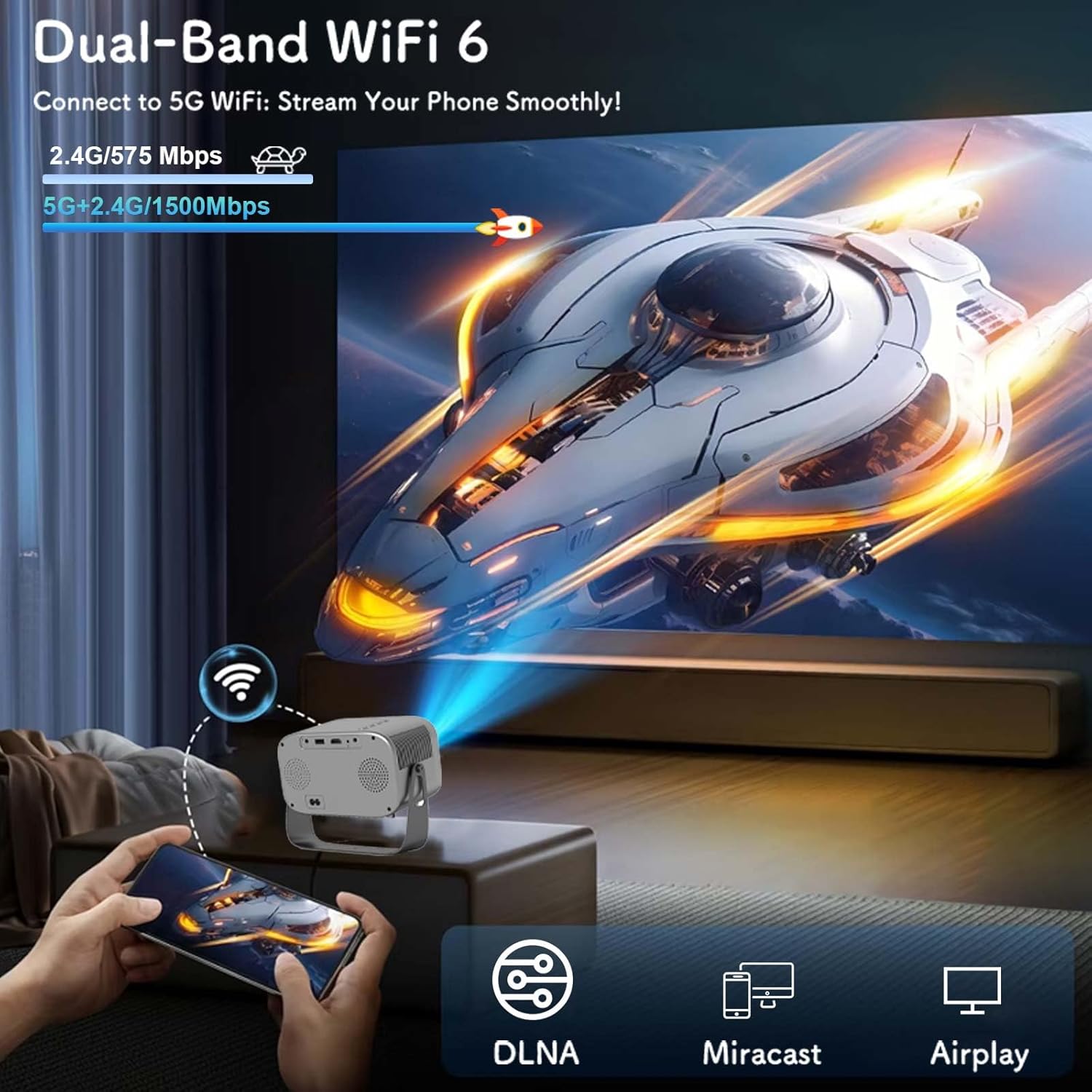
Figure 5.1: Connecting to Dual-Band WiFi 6 and screen mirroring.
5.3 ການເຊື່ອມຕໍ່ Bluetooth
The projector features Bluetooth 5.2, allowing connection to external audio devices like HiFi speakers or headphones for enhanced sound.
- ກວດໃຫ້ແນ່ໃຈວ່າອຸປະກອນສຽງ Bluetooth ຂອງທ່ານຢູ່ໃນໂໝດຈັບຄູ່.
- On the projector, go to the settings menu and select 'Bluetooth'.
- Scan for available devices and select your audio device to pair.

Figure 5.2: Bluetooth 5.2 connectivity for external audio.
5.4 ການສະທ້ອນໜ້າຈໍ
The projector supports DLNA, Miracast, and Airplay for screen mirroring from smartphones and other compatible devices. Ensure your device and the projector are connected to the same Wi-Fi network for optimal performance.
5.5 ການເຊື່ອມຕໍ່ອຸປະກອນພາຍນອກ
The projector offers multiple interfaces for connecting various devices:
- HDMI: Connect laptops, game consoles, TV sticks, etc.
- USB: Play media from USB flash drives.
- ຂອງ: Connect older devices using an AV cable (not included).
- Jack ສຽງ 3.5mm: ເຊື່ອມຕໍ່ຫູຟັງແບບມີສາຍ ຫຼື ລຳໂພງພາຍນອກ.
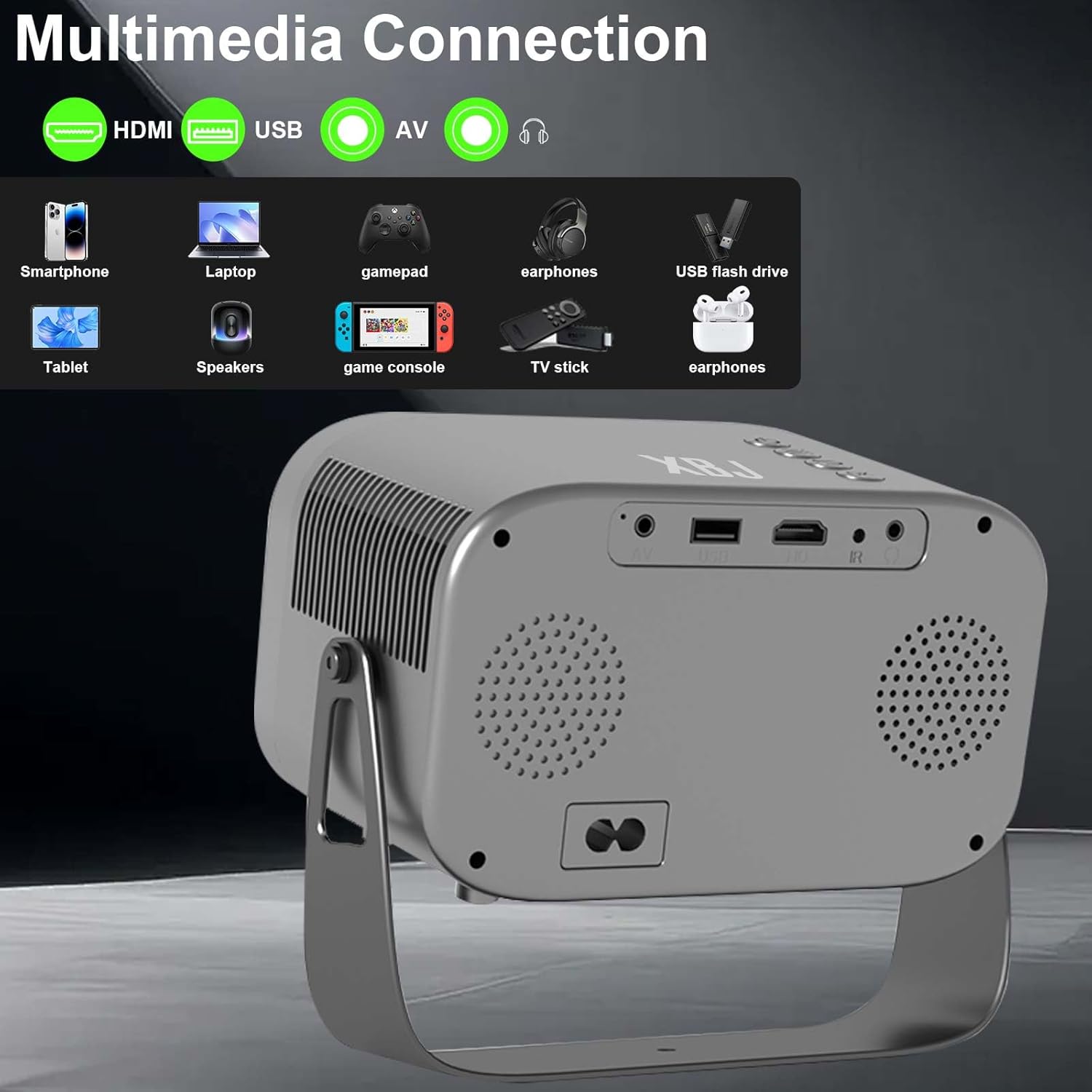
Figure 5.3: Multimedia connection ports on the XBJ K6 projector.
6. ບໍາລຸງຮັກສາ
6.1 ການເຮັດຄວາມສະອາດເລນ
ໃຊ້ຜ້າອ່ອນໆທີ່ບໍ່ມີຂົນທີ່ອອກແບບມາສະເພາະສຳລັບເລນ optical ເພື່ອເຊັດເລນໂປເຈັກເຕີຢ່າງອ່ອນໂຍນ. ຫຼີກລ່ຽງການໃຊ້ວັດສະດຸທີ່ມີສີຂັດ ຫຼື ສານເຄມີທີ່ຮຸນແຮງ ເຊິ່ງສາມາດທຳລາຍຊັ້ນເຄືອບເລນໄດ້.
6.2 ການອະນາໄມພາຍນອກ
ເຊັດດ້ານນອກຂອງໂປເຈັກເຕີດ້ວຍຜ້າອ່ອນ, ແຫ້ງ. ສໍາລັບຮອຍແຂງ, ເລັກນ້ອຍ damp ສາມາດໃຊ້ຜ້າເຊັດໂຕໄດ້, ຕາມດ້ວຍຜ້າແຫ້ງ. ໃຫ້ແນ່ໃຈວ່າບໍ່ມີຂອງແຫຼວເຂົ້າໄປໃນອຸປະກອນ.
6.3 ການເກັບຮັກສາ
ເມື່ອບໍ່ໄດ້ໃຊ້ງານເປັນເວລາດົນ, ໃຫ້ເກັບຮັກສາໂປເຈັກເຕີໄວ້ໃນບ່ອນທີ່ເຢັນ, ແຫ້ງ, ຫ່າງຈາກແສງແດດໂດຍກົງ ແລະ ອຸນຫະພູມທີ່ຮຸນແຮງ. ແນະນຳໃຫ້ປິດເລນເພື່ອປົກປ້ອງມັນຈາກຝຸ່ນ.
7. ການແກ້ໄຂບັນຫາ
If you encounter issues with your XBJ K6 projector, please refer to the following common solutions:
- ບໍ່ມີພະລັງງານ: Ensure the power cord is securely connected to both the projector and the power outlet. Try a different outlet.
- ບໍ່ມີຮູບພາບ: Check all cable connections (HDMI, AV). Ensure the correct input source is selected in the projector's menu. Adjust focus.
- ຮູບມົວ: Use the remote control's 'F+' and 'F-' buttons to adjust the electric focus. Ensure the projection surface is flat.
- ບໍ່ມີສຽງ ຫຼື ສຽງຕ່ຳ: Adjust the volume on both the projector and any connected external audio devices. Check Bluetooth connection if using wireless speakers/headphones. Ensure internal speakers are not muted.
- ບັນຫາການເຊື່ອມຕໍ່ Wi-Fi/Bluetooth: Ensure the projector is within range of your router/Bluetooth device. Restart the projector and your network devices. Re-pair Bluetooth devices.
- ບັນຫາການເຮັດວຽກຂອງແອັບຯ: Ensure the projector is connected to the internet. Check for app updates within the Android system. Some apps may have specific device compatibility requirements.
ສໍາລັບການຊ່ວຍເຫຼືອເພີ່ມເຕີມ, ກະລຸນາຕິດຕໍ່ຝ່າຍຊ່ວຍເຫຼືອລູກຄ້າ.
8. ຂໍ້ມູນຈໍາເພາະ
| ຄຸນສົມບັດ | ຂໍ້ມູນຈໍາເພາະ |
|---|---|
| ຍີ່ຫໍ້ | XBJ |
| ໝາຍເລກຕົວແບບ | TYYK6SKS001 |
| ນ້ໍາຫນັກລາຍການ | 1.87 ປອນ |
| ຂະໜາດສິນຄ້າ | 7.28 x 4.17 x 6.06 ນິ້ວ |
| ຄວາມລະອຽດການສະແດງ | 1280 x 720 (Supports 1080P/4K decoding) |
| ຄວາມສະຫວ່າງ | 300 ANSI Lumens |
| ເຕັກໂນໂລຊີການເຊື່ອມຕໍ່ | 3.5mm Jack, Bluetooth 5.2, HDMI, USB, Wi-Fi 6 |
| ຄຸນນະສົມບັດພິເສດ | Built-In Cooling System, Built-In Speaker, Built-In Wi-Fi, Digital Keystone Correction, Portable, Electric Focus, 360° Rotatable Stand |
| ການນໍາໃຊ້ທີ່ແນະນໍາ | Education, Gaming, Home Cinema |
9. ການຮັບປະກັນແລະການສະຫນັບສະຫນູນ
9.1 ຂໍ້ມູນການຮັບປະກັນ
New products may be damaged during shipping. If you receive a damaged item, please contact our store immediately. We are fully responsible for products sold via our official store.
9.2 ສະຫນັບສະຫນູນລູກຄ້າ
For technical support or any issues you encounter with your XBJ K6 Mini Portable Projector, please contact our customer support team. We are committed to helping you resolve any problems.
ອີເມວ: ESzxkj@outlook.com
24/7 Customer Support is available.


