1. ບົດແນະນຳ
The EDIFIER MP330 is a portable Bluetooth speaker designed to deliver a high-quality audio experience with its retro aesthetic and advanced features. It supports Hi-Res audio and offers versatile connectivity options.

Image: The EDIFIER MP330 portable Bluetooth speaker, showcasing its brown finish and integrated leather handle.
2. ເນື້ອໃນຊຸດ
ກະລຸນາກວດເບິ່ງກ່ອງສໍາລັບລາຍການຕໍ່ໄປນີ້:
- EDIFIER MP330 Speaker x 1
- ສາຍ USB-C ຫາ USB-C x 1
- ຄູ່ມືເລີ່ມຕົ້ນໄວ x 1
- Important Safety Information x 1

Image: A visual representation of the EDIFIER MP330 speaker and its included accessories: USB-C cable, quick start guide, and safety information.
3. ຜະລິດຕະພັນເກີນview
3.1 ການຄວບຄຸມແລະພອດ
The EDIFIER MP330 features intuitive controls and essential ports for various audio sources.
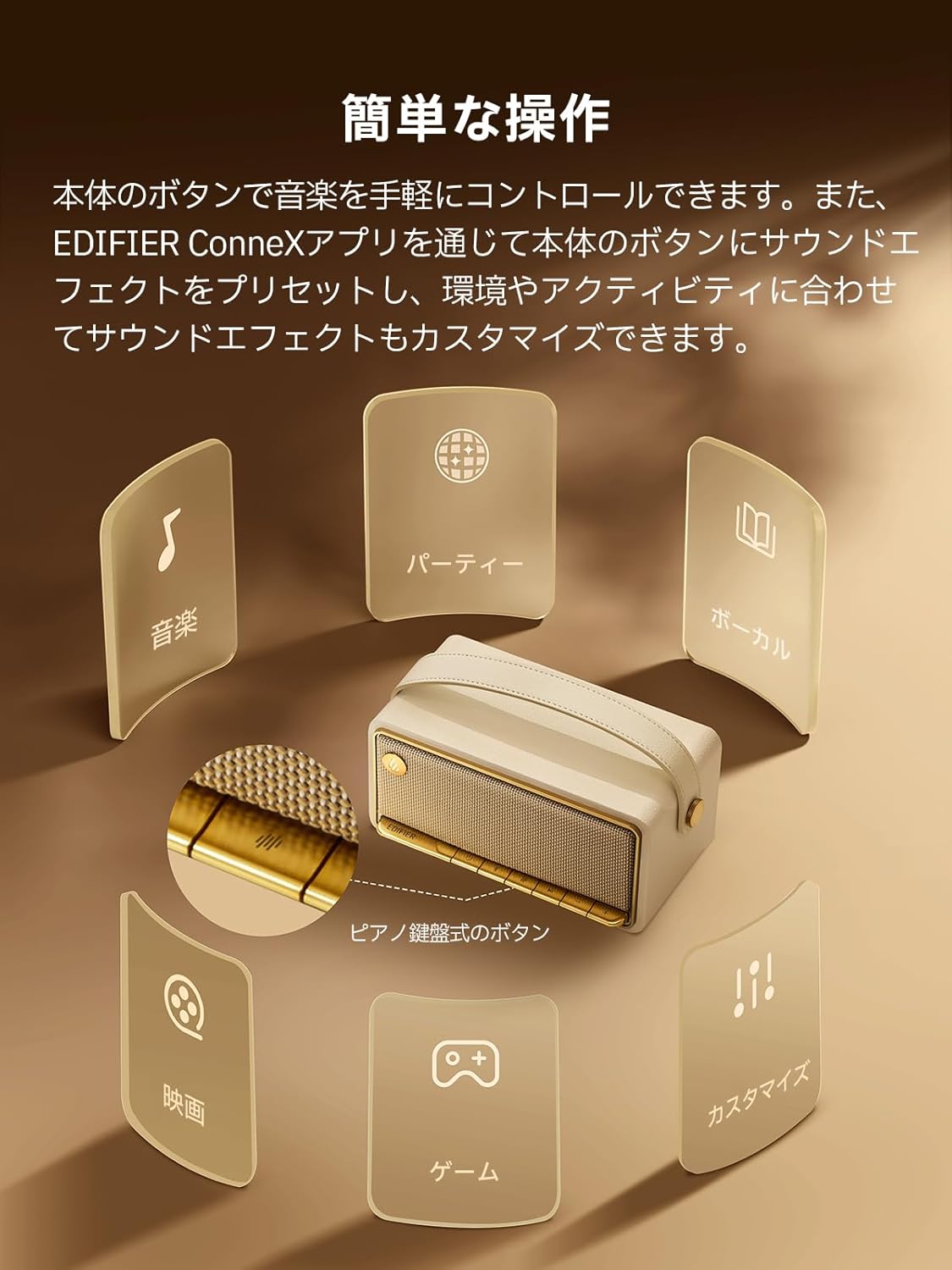
Image: A diagram illustrating the control buttons and indicator lights on the EDIFIER MP330 speaker, showing their functions for power, mode selection, playback, and volume.
- ປຸ່ມເປີດປິດ: ກົດຄ້າງໄວ້ເພື່ອເປີດ/ປິດ.
- ປຸ່ມໂໝດ: Short press to cycle through Bluetooth, USB-C, and microSD card input modes.
- ປຸ່ມຫຼິ້ນ/ຢຸດຊົ່ວຄາວ: ກົດສັ້ນເພື່ອຫຼິ້ນ ຫຼືຢຸດສຽງ.
- ປຸ່ມເພີ່ມສຽງຂຶ້ນ/ຕິດຕາມຕໍ່ໄປ: ກົດສັ້ນເພື່ອປະລິມານຂຶ້ນ, ກົດຄ້າງໄວ້ສຳລັບເພງຕໍ່ໄປ.
- ປະລິມານລົງ/ປຸ່ມຕິດຕາມກ່ອນໜ້າ: ກົດສັ້ນເພື່ອປະລິມານລົງ, ກົດຄ້າງໄວ້ສຳລັບເພງກ່ອນໜ້າ.
- ຜອດ USB-C: ສໍາລັບການສາກໄຟແລະສຽງ.
- ຊ່ອງສຽບກາດ microSD: ສໍາລັບການຫຼິ້ນສຽງ files directly from a microSD card.
4. ຕັ້ງຄ່າ
4.1 ກຳລັງສາກລຳໂພງ
Before first use, fully charge the speaker using the provided USB-C cable and a compatible power adapter (not included). The indicator light will show charging status.
4.2 ເປີດ/ປິດ
- ເພື່ອເປີດເຄື່ອງ: ກົດປຸ່ມເປີດປິດຄ້າງໄວ້ຈົນກ່ວາໄຟຕົວຊີ້ວັດຈະສະຫວ່າງ.
- ເພື່ອປິດເຄື່ອງ: ກົດປຸ່ມເປີດປິດຄ້າງໄວ້ຈົນກວ່າໄຟຊີ້ບອກຈະປິດ.
4.3 ການຈັບຄູ່ Bluetooth
ເພື່ອເຊື່ອມຕໍ່ອຸປະກອນຂອງທ່ານຜ່ານ Bluetooth:
- Power on the MP330 speaker. The Bluetooth indicator will flash, indicating it is in pairing mode.
- ໃນອຸປະກອນຂອງທ່ານ (ໂທລະສັບສະຫຼາດ, ແທັບເລັດ, ແລະອື່ນໆ), ເປີດໃຊ້ Bluetooth ແລະຊອກຫາອຸປະກອນທີ່ມີຢູ່.
- Select "EDIFIER MP330" from the list of devices.
- ເມື່ອເຊື່ອມຕໍ່ແລ້ວ, ຕົວຊີ້ວັດ Bluetooth ຈະຄົງຢູ່.
4.4 ການເຊື່ອມຕໍ່ຫຼາຍຈຸດ
The MP330 supports connecting to two Bluetooth devices simultaneously. After connecting the first device, put the speaker back into pairing mode and connect the second device. You can then switch between audio sources by pausing playback on one device and starting it on the other.

Image: Two mobile phones displaying music playback interfaces, indicating a multipoint Bluetooth connection to the EDIFIER MP330 speaker.
4.5 ການຈັບຄູ່ສະເຕຣິໂອ (TWS)
For an enhanced stereo sound experience, you can pair two MP330 speakers together:
- Ensure both MP330 speakers are powered on and not connected to any Bluetooth device.
- On one speaker, press and hold the Bluetooth button until it enters TWS pairing mode (indicator light will flash a specific pattern).
- The two speakers will automatically connect to each other. One speaker will become the left channel and the other the right.
- Once paired, connect your device to the primary speaker via Bluetooth as described in section 4.3.

Image: Two EDIFIER MP330 speakers, one black and one ivory, positioned to illustrate stereo pairing, with a Bluetooth logo and arrows indicating connection.
5. ຄໍາແນະນໍາການດໍາເນີນງານ
5.1 Switching Input Modes
Short press the Mode button to switch between Bluetooth, USB-C, and microSD card input modes. The indicator light will change color to reflect the active mode.
5.2 USB-C Audio Playback
Connect the MP330 to your computer using the provided USB-C cable. The speaker will automatically switch to USB-C audio mode. Select "EDIFIER MP330" as the audio output device on your computer.

Image: A diagram showing the EDIFIER MP330 speaker connected to a computer via a USB-C cable, indicating USB-C audio playback.
5.3 microSD Card Playback
ໃສ່ແຜ່ນ microSD ທີ່ມີສຽງ files into the microSD card slot. The MP330 will automatically switch to microSD card mode and begin playback.

Image: A diagram illustrating how to insert a microSD card into the dedicated slot on the EDIFIER MP330 speaker.
5.4 Using the EDIFIER Connex App
Download the EDIFIER Connex app to unlock extended features and customize your listening experience. The app allows you to:
- ສະຫຼັບແຫຼ່ງປ້ອນຂໍ້ມູນ.
- ຄວບຄຸມການຫຼິ້ນ.
- Customize sound effects (equalizer presets or custom settings).
- Access the electronic user manual and other settings.

Image: Multiple smartphone screens displaying the EDIFIER Connex app interface, highlighting various control and customization options for the speaker.
6. ບໍາລຸງຮັກສາ
To ensure the longevity and optimal performance of your EDIFIER MP330 speaker, follow these maintenance guidelines:
- ທໍາຄວາມສະອາດ: Use a soft, dry cloth to clean the speaker's surface. Avoid using abrasive cleaners, solvents, or strong chemicals, as they may damage the finish.
- ການເກັບຮັກສາ: ເກັບຮັກສາລໍາໂພງໄວ້ໃນບ່ອນທີ່ເຢັນ, ແຫ້ງແລ້ງຫ່າງຈາກແສງແດດໂດຍກົງ, ອຸນຫະພູມທີ່ຮຸນແຮງ, ແລະຄວາມຊຸ່ມຊື່ນສູງ.
- ການເປີດເຜີຍນ້ໍາ: The speaker is not waterproof. Avoid exposing it to water, rain, or excessive moisture.
- ການຈັດການ: ຈັດການລໍາໂພງດ້ວຍຄວາມລະມັດລະວັງ. ຫຼີກລ້ຽງການປະຖິ້ມມັນຫຼືການຮັບຜົນກະທົບທີ່ເຂັ້ມແຂງ.
- ການດູແລຫມໍ້ໄຟ: ສໍາລັບອາຍຸຂອງຫມໍ້ໄຟທີ່ດີທີ່ສຸດ, ຫຼີກເວັ້ນການປະຖິ້ມຫມໍ້ໄຟຢ່າງເຕັມທີ່ເລື້ອຍໆ. ຖ້າເກັບຮັກສາໄວ້ເປັນໄລຍະເວລາ, ສາກແບັດເຕີຣີໃຫ້ເຫຼືອປະມານ 50% ທຸກໆສອງສາມເດືອນ.
7. ການແກ້ໄຂບັນຫາ
If you encounter issues with your EDIFIER MP330 speaker, refer to the following common troubleshooting steps:
- ບໍ່ມີພະລັງງານ:
- ກວດໃຫ້ແນ່ໃຈວ່າລຳໂພງຖືກສາກເຕັມແລ້ວ.
- Check if the power button is pressed and held correctly to turn on the device.
- ບໍ່ມີສຽງ:
- Verify the volume level on both the speaker and your connected device.
- Ensure the correct input mode (Bluetooth, USB-C, microSD) is selected.
- ຖ້າໃຊ້ Bluetooth, ໃຫ້ຮັບປະກັນວ່າລຳໂພງຖືກຈັບຄູ່ ແລະ ເຊື່ອມຕໍ່ກັບອຸປະກອນຂອງທ່ານຢ່າງຖືກຕ້ອງແລ້ວ.
- If using a microSD card, ensure the card is inserted correctly and contains playable audio files.
- ບັນຫາການຈັບຄູ່ Bluetooth:
- Make sure the speaker is in Bluetooth pairing mode (flashing indicator light).
- ປິດໃຊ້ງານ ແລະເປີດໃຊ້ Bluetooth ຄືນໃໝ່ຢູ່ໃນອຸປະກອນຂອງທ່ານ.
- Move the speaker closer to your device and away from potential interference sources.
- ລອງຍົກເລີກການຈັບຄູ່ ແລະ ຈັບຄູ່ລຳໂພງຄືນໃໝ່ຈາກການຕັ້ງຄ່າ Bluetooth ຂອງອຸປະກອນຂອງທ່ານ.
- Stereo Pairing Not Working:
- Ensure both speakers are not connected to any other Bluetooth device before initiating TWS pairing.
- Follow the TWS pairing steps carefully (Section 4.5).
- ບັນຫາການເຊື່ອມຕໍ່ແອັບ:
- Ensure Bluetooth is enabled and the speaker is connected to your device.
- Update the EDIFIER Connex app to the latest version.
- ຣີສະຕາດທັງລຳໂພງ ແລະອຸປະກອນຂອງທ່ານ.
If the problem persists after trying these steps, please contact Edifier customer support for further assistance.
8. ຂໍ້ມູນຈໍາເພາະ
Detailed technical specifications for the EDIFIER MP330 speaker:

Image: A comparison chart highlighting key specifications of the EDIFIER MP330 and MP230 models, including output power, Bluetooth version, battery capacity, playback time, and Hi-Res audio support.
| ຄຸນສົມບັດ | ຂໍ້ມູນຈໍາເພາະ |
|---|---|
| ຊື່ຕົວແບບ | MP330 |
| ປະເພດລຳໂພງ | ລຳ ໂພງແບບພະກະພາ |
| ວັດສະດຸ | ໄມ້ (MDF) |
| ສີ | ສີນ້ຳຕານ |
| ພະລັງງານຜົນຜະລິດ | 40W RMS |
| ລຸ້ນ Bluetooth | 6.0 |
| ຄວາມອາດສາມາດຫມໍ້ໄຟ | 4800mAh |
| ເວລາຫຼິ້ນ | ສູງສຸດເຖິງ 19 ຊົ່ວໂມງ (ໃນລະດັບສຽງ 50%) |
| ການຕອບສະໜອງຄວາມຖີ່ | 53Hz-40kHz |
| ສຽງ Hi-Res | Supported (up to 24bit/96kHz) |
| ການເຊື່ອມຕໍ່ | Bluetooth, USB-C, microSD card |
| ຂະໜາດ (ກວ້າງ x ສູງ) | 20.7 x 11.6 x 10.1 cm |
| ນ້ຳໜັກ | 1.13 ກິໂລ |
| ວິທີການຄວບຄຸມ | ແອັບ, ປຸ່ມກົດ |
| ອັດຕາສ່ວນສັນຍານຫາສຽງລົບກວນ (S/N) | 85 dB |

Image: A technical drawing showing the dimensions (width, depth, height) and weight of the EDIFIER MP330 speaker.
9. ການຮັບປະກັນແລະການສະຫນັບສະຫນູນ
For warranty information, please refer to the warranty card included in your product packaging or visit the official Edifier website. If you require technical support or have questions about your EDIFIER MP330 speaker, please contact Edifier customer service through their official channels.
Edifier ຢ່າງເປັນທາງການ Webເວັບໄຊ: www.edifier.com


