1. ຄໍາແນະນໍາຄວາມປອດໄພ
Please read all instructions carefully before assembly and use to ensure safe operation and prevent injury or damage. Keep this manual for future reference.
- ໃຫ້ແນ່ໃຈວ່າອົງປະກອບທັງຫມົດມີຢູ່ແລະບໍ່ເສຍຫາຍກ່ອນທີ່ຈະປະກອບ. ຢ່າໃຊ້ຖ້າຫາກວ່າພາກສ່ວນໃດຫນຶ່ງຂາດຫາຍໄປຫຼືຜິດພາດ.
- ໃຫ້ເດັກນ້ອຍ ແລະ ສັດລ້ຽງຢູ່ຫ່າງຈາກໂຕະໃນລະຫວ່າງການໃຊ້ງານເພື່ອປ້ອງກັນອຸບັດຕິເຫດ.
- Ensure there are no obstructions (walls, furniture, cables, etc.) in the desk's path during height adjustment.
- Do not place heavy or unstable objects on the desk that exceed its maximum load capacity of 100 kg.
- Avoid placing the desk near heat sources, open flames, or in excessively humid environments.
- Unplug the desk from the power outlet before cleaning, maintenance, or if it will be unused for an extended period.
- ໃຊ້ພຽງແຕ່ອະແດບເຕີໄຟ ແລະ ສາຍໄຟທີ່ໃຫ້ມາເທົ່ານັ້ນ.
- Do not attempt to modify or disassemble the desk's electrical components. Contact qualified service personnel for repairs.
2. ຜະລິດຕະພັນເກີນview
The FLEXISPOT EC5 Lite is an electric height-adjustable desk frame designed for ergonomic workspaces. It features a robust dual-motor system and a stable 3-column leg design.
ຄຸນນະສົມບັດທີ່ສໍາຄັນ:
- Dual-Motor Lifting System: Provides smooth, quiet (<50 dB) and stable height adjustments.
- Wide Height Range: Adjustable from 60 cm to 125 cm to accommodate various user preferences and activities.
- ຄວາມສາມາດໃນການໂຫຼດສູງ: Supports up to 100 kg, suitable for multiple monitors and office equipment.
- Smart Memory Panel: Allows saving and recalling up to 4 preferred height settings.
- ເຕັກໂນໂລຊີຕ້ານການປະທະກັນ: Automatically stops and retracts the desk if an obstacle is detected during movement, ensuring safety.
- ການກໍ່ສ້າງທີ່ເຂັ້ມແຂງ: Made with reinforced steel for durability and stability.

Figure 2.1: Ultra-High Load Capacity (100 kg)

Figure 2.2: Large Height Adjustment Range (60-125 cm)

Figure 2.3: Powerful Dual Motors
3. ການຕິດຕັ້ງແລະການປະກອບ
The FLEXISPOT EC5 Lite desk frame is designed for straightforward assembly, typically completed in under 25 minutes. A detailed instruction manual is included with the product for step-by-step guidance.
ເຄັດລັບກອງປະຊຸມ:
- ລ້າງພື້ນທີ່ກວ້າງຂວາງສໍາລັບການປະກອບ.
- Lay out all parts and hardware according to the included manual.
- ຮັບປະກັນວ່າສະກູທັງໝົດຖືກຂັນແໜ້ນດີ, ແຕ່ຢ່າຂັນແໜ້ນເກີນໄປ.
- The frame's width is adjustable to fit various tabletop sizes.

Figure 3.1: Wide Adjustable Frame Width
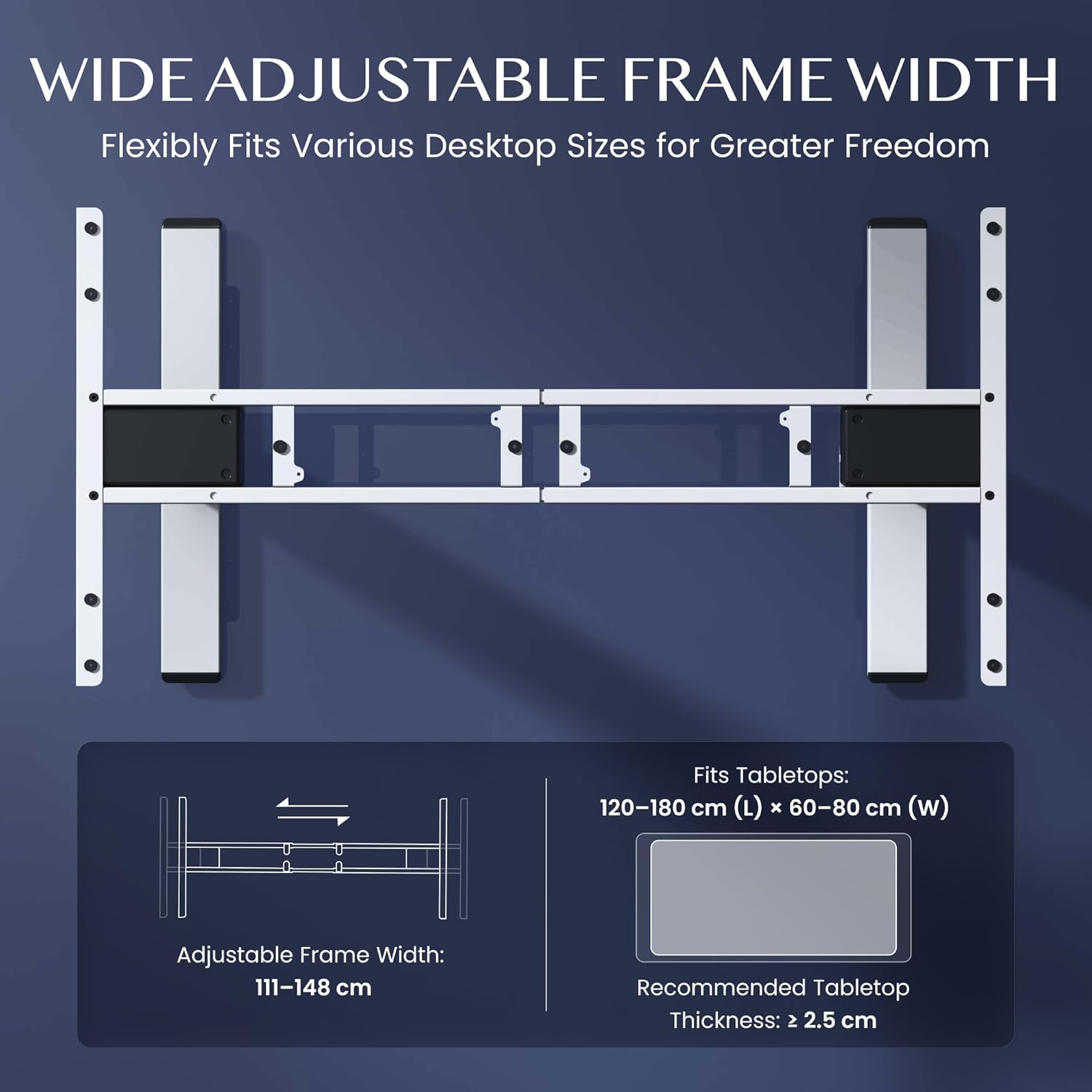
Figure 3.2: Easy Installation Components
4. ຄໍາແນະນໍາການດໍາເນີນງານ
The FLEXISPOT EC5 Lite desk is operated via a digital control panel, offering intuitive height adjustment and memory functions.
ແຜງຄວບຄຸມດິຈິຕອນ:

ຮູບ 4.1: ແຜງຄວບຄຸມດິຈິຕອນ
ການປັບຄວາມສູງ:
- ໃຊ້ ຂຶ້ນ (^) ແລະ ລົງ (v) arrow buttons on the control panel to manually adjust the desk height.
- The current height will be displayed on the LED screen.
ໜ່ວຍຄວາມຈຳທີ່ຕັ້ງໄວ້ລ່ວງໜ້າ:
The desk allows you to save up to 4 preferred height settings for quick adjustments.
- ປັບໂຕະກັບຄວາມສູງທີ່ທ່ານຕ້ອງການໂດຍໃຊ້ປຸ່ມຂຶ້ນ/ລົງ.
- ກົດ 'ມ' ປຸ່ມ. ໜ້າຈໍຈະສະແດງ 'S-'.
- ກົດປຸ່ມຕົວເລກໜຶ່ງທັນທີ (1, 2, 3, ຫຼື 4) to save the current height to that preset. The display will show 'S-1', 'S-2', etc., to confirm.
- ເພື່ອເອີ້ນຄືນຄວາມສູງທີ່ບັນທຶກໄວ້, ພຽງແຕ່ກົດປຸ່ມຕົວເລກທີ່ສອດຄ້ອງກັນ (1, 2, 3, ຫຼື 4). ໂຕະຈະຍ້າຍໄປທີ່ຕຳແໜ່ງທີ່ບັນທຶກໄວ້ໂດຍອັດຕະໂນມັດ.
ລະບົບຕ້ານການ collision:
The desk is equipped with an anti-collision sensor. If the desk encounters an obstacle during upward or downward movement, it will automatically stop and retract slightly to prevent damage or injury.
5. ບໍາລຸງຮັກສາ
Regular maintenance ensures the longevity and optimal performance of your FLEXISPOT EC5 Lite desk.
- ທໍາຄວາມສະອາດ: Wipe the desk frame and control panel with a soft, damp cloth. Avoid using harsh chemicals, abrasive cleaners, or excessive moisture.
- ການກວດກາ: ກວດເບິ່ງທຸກສະກູແລະສະກູເປັນໄລຍະເພື່ອຮັບປະກັນວ່າພວກມັນແຫນ້ນ. ຮັດແໜ້ນ ຖ້າຈຳເປັນ.
- ການຄຸ້ມຄອງສາຍໄຟ: ຮັບປະກັນວ່າສາຍໄຟທັງໝົດຖືກຈັດລຽງຢ່າງເປັນລະບຽບ ແລະ ບໍ່ຖືກບີບ ຫຼື ພັນກັນ, ໂດຍສະເພາະໃນລະຫວ່າງການປັບຄວາມສູງ.
- ສາຍໄຟ: Inspect the power cord for any signs of damage. If damaged, discontinue use and contact customer support.
6. ການແກ້ໄຂບັນຫາ
If you encounter issues with your FLEXISPOT EC5 Lite desk, refer to the following common troubleshooting steps:
- ໂຕະບໍ່ຍ້າຍ:
- ກວດເບິ່ງວ່າສາຍໄຟຖືກສຽບຢ່າງປອດໄພກັບໂຕະເຮັດວຽກ ແລະປລັກສຽບໄຟທີ່ເຮັດວຽກຫຼືບໍ່.
- Ensure no objects are obstructing the desk's movement, triggering the anti-collision system.
- Uneven Movement or Error Codes:
- Perform a reset: Lower the desk to its lowest position and hold the 'Down' button for approximately 5-10 seconds until the desk slightly lowers further or an 'RST' message appears, then releases. The desk should then reset to its lowest point.
- If an error code persists, consult the full product manual or contact customer support.
- ສິ່ງລົບກວນໃນລະຫວ່າງການປະຕິບັດງານ:
- A slight motor hum is normal. If the noise is excessive or unusual, check for loose components or contact support.
Video 6.1: Crash Test Demonstration. This video illustrates the desk's stability and durability under impact, showing minimal disturbance to items on the FlexiSpot desk compared to others.
7. ຂໍ້ມູນຈໍາເພາະ
Detailed technical specifications for the FLEXISPOT EC5 Lite Electric Standing Desk frame.

Figure 7.1: Desk Dimensions and Specifications
| ຄຸນສົມບັດ | ຂໍ້ມູນຈໍາເພາະ |
|---|---|
| ຍີ່ຫໍ້ | FLEXISPOT |
| ຕົວແບບ | EC5 Lite |
| ສີ | ສີຂາວ |
| ຂະໜາດສິນຄ້າ (L x W x H) | 68 x 148.6 x 125 cm (frame) |
| ວັດສະດຸ | ເຫຼັກໂລຫະປະສົມ |
| ຊ່ວງການປັບຄວາມສູງ | 60 - 125 ຊມ |
| ຄວາມສາມາດໃນການໂຫຼດສູງສຸດ | 100 ກິໂລ |
| ຄວາມໄວສູງສຸດ | 25 ມມ/ວິນາທີ |
| ລະດັບສຽງ | <50 dB |
| Frame Width Adjustment | 111 - 148 ຊມ |
| Recommended Tabletop Size | 120-180 cm (L) x 60-80 cm (W) |
| Recommended Tabletop Thickness | ≥ 2.5 ຊມ |
| ຄຸນນະສົມບັດພິເສດ | Electric, Height Adjustable, Smart Memory, Anti-collision Safety |
8. ການຮັບປະກັນແລະການສະຫນັບສະຫນູນ
FLEXISPOT stands behind the quality of its products with comprehensive warranty coverage.
- Frame and Motors: ຮັບປະກັນ 5 ປີ.
- ອົງປະກອບເອເລັກໂຕຣນິກ: ຮັບປະກັນ 2 ປີ.
For warranty claims, technical assistance, or any questions regarding your FLEXISPOT EC5 Lite desk, please contact FLEXISPOT customer support through their official website or your point of purchase. Please have your purchase receipt and product model information ready.


