1. ບົດແນະນຳ
ຂອບໃຈສໍາລັບການຊື້asing the ZEBRONICS Juke BAR 200A Soundbar. This manual provides essential information for the safe and correct operation of your device. Please read it thoroughly before use and retain it for future reference.
ເນື້ອໃນຊຸດ
- ແຖບສຽງ - 1 ໜ່ວຍ
- ຊັບວູບເຟີ - 1 ໜ່ວຍ
- ຄູ່ມືລະຫັດ QR - 1 ໜ່ວຍ
- Power Adapter - 1 unit
- ຣີໂໝດຄວບຄຸມ - 1 ໜ່ວຍ
2. ຄໍາແນະນໍາຄວາມປອດໄພ
ເພື່ອຮັບປະກັນການເຮັດວຽກທີ່ປອດໄພ ແລະປ້ອງກັນຄວາມເສຍຫາຍ, ກະລຸນາປະຕິບັດຕາມຂໍ້ຄວນລະວັງດ້ານຄວາມປອດໄພຕໍ່ໄປນີ້:
- ຢ່າເຮັດໃຫ້ອຸປະກອນຖືກຝົນຫຼືຄວາມຊຸ່ມຊື່ນ.
- ຫ້າມປິດຊ່ອງລະບາຍອາກາດໃດໆ.
- ວາງອຸປະກອນຢູ່ເທິງພື້ນທີ່ຮາບພຽງທີ່ຫມັ້ນຄົງ.
- ໃຊ້ອະແດບເຕີໄຟຟ້າທີ່ສະໜອງໃຫ້ໂດຍຜູ້ຜະລິດເທົ່ານັ້ນ.
- ຫ້າມເປີດຄasing; ສົ່ງການບໍລິການທັງໝົດໃຫ້ກັບບຸກຄະລາກອນທີ່ມີຄຸນວຸດທິ.
- ເກັບຮັກສາອຸປະກອນໃຫ້ຫ່າງຈາກແສງແດດໂດຍກົງ, ແຫຼ່ງຄວາມຮ້ອນ ແລະ ສະໜາມແມ່ເຫຼັກແຮງ.
- ເຮັດຄວາມສະອາດດ້ວຍຜ້າແຫ້ງເທົ່ານັ້ນ.
3. ຜະລິດຕະພັນເກີນview
The ZEBRONICS Juke BAR 200A is a compact soundbar system designed to enhance your audio experience. It features a soundbar with dual drivers and a dedicated subwoofer for powerful bass.
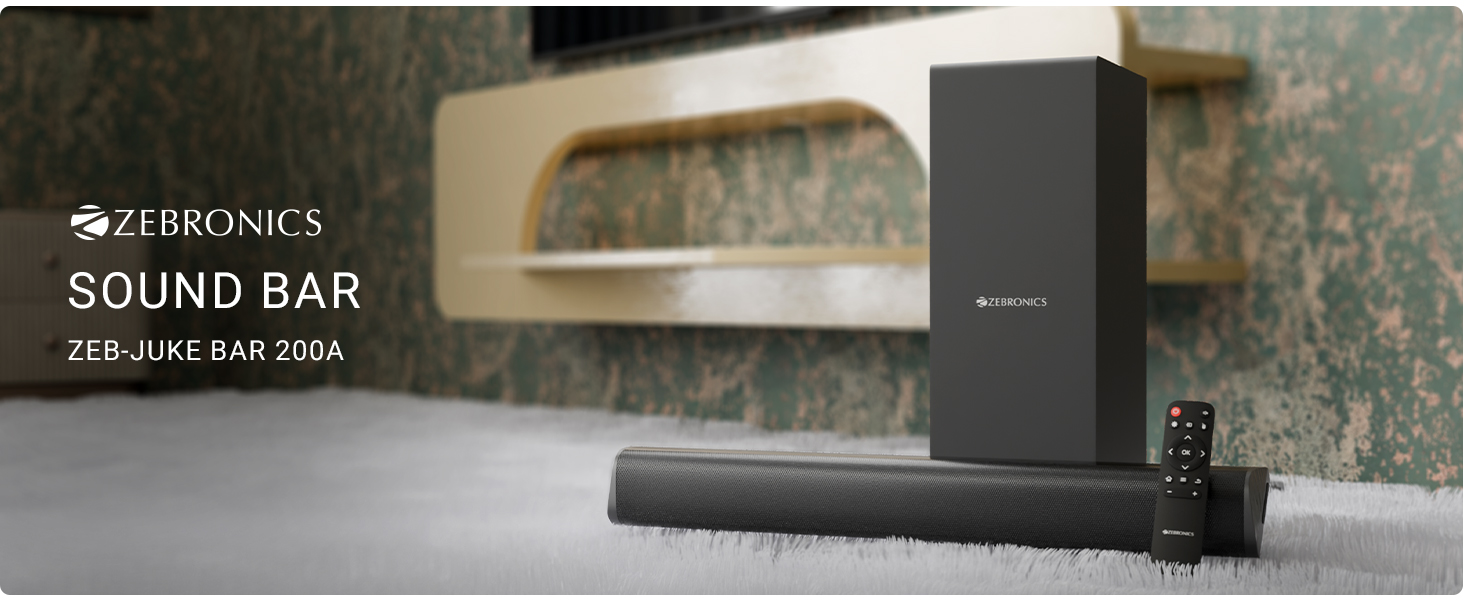
ຮູບທີ 3.1: ZEBRONICS Juke BAR 200A Soundbar, Subwoofer, and Remote Control. This image displays the complete sound system, including the main soundbar unit, the separate subwoofer, and the remote control, providing a visual representation of all primary components.
ຄຸນນະສົມບັດທີ່ສໍາຄັນ
- ຜົນຜະລິດ 90W RMS: ໃຫ້ສຽງທີ່ມີພະລັງ ແລະ ຊັດເຈນ.
- Dual Driver Soundbar: Equipped with 5.08cm x 2 drivers for balanced sound.
- 11.43cm Subwoofer: Provides deep, rich bass.
- ການເຊື່ອມຕໍ່ຫຼາຍ: Supports Bluetooth v5.1, HDMI ARC, and USB.
- Dolby Audio Decoding: Built-in Dolby Digital and Dolby Digital+ decoding for versatile audio.
- ຕິດຝາໄດ້: ອອກແບບມາສຳລັບທາງເລືອກໃນການຈັດວາງທີ່ມີຄວາມຍືດຫຍຸ່ນ.
- ການຄວບຄຸມໄລຍະໄກ: Full control over audio settings.

ຮູບທີ 3.2: Soundbar Media and Volume Controls and Remote Control. This image highlights the physical control buttons on the soundbar for power, volume up, and volume down, alongside a detailed view of the included remote control, illustrating all available buttons for comprehensive audio management.

ຮູບທີ 3.3: Soundbar Rear Panel with Connectivity Ports. This image provides a close-up view of the soundbar's rear panel, clearly labeling the HDMI ARC, USB, DC IN, and SW OUT ports, essential for understanding connection options.
4. ຕັ້ງຄ່າ
4.1 ການຈັດວາງ
Place the soundbar on a stable surface in front of your television or mount it on the wall below your TV. Position the subwoofer on the floor, ideally near the soundbar, for optimal bass performance.
4.2 ການເຊື່ອມຕໍ່ຊັບວູບເຟີ
Connect the subwoofer to the soundbar using the provided SW OUT cable. Ensure a secure connection.
4.3 ການເຊື່ອມຕໍ່ພະລັງງານ
- ເຊື່ອມຕໍ່ອະແດບເຕີໄຟກັບຜອດ DC IN ໃນແຖບສຽງ.
- ສຽບອະແດບເຕີໄຟເຂົ້າໄປໃນບ່ອນສຽບຝາທີ່ເຫມາະສົມ.
4.4 ການເຊື່ອມຕໍ່ສຽງ
ເລືອກຫນຶ່ງໃນວິທີການຕໍ່ໄປນີ້ເພື່ອເຊື່ອມຕໍ່ແຫຼ່ງສຽງຂອງທ່ານ:
- HDMI ARC: For optimal audio quality and control, connect an HDMI cable from your TV's HDMI ARC port to the HDMI ARC port on the soundbar. This allows your TV remote to control the soundbar's volume.
- Bluetooth: For wireless connection, refer to the "Bluetooth Pairing" section in Operating Instructions.
- USB: ໃສ່ແຜ່ນ USB ທີ່ມີສຽງ files ເຂົ້າໄປໃນພອດ USB ສໍາລັບການຫຼິ້ນໂດຍກົງ.
5. ຄໍາແນະນໍາການດໍາເນີນງານ
5.1 ເປີດ/ປິດ
- ກົດ ພະລັງງານ ປຸ່ມເທິງແຖບສຽງ ຫຼືການຄວບຄຸມໄລຍະໄກເພື່ອເປີດ ຫຼືປິດເຄື່ອງ.
- The LED indicator on the soundbar will illuminate when powered on.
5.2 ການເລືອກຮູບແບບການປ້ອນຂໍ້ມູນ
ກົດ ປ້ອນຂໍ້ມູນ button on the remote control to cycle through available input modes: Bluetooth (BT), HDMI ARC, and USB.
5.3 ການຈັບຄູ່ Bluetooth
- Turn on the soundbar and select Bluetooth mode. The LED indicator will flash, indicating pairing mode.
- Enable Bluetooth on your mobile device or computer and search for "ZEB-JUKE BAR 200A".
- Select the device to pair. Once connected, the LED indicator will glow steadily.
5.4 ການຄວບຄຸມປະລິມານ
- ໃຊ້ ປະລິມານຂຶ້ນ (+) ແລະ ບໍລິມາດລົງ (-) ປຸ່ມຕ່າງໆໃນແຖບສຽງ ຫຼື ຣີໂໝດຄວບຄຸມເພື່ອປັບລະດັບສຽງ.
- ກົດ ປິດສຽງ button on the remote to mute or unmute the audio.
5.5 ການຫຼິ້ນ USB
Insert a USB flash drive into the USB port. The soundbar will automatically switch to USB mode and begin playing compatible audio files. Use the remote control for playback functions (Play/Pause, Next/Previous Track).
6. ຝາຜະ ໜັງ
The ZEBRONICS Juke BAR 200A is designed to be wall-mountable. Ensure you use appropriate screws and wall plugs for your wall type. It is recommended to consult a professional for wall mounting to prevent damage or injury.
- Measure the distance between the mounting holes on the back of the soundbar.
- Mark the corresponding positions on the wall.
- ເຈາະຮູແລະສຽບໃສ່ຝາ (ຖ້າຈໍາເປັນ).
- Secure the soundbar to the wall using suitable screws.
7. ບໍາລຸງຮັກສາ
- ທໍາຄວາມສະອາດ: ໃຊ້ຜ້າປຽກແຫ້ງເພື່ອເຮັດຄວາມສະອາດພື້ນຜິວຂອງແຖບສຽງ ແລະເຄື່ອງຍ່ອຍ. ຢ່າໃຊ້ເຄື່ອງເຮັດຄວາມສະອາດຂອງແຫຼວຫຼືວັດສະດຸຂັດ.
- ການເກັບຮັກສາ: ຖ້າເກັບຮັກສາເຄື່ອງສໍາລັບໄລຍະເວລາທີ່ຍາວນານ, ຖອດມັນອອກຈາກພະລັງງານແລະເກັບໄວ້ໃນບ່ອນທີ່ເຢັນ, ແຫ້ງ.
- ການລະບາຍອາກາດ: ໃຫ້ແນ່ໃຈວ່າບໍ່ປິດຊ່ອງລະບາຍອາກາດເພື່ອປ້ອງກັນຄວາມຮ້ອນເກີນໄປ.
8. ການແກ້ໄຂບັນຫາ
| ບັນຫາ | ສາເຫດທີ່ເປັນໄປໄດ້ | ການແກ້ໄຂ |
|---|---|---|
| ບໍ່ມີພະລັງງານ | ອະແດບເຕີໄຟບໍ່ໄດ້ເຊື່ອມຕໍ່ ຫຼືປລັກສຽບເກີດຄວາມຜິດພາດ. | Check power connections. Try a different outlet. |
| ບໍ່ມີສຽງ | Incorrect input mode, low volume, or incorrect cable connection. | Select the correct input mode. Increase volume. Check audio cables. |
| Bluetooth ບໍ່ເຊື່ອມຕໍ່ | Soundbar not in pairing mode, device too far, or previously paired. | Ensure soundbar is in BT pairing mode. Move device closer. Forget device on your phone and re-pair. |
| ການຄວບຄຸມໄລຍະໄກບໍ່ເຮັດວຽກ | Low battery or obstruction. | Replace remote batteries. Ensure no obstructions between remote and soundbar. |
9. ຂໍ້ມູນຈໍາເພາະ
| ຄຸນສົມບັດ | ລາຍລະອຽດ |
|---|---|
| ຊື່ຕົວແບບ | Zeb - Juke Bar 200A |
| ປະເພດລຳໂພງ | Soundbar ກັບ Subwoofer |
| ພະລັງງານຜົນຜະລິດທັງຫມົດ | 90 Watts RMS (Soundbar: 20W x 2, Subwoofer: 50W) |
| ເສັ້ນຜ່າສູນກາງຂອງ Subwoofer | 11.43 ຊັງຕີແມັດ |
| Soundbar Driver Size | ຂະ ໜາດ 5.08cm x 2 |
| ການເຊື່ອມຕໍ່ | Bluetooth v5.1, HDMI ARC, USB |
| ຊ່ອງສຽງອ້ອມຮອບ | 2.1 |
| ການຖອດລະຫັດສຽງ | Dolby Digital, Dolby Digital+ |
| ວິທີການຄວບຄຸມ | Remote, Control Buttons |
| ຂະໜາດສິນຄ້າ | 6.3 ລວງຍາວ x 50 ລວງກວ້າງ x 6.3 ຊັງຕີແມັດ (Soundbar) |
| ນ້ໍາຫນັກລາຍການ | 2.5 ກິໂລ |
| ອົງປະກອບລວມ | Sound Bar, Subwoofer, QR Code Guide, Power Adapter, Remote |
10. ຂໍ້ມູນການຮັບປະກັນ
This product is covered by a manufacturer's warranty. Please refer to the QR Code Guide included in your package or visit the official ZEBRONICS website for detailed warranty terms and conditions. Retain your purchase receipt as proof of purchase for warranty claims.
For extended warranty options, please check with your retailer or the ZEBRONICS official channels.
11. ສະຫນັບສະຫນູນ
For technical assistance, product inquiries, or service requests, please contact ZEBRONICS customer support:
- ທາງການ Webເວັບໄຊ: www.zebronics.com
- ບໍລິການລູກຄ້າ: Refer to the QR Code Guide or the official website for the latest contact information (phone numbers, email support).
Please have your product model number (Juke BAR 200A) and purchase details ready when contacting support.


