1. ບົດແນະນຳ
ຂອບໃຈສໍາລັບການຊື້asing the Supersonic Professional Stereo Amplifier AV-972SA. This amplifier is designed to provide high-fidelity audio for your home entertainment or karaoke system. With its versatile features, including USB/SD card playback, FM radio, and microphone inputs, it offers a powerful and clear sound experience. Please read this manual carefully before operating the unit to ensure proper use and to maximize its performance.
2. ຄໍາແນະນໍາຄວາມປອດໄພທີ່ສໍາຄັນ
- ການສະຫນອງພະລັງງານ: ຮັບປະກັນການສະຫນອງພະລັງງານ voltage matches the requirements specified on the unit (220V~250V/50Hz).
- ການລະບາຍອາກາດ: ຫ້າມປິດຊ່ອງລະບາຍອາກາດໃດໆ. ຕິດຕັ້ງຕາມຄໍາແນະນໍາຂອງຜູ້ຜະລິດ.
- ນ້ໍາແລະຄວາມຊຸ່ມ: ຢ່າເຮັດໃຫ້ເຄື່ອງນີ້ຖືກຝົນ ຫຼືຄວາມຊຸ່ມຊື່ນ. ຫ້າມວາງສິ່ງຂອງທີ່ເຕັມໄປດ້ວຍນ້ຳເຊັ່ນ: ໂຖປັດສະວະ, ໃສ່ເຄື່ອງ.
- ຄວາມຮ້ອນ: ຫ້າມຕິດຕັ້ງໃກ້ກັບແຫຼ່ງຄວາມຮ້ອນເຊັ່ນລັງສີ, ເຄື່ອງບັນທຶກຄວາມຮ້ອນ, ເຕົາຫຼືອຸປະກອນອື່ນໆ (ລວມທັງ. amplifiers) ທີ່ຜະລິດຄວາມຮ້ອນ.
- ທໍາຄວາມສະອາດ: ເຮັດຄວາມສະອາດດ້ວຍຜ້າແຫ້ງເທົ່ານັ້ນ.
- ການບໍລິການ: ຢ່າພະຍາຍາມບໍລິການຜະລິດຕະພັນນີ້ດ້ວຍຕົນເອງ. ອ້າງເຖິງການບໍລິການທັງtoົດໃຫ້ກັບພະນັກງານບໍລິການທີ່ມີຄຸນວຸດທິ.
- ການເຊື່ອມຕໍ່ລຳໂພງ: Ensure correct polarity when connecting speakers to prevent damage to the amplifier ແລະລໍາໂພງ.
3. ຄຸນນະສົມບັດທີ່ສໍາຄັນ
- Luxury Color Pointer Screen Display
- High-Fidelity Stereo Dynamic Ampການອອກແບບຊີວິດ
- Bass-enhancement Technology
- ຜົນຜະລິດ 3000W ທີ່ມີປະສິດທິພາບ
- Professional Karaoke FM Radio Tuner
- USB/SD Card Playback for MP3 files
- Low Leak Magnetic Ring type Voltage
- Optimized for use with 12", 15", and 18" loudspeakers
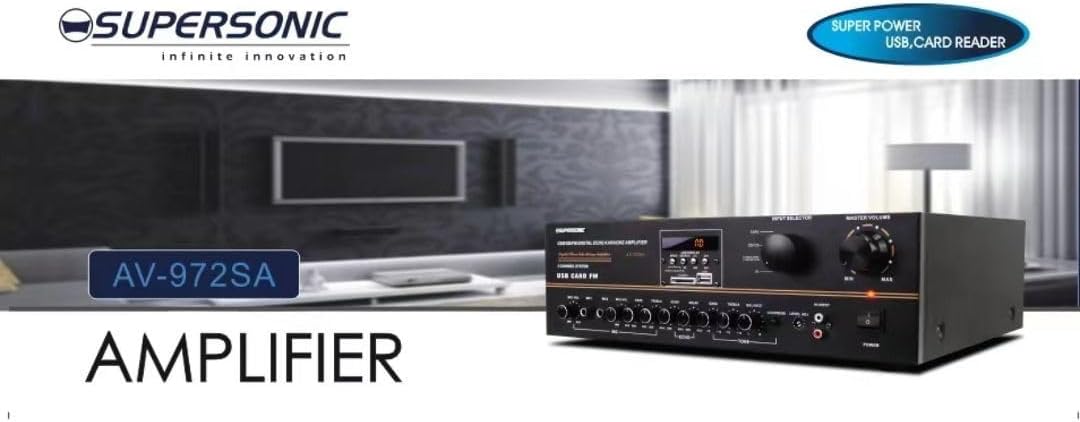
ຮູບພາບ 3.1: A visual representation of the key features of the Supersonic AV-972SA amplifier, including its display, power output, and connectivity options.
4. ຜະລິດຕະພັນເກີນview
The Supersonic AV-972SA amplifier features a user-friendly front panel for easy control and a rear panel for all necessary connections.
4.1 ກະດານດ້ານ ໜ້າ

ຮູບພາບ 4.1: ດ້ານໜ້າ view of the Supersonic AV-972SA amplifier, showcasing its controls, display, and input ports in a home setting.
ແຜງດ້ານຫນ້າປະກອບມີ:
- ປຸ່ມເປີດປິດ: ຫັນ ampຊີວິດເປີດຫຼືປິດ.
- ການຄວບຄຸມລະດັບສຽງຫຼັກ: ປັບປະລິມານຜົນຜະລິດໂດຍລວມ.
- ການຄວບຄຸມສຽງເບດ/ສຽງດັງ: Adjusts low and high frequency response.
- ຜູ້ເລືອກຂາເຂົ້າ: Switches between different audio sources (e.g., USB, SD, FM, AUX).
- ຊ່ອງສຽບກາດ USB/SD: ສໍາລັບການຫຼິ້ນສຽງ fileໂດຍກົງຈາກໄດຣຟ໌ USB ຫຼື SD card.
- FM Tuner Controls: For radio station selection and tuning.
- ການປ້ອນຂໍ້ມູນໄມໂຄຣໂຟນ: For connecting microphones for karaoke or public address.
- ຈໍສະແດງຜົນ: ສະແດງຮູບແບບປະຈຸບັນ, ຂໍ້ມູນຕິດຕາມ, ຫຼືຄວາມຖີ່ FM.
4.2 ແຜງດ້ານຫລັງ
The rear panel provides all necessary connections for speakers, power, and external audio sources.
- ປາຍ ລຳ ໂພງ: Connect your loudspeakers here. Ensure correct polarity (+ to + and - to -).
- ການປ້ອນຂໍ້ມູນສຽງ (RCA): For connecting external audio devices like CD players, DVD players, or other audio sources.
- ສາຍໄຟເຂົ້າ: Connect the provided power cord here.
- FM Antenna Input: Connect the FM antenna for improved radio reception.
5. ຄູ່ມືການຕິດຕັ້ງ
Follow these steps to set up your Supersonic AV-972SA ampມີຊີວິດຊີວາ:
- ການຈັດວາງ: ວາງ amplifier on a stable, flat surface with adequate ventilation around it. Avoid direct sunlight, heat sources, or areas with high humidity.
- ການເຊື່ອມຕໍ່ລຳໂພງ: Connect your loudspeakers to the speaker terminals on the rear panel. Match the positive (+) terminal on the amplifier to the positive (+) terminal on your speaker, and the negative (-) to the negative (-). Ensure all connections are secure. This amplifier is designed to work best with 12", 15", or 18" loudspeakers.
- ການເຊື່ອມຕໍ່ແຫຼ່ງສຽງ:
- ອຸປະກອນພາຍນອກ: Connect your CD player, DVD player, or other audio sources to the RCA audio input jacks on the rear panel.
- ແຜ່ນ USB/SD: Insert a USB flash drive or SD card into the respective slot on the front panel.
- ເສົາອາກາດ FM: Connect the FM antenna to the designated input on the rear panel for optimal radio reception.
- ການເຊື່ອມຕໍ່ພະລັງງານ: ຮັບປະກັນ amplifier's power switch is in the OFF position. Connect the power cord to the amplifier's power input and then plug it into a suitable 220V~250V/50Hz AC power outlet.
6. ຄໍາແນະນໍາການດໍາເນີນງານ
6.1 ການເປີດ/ປິດ
ກົດ ປຸ່ມເປີດປິດ ຢູ່ແຜງດ້ານໜ້າເພື່ອໝຸນ amplifier ON. The display will illuminate. Press it again to turn the ampLifier ປິດ.
6.2 Selecting Audio Source
ໃຊ້ ຕົວເລືອກການປ້ອນຂໍ້ມູນ button or knob on the front panel to cycle through available audio sources: USB, SD, FM, or AUX (RCA input).
6.3 ການຄວບຄຸມປະລິມານ ແລະສຽງ
- ປະລິມານໂທ: ໝຸນ ປະລິມານຕົ້ນສະບັບ knob to adjust the overall sound level. Start with a low volume and gradually increase it.
- Bass/Treble: ໃຊ້ ເບສ ແລະ ສຽງດັງ knobs to fine-tune the low and high frequencies of the audio output to your preference.
6.4 ການຫຼິ້ນບັດ USB/SD
Once a USB drive or SD card containing MP3 audio files is inserted, the amplifier will automatically switch to USB/SD mode and begin playback. Use the control buttons (Play/Pause, Next, Previous) on the front panel to manage playback.
6.5 ການດໍາເນີນງານວິທະຍຸ FM
Select the FM input using the ຕົວເລືອກການປ້ອນຂໍ້ມູນ. Use the FM tuner controls to scan for and select radio stations. The display will show the current frequency.
6.6 ການໃຊ້ໄມໂຄຣໂຟນ (ຄາຣາໂອເກະ)
Connect your microphones to the microphone input jacks on the front panel. Adjust the microphone volume and echo effects (if available) using the dedicated controls. Ensure the main volume is set appropriately to avoid feedback.
7. ບໍາລຸງຮັກສາ
- ທໍາຄວາມສະອາດ: Disconnect the power before cleaning. Use a soft, dry cloth to wipe the exterior of the ampເຄື່ອງສີດນໍ້າຢາ. ຢ່າໃຊ້ນໍ້າຢາທໍາຄວາມສະອາດທີ່ເປັນຂອງແຫຼວ ຫຼື ສະເປຣສີດນໍ້າຢາ.
- ການລະບາຍອາກາດ: Regularly check that the ventilation openings are clear of dust and debris to prevent overheating.
- ການເກັບຮັກສາ: ຖ້າຫາກວ່າການເກັບຮັກສາ amplifier for an extended period, ensure it is in a cool, dry place, away from direct sunlight and extreme temperatures.
8. ການແກ້ໄຂບັນຫາ
| ບັນຫາ | ສາເຫດທີ່ເປັນໄປໄດ້ | ການແກ້ໄຂ |
|---|---|---|
| ບໍ່ມີພະລັງງານ | ບໍ່ໄດ້ເຊື່ອມຕໍ່ສາຍໄຟ; ປລັກໄຟມີບັນຫາ; Amplifier power switch off | Check power cord connection; Try a different outlet; Ensure power switch is ON |
| ບໍ່ມີສຽງອອກ | Volume too low; Incorrect input selected; Speaker wires loose or incorrectly connected; Faulty audio source | Increase master volume; Select correct input; Check speaker connections and polarity; Test with a different audio source |
| ການຮັບ FM ບໍ່ດີ | ເສົາອາກາດບໍ່ໄດ້ເຊື່ອມຕໍ່ ຫຼື ຢູ່ໃນຕຳແໜ່ງທີ່ບໍ່ດີ; ສັນຍານອ່ອນ | Connect FM antenna securely; Adjust antenna position; Try manual tuning |
| USB/SD ບໍ່ຫຼິ້ນ | ບໍ່ຖືກຕ້ອງ file format; USB/SD card faulty or not inserted correctly; Amplifier not in USB/SD mode | ຮັບປະກັນ files are MP3 format; Reinsert USB/SD card; Select USB/SD input mode |
9. ຂໍ້ມູນຈໍາເພາະ
| ຄຸນສົມບັດ | ຂໍ້ມູນຈໍາເພາະ |
|---|---|
| ຍີ່ຫໍ້ | ສຽງສູງ |
| ໝາຍເລກຕົວແບບ | AMP-AV972SA |
| ຜົນຜະລິດວັດtage | 3000W |
| ເຕັກໂນໂລຊີການເຊື່ອມຕໍ່ | USB |
| ຄຸນນະສົມບັດພິເສດ | ການອອກແບບກະທັດຮັດ |
| ສີ | ດຳ |
| ຂະໜາດສິນຄ້າ | 25D x 45W x 26H ຊມ |
| ນ້ໍາຫນັກລາຍການ | 1 ກິໂລກຣາມ |
| ວິທີການຄວບຄຸມ | ແຕະ |
| ການສະຫນອງພະລັງງານ | 220V ~ 250V / 50Hz |
10. ການຮັບປະກັນແລະການສະຫນັບສະຫນູນ
This Supersonic AV-972SA amplifier ມາພ້ອມກັບ a ການຮັບປະກັນ 6 ເດືອນຂອງຜູ້ຜະລິດ from the date of purchase. This warranty covers manufacturing defects under normal use. It does not cover damage caused by misuse, accidents, unauthorized modifications, or improper installation.
For warranty claims or technical support, please contact your retailer or the Supersonic customer service department. Please have your proof of purchase and product model number (AMP-AV972SA) ready when contacting support.


