1. ບົດແນະນຳ
This manual provides essential information for setting up, operating, and maintaining your NIMO 15.6-inch FHD Laptop. Please read this guide thoroughly to ensure optimal performance and longevity of your device. Keep this manual for future reference.
2. ສິ່ງທີ່ຢູ່ໃນກ່ອງ
- 1 x ຄອມພິວເຕີໂນດບຸກ NIMO N155
- 1 x ເຄື່ອງສາກໄຟໄວ Type-C 65W PD
- 1 x ຄູ່ມືຜູ້ໃຊ້
- Windows 11 Home (Pre-installed)
- 2 Years Warranty, 90 Days Return Information
3. ຜະລິດຕະພັນເກີນview
The NIMO 15.6-inch FHD Laptop is designed for efficiency and convenience, featuring a robust AMD Ryzen 5 processor, ample memory, and fast storage. Its sleek design and comprehensive connectivity options make it suitable for various tasks.
3.1. ອົງປະກອບຂອງແລັບທັອບ

Figure 1: NIMO 15.6-inch FHD Laptop (Rose Gold variant)
This image displays the NIMO 15.6-inch FHD Laptop in Rose Gold, showcasing its full-size keyboard, large touchpad, and the vibrant display. Key features like fingerprint sensor, Type-C PD charger, and backlit keyboard are highlighted on the screen.
3.2. ພອດ ແລະຕົວເຊື່ອມຕໍ່

Figure 2: NIMO Laptop Ports Diagram
This diagram illustrates the available ports on the NIMO laptop, including Micro SD card reader, USB 2.0, USB 3.2 Gen1, Audio Jack, Kensington Lock on one side, and Type-C, USB 3.2 Gen1 Full-function, HDMI 1.4, and a Charge LED on the other side.
- ພອດ USB 3.0: For high-speed data transfer and connecting peripherals.
- ພອດ USB 2.0: ສໍາລັບການເຊື່ອມຕໍ່ອຸປະກອນ USB ມາດຕະຖານ.
- Type-C Port: Supports 65W Power Delivery (PD) for fast charging and data transfer.
- HDMI1.4: ສໍາລັບການເຊື່ອມຕໍ່ກັບຈໍສະແດງຜົນພາຍນອກ.
- ຕົວອ່ານບັດ Micro SD: ສໍາລັບການຂະຫຍາຍການເກັບຮັກສາຫຼືການໂອນ files ຈາກບັດຄວາມຊົງຈໍາ.
- Jack ສຽງ: ສໍາລັບການເຊື່ອມຕໍ່ຫູຟັງຫຼືລໍາໂພງພາຍນອກ.
- Kensington Lock Slot: For physical security of the device.
4. ຕັ້ງຄ່າ
4.1. ການເປີດເຄື່ອງເບື້ອງຕົ້ນ
- ຖອດແລັບທັອບ ແລະອຸປະກອນເສີມທັງໝົດອອກຈາກກ່ອງ.
- Connect the 65W Type-C PD Fast Charger to the laptop's Type-C port and a power outlet.
- Open the laptop lid. The laptop may power on automatically. If not, press the power button located on the top right of the keyboard.
- ປະຕິບັດຕາມຄໍາແນະນໍາໃນຫນ້າຈໍເພື່ອເຮັດສໍາເລັດການຕິດຕັ້ງ Windows 11 Home, ລວມທັງພາສາ, ພາກພື້ນ, ການເຊື່ອມຕໍ່ເຄືອຂ່າຍ, ແລະການສ້າງບັນຊີຜູ້ໃຊ້.
4.2. ການເຊື່ອມຕໍ່ເຄືອຂ່າຍ
During the initial setup or at any time, you can connect your NIMO laptop to a Wi-Fi network:
- ຄລິກໄອຄອນ Wi-Fi ໃນຖາດລະບົບ (ມຸມຂວາລຸ່ມຂອງຫນ້າຈໍ).
- ເລືອກເຄືອຂ່າຍ Wi-Fi ທີ່ທ່ານຕ້ອງການຈາກບັນຊີລາຍຊື່.
- ໃສ່ລະຫັດຜ່ານເຄືອຂ່າຍຖ້າຖືກເຕືອນແລະຄລິກ 'ເຊື່ອມຕໍ່'.
5. ຄໍາແນະນໍາການດໍາເນີນງານ
5.1. ການຄຸ້ມຄອງພະລັງງານ
- ເປີດ: ກົດປຸ່ມເປີດປິດ.
- ຮູບແບບການນອນ: ປິດຝາ ຫຼືກົດປຸ່ມເປີດປິດຊົ່ວຄາວ.
- ປິດລົງ: ຄລິກທີ່ປຸ່ມເລີ່ມຕົ້ນ, ຈາກນັ້ນເປີດປິດ > ປິດລົງ.
- ຣີສະຕາດ: ຄລິກທີ່ປຸ່ມ Start, ຈາກນັ້ນ Power > Restart.
5.2. ແປ້ນພິມ ແລະ Touchpad
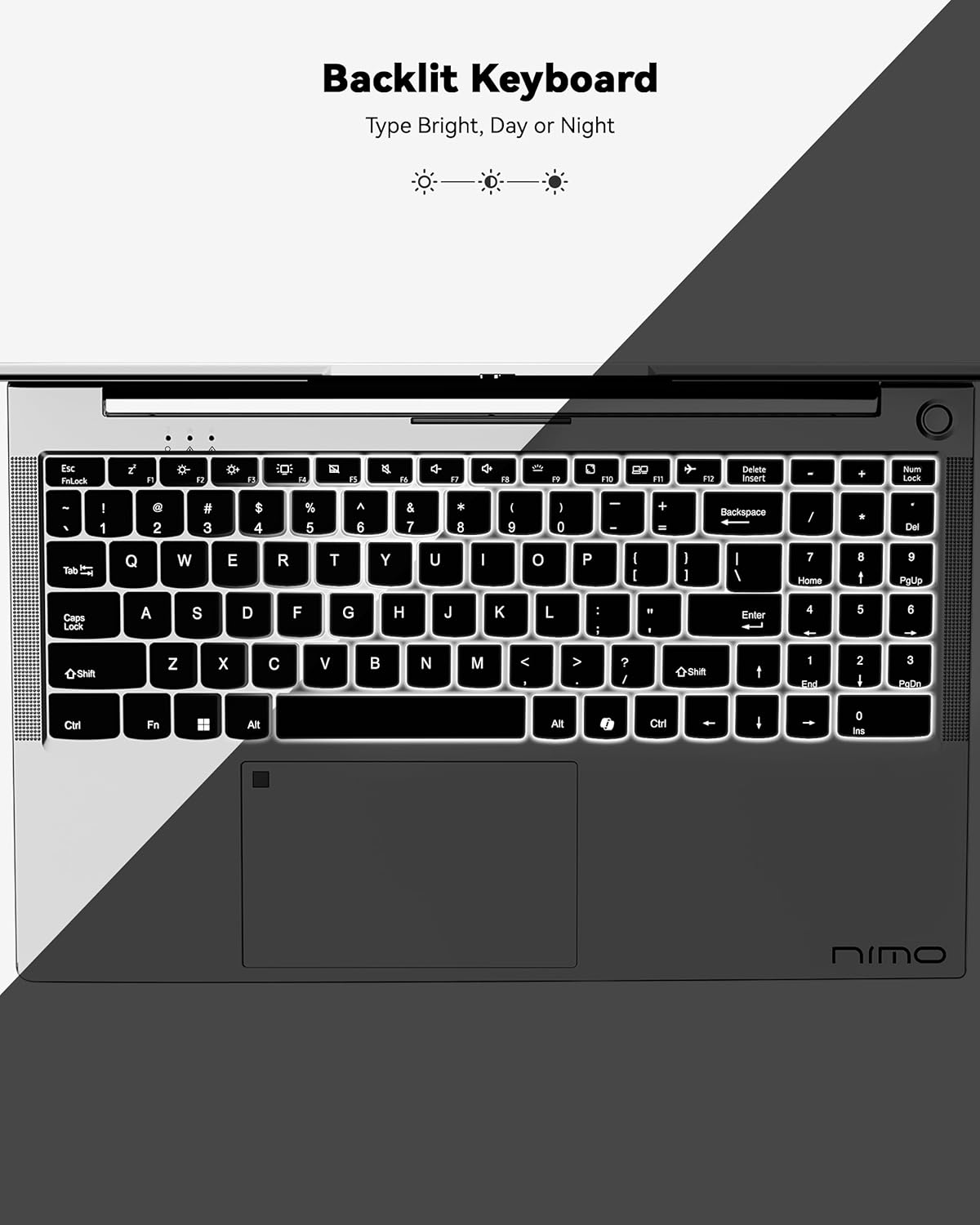
ຮູບ 3: ແປ້ນພິມ Backlit
This image highlights the backlit keyboard feature of the NIMO laptop, demonstrating how the keys illuminate for typing in low-light conditions.
- ແປ້ນພິມ Backlit: ກົດ Fn + F5 (or the key with the keyboard backlight icon) to toggle the backlight on/off or adjust brightness.
- ແຜ່ນສໍາຜັດ: Supports multi-touch gestures for scrolling, zooming, and navigation. Refer to Windows settings for customization.
- ເຊັນເຊີນີ້ວມື: Located on the touchpad for secure and instant login. Set up your fingerprint in Windows Settings > Accounts > Sign-in options.

Figure 4: Fingerprint Sensor on Touchpad
This image shows a close-up of the NIMO laptop's touchpad, clearly indicating the integrated fingerprint sensor for quick and secure access.
5.3. Webກ້ອງ
The laptop features a 2MP webcam for video calls and conferences. Ensure proper lighting for best image quality.
5.4. ສຽງ
The integrated speakers provide clear audio. You can also connect headphones or external speakers via the audio jack.
6. ຄຸນນະສົມບັດທີ່ສໍາຄັນ
- Vivid 15.6" Full HD Display: Enjoy stunning visuals with the 15.6" Full HD (1920x1080) IPS anti-glare display, featuring an 85% screen-to-body ratio and micro-edge design.
- ປະສິດທິພາບທີ່ມີປະສິດທິພາບ: Equipped with an AMD Ryzen 5 processor, 16GB DDR4 RAM, and a 1TB PCIe SSD for fast boot-ups, seamless multitasking, and efficient handling of applications.
- Upgradable Components: The RAM and SSD slots are expandable, allowing for future memory and storage upgrades.
- 65W USB-C PD Fast Charger: The included charger provides rapid power delivery, offering 2 hours of use from just 15 minutes of charging. It is also versatile for charging other compatible devices.
- Secure & Instant Login: Integrated fingerprint reader on the touchpad ensures quick and secure access to your device.
- Ergonomic Backlit Keyboard: Work comfortably in any environment with the backlit keyboard, featuring adjustable brightness.
- ການເຊື່ອມຕໍ່ແບບບໍ່ມີຮອຍຕໍ່: Features Wi-Fi 6 and Bluetooth 5.2 for stable, high-speed wireless connections, along with multiple USB 3.0 ports and HDMI for versatile peripheral connections.
Video 1: NIMO Laptop - Perfect for Work and Study, Anytime, Anywhere
This video demonstrates the NIMO laptop's versatility for various tasks, highlighting its portability and performance for work, study, and entertainment in different settings.
Video 2: NIMO 15.6 FHD Laptop for Students Home Work
This video showcases the NIMO 15.6 FHD laptop as an ideal device for students, home users, and professionals, emphasizing its suitability for educational and work-related tasks.
7. ບໍາລຸງຮັກສາ
- ທໍາຄວາມສະອາດ: ໃຊ້ຜ້າແພທີ່ອ່ອນນຸ່ມ, ບໍ່ມີສານດ່າງເພື່ອເຮັດຄວາມສະອາດໜ້າຈໍ ແລະ ພາຍນອກ. ຫຼີກເວັ້ນການສານເຄມີທີ່ຮຸນແຮງ.
- ການດູແລຫມໍ້ໄຟ: ເພື່ອຍືດອາຍຸການໃຊ້ງານຂອງແບັດເຕີຣີ, ຄວນຫຼີກລ່ຽງການສາກແບັດເຕີຣີຈົນໝົດເລື້ອຍໆ. ເກັບຮັກສາຄອມພິວເຕີໂນດບຸກໄວ້ໃນບ່ອນທີ່ເຢັນແລະແຫ້ງ.
- ອັບເດດຊອບແວ: ປັບປຸງລະບົບປະຕິບັດການ Windows ແລະໄດເວີຂອງທ່ານເປັນປະຈໍາເພື່ອຮັບປະກັນປະສິດທິພາບ ແລະຄວາມປອດໄພທີ່ດີທີ່ສຸດ.
- ການລະບາຍອາກາດ: Ensure the laptop's ventilation openings are not blocked to prevent overheating. Use on a hard, flat surface.
8. ການແກ້ໄຂບັນຫາ
- ແລັບທັອບບໍ່ເປີດ: Ensure the charger is securely connected and the battery has sufficient charge. Try a different power outlet.
- ໜ້າ ຈໍຫວ່າງເປົ່າ: Connect to an external monitor to check if the display is the issue. Restart the laptop.
- ບັນຫາການເຊື່ອມຕໍ່ Wi-Fi: Restart your router and the laptop. Check Wi-Fi settings and ensure airplane mode is off.
- ປະສິດທິພາບຊ້າ: Close unnecessary applications, check for malware, and ensure sufficient free storage space. Consider upgrading RAM or SSD if performance remains an issue.
- ແປ້ນພິມ ຫຼື touchpad ບໍ່ຕອບສະໜອງ: ຣີສະຕາດແລັບທັອບ. ກວດເບິ່ງການອັບເດດໄດເວີໃນ Device Manager.
For persistent issues, please refer to the support section or contact NIMO customer service.
9. ຂໍ້ມູນຈໍາເພາະ
| ຄຸນສົມບັດ | ຂໍ້ມູນຈໍາເພາະ |
|---|---|
| ຂະຫນາດຈໍສະແດງຜົນຢືນ | 15.6 ນິ້ວ |
| ຄວາມລະອຽດໜ້າຈໍ | - ຄວາມລະອຽດ 1920 x 1080 ພິກເຊວ (Full HD) |
| ໂຮງງານຜະລິດ | AMD Ryzen 5 (3.7 GHz) |
| RAM | 16 GB DDR4 (Upgradable) |
| ຄວາມໄວຄວາມຈໍາ | 4800 MHz |
| ຮາດດິດ | 1024 GB SSD (Upgradable) |
| Graphics Coprocessor | AMD Integrated graphics |
| ລະບົບປະຕິບັດການ | ໜ້າຫຼັກ Windows 11 |
| ປະເພດໄຮ້ສາຍ | 802.11a/b/g/n/ac (Wi-Fi 6) |
| Bluetooth | Bluetooth 5.2 |
| ຈຳນວນຂອງ USB 2.0 Ports | 1 |
| ຈຳນວນຂອງ USB 3.0 Ports | 3 |
| ອາຍຸຫມໍ້ໄຟສະເລ່ຍ | 9 ຊົ່ວໂມງ |
| ນ້ໍາຫນັກລາຍການ | 5 ປອນ |
| ຂະໜາດສິນຄ້າ | 14.07 x 8.98 x 0.76 ນິ້ວ |
| ຫລັງ Webຄວາມລະອຽດກ້ອງ | 2 MP |
| ຄຸນນະສົມບັດພິເສດ | ແປ້ນພິມ Backlit, ເຄື່ອງອ່ານລາຍນິ້ວມື, ສຽງ HD, ປຸ່ມກົດຕົວເລກ |
10. ການຮັບປະກັນແລະການສະຫນັບສະຫນູນ
Your NIMO laptop comes with a ການຮັບປະກັນຂອງຜູ້ຜະລິດ 2 ປີ. Additionally, NIMO offers a ນະໂຍບາຍການສົ່ງຄືນ ແລະ ແລກປ່ຽນສິນຄ້າພາຍໃນ 90 ມື້ ໂດຍບໍ່ມີບັນຫາຫຍຸ້ງຍາກ. Our dedicated support team is available to assist with any issues or replacements.
10.1. ຕິດຕໍ່ສະຫນັບສະຫນູນ
- For product-related questions or technical assistance, please contact NIMO customer service via their official webເວັບໄຊທ໌, ອີເມວ, ຫຼືໂທລະສັບ.
- Contact information can typically be found on the NIMO official webເວັບໄຊທ໌ ຫຼື ໜ້າຜະລິດຕະພັນ.
11. ຂໍ້ມູນຄວາມປອດໄພ
- ໃຊ້ສະເພາະເຄື່ອງສາກໄຟຕົ້ນສະບັບເທົ່ານັ້ນ ແລະ ກວດກາສາຍໄຟເປັນປະຈຳເພື່ອໃຫ້ແນ່ໃຈວ່າສາຍໄຟບໍ່ເສຍຫາຍ.
- ຈັບຄອມພິວເຕີໂນດບຸກດ້ວຍຖານຂອງມັນ ແລະ ພິຈາລະນາໃຊ້ກະເປົ໋າປ້ອງກັນ. ຫຼີກລ່ຽງການວາງວັດຖຸໜັກໃສ່ມັນ.
- Place the laptop on a hard, flat surface to ensure proper ventilation and prevent overheating. Keep it away from extreme temperatures and moisture.
- Do not overcharge the battery. Discontinue use if the battery swells or shows signs of damage.
- Set strong passwords, keep software updated, use antivirus protection, and regularly back up your data.
- ໃນກໍລະນີທີ່ມີນ້ຳຮົ່ວໄຫຼ, ໃຫ້ຖອດປລັກໄຟຄອມພິວເຕີໂນດບຸກທັນທີ ແລະ ປ່ອຍໃຫ້ມັນແຫ້ງສະນິດກ່ອນທີ່ຈະພະຍາຍາມເປີດມັນ.
- For any technical issues, consult qualified professionals. Do not attempt to disassemble or repair the device yourself.
12. ການປະຕິເສດທາງກົດໝາຍ
This laptop is provided "as is," with no express or implied warranties except for the manufacturer's limited warranty (if applicable). Implied warranties of merchantability or fitness for a specific purpose are disclaimed. NIMO is not liable for damages resulting from misuse (e.g., non-approved chargers, unauthorized repairs), physical damage, or failure to follow safety guidelines, including data loss or business interruption. Users are responsible for regularly backing up their data. This disclaimer does not exclude liability for manufacturing defects or violations of mandatory local laws. By using the NIMO laptop, you accept these terms, which are governed by applicable jurisdiction laws.


