ແນະນຳ
Thank you for choosing the miliboo MJL01 Tripod Dolly. This instruction manual provides essential information for the safe and effective setup, operation, and maintenance of your new tripod dolly. Please read this manual thoroughly before use and retain it for future reference.
ຂໍ້ມູນຄວາມປອດໄພ
- Always ensure the tripod dolly is placed on a stable, level surface before mounting any equipment.
- Do not exceed the maximum load capacity of 33 lbs (15 kg). Overloading can cause instability and damage to the equipment.
- Ensure all tripod legs are securely clamped into the dolly's leg mounts before moving.
- Engage the wheel brakes when the dolly is stationary to prevent unintended movement.
- Exercise caution when moving the dolly, especially on uneven surfaces or near obstacles.
- Keep hands and fingers clear of moving parts and clamping mechanisms during setup and adjustment.
ເນື້ອໃນຊຸດ
ກວດສອບວ່າລາຍການທັງຫມົດແມ່ນມີຢູ່ໃນຊຸດ:
- 1 x miliboo MJL01 Tripod Dolly
- 1 x ກະເປົາຖື
ຕັ້ງຄ່າ
1. Unfolding the Dolly
To unfold the miliboo MJL01 Tripod Dolly, press the pull buckle lock button located on the central hub. Extend the three arms outwards until they are fully open and click into place. Ensure all arms are securely locked.
2. Attaching a Tripod
Position your tripod centrally on the dolly. Align each tripod leg with one of the dolly's leg mounts. The universal leg lock design accommodates various tripod leg types, including horseshoe or round legs.

ຮູບພາບນີ້ສະແດງໃຫ້ເຫັນລາຍລະອຽດ view of the miliboo MJL01 Tripod Dolly's features, including the universal leg lock design, the retractable caster pin for compact storage, the press-to-lock mechanism for the wheels, and the 360° free-moving wheels.
3. Adjusting Leg Mounts
Each leg mount on the dolly is adjustable. Simply align each tripod foot pad and tighten the thumbscrews on each clamp to secure the tripod leg firmly. Ensure the tripod is stable and centered before proceeding.
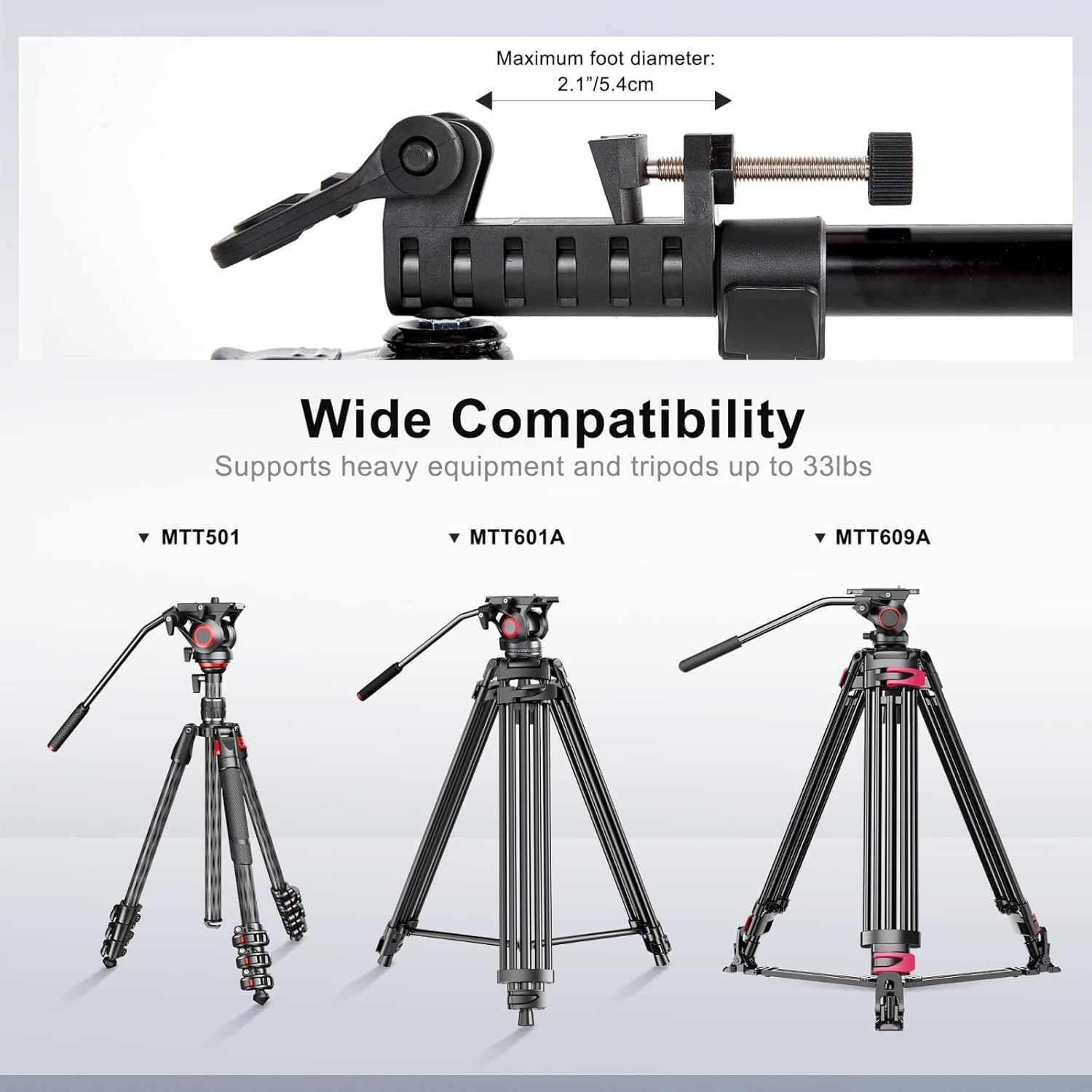
This image illustrates the wide compatibility of the miliboo MJL01 Tripod Dolly with various tripod models (MTT501, MTT601A, MTT609A). It also highlights the maximum foot diameter of 2.1 inches (5.4 cm) that the leg clamps can accommodate.
4. Adjusting Telescopic Arms
The dolly features telescopic arms that can be adjusted to two different sizes to accommodate various tripod footprints. Extend or retract the arms as needed to match your tripod's spread, then secure them in place.

This image demonstrates the two telescopic sizes of the miliboo MJL01 Tripod Dolly. It shows the adjustable arm lengths, allowing the dolly to expand from a compact 13 inches (33 cm) to 25.6 inches (65 cm) or from 18.1 inches (46 cm) to 35.4 inches (90 cm) for wider tripod stances.
ປະຕິບັດການ
1. Moving the Dolly
Once your tripod is securely mounted, release the wheel brakes by pressing the pull buckle lock button on each wheel. The 2-inch rubber wheels provide smooth movement, allowing you to reposition your camera setup with ease.

This image displays the miliboo MJL01 Tripod Dolly with a tripod securely mounted, illustrating its readiness for movement and use in a photography or videography setup.
2. Using Wheel Brakes
Each wheel is equipped with an independent brake. To lock the dolly in position, press down on the brake lever located on each wheel. To release, lift the lever. Always engage the brakes when the dolly is stationary to prevent accidental rolling.

This close-up image highlights the leg clamps and the 2-inch rubber wheels of the miliboo MJL01 Tripod Dolly, showing the mechanism for securing tripod legs and the design of the smooth-rolling wheels with their individual brake levers.
3. ພັບສໍາລັບການເກັບຮັກສາ
To fold the dolly for storage or transport, first remove the tripod. Then, press the pull buckle lock button on the central hub and retract the arms inwards. The dolly will fold into a compact size. Use the integrated carrying handle or the included carrying bag for easy transportation.

This image illustrates the miliboo MJL01 Universal Tripod Dolly in both its extended, operational state and its compact, folded state, demonstrating its portability. Key specifications such as Model: MJL01, Max Load: 33 lbs, Folding Size: 16.7 inches, Weight Only: 3.7 lbs, and Packing Size: 5.5*5.5*17.7 inches are also displayed.

ເທິງລົງລຸ່ມນີ້ view shows the miliboo MJL01 Tripod Dolly in its fully folded configuration, highlighting its compact and streamlined design for convenient storage and transport.
ບໍາລຸງຮັກສາ
- ທໍາຄວາມສະອາດ: Wipe the dolly with a soft, dry cloth after each use to remove dust and debris. For stubborn dirt, use a slightly damp ເຊັດຜ້າ ແລະ ສະບູ່ອ່ອນໆໃຫ້ແຫ້ງດີ. ຫຼີກລ່ຽງສານເຄມີຮຸນແຮງ ຫຼື ນໍ້າຢາທໍາຄວາມສະອາດທີ່ມີສີຂັດ.
- ການກວດກາ: ແຕ່ລະໄລຍະກວດເບິ່ງ screws ທັງຫມົດ, clamps, and joints for tightness. Ensure the wheels roll smoothly and the brakes engage effectively. Lubricate moving parts if necessary with a silicone-based lubricant.
- ການເກັບຮັກສາ: Store the dolly in its carrying bag in a cool, dry place away from direct sunlight and extreme temperatures.
ການແກ້ໄຂບັນຫາ
- Dolly not rolling smoothly: Check for debris caught in the wheels. Ensure wheel brakes are fully disengaged. If wheels are stiff, apply a small amount of lubricant to the axles.
- Tripod not secure in leg mounts: Ensure the thumbscrews on each leg clamp are tightened sufficiently. Verify that the tripod legs are fully seated in the mounts.
- Dolly arms not locking: Ensure the arms are fully extended until they click into their locked position. Check for any obstructions in the locking mechanism.
- Wheel brakes not engaging: Inspect the brake levers for damage or obstruction. Ensure the brake mechanism is clean and free of debris.
ຂໍ້ມູນຈໍາເພາະ
| ຄຸນສົມບັດ | ຂໍ້ມູນຈໍາເພາະ |
|---|---|
| ໝາຍເລກຕົວແບບ | MJL01 |
| ຂະ ໜາດ ຜະລິດຕະພັນ (ພັບໄດ້) | 5.5 x 5.5 x 17.7 ນິ້ວ (14 x 14 x 45 cm) |
| ນ້ໍາຫນັກລາຍການ | 3.7 ປອນ (1.68 ກິໂລ) |
| ຄວາມສາມາດໃນການໂຫຼດສູງສຸດ | 33 lbs (15 ກິໂລ) |
| ຂະໜາດລໍ້ | 2 inches (5 cm) Rubber Wheels |
| ອຸປະກອນທີ່ເຂົ້າກັນໄດ້ | Tripods (with horseshoe or round legs) |
| ວັດສະດຸ | ໂລຫະປະສົມອາລູມິນຽມ |
ການຮັບປະກັນແລະການສະຫນັບສະຫນູນ
miliboo provides an after-sales guarantee for this product. If you encounter any problems during use, please contact our after-sales service team. We are committed to resolving your issues within 24 hours.
For support, please refer to the contact information provided with your purchase or visit the official miliboo webເວັບໄຊ.


