1. ບົດແນະນຳ
This manual provides essential information for the proper use and maintenance of your DigiLand Android Tablet S10. Please read it thoroughly before operating the device to ensure optimal performance and longevity. The DigiLand S10 is a 10.1-inch Android 14 tablet designed for versatile use, featuring an Octa-Core processor, ample memory, and a high-definition display.
2. ຂໍ້ມູນຄວາມປອດໄພ
- ຢ່າໃຫ້ແທັບເລັດຖືກອຸນຫະພູມສູງ, ແສງແດດໂດຍກົງ ຫຼື ຄວາມຊຸ່ມຊື່ນສູງ.
- ຫຼີກລ່ຽງການຕົກ ຫຼື ການກະທົບທີ່ຮຸນແຮງໃສ່ແທັບເລັດ.
- Use only the original charger and accessories provided with the tablet.
- ຢ່າພະຍາຍາມຖອດປະກອບ ຫຼື ສ້ອມແປງແທັບເລັດດ້ວຍຕົນເອງ. ໃຫ້ປຶກສາພະນັກງານບໍລິການທີ່ມີຄຸນວຸດທິ.
- ເກັບຮັກສາຢາເມັດໃຫ້ຫ່າງຈາກນໍ້າ ແລະ ຂອງແຫຼວອື່ນໆ.
- ກຳຈັດແທັບເລັດ ແລະ ແບັດເຕີຣີຂອງມັນຢ່າງມີຄວາມຮັບຜິດຊອບຕາມລະບຽບການຂອງທ້ອງຖິ່ນ.
3. ເນື້ອໃນຊຸດ
ເມື່ອເປີດຊຸດ, ກະລຸນາກວດສອບວ່າທຸກລາຍການທີ່ລະບຸໄວ້ຂ້າງລຸ່ມນີ້ແມ່ນຢູ່ ແລະຢູ່ໃນສະພາບດີ:
- DigiLand Android Tablet S10 (Blue)
- ສາຍສາກໄຟ USB Type-C
- Power Adapter
- ຄູ່ມືເລີ່ມຕົ້ນດ່ວນ

Figure 3.1: Items included in the DigiLand Tablet S10 package. This image displays the tablet itself, its packaging box, a USB Type-C charging cable, a power adapter, and a quick start guide, ensuring users can confirm all components are present.
4. ຜະລິດຕະພັນເກີນview
The DigiLand S10 tablet features a sleek design with essential ports and controls for user convenience.
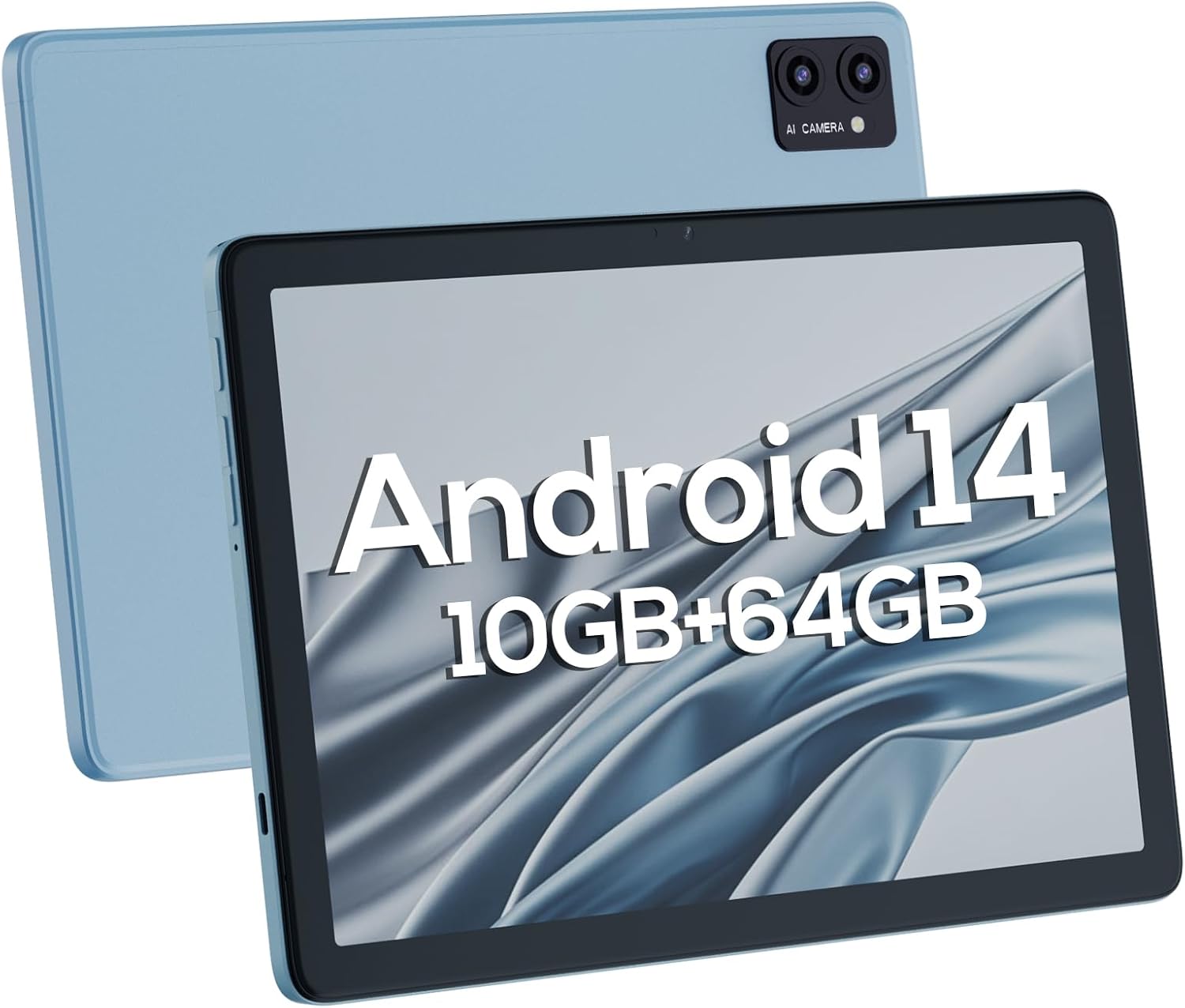
ຮູບ 4.1: ດ້ານຫນ້າແລະຫລັງ views of the DigiLand Android Tablet S10. The image highlights the tablet's 10.1-inch display on the front and the dual camera module on the blue-colored back panel.
ອົງປະກອບທີ່ສໍາຄັນ:
- ໜ້າຈໍ IPS ຂະໜາດ 10.1 ນິ້ວ: Provides vibrant visuals with 800x1280 resolution.
- ກ້ອງໜ້າ (5MP): Located on the front bezel, suitable for video calls and selfies.
- ກ້ອງຫຼັງ (8MP): Located on the back, for capturing photos and videos.
- ປຸ່ມເປີດປິດ: ໃຊ້ເພື່ອເປີດ/ປິດແທັບເລັດ ຫຼື ເຮັດໃຫ້ມັນເຂົ້າສູ່ໂໝດນອນ/ຕື່ນ.
- ປຸ່ມລະດັບສຽງ: ປັບລະດັບສຽງ.
- ພອດ USB Type-C: ສໍາລັບການສາກໄຟແລະການໂອນຂໍ້ມູນ.
- Jack ຫູຟັງ 3.5 ມມ: ສໍາລັບການເຊື່ອມຕໍ່ຫູຟັງແບບມີສາຍ.
- ຊ່ອງສຽບກາດ MicroSD: ສຳລັບການຂະຫຍາຍບ່ອນເກັບຂໍ້ມູນໄດ້ເຖິງ 256GB.
- ລຳ ໂພງຄູ່: ສະໜອງສຽງອອກ.
5. ຕັ້ງຄ່າ
5.1 ການສາກໄຟເບື້ອງຕົ້ນ
Before first use, fully charge your tablet. Connect the USB Type-C cable to the tablet's charging port and the power adapter to a wall outlet. The battery indicator on the screen will show charging status. A full charge typically takes several hours.
5.2 ການເປີດ/ປິດ
- ເພື່ອເປີດເຄື່ອງ: Press and hold the Power button until the DigiLand logo appears.
- ປິດເຄື່ອງ: ກົດປຸ່ມເປີດ/ປິດຄ້າງໄວ້ຈົນກວ່າເມນູປິດເຄື່ອງຈະປາກົດຂຶ້ນ. ເລືອກ "ປິດເຄື່ອງ" ແລະຢືນຢັນ.
- ນອນ/ຕື່ນ: ກົດປຸ່ມເປີດປິດສັ້ນ Br.
5.3 ຕົວຊ່ວຍສ້າງການຕິດຕັ້ງເບື້ອງຕົ້ນ
Upon first power-on, the Android 14 setup wizard will guide you through basic configurations:
- ເລືອກພາສາຂອງທ່ານ.
- ເຊື່ອມຕໍ່ກັບເຄືອຂ່າຍ Wi-Fi.
- ເຂົ້າສູ່ລະບົບດ້ວຍບັນຊີ Google ຂອງທ່ານ ຫຼືສ້າງອັນໃໝ່.
- Review ແລະຍອມຮັບຂໍ້ກໍານົດແລະເງື່ອນໄຂ.
- ຕັ້ງຄ່າການລັອກໜ້າຈໍ (PIN, ຮູບແບບ, ຫຼືລະຫັດຜ່ານ).
- ຕັ້ງຄ່າການຕັ້ງຄ່າອື່ນຕາມທີ່ເຕືອນ.
5.4 ການຂະຫຍາຍບ່ອນເກັບຂໍ້ມູນ
The tablet supports MicroSD cards up to 256GB for additional storage. Locate the MicroSD card slot (often near the headphone jack or power button, as shown in Figure 4.1) and insert the card gently until it clicks into place. You may need to format the card via the tablet's settings for optimal use.
6. ປະຕິບັດການແທັບເລັດ
6.1 ການນໍາທາງພື້ນຖານ
- ໜ້າຈໍຫຼັກ: ຫນ້າຈໍຫລັກບ່ອນທີ່ທ່ານສາມາດເຂົ້າເຖິງແອັບຯແລະ widget.
- App Drawer: ປັດຂຶ້ນຈາກໜ້າຈໍຫຼັກໄປຫາ view ແອັບພລິເຄຊັນທີ່ຕິດຕັ້ງທັງໝົດ.
- ແຜງການແຈ້ງເຕືອນ: ປັດລົງຈາກເທິງສຸດຂອງໜ້າຈໍເພື່ອເຂົ້າເຖິງການແຈ້ງເຕືອນ ແລະການຕັ້ງຄ່າດ່ວນ.
- ແອັບຫຼ້າສຸດ: Tap the square navigation button (or swipe up and hold from the bottom if using gestures) to see recently opened applications.
6.2 ການເຊື່ອມຕໍ່ Wi-Fi ແລະ Bluetooth
- Wi-Fi: ໄປທີ່ ການຕັ້ງຄ່າ > ເຄືອຂ່າຍ ແລະອິນເຕີເນັດ > Wi-Fiເປີດ Wi-Fi ແລະເລືອກເຄືອຂ່າຍທີ່ທ່ານຕ້ອງການ. ໃສ່ລະຫັດຜ່ານຖ້າຕ້ອງການ.
- Bluetooth: ໄປທີ່ ການຕັ້ງຄ່າ> ອຸປະກອນເຊື່ອມຕໍ່ແລ້ວ> ການຕັ້ງຄ່າການເຊື່ອມຕໍ່> Bluetooth. ເປີດ Bluetooth ແລະຈັບຄູ່ກັບອຸປະກອນທີ່ມີຢູ່.
6.3 ການນໍາໃຊ້ກ້ອງຖ່າຍຮູບ
ແທັບເລັດມີກ້ອງໜ້າ 5MP ແລະ ກ້ອງຫຼັງ 8MP.
- ເປີດແອັບກ້ອງຖ່າຍຮູບ.
- ແຕະໄອຄອນສະຫຼັບກ້ອງຖ່າຍຮູບເພື່ອສະຫຼັບລະຫວ່າງກ້ອງໜ້າ ແລະກ້ອງຫຼັງ.
- ແຕະປຸ່ມຊັດເຕີເພື່ອຖ່າຍຮູບ ຫຼືເລີ່ມ/ຢຸດການບັນທຶກວິດີໂອ.

Figure 6.1: Visual representation of the tablet's camera capabilities, showing sample images captured by both the 5MP front and 8MP rear cameras.
6.4 ການຄຸ້ມຄອງຫມໍ້ໄຟ
ແບດເຕີຣີ້ 6000 mAh ສະຫນອງການນໍາໃຊ້ທີ່ຍາວນານ. ເພື່ອເພີ່ມປະສິດທິພາບອາຍຸຫມໍ້ໄຟ:
- ຫຼຸດຄວາມສະຫວ່າງໜ້າຈໍ.
- ປິດ Wi-Fi ແລະ Bluetooth ເມື່ອບໍ່ໄດ້ໃຊ້ງານ.
- ປິດແອັບພລິເຄຊັນທີ່ບໍ່ໄດ້ໃຊ້ທີ່ເຮັດວຽກຢູ່ໃນພື້ນຫຼັງ.
- Enable Battery Saver mode in Settings.

Figure 6.2: Battery performance details for the DigiLand Tablet S10. This graphic illustrates the 6000mAh battery capacity and provides estimated usage durations for various activities like video playback (9 hours), music (14 hours), and browsing (15 hours).
7. ບໍາລຸງຮັກສາ
- ທໍາຄວາມສະອາດ: ໃຊ້ຜ້າອ່ອນໆທີ່ບໍ່ມີຂົນເພື່ອທຳຄວາມສະອາດໜ້າຈໍ ແລະ ຕົວເຄື່ອງ. ຫຼີກລ່ຽງນ້ຳຢາທຳຄວາມສະອາດທີ່ມີສານຂັດ.
- ອັບເດດຊອບແວ: ກວດສອບ ແລະຕິດຕັ້ງການອັບເດດລະບົບເປັນປະຈຳເພື່ອຮັບປະກັນປະສິດທິພາບ ແລະຄວາມປອດໄພທີ່ດີທີ່ສຸດ. ໄປທີ່ ການຕັ້ງຄ່າ > ລະບົບ > ການປັບປຸງລະບົບ.
- ການຈັດການການເກັບຮັກສາ: ລ້າງແຄດເປັນໄລຍະ, ລຶບທີ່ບໍ່ຈໍາເປັນ files, ແລະຖອນການຕິດຕັ້ງແອັບຯທີ່ບໍ່ໄດ້ໃຊ້ເພື່ອເພີ່ມພື້ນທີ່ຫວ່າງ.
- ຂໍ້ມູນສຳຮອງ: ສຳຮອງຂໍ້ມູນສຳຄັນໄວ້ໃນການບໍລິການຄລາວ ຫຼື ອຸປະກອນເກັບຂໍ້ມູນພາຍນອກເປັນປະຈຳເພື່ອປ້ອງກັນການສູນເສຍຂໍ້ມູນ.
8. ການແກ້ໄຂບັນຫາ
| ບັນຫາ | ການແກ້ໄຂທີ່ເປັນໄປໄດ້ |
|---|---|
| ແທັບເລັດຈະບໍ່ເປີດ | ໃຫ້ແນ່ໃຈວ່າແບັດເຕີຣີສາກແລ້ວ. ກົດປຸ່ມເປີດປິດຄ້າງໄວ້ປະມານ 10-15 ວິນາທີເພື່ອບັງຄັບໃຫ້ເປີດຄືນໃໝ່. |
| ການປະຕິບັດຊ້າ | Close unused apps, clear cache, restart the tablet. Consider a factory reset if issues persist (backup data first). |
| ບັນຫາການເຊື່ອມຕໍ່ Wi-Fi | Restart the tablet and router. Forget the network and reconnect. Ensure Wi-Fi is enabled. |
| ແອັບຂັດຂ້ອງ | Clear app cache/data (Settings > Apps), update the app, or reinstall it. |
| ໜ້າຈໍບໍ່ຕອບສະໜອງ | Force restart the tablet. If issue persists, contact support. |
9. ຂໍ້ມູນຈໍາເພາະ
Below are the detailed technical specifications for the DigiLand Android Tablet S10:
| ຄຸນສົມບັດ | ລາຍລະອຽດ |
|---|---|
| ຍີ່ຫໍ້ | DigiLand |
| ຊື່ຕົວແບບ | DigiLand-S10 |
| ລະບົບປະຕິບັດການ | Android 14 |
| ຂະໜາດໜ້າຈໍ | 10.1 ນິ້ວ |
| ຄວາມລະອຽດໜ້າຈໍ | 800 x 1280 (IPS HD Display) |
| ໂຮງງານຜະລິດ | A523, Octa core, Cortex A55@1.8 GHz, 22nm |
| RAM | 10GB (4+6GB) |
| ການເກັບຮັກສາພາຍໃນ | 64 GB |
| ການເກັບຮັກສາທີ່ຂະຫຍາຍໄດ້ | Up to 256GB via TF card (MicroSD) |
| ກ້ອງໜ້າ | 5MP |
| ກ້ອງຫຼັງ | 8MP |
| ຄວາມອາດສາມາດຫມໍ້ໄຟ | 6000mAh |
| ການເຊື່ອມຕໍ່ | Wi-Fi (2.4G+5G), Bluetooth 5.0, USB Type-C, 3.5mm Headphone Jack |
| ຂະໜາດ (LxWxH) | 7 x 4 x 0.5 ນິ້ວ |
| ນ້ໍາຫນັກລາຍການ | 2.42 ປອນ (ປະມານ 510g) |
| ສີ | ສີຟ້າ |

ຮູບ 9.1: ເກີນview of the DigiLand Tablet S10's core specifications. This graphic highlights features such as Android 14, MTK Helio A523 Octa-Core Processor, 10GB RAM, 64GB ROM (expandable to 256GB), 10.1-inch HD display, 6000mAh battery, 5MP front camera, 8MP rear camera, 510g weight, and 8.8mm thickness.
10. ການຮັບປະກັນແລະການສະຫນັບສະຫນູນ
10.1 ຂໍ້ມູນການຮັບປະກັນ
DigiLand products typically come with a limited manufacturer's warranty. Please refer to the warranty card included in your product packaging or visit the official DigiLand website for detailed terms and conditions regarding warranty coverage, duration, and limitations. Keep your proof of purchase for warranty claims.
10.2 ສະຫນັບສະຫນູນລູກຄ້າ
For technical assistance, troubleshooting, or any inquiries regarding your DigiLand Android Tablet S10, please contact DigiLand customer support. Contact information can usually be found in the Quick Start Guide or on the official DigiLand website. When contacting support, please have your product model (DigiLand-S10) and purchase details ready.
Thank you for choosing DigiLand. We hope you enjoy your new tablet!


