1. ຜະລິດຕະພັນເກີນview
The ARRIS YIKONG YK4107 is a 1/10 scale 4WD RC rock crawler designed for superior off-road performance. It features advanced functionalities for an immersive remote-controlled experience.
ຄຸນນະສົມບັດທີ່ສໍາຄັນ:
- 2-Speed Transmission with Locking Differentials: Switch between high and low gears with remote-controlled front and rear differential locks for optimal performance on various terrains.
- Low Center of Gravity (LCG) Chassis: Engineered with a low-profile chassis and portal axles for enhanced stability, balance, and ground clearance on challenging trails.
- Realistic Scale Body with LED Light System: Features a clear 1.2mm PC body, detailed interior, and remote-controlled LED lights for an authentic RC experience.
- Durable Drivetrain and Suspension: Equipped with full metal gears, oil-filled shocks, U-joint front axles, and competition-grade crawler tires for smooth, rugged off-road driving.
- 10CH Radio with Multiple Driving Modes: Includes a 2.4GHz 10-channel transmitter with adjustable drag brake, lighting control, and switchable normal/competition modes for full customization.

Figure 1: ARRIS YIKONG YK4107 RC Rock Crawler with its remote control.

ຮູບ 2: ດ້ານຫລັງ view of the YK4107, highlighting the spare tire and rear bumper.

ຮູບ 3: ດ້ານຫນ້າ view of the YK4107, showing the grille, headlights, and front bumper.
2. ສິ່ງທີ່ຢູ່ໃນກ່ອງ
Your ARRIS YIKONG YK4107 package includes the following items:
- ການຄວບຄຸມໄລຍະໄກ
- ສາຍສາກ
- ຄູ່ມືຜະລິດຕະພັນ
- ໝາຍເຫດ: Batteries and charger are not included for the RC car.
3. ຕັ້ງຄ່າ
3.1 ການຕິດຕັ້ງຫມໍ້ໄຟຄວບຄຸມໄລຍະໄກ
The remote control requires 1 AA battery (not included). Refer to the remote control's specific instructions for proper battery insertion.
3.2 RC Car Battery Installation
The RC car operates on a 2S Li-ion battery (not included). Ensure the battery is fully charged before use. Connect the battery to the ESC (Electronic Speed Controller) and secure it in the designated battery compartment. Refer to the detailed instructions in the included Product Manual for specific steps.
3.3 ການກວດກາເບື້ອງຕົ້ນ
Before first use, inspect all components for any signs of damage or loose connections. Ensure all screws are tightened and the wheels are securely attached.
4. ຄໍາແນະນໍາການດໍາເນີນງານ
The YK4107 offers advanced control features for diverse driving scenarios.
4.1 ການເປີດເຄື່ອງ
- Ensure the RC car's battery is connected and fully charged.
- ເປີດການຄວບຄຸມຫ່າງໄກສອກຫຼີກ.
- Turn on the RC car. The LED lights should illuminate.
4.2 Driving Modes and Controls
The 10-channel remote control allows for precise manipulation of the crawler's features:
- ລະບົບສາຍສົ່ງ 2 ຄວາມໄວ: Use the designated switch on the remote to toggle between high and low gears.
- Differential Locks: Engage or disengage front and rear differential locks via the remote for improved traction on uneven surfaces.
- Tank Turn Function: This innovative DIG function allows remote control to lock a single rear wheel, enabling a tighter turning radius. Press Channel 4 button to activate Tank Mode. The rear differential lock will release automatically. When the steering wheel turns right, the rear servo works with the direction, braking the right rear wheel. Pressing the accelerator moves the vehicle forward.
- ໄຟ LED: Control the LED light system using the dedicated lighting control button on the remote.
- Drag Brake: Adjust the drag brake strength directly from the transmitter.
- Normal/Competition Modes: Switch between normal and competition driving modes for different performance characteristics.

Figure 4: Visual explanation of the Tank U-turn function, showing remote control input and vehicle movement.

ຮູບທີ 5: ລາຍລະອຽດ view of remote control buttons and their corresponding actions for the Tank U-turn function.
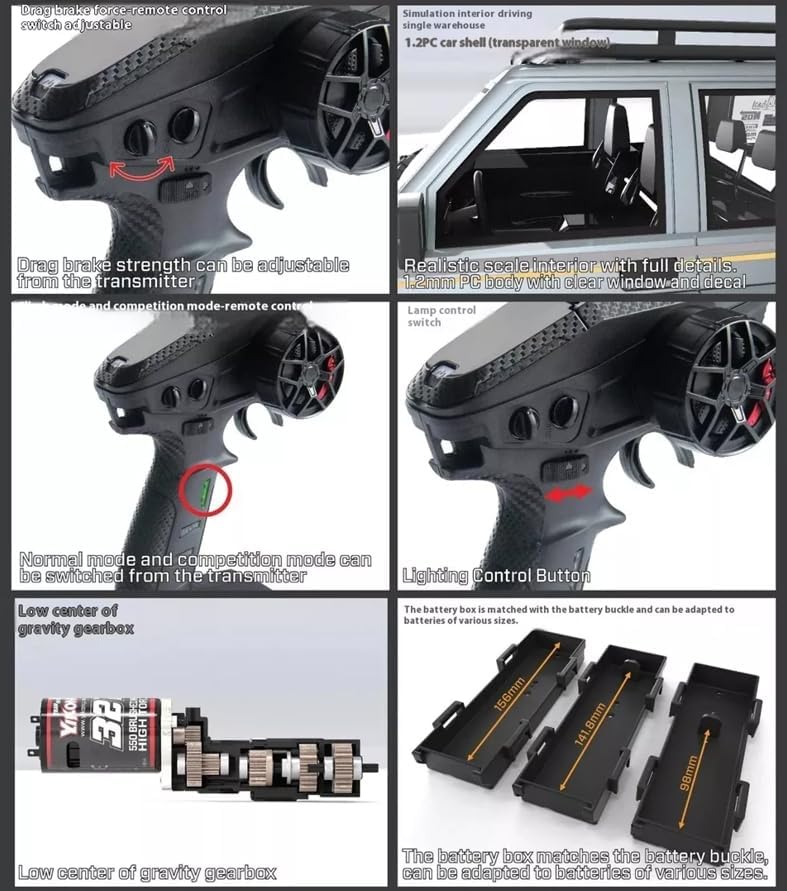
ຮູບ 6: ເກີນview of remote control adjustable features like drag brake, driving modes, lighting control, and various battery box sizes.
4.3 ຄຳແນະນຳການຂັບຂີ່
- Practice in an open area to familiarize yourself with the controls.
- Utilize the 2-speed transmission and differential locks to adapt to different terrains.
- Avoid prolonged exposure to water or extreme temperatures unless specified as waterproof.

Figure 7: The YK4107 demonstrating its climbing capabilities on rocky terrain.

Figure 8: The YK4107 showcasing its articulation and ground clearance on a challenging incline.
Video 1: Official product video demonstrating the YK4107 1/10 RC 4WD Climbing Truck in action, highlighting its features and performance.
5. ບໍາລຸງຮັກສາ
Regular maintenance ensures the longevity and optimal performance of your YK4107 RC Rock Crawler.
5.1 ການເບິ່ງແຍງທົ່ວໄປ
- Clean the vehicle after each use to remove dirt, dust, and debris.
- Inspect all moving parts for wear and tear.
- ໃຫ້ແນ່ໃຈວ່າ screws ແລະ fasteners ທັງຫມົດແມ່ນແຫນ້ນ.
5.2 ລະບົບຂັບເຄື່ອນ ແລະ ລະບົບລະງັບ
- The vehicle is equipped with full ball bearings. Periodically check for smooth operation and lubricate as needed.
- Inspect the oil-filled shocks for leaks and proper damping.
- Check the U-joint front axles for any damage or excessive play.
- Ensure the manual operated front and rear locking differentials engage and disengage correctly.

ຮູບທີ 9: ຂ້າງລຸ່ມ view of the YK4107 chassis, showing the steering gear buffer protection device and high-torque metal gear steering servo.
6. ການແກ້ໄຂບັນຫາ
If you encounter any issues with your YK4107, refer to the following general troubleshooting tips:
- ບໍ່ມີພະລັງງານ: Check if the battery is fully charged and correctly connected. Ensure the remote control has fresh batteries and is powered on.
- ການສູນເສຍການຄວບຄຸມ: Verify that the remote control and vehicle are properly bound. Check for any interference in the operating environment.
- ປະສິດທິພາບບໍ່ດີ: Inspect tires for damage or proper inflation. Check suspension components for any binding or damage. Ensure differential locks are engaging as intended for the terrain.
- ສິ່ງລົບກວນທີ່ຜິດປົກກະຕິ: Discontinue use immediately and inspect the drivetrain, gears, and motor for any obstructions or damage.
For more detailed troubleshooting, please consult the comprehensive Product Manual included with your purchase.
7. ຂໍ້ມູນຈໍາເພາະ
| ຄຸນສົມບັດ | ຂໍ້ມູນຈໍາເພາະ |
|---|---|
| ຂະໜາດສິນຄ້າ | 21.3 x 9.7 x 9.64 ນິ້ວ |
| ນ້ໍາຫນັກລາຍການ | 10.78 ປອນ |
| ASIN | B0F6LTJGK1 |
| ໝາຍເລກຕົວແບບ | YK4107 RC CRAWLER |
| ຜູ້ຜະລິດແນະນໍາອາຍຸ | 16 ປີຂຶ້ນໄປ |
| ໝໍ້ໄຟ | 1 AA battery required (included for remote) |
| ຜູ້ຜະລິດ | ອາຣິສ |
8. ການຮັບປະກັນແລະການສະ ໜັບ ສະ ໜູນ
For any product-related inquiries, technical assistance, or support, please refer to the contact information provided in your Product Manual or visit the official ARRIS webເວັບໄຊ.
While specific warranty details are provided with the product, extended protection plans are available for purchase separately. These plans offer additional coverage beyond the standard manufacturer's warranty.


