1. ຂໍ້ມູນຄວາມປອດໄພທີ່ສໍາຄັນ
This section outlines critical safety precautions for operating the Twotrees TTS-10 Pro Laser Engraver. Failure to follow these instructions may result in serious injury or damage to the equipment.
1.1 ຄວາມປອດໄພຂອງເລເຊີ
The TTS-10 Pro is a Class 4 laser product. Direct or scattered laser radiation can cause severe eye and skin damage. Always wear appropriate laser safety goggles when the machine is in operation. Never look directly into the laser beam.

Image: Laser safety warning label for the TTS-10 Pro, indicating Class 4 laser radiation and the need to avoid eye or skin exposure.
- ການປົກປ້ອງຕາ: Always wear certified laser safety goggles that block the specific wavelength of the laser (typically 450nm for blue diode lasers).
- ການປົກປ້ອງຜິວຫນັງ: Avoid direct exposure of skin to the laser beam.
- ເອກະສານຄັດຕິດ: Operate the engraver in a controlled environment, ideally with a protective enclosure to contain scattered radiation.
- ວັດສະດຸທີ່ຕິດໄຟໄດ້: Do not engrave or cut highly flammable materials without proper ventilation and fire suppression.
- ການລະບາຍອາກາດ: Ensure adequate ventilation to remove smoke and fumes produced during engraving/cutting, which can be harmful.
- ການເບິ່ງແຍງກວດກາ: ຢ່າປະໄວ້ເຄື່ອງໂດຍບໍ່ໄດ້ໃສ່ເຄື່ອງໃນເວລາເຮັດວຽກ.
1.2 ຄວາມປອດໄພທາງໄຟຟ້າ
- ໃຊ້ພຽງແຕ່ອະແດັບເຕີໄຟທີ່ໃຫ້ມາ.
- Ensure the power supply is stable and matches the machine's requirements (DC 12V, 4A).
- ຫ້າມໃຊ້ເຄື່ອງດ້ວຍມືປຽກ ຫຼື ໃນສະພາບທີ່ປຽກ.amp ເງື່ອນໄຂ.
2. ຜະລິດຕະພັນເກີນview
The Twotrees TTS-10 Pro is a high-precision laser engraving and cutting machine designed for various materials including wood, metal, acrylic, glass, and stainless steel. It features a 10000mW laser output, a 0.069mm laser spot, and a maximum engraving speed of 30000mm/min.

Image: The Twotrees TTS-10 Pro Laser Engraver, fully assembled and ready for use.
2.1 ລັກສະນະທີ່ສໍາຄັນ
- High Power Laser: 10000mW (10W) LD+FAC+C-Lens compressed spot technology for efficient engraving and cutting.
- ຄວາມຊັດເຈນ: 0.069mm ultra-fine laser spot for detailed work.
- ຄວາມໄວ: ຄວາມໄວໃນການແກະສະຫຼັກສູງເຖິງ 30000 ມມ/ນາທີ.
- Advanced Mainboard: 32-bit dual-core MCU for faster processing and versatile functions.
- ການເຊື່ອມຕໍ່: Supports online engraving, TF card offline operation, mobile app (MKSLaser), and computer WEB ການຄວບຄຸມ.
- ຄວາມເຂົ້າກັນໄດ້ຂອງຊອບແວ: Compatible with LaserGRBL (Windows) and Lightburn (Windows, Mac).
- Air Assist Nozzle: Integrated metal air assist nozzle for improved cutting penetration and efficiency.
3. ຄໍາແນະນໍາການຕິດຕັ້ງ
The Twotrees TTS-10 Pro comes largely pre-assembled. This section guides you through the final steps to prepare your machine for operation.
3.1 ການຫຸ້ມຫໍ່ແລະການກວດກາ
- ເອົາສ່ວນປະກອບທັງຫມົດອອກຈາກການຫຸ້ມຫໍ່ຢ່າງລະມັດລະວັງ.
- ກວດສອບວ່າທຸກຊິ້ນສ່ວນທີ່ລະບຸໄວ້ໃນລາຍການຫຸ້ມຫໍ່ແມ່ນມີຢູ່ ແລະ ບໍ່ເສຍຫາຍ.
- Place the main frame on a stable, level surface.
3.2 ການຕິດຕັ້ງໂມດູນເລເຊີ
The laser module is typically pre-installed or requires minimal attachment.
- Ensure the laser module is securely fastened to the gantry. Refer to the quick start guide for specific fastening points if not already attached.
- Connect the laser module cable to the designated port on the mainboard.

Image: The laser module, demonstrating its fine spot size for detailed engraving.
3.3 Air Assist Nozzle Attachment (Optional Upgrade)
The TTS-10 Pro includes a metal air assist nozzle. While the core kit does not include an air pump, the nozzle is designed for easy integration with an external air assist system.
- Attach the metal air assist nozzle to the laser module as per the diagram in the quick start guide.
- If using an external air pump (not included), connect the air hose to the nozzle.

Image: The TTS-10 Pro with optional accessories like air assist, which can be integrated using the included nozzle.
3.4 ການເຊື່ອມຕໍ່ພະລັງງານ
- ເຊື່ອມຕໍ່ອະແດບເຕີໄຟຟ້າເຂົ້າກັບພອດສຽບໄຟເຂົ້າຂອງເຄື່ອງ.
- ສຽບອະແດບເຕີໄຟເຂົ້າໄປໃນບ່ອນສຽບໄຟຟ້າທີ່ເຫມາະສົມ.
4. ຄໍາແນະນໍາການດໍາເນີນງານ
This section provides guidance on operating your Twotrees TTS-10 Pro Laser Engraver.
4.1 ການຕິດຕັ້ງຊອບແວ ແລະ ການເຊື່ອມຕໍ່
The TTS-10 Pro is compatible with several software options:
- LaserGRBL: Free software for Windows. Download from the official LaserGRBL webເວັບໄຊ.
- Lightburn: Paid software for Windows and Mac. Download from the official Lightburn webເວັບໄຊ.
- MKSLaser: Mobile app for Android and iOS systems. Download from your device's app store.
- Install your preferred software on your computer or mobile device.
- Connect the engraver to your computer via USB or establish a wireless connection if supported by the software/mainboard.
- Follow the software's instructions to establish communication with the engraver.
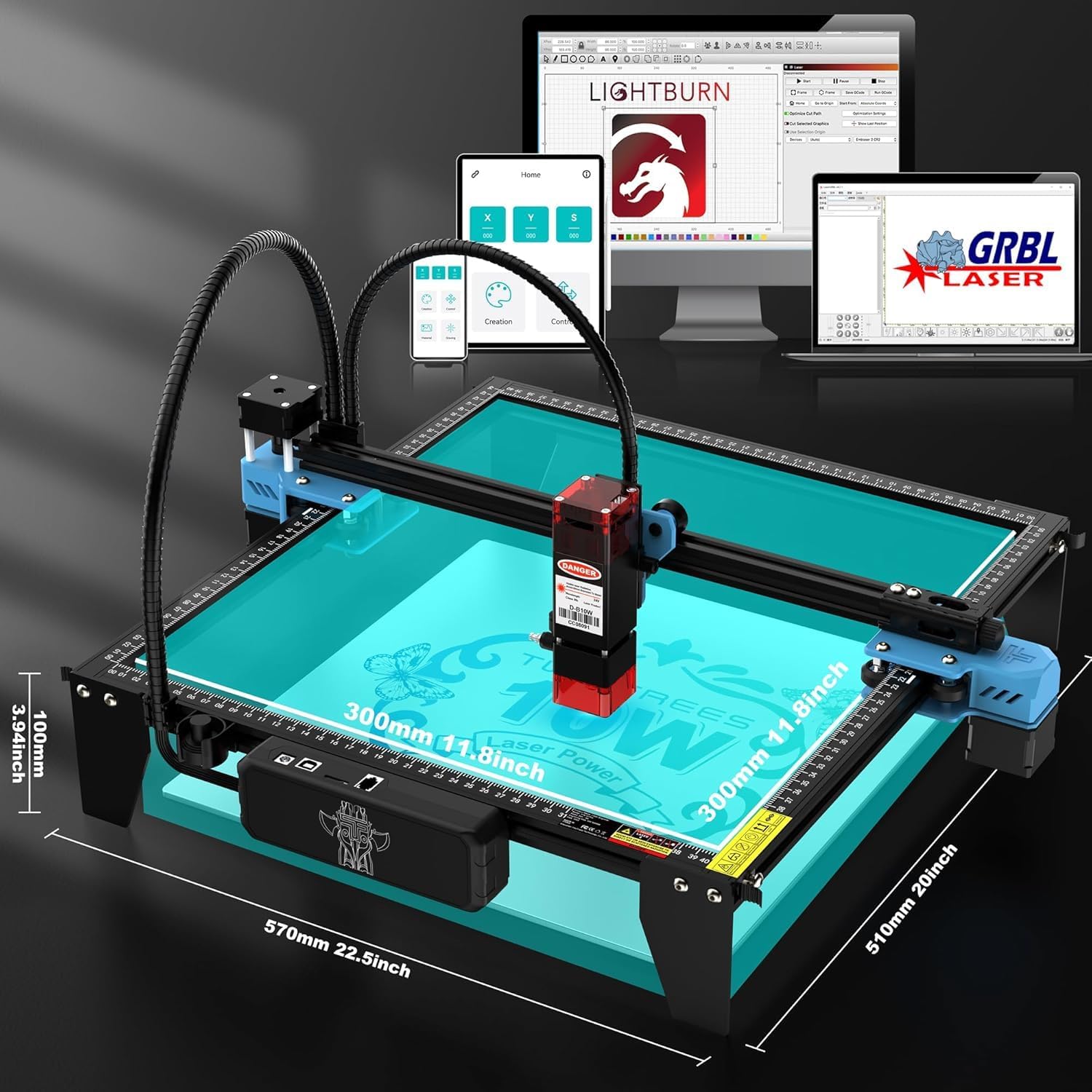
Image: Software compatibility of the TTS-10 Pro, including Lightburn, LaserGRBL, and a mobile application.
4.2 ການກະກຽມວັດສະດຸ
- Place the material to be engraved or cut within the working area (300x300mm).
- Ensure the material is flat and securely positioned to prevent movement during operation.
- ປັບໂຟກັສເລເຊີຕາມຄວາມໜາຂອງວັດສະດຸ.
4.3 ຂະບວນການແກະສະຫລັກແລະການຕັດ
- Import or create your design in the chosen software.
- Set the appropriate laser power, speed, and passes for your material. The TTS-10 Pro can cut 8mm plywood and 5mm black acrylic in a single pass.
- ກ່ອນview the engraving path to ensure correct positioning.
- Initiate the engraving/cutting process. Always wear safety goggles during operation.

Image: The TTS-10 Pro demonstrates high-speed and high-quality engraving capabilities compared to other models.
5. ບໍາລຸງຮັກສາ
Regular maintenance ensures optimal performance and extends the lifespan of your TTS-10 Pro Laser Engraver.
5.1 Cleaning the Laser Lens
Dust and debris on the laser lens can reduce laser power and engraving quality.
- ຄວາມຖີ່: Clean the lens after every 10-20 hours of operation, or if you notice a decrease in performance.
- ຂັ້ນຕອນ: Use a specialized lens cleaning solution and a lint-free cloth or cotton swab. Gently wipe the lens surface.
5.2 Cleaning the Air Assist Nozzle
The air assist nozzle can accumulate residue from smoke and debris, affecting airflow.
- ຄວາມຖີ່: Inspect and clean the nozzle regularly, especially after cutting operations.
- ຂັ້ນຕອນ: Disconnect the air hose (if applicable) and carefully remove any blockages or buildup from the nozzle opening.
5.3 Rail and Belt Maintenance
The linear rails and belts ensure smooth movement of the laser module.
- ທໍາຄວາມສະອາດ: Periodically clean the rails with a soft cloth to remove dust and debris.
- ການລະບາຍສີ: Apply a small amount of lithium grease or machine oil to the linear rails every few months to ensure smooth operation.
- ຄວາມເຄັ່ງຕຶງສາຍແອວ: ກວດເບິ່ງຄວາມກົດດັນຂອງສາຍແອວກໍານົດເວລາ. ພວກເຂົາຄວນຈະເຄັ່ງຄັດແຕ່ບໍ່ເຄັ່ງຄັດເກີນໄປ. ປັບຕົວຖ້າຈໍາເປັນ.
6. ການແກ້ໄຂບັນຫາ
This section addresses common issues you might encounter with your TTS-10 Pro Laser Engraver.
6.1 ເລເຊີບໍ່ຍິງ ຫຼື ຜົນຜະລິດອ່ອນ
- ກວດສອບພະລັງງານ: Ensure the machine is powered on and the laser module cable is securely connected.
- ການຕັ້ງຄ່າຊອບແວ: Verify that the laser power setting in your software is not set too low or to 0.
- ຄວາມສະອາດເລນ: A dirty laser lens can significantly reduce output. Refer to Section 5.1 for cleaning instructions.
- ຈຸດສຸມ: ໃຫ້ແນ່ໃຈວ່າເລເຊີຖືກໂຟກັສຢ່າງຖືກຕ້ອງໃສ່ພື້ນຜິວຂອງວັດສະດຸ.
6.2 Machine Not Connecting to Software
- ການເຊື່ອມຕໍ່ USB: ໃຫ້ແນ່ໃຈວ່າສາຍ USB ໄດ້ເຊື່ອມຕໍ່ກັບທັງເຄື່ອງ ແລະ ຄອມພິວເຕີຢ່າງແໜ້ນໜາແລ້ວ. ລອງໃຊ້ພອດ USB ຫຼື ສາຍອື່ນ.
- ຄົນຂັບລົດ: ກວດສອບວ່າມີການຕິດຕັ້ງໄດເວີ USB ທີ່ຈໍາເປັນໃນຄອມພິວເຕີຂອງທ່ານ.
- Software Port: In your engraving software, ensure the correct COM port is selected.
- ວົງຈອນພະລັງງານ: Turn off both the engraver and your computer, then restart them.
6.3 ຄຸນນະພາບການແກະສະຫຼັກ/ການຕັດທີ່ບໍ່ດີ
- ຈຸດສຸມ: Improper focus is a common cause. Re-focus the laser.
- Speed/Power Settings: Adjust laser speed and power settings for the specific material. Too fast or too low power can result in incomplete cuts or faint engravings.
- ຄວາມເຂົ້າກັນໄດ້ຂອງວັດສະດຸ: Note that diode lasers like the TTS-10 Pro are generally not suitable for cutting clear acrylic. They excel with opaque acrylic, wood, and other materials.
- Material Stability: Ensure the material is not moving during the process.
- ບັນຫາກົນຈັກ: Check for loose belts or debris on the rails that might cause skipped steps or uneven movement.
6.4 Gantry Movement Issues
- ສາຍໄຟ: Inspect all motor and limit switch cables for secure connections and any signs of damage or short circuits.
- ອຸປະສັກ: Check the gantry and rails for any physical obstructions.
- ການລະບາຍສີ: Ensure the linear rails are properly lubricated (see Section 5.3).
7. ຂໍ້ມູນຈໍາເພາະ
Detailed technical specifications for the Twotrees TTS-10 Pro Laser Engraver.
| ຄຸນສົມບັດ | ຂໍ້ມູນຈໍາເພາະ |
|---|---|
| ຕົວແບບ | TTS-10 Pro |
| ຍີ່ຫໍ້ | Twotrees |
| ພະລັງງານອອກເລເຊີ | 10000mW (10W) |
| ຊັ້ນເລເຊີ | ຫ້ອງຮຽນ 4 |
| ຂະຫນາດເລເຊີ | 0.069ມມ |
| ຄວາມໄວການແກະສະຫຼັກ | ສູງສຸດ 30000 ມມ/ນາທີ |
| ພື້ນທີ່ເຮັດວຽກ | 300 x 300 ມມ (12 x 12 ນິ້ວ) |
| ການຈັດອັນດັບການປ້ອນຂໍ້ມູນ | DC 12V, 4A |
| ຂະໜາດສິນຄ້າ | 20.1 x 7 x 7 ນິ້ວ |
| ນ້ໍາຫນັກລາຍການ | 7.92 ປອນ |
| ຄວາມເຂົ້າກັນໄດ້ຂອງຊອບແວ | LaserGRBL, Lightburn, MKSLaser App |
| ວັດສະດຸທີ່ຮອງຮັບ | Wood, Metal, Acrylic (opaque), Glass, Stainless Steel, Leather, Paper, Fabric, etc. |