1. ບົດແນະນຳ
Thank you for choosing the havit OWS915 Open Ear Headphones. These headphones are designed to provide a comfortable and secure listening experience while maintaining awareness of your surroundings. Featuring Bluetooth 5.4 connectivity, 64 hours of total playtime with the charging case, IPX5 water resistance, and Environmental Noise Cancellation (ENC) for clear calls, the OWS915 is suitable for various activities.
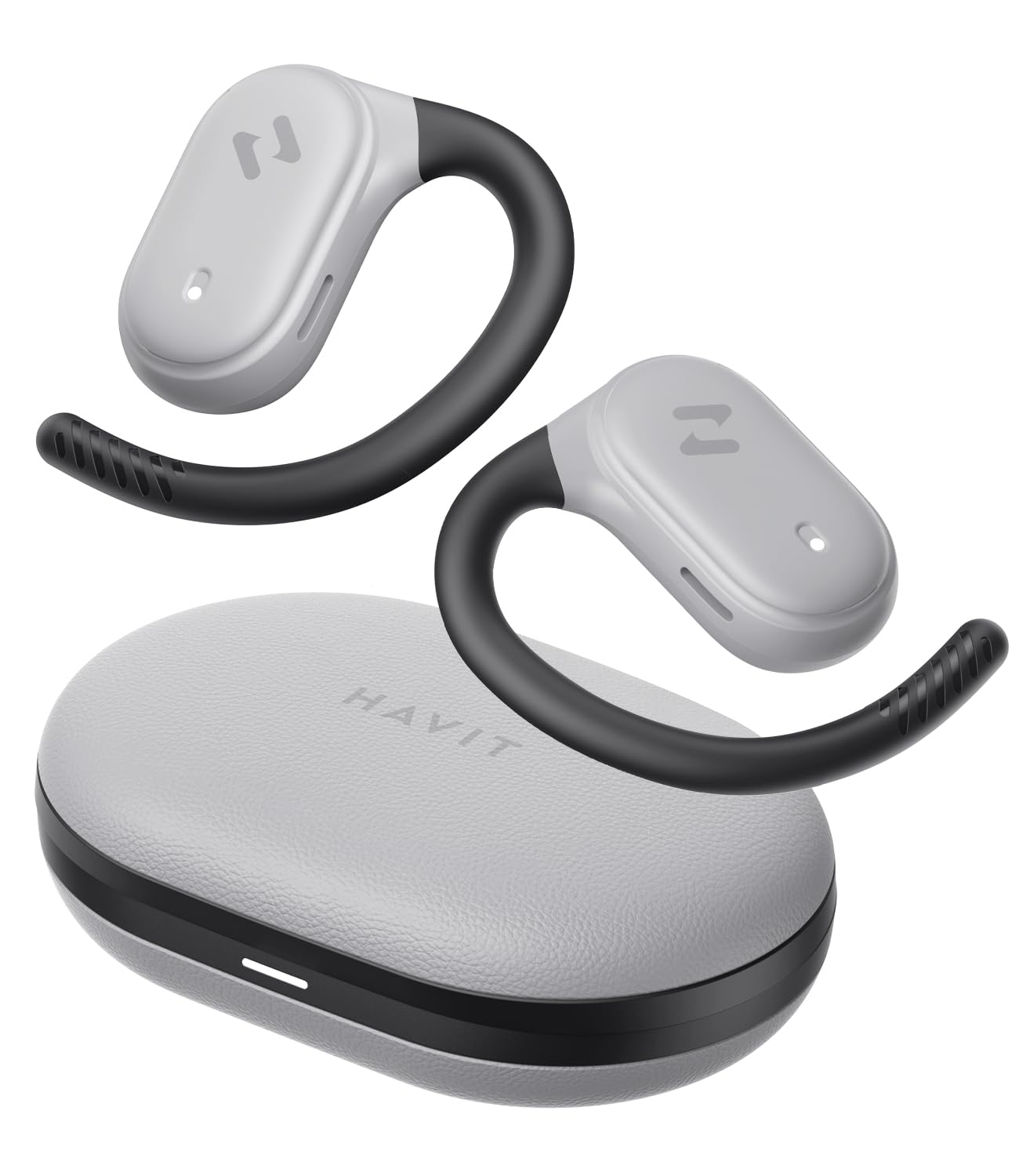
Image: havit OWS915 Open Ear Headphones and their charging case, showcasing ການອອກແບບຂອງຜະລິດຕະພັນ.
2. ສິ່ງທີ່ຢູ່ໃນກ່ອງ
- havit OWS915 Open Ear Headphones (Left and Right)
- ກ່ອງສາກ
- ສາຍສາກ USB-C
- ຄູ່ມືຜູ້ໃຊ້

Image: A visual representation of all items included in the havit OWS915 product packaging.
3. ຄໍາແນະນໍາກ່ຽວກັບການໃສ່
ເພື່ອຄວາມສະດວກສະບາຍ ແລະຄຸນນະພາບສຽງທີ່ດີທີ່ສຸດ, ໃຫ້ແນ່ໃຈວ່າໃສ່ຫູຟັງຢ່າງຖືກຕ້ອງ.
- ເປີດກໍລະນີສາກໄຟແລະຖອດຫູຫູອອກ.
- Place the earhook over the top of your ear.
- Adjust the earbud so that the speaker rests comfortably outside your ear canal, directing sound towards your ear.

Image: A three-step visual guide demonstrating the proper way to position the open-ear headphones on the ear.
4. ຕັ້ງຄ່າ
4.1 ການຈັບຄູ່ເບື້ອງຕົ້ນ
- ກວດໃຫ້ແນ່ໃຈວ່າໄດ້ສາກຫູຟັງແລ້ວ.
- ເປີດກ່ອງສາກໄຟ. ຫູຟັງເອຍບັດຈະເຂົ້າສູ່ໂໝດຈັບຄູ່ໂດຍອັດຕະໂນມັດ, ໂດຍມີໄຟ LED ກະພິບສະແດງຢູ່.
- ໃນອຸປະກອນຂອງທ່ານ (ໂທລະສັບສະຫຼາດ, ແທັບເລັດ, ຄອມພິວເຕີ), ເປີດ Bluetooth ແລະຊອກຫາອຸປະກອນທີ່ມີຢູ່.
- Select "havit OWS915" from the list of devices.
- ເມື່ອເຊື່ອມຕໍ່ແລ້ວ, ໄຟ LED ເທິງຫູຟັງຈະຢຸດກະພິບ.
4.2 ການສາກຫູຟັງ ແລະ ເຄສ
The headphones provide up to 8.5 hours of playtime on a single charge, with the charging case extending this to a total of 64 hours.
- ສາຍສາກຫູຟັງ: ໃສ່ຫູຟັງເອຍບັດໃສ່ໃນກ່ອງສາກໄຟ. ພວກມັນຈະເລີ່ມສາກໄຟໂດຍອັດຕະໂນມັດ. ໄຟສັນຍານຢູ່ເທິງຫູຟັງຈະສະແດງສະຖານະການສາກໄຟ.
- ຕູ້ສາກໄຟ: Connect the provided USB-C cable to the charging port on the case and to a power source. The indicator light on the case will show charging progress.

Image: The havit OWS915 headphones in their charging case, highlighting the 8.5 hours of playtime per charge and 64 hours total with the case.
5. ຄໍາແນະນໍາການດໍາເນີນງານ
5.1 ແຕະການຄວບຄຸມ
The havit OWS915 headphones feature intuitive touch controls on each earbud.
| ຟັງຊັນ | ການປະຕິບັດ |
|---|---|
| ຫຼິ້ນ/ຢຸດຊົ່ວຄາວ | ແຕະໃສ່ຫູຟັງຫູຟັງສອງຄັ້ງ |
| ເພງກ່ອນໜ້າ | Touch and hold left earbud for 1 second |
| ເພງຕໍ່ໄປ | Touch and hold right earbud for 1 second |
| ຕອບ/ວາງສາຍ | ແຕະໃສ່ຫູຟັງຫູຟັງສອງຄັ້ງ |
| ປະຕິເສດການໂທ | Touch and hold either earbud for 1 second |
| ຜູ້ຊ່ວຍສຽງ | ແຕະໃສ່ຫູຟັງຊ້າຍສາມເທື່ອ |
| ໂໝດເກມ/ໂໝດດົນຕີ | ແຕະໃສ່ຫູຟັງເບື້ອງຂວາສາມເທື່ອ |

Image: A visual guide detailing the various touch control functions on the havit OWS915 earbuds.
5.2 HAVIT LIFE APP
Enhance your listening experience by downloading the HAVIT LIFE APP. The app allows you to:
- Customize EQ settings to match your audio preferences.
- ປັບຟັງຊັນການຄວບຄຸມແບບສຳຜັດ.
- Monitor headphone battery levels.
- Switch between game and music modes.

Image: Screenshots of the HAVIT LIFE APP, demonstrating options for equalizer settings and other customizations.
6. ຄຸນສົມບັດ ແລະ ເຕັກໂນໂລຊີ
6.1 Open-Ear Design and Comfort
The OWS915 headphones feature an open-ear design with lightweight (7.9 grams) and soft TPU materials, ensuring a comfortable and secure fit for extended wear without fatigue. This design allows you to remain aware of your surroundings.

Image: A person wearing the havit OWS915 headphones, illustrating the comfortable and secure open-ear design.
6.2 Powerful Sound Performance
Equipped with advanced 14.2mm dynamic drivers and bass enhancement technology, these headphones deliver rich bass and vibrant 3D surround sound for an immersive audio experience.

Image: An illustration of the 14.2mm dynamic drivers, highlighting their role in delivering powerful bass.
6.3 Crystal Clear Calls with 4-Microphone ENC
The integrated 4-microphone Environmental Noise Cancellation (ENC) technology ensures your voice is transmitted clearly during calls, even in noisy environments.
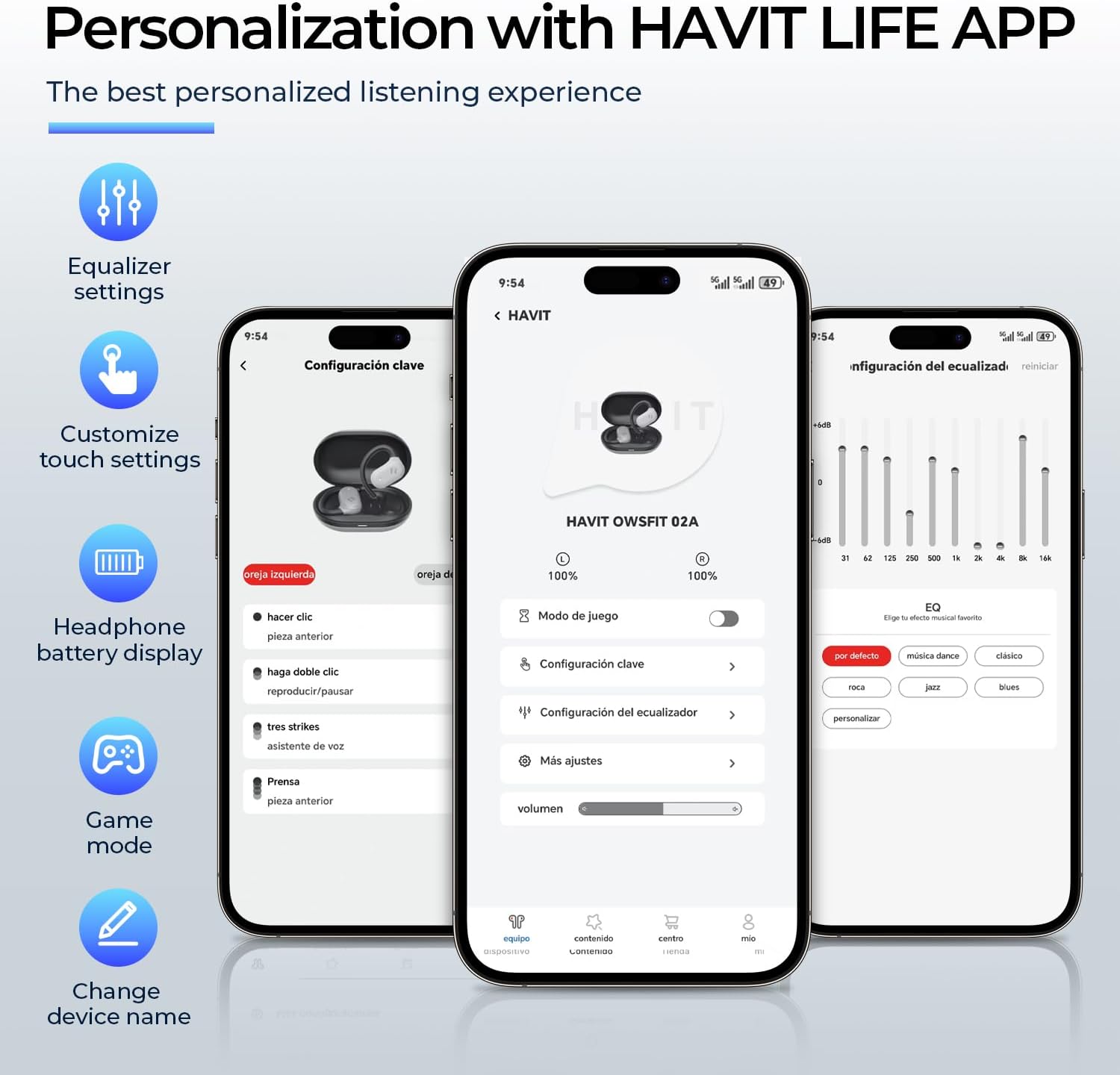
Image: A person using the havit OWS915 headphones for a call, illustrating the clear communication provided by 4-microphone ENC technology.
6.4 Cutting-Edge Directional Audio Technology
Innovative directional audio technology provides precise sound placement, minimizing sound leakage while improving bass quality. This allows you to enjoy your audio without disturbing others and without compromising your awareness.

Image: A visual representation of the directional audio technology, showing sound waves directed towards the ear with minimal leakage.
6.5 ກັນນ້ຳ IPX5
With an IPX5 rating, the OWS915 headphones are resistant to sweat and splashes, making them suitable for workouts, outdoor activities, and light rain.
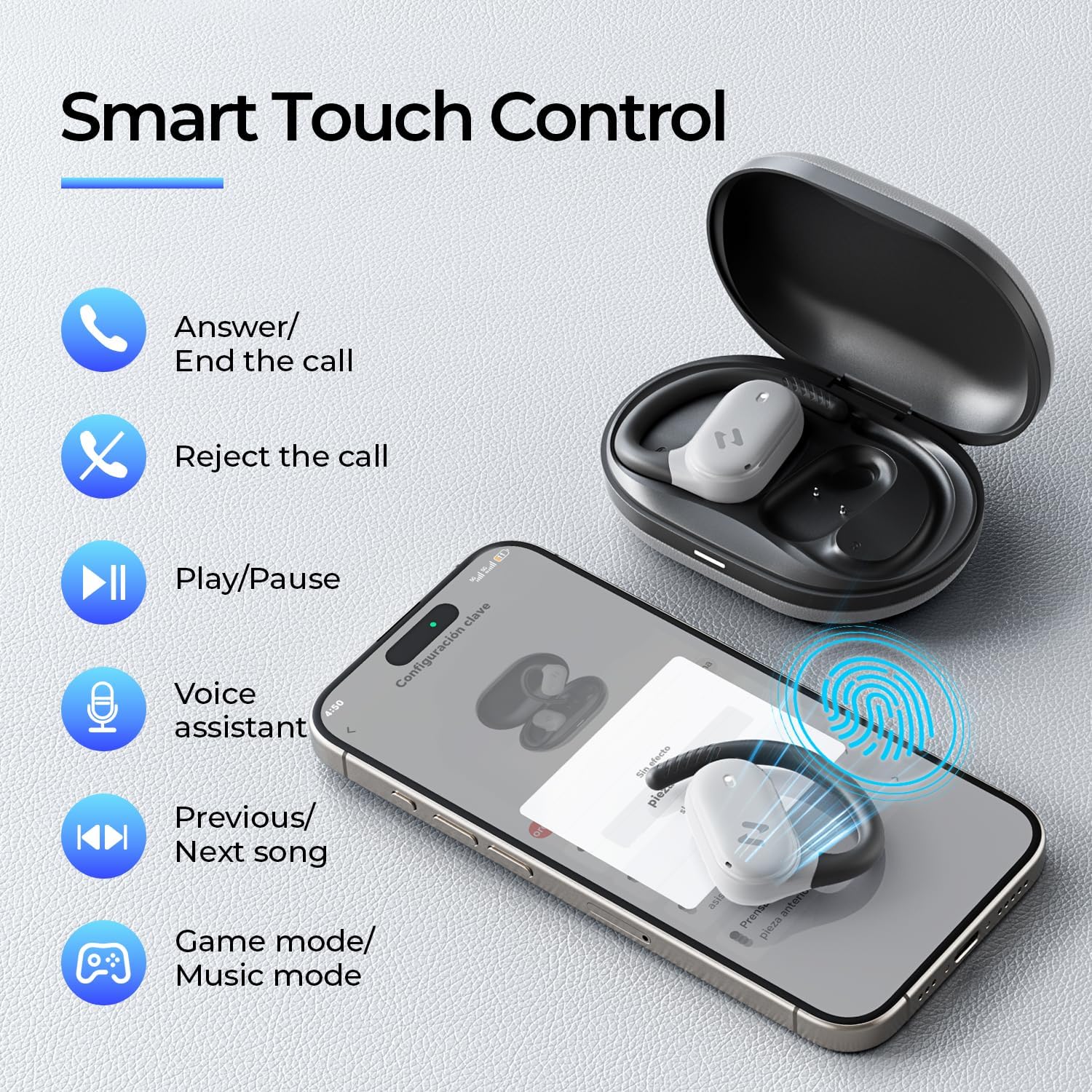
Image: The havit OWS915 headphones partially submerged in water, demonstrating their IPX5 water and sweat resistance.
7. ບໍາລຸງຮັກສາ
- ທໍາຄວາມສະອາດ: ເຊັດຫູຟັງຫູຟັງ ແລະ ກະເປົ໋າສາກໄຟເປັນປະຈຳດ້ວຍຜ້າອ່ອນ ແລະ ແຫ້ງ. ຫຼີກເວັ້ນການນໍາໃຊ້ວັດສະດຸຂັດຫຼືສານເຄມີທີ່ຮຸນແຮງ.
- ການເປີດເຜີຍນ້ໍາ: While IPX5 rated, avoid submerging the headphones in water. If exposed to sweat or splashes, wipe them dry before placing them back in the charging case.
- ການເກັບຮັກສາ: Store the headphones in their charging case when not in use to protect them and ensure they remain charged.
- ການດູແລຫມໍ້ໄຟ: To prolong battery life, avoid fully discharging the headphones or charging case frequently. Charge them regularly.
8. ການແກ້ໄຂບັນຫາ
- ບໍ່ມີພະລັງງານ: ກວດໃຫ້ແນ່ໃຈວ່າຫູຟັງຫູຟັງ ແລະກ່ອງສາກສາກເຕັມແລ້ວ.
- ລົ້ມເຫລວໃນການຈັບຄູ່:
- ໃຫ້ແນ່ໃຈວ່າ Bluetooth ຖືກເປີດໃຊ້ຢູ່ໃນອຸປະກອນຂອງທ່ານ.
- ໃຫ້ແນ່ໃຈວ່າຫູຟັງເອຍບັດຢູ່ໃນໂໝດຈັບຄູ່ (ໄຟ LED ກະພິບ).
- ປິດ Bluetooth ໃນອຸປະກອນທີ່ຢູ່ໃກ້ຄຽງອື່ນໆທີ່ອາດຈະພະຍາຍາມເຊື່ອມຕໍ່.
- Try resetting the earbuds (refer to the full manual for specific reset instructions if needed).
- ບໍ່ມີສຽງ:
- ກວດສອບລະດັບສຽງທັງໃນອຸປະກອນຂອງທ່ານ ແລະ ຫູຟັງ.
- ໃຫ້ແນ່ໃຈວ່າຫູຟັງໄດ້ເຊື່ອມຕໍ່ກັບອຸປະກອນຂອງທ່ານຢ່າງຖືກຕ້ອງແລ້ວ.
- ລອງຫຼິ້ນສຽງຈາກແອັບພລິເຄຊັນ ຫຼືແຫຼ່ງອື່ນ.
- ຄຸນນະພາບການໂທບໍ່ດີ:
- ໃຫ້ແນ່ໃຈວ່າໄມໂຄຣໂຟນບໍ່ຖືກກີດຂວາງ.
- ຍ້າຍໄປພື້ນທີ່ທີ່ມີສຽງລົບກວນໃນພື້ນຫຼັງໜ້ອຍລົງ.
- ກວດເບິ່ງການເຊື່ອມຕໍ່ເຄືອຂ່າຍຂອງອຸປະກອນຂອງທ່ານ.
9. ຂໍ້ມູນຈໍາເພາະ
| ຄຸນສົມບັດ | ຂໍ້ມູນຈໍາເພາະ |
|---|---|
| ຊື່ຕົວແບບ | OWS915 |
| ເຕັກໂນໂລຊີການເຊື່ອມຕໍ່ | ໄຮ້ສາຍ (Bluetooth 5.4) |
| ຊ່ວງ Bluetooth | 10 ແມັດ |
| ອາຍຸແບັດເຕີຣີ (ຫູຟັງ) | 8.5 ຊົ່ວໂມງ (ຄ່າບໍລິການດຽວ) |
| ເວລາຫຼິ້ນທັງໝົດ (ພ້ອມກໍລະນີ) | 64 ຊົ່ວໂມງ |
| ລະດັບຄວາມຕ້ານທານນ້ໍາ | IPX5 (ກັນນໍ້າ) |
| ຂະໜາດໄດເວີສຽງ | 14.2 ມິນລິແມັດ |
| ວິທີການຄວບຄຸມ | ແອັບ, ແຕະ |
| ອົງປະກອບລວມ | ໄມໂຄຣໂຟນ |
| ນ້ຳໜັກລາຍການ (ຫູຟັງ) | 7.9 ກຣາມ (ແຕ່ລະອັນ) |
| ນ້ຳໜັກກະເປົ໋າ | 77.8 ກຣາມ |
| ວັດສະດຸ | PC + ABS + TPU |
| ການຕອບສະໜອງຄວາມຖີ່ | 20 KHz |
| ຄວາມອ່ອນໄຫວ | 118 dB |
| impedance | 32 ໂອມ |
10. ວິດີໂອແນະນໍາ
ເບິ່ງວິດີໂອຢ່າງເປັນທາງການນີ້ສຳລັບພາບລວມview of the havit OWS915 Open Ear Headphones.
Video: An official product video from HAVIT Direct showcasing the havit OWS915 Open Ear Headphones, including their design and features.
11. ການຮັບປະກັນແລະການສະຫນັບສະຫນູນ
havit products come with a standard warranty. For detailed warranty information, technical support, or customer service inquiries, please refer to the warranty card included in your product packaging or visit the official havit webເວັບໄຊ. ທ່ານອາດຈະຕິດຕໍ່ຜູ້ຂາຍໂດຍກົງເພື່ອຂໍຄວາມຊ່ວຍເຫຼືອ.
ສະຫນັບສະຫນູນອອນໄລນ໌: www.havit.com/support


