ແນະນຳ
This manual provides detailed instructions for the installation, operation, and maintenance of your Waveform DualMini 2x2 MIMO Window Antenna Kit. The DualMini is designed to enhance 4G and 5G cellular signal reception for compatible routers and hotspots, improving data rates, reducing latency, and increasing connection reliability. Its omnidirectional design simplifies placement, making it suitable for various environments including homes and RVs.
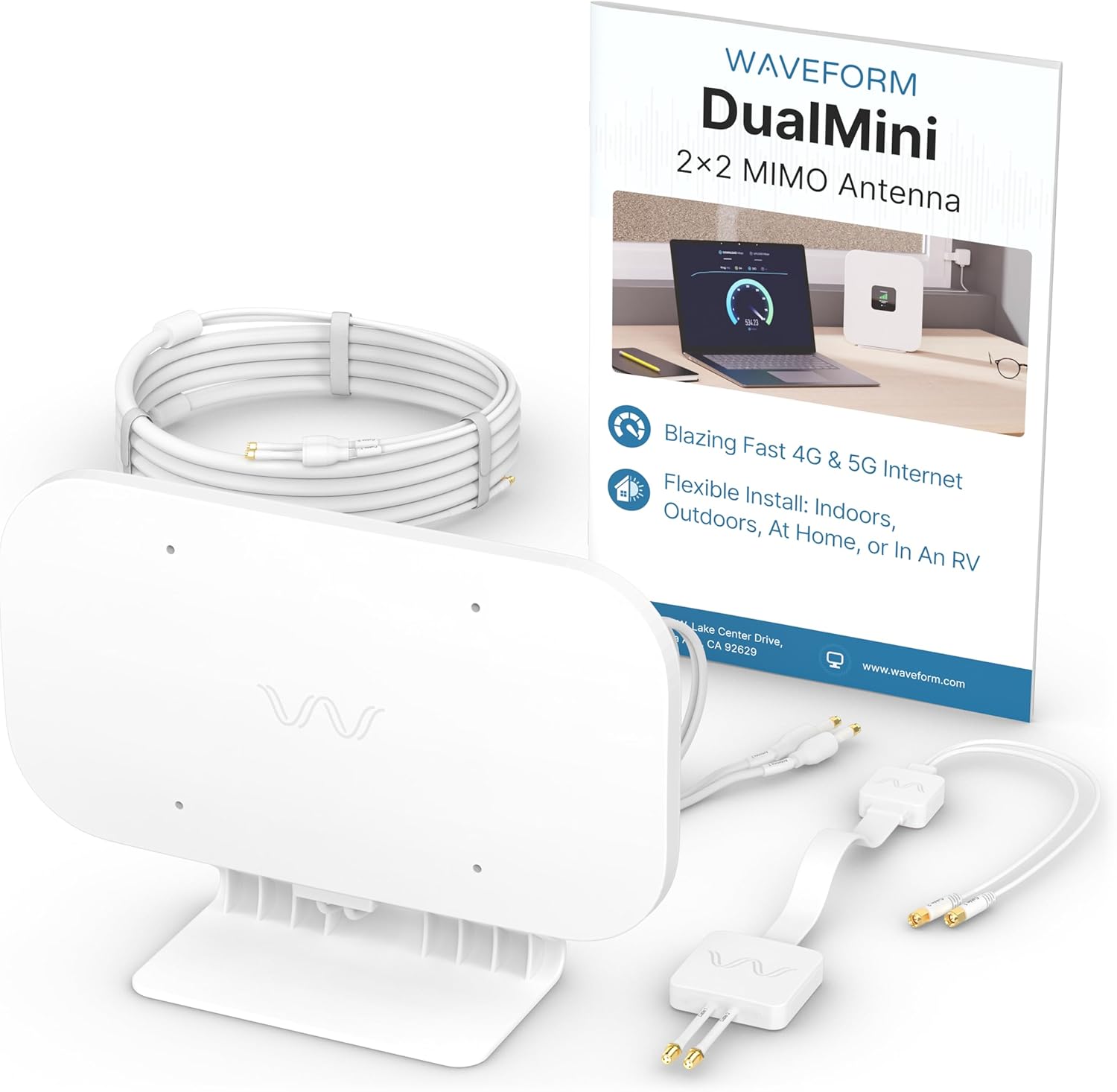
The Waveform DualMini 2x2 MIMO Antenna Kit includes the main antenna unit, connection cables, TS9 adapters, and the user manual.
ເນື້ອໃນຊຸດ
The Waveform DualMini Complete Kit includes the following components:
- DualMini Antenna
- ສາຍເຂົ້າປ່ອງຢ້ຽມ
- 10ft UltraFlex Twin Cable
- 2x TS9 Adapters
- Desktop ຕັ້ງ
- ຈອກດູດ
- Wall Screws & Anchors
- Pole Mount Bracket with Zip Ties
- ຄູ່ມືຜູ້ໃຊ້

The complete kit includes the DualMini antenna, Window Entry Cable, 10ft UltraFlex Twin Cable, 2x TS9 Adapters, Desktop Stand, Suction Cups, Wall Screws & Anchors, Pole Mount Bracket with Zip Ties, and a User Manual.
ຄູ່ມືການຕິດຕັ້ງ
The DualMini antenna offers flexible installation options for both indoor and outdoor use. Optimal performance is typically achieved with outdoor placement.
1. Mount Your DualMini Antenna
Choose a mounting location that provides the best possible signal reception. The omnidirectional design means no precise aiming is required, but placing it on the side of your building or RV that receives the strongest signal is recommended.
- ການຕິດຕັ້ງກາງແຈ້ງ: For optimal performance, consider wall or pole mounting. Use the provided wall screws, anchors, or the pole mount bracket with zip ties.
- Indoor Mounting: For easier installation, use the included suction cups for window attachment or the desktop stand for placement on a flat surface.

This image demonstrates the various ways to mount the DualMini antenna for optimal performance or easier installation, including wall, pole, window, and desktop options.
2. ແລ່ນສາຍໄຟພາຍໃນ
Utilize the Window Entry Cable to route the antenna cables from outside to inside your building or RV without drilling. This cable is designed to pass through most window frames when closed.

The Window Entry Cable allows for routing antenna cables indoors without drilling, passing through a window frame to connect to your gateway.
3. Connect Your 5G Gateway
Connect the UltraFlex Twin Cables from the antenna to the external antenna ports on your 4G LTE or 5G gateway or router. Some gateways may require the included TS9 adapters. After connecting, reboot your gateway to ensure it recognizes the external antenna.

This image illustrates the final step of connecting the antenna cables to the external antenna ports of your 4G LTE or 5G gateway. TS9 adapters may be required for some gateways.
ການດໍາເນີນງານ
Once installed and connected, the DualMini antenna will work with your compatible 4G/5G router or hotspot to improve cellular signal reception. The antenna's omnidirectional design means it receives signals from all directions, eliminating the need for precise aiming. Your router will automatically utilize the improved signal for faster and more reliable internet connectivity.

This diagram shows how the DualMini antenna connects to a cellular router, enhancing 4G or 5G internet performance for home use.
ຄວາມເຂົ້າກັນໄດ້
The Waveform DualMini antenna is designed for use with 4G LTE and 5G cellular gateways, modems, and routers that feature two external antenna ports. It supports a wide range of devices and carriers.
Compatible Devices and Carriers:
- Routers/Hotspots: Inseego, Netgear (e.g., M5 & M6), Peplink, Cradlepoint, GL.iNet, Cudy, TP-Link, Teltonika, and others with 2 antenna ports.
- ຜູ້ໃຫ້ບໍລິການ: Verizon, T-Mobile, AT&T, Rogers, Telus, Bell, and other 4G/5G networks.
Devices with TS9 ports will require the included TS9 adapters for connection.

The DualMini antenna is compatible with a wide range of 4G LTE and 5G gateways, modems, and routers from brands like Inseego, Netgear, Peplink, Cradlepoint, GL.iNet, Cudy, TP-Link, and Teltonika, across carriers such as Verizon, T-Mobile, AT&T, Rogers, Telus, and Bell.
ການແກ້ໄຂບັນຫາ
If you experience issues with your DualMini antenna, consider the following:
- ກວດສອບການເຊື່ອມຕໍ່: Ensure all cables are securely connected to both the antenna and your router/hotspot. Verify that TS9 adapters (if used) are properly attached.
- Router Reboot: After connecting the antenna, always reboot your cellular gateway or router.
- ການວາງເສົາອາກາດ: Experiment with different antenna locations. While omnidirectional, placing the antenna on the side of your home or RV facing the nearest cell tower can still yield better results.
- Signal Strength Indicators: Refer to your router's interface for signal strength metrics (e.g., RSRP, SINR) rather than just
ເອກະສານທີ່ກ່ຽວຂ້ອງ - DMIN-1

Waveform MIMO External Antennas: Installation and Optimization Guide
Comprehensive guide to installing, positioning, and optimizing Waveform MIMO External Antennas for improved cellular signal and data rates. Covers setup, compatibility, and troubleshooting.
ເສົາອາກາດພາຍນອກ Waveform 4x4 MIMO: ຄູ່ມືການຕິດຕັ້ງ ແລະ ການເພີ່ມປະສິດທິພາບ
ຄຳແນະນຳແບບເທື່ອລະຂັ້ນຕອນຈາກ Waveform ສຳລັບການຕິດຕັ້ງເສົາອາກາດພາຍນອກ 4x4 MIMO ເພື່ອເພີ່ມສັນຍານໂທລະສັບມືຖື. ກວມເອົາການຕັ້ງຄ່າ, ການວາງຕຳແໜ່ງ, ການທົດສອບ ແລະ ການເພີ່ມປະສິດທິພາບສຳລັບເຣົາເຕີ ແລະ ຈຸດເຊື່ອມຕໍ່ໂທລະສັບມືຖື.
Waveform Griddy Parabolic Antenna: ການປະກອບ, ການຕິດຕັ້ງ, ແລະຄູ່ມືການຕັ້ງເປົ້າ
ຄູ່ມືທີ່ສົມບູນແບບສໍາລັບການປະກອບ, ການຕັ້ງຄ່າ, ແລະການມຸ່ງຫມາຍຂອງສາຍອາກາດພາຣາໂບລິກ Waveform Griddy ສໍາລັບການປະຕິບັດທີ່ດີທີ່ສຸດໃນຄໍາຮ້ອງສະຫມັກໂທລະສັບມືຖືແລະ Wi-Fi. ລວມມີການເລືອກ feedhorn, ການຕິດຕັ້ງ MIMO, ແລະຄໍາແນະນໍາການຕັ້ງເປົ້າ.
ເສົາອາກາດພາຍນອກ Waveform 4x4 MIMO: ຄູ່ມືການຕິດຕັ້ງ ແລະ ການເພີ່ມປະສິດທິພາບ
Comprehensive guide to installing, positioning, and optimizing Waveform 4x4 MIMO External Antennas for improved cellular signal and data rates. Includes setup, troubleshooting, and compatibility information.
ຄູ່ມືການຕິດຕັ້ງ ແລະ ຕັ້ງຄ່າເສົາອາກາດ Griddy Parabolic ໂດຍ Waveform
ຄູ່ມືທີ່ຄົບຖ້ວນສົມບູນກ່ຽວກັບການປະກອບ, ການຕິດຕັ້ງ, ແລະ ການແນມເສົາອາກາດ Waveform Griddy parabolic ເພື່ອໃຫ້ສັນຍານໂທລະສັບມືຖື ແລະ WiFi ມີປະສິດທິພາບສູງສຸດ. ລວມທັງການເລືອກ feedhorn ແລະ ການຕັ້ງຄ່າ MIMO.
Waveform QuadPro Duo Directional 8x8 MIMO Antenna Kit ຄູ່ມືການຕິດຕັ້ງ
ຄູ່ມືນີ້ໃຫ້ຄໍາແນະນໍາທີ່ສົມບູນແບບສໍາລັບການຕິດຕັ້ງ ແລະການເພີ່ມປະສິດທິພາບ Waveform QuadPro Duo Directional 8x8 MIMO Antenna Kit ເພື່ອປັບປຸງສັນຍານໂທລະສັບມືຖື ແລະຄວາມໄວຂໍ້ມູນ. ມັນກວມເອົາ unboxing, setup, positioning, connection, mounting, weatherproof, grounding, and advanced optimization techniques.