1. ບົດແນະນຳ
This manual provides essential information for setting up, operating, and maintaining your DOOGEE Tab A9 Pro Android 15 Tablet. Please read it thoroughly to ensure proper usage and to maximize your device's capabilities.
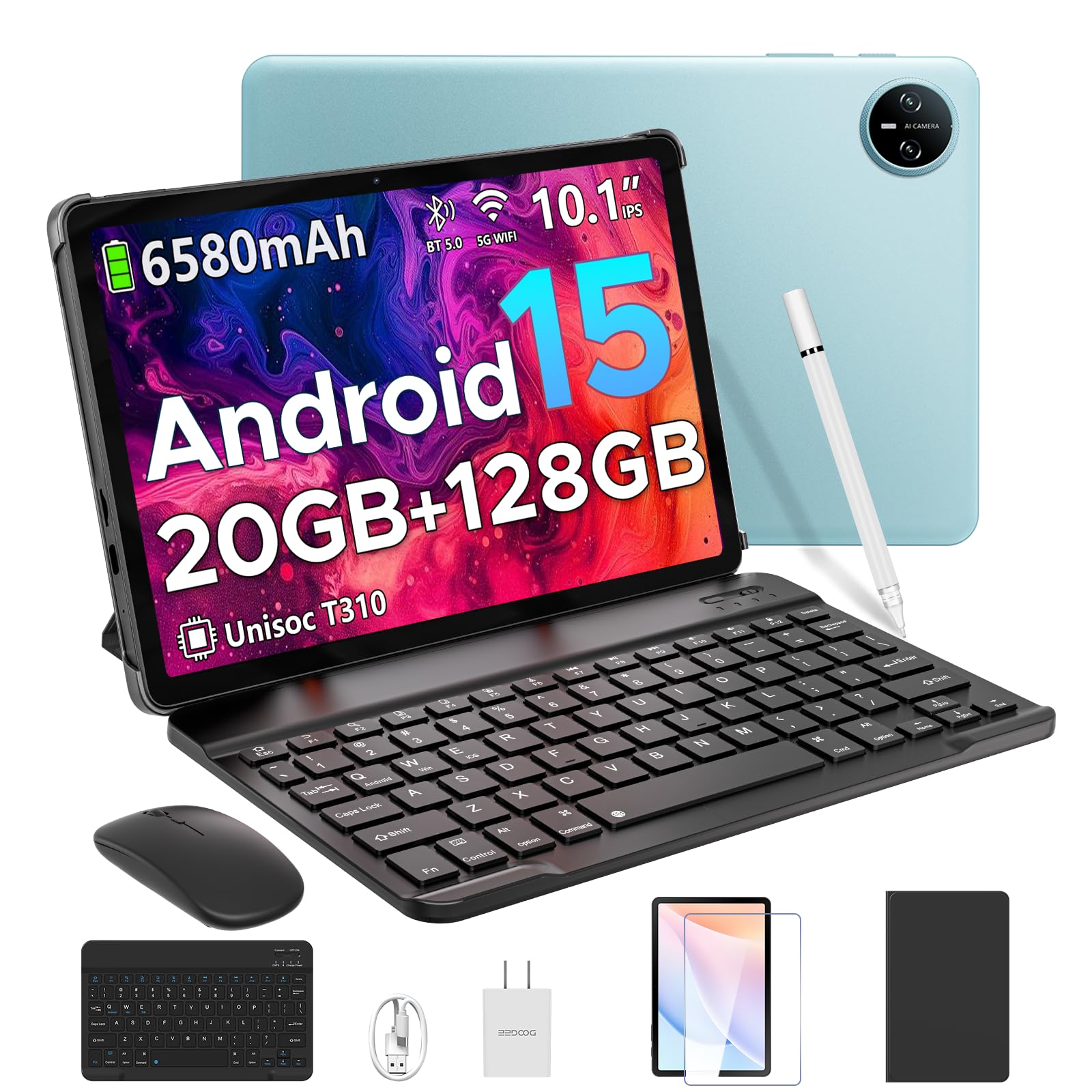
Image 1.1: The DOOGEE Tab A9 Pro Tablet.
2. ສິ່ງທີ່ຢູ່ໃນກ່ອງ
Your DOOGEE Tab A9 Pro package includes the following items:
- DOOGEE Tab A9 Pro Tablet (x1)
- Type-C USB Cable (x1)
- ເຄື່ອງສາກ (x1)
- ຄູ່ມື (x1)
- ບັດຮັບປະກັນ (x1)
- ແປ້ນພິມ Bluetooth (ສະບັບ VIP)
- ເມົ້າ Bluetooth (ສະບັບ VIP)
- Stylus (ສະບັບ VIP)
- ແຜ່ນປົກໜັງ (ສະບັບ VIP)
- ຟິມອຸນຫະພູມ (ສະບັບ VIP)

Image 2.1: All items included in the DOOGEE Tab A9 Pro package.
3. ຜະລິດຕະພັນເກີນview
The DOOGEE Tab A9 Pro features a sleek design with essential components for user interaction and connectivity.
3.1 ລັກສະນະທາງກາຍະພາບ
- ຈໍສະແດງຜົນ: 10.1-inch IPS HD Ultra-Clear Display.
- ກ້ອງຖ່າຍຮູບ: ກ້ອງຫຼັກ 8MP (ດ້ານຫຼັງ) ແລະ ກ້ອງໜ້າ 5MP.
- ສຽງ: High-Quality Dual Speakers and a 3.5mm Audio Jack.
- ພອດ: Type-C USB port for charging and data transfer.
- ປຸ່ມ: Power button and volume controls located on the side.

ຮູບພາບ 3.1: ດ້ານຫລັງ view of the DOOGEE Tab A9 Pro, highlighting the camera module.

ຮູບພາບ 3.2: ຂ້າງ view of the tablet, illustrating the power button, volume controls, and ports.
ວິດີໂອທີ 3.1: ການສະແດງວິດີໂອສັ້ນໆasing the ultra-thin body and design of the DOOGEE Tab A9 Pro.
4. ຕັ້ງຄ່າ
4.1 ການສາກໄຟເບື້ອງຕົ້ນ
Before first use, fully charge your tablet using the provided Type-C USB cable and charger. The battery indicator on the screen will show charging progress.
4.2 ເປີດ/ປິດ
- ເພື່ອເປີດເຄື່ອງ: Press and hold the power button until the DOOGEE logo appears.
- ປິດເຄື່ອງ: ກົດປຸ່ມເປີດປິດຄ້າງໄວ້, ຈາກນັ້ນເລືອກ 'ປິດເຄື່ອງ' ຈາກຕົວເລືອກທີ່ປາກົດຢູ່ໜ້າຈໍ.
4.3 ຕົວຊ່ວຍສ້າງການຕິດຕັ້ງເບື້ອງຕົ້ນ
Upon first power-on, follow the on-screen instructions to complete the initial setup, including language selection, Wi-Fi connection, and Google account login.
5. ລະບົບປະຕິບັດການ (Android 15)
The DOOGEE Tab A9 Pro runs on the Android 15 operating system, offering a smart, fluid, and secure user experience with enhanced privacy features.

Image 5.1: Visual representation of the Android 15 system interface.
ວິດີໂອທີ 5.1: ຈົບແລ້ວview of the DOOGEE Tab A9 Pro running Android 15.
6. ປະສິດທິພາບ & ການເກັບຮັກສາ
The tablet is designed for smooth operation and ample ຄວາມອາດສາມາດເກັບຮັກສາ.
6.1 ໜ່ວຍປະມວນຜົນ
Powered by the energy-efficient Unisoc T310 octa-core processor, the tablet ensures seamless performance for various tasks.

Image 6.1: Diagram illustrating the Unisoc T310 Quad-Core Processor.
6.2 RAM and Storage
The tablet features 20GB of RAM (4GB physical + 16GB virtual) and 128GB of internal storage. Storage can be expanded up to 2TB using a microSD card (sold separately).

Image 6.2: Visual representation of the tablet's RAM and ROM configuration.
7. Display & Audio
Experience vibrant visuals and clear sound with your tablet.
7.1 ຈໍສະແດງຜົນ
The 10.1-inch IPS HD display offers wide viewing angles and a resolution of 1280x800 for an immersive visual experience.

Image 7.1: The 10.1-inch IPS HD display with key specifications.
7.2 ສຽງ
Built-in dual speakers deliver clear and dynamic sound for movies, music, and video calls.

Image 7.2: Illustration of the tablet's dual speaker system.
8. ກ້ອງຖ່າຍຮູບ
Capture moments and conduct video calls with the integrated cameras.
8.1 Main Camera
The 8MP main camera allows you to take sharp photos.

Image 8.1: Close-up of the 8MP main camera on the tablet's rear.
ກ້ອງ ໜ້າ 8.2
The 5MP front camera is suitable for selfies and video calls.

Image 8.2: The 5MP front camera in use for a video call.
9. ການເຊື່ອມຕໍ່
ເຊື່ອມຕໍ່ດ້ວຍຕົວເລືອກໄຮ້ສາຍຕ່າງໆ.
9.1 WiFi
Supports 2.4G/5G dual-band Wi-Fi for smooth, high-speed internet access.

Image 9.1: Features of WiFi 5 connectivity on the tablet.
Bluetooth 9.2
Equipped with Bluetooth 5.0 for connecting wireless accessories.
9.3 GPS
Built-in GPS provides accurate navigation for travel and outdoor activities.
10. ອຸປະກອນເສີມ
The DOOGEE Tab A9 Pro comes with a suite of accessories to enhance its functionality.
10.1 ແປ້ນພິມ Bluetooth
Connect the Bluetooth keyboard for a desktop-like typing experience, ideal for productivity tasks.

Image 10.1: The tablet connected to its Bluetooth keyboard for efficient typing.
10.2 Mouse and Stylus
The included mouse and stylus further enhance navigation and interaction, especially for note-taking and creative tasks.

Image 10.2: The tablet shown with its accompanying keyboard and mouse.

Image 10.3: The tablet being used with the stylus for precise input.
10.3 ກໍລະນີປ້ອງກັນ
The protective case shields your tablet from drops and scratches and can also function as a stand.

Image 10.4: The tablet securely placed within its protective case.
11. ການຄຸ້ມຄອງຫມໍ້ໄຟ
The tablet is equipped with a high-capacity battery for extended use.
11.1 ຄວາມອາດສາມາດຫມໍ້ໄຟ
Features a long-lasting 6580mAh battery, providing hours of power for various activities without frequent recharging.

Image 11.1: Diagram showing the 6580mAh battery inside the tablet.
Video 11.1: A video highlighting the large battery capacity of the DOOGEE Tab A9 Pro.
12. ຄຸນນະສົມບັດຄວາມປອດໄພ
Protect your device and data with built-in security options.
12.1 ການປົດລັອກດ້ວຍໜ້າ
Effortlessly unlock your tablet using facial recognition technology.

Image 12.1: Illustration of the facial recognition unlock feature.
12.2 Fortified Privacy Shield
Android 15 provides enhanced privacy controls, robust data encryption, timely security patches, and proactive app screening for unbreakable security.

ຮູບພາບ 12.2: ຫຼາຍກວ່າview of Android 15's privacy features.
13. Multitasking & Productivity
Optimize your workflow and entertainment with these features.
13.1 ການເຮັດວຽກຫຼາຍຢ່າງພ້ອມກັນແບບແບ່ງໜ້າຈໍ
Run two applications simultaneously side-by-side for enhanced productivity.

Image 13.1: The tablet displaying two apps in split-screen mode.
13.2 Built-in WPS Office
The tablet comes with WPS Office pre-installed, providing PC-level productivity for documents, spreadsheets, and presentations (Note: WPS Office feature may be unavailable in certain regions).

Image 13.2: The tablet showcasing WPS Office applications.
Video 13.1: A video demonstrating the DOOGEE Tab A9 Pro's capabilities for learning and work.
14. ບໍາລຸງຮັກສາ
14.1 ການທໍາຄວາມສະອາດ
ໃຊ້ຜ້າແພທີ່ອ່ອນໆ, ບໍ່ມີສານດ່າງເພື່ອເຮັດຄວາມສະອາດໜ້າຈໍ ແລະຕົວເຄື່ອງຂອງແທັບເລັດ. ຫຼີກເວັ້ນການນໍາໃຊ້ສານເຄມີທີ່ຮຸນແຮງຫຼືວັດສະດຸຂັດ.
14.2 ການປັບປຸງຊອບແວ
ກວດສອບແລະຕິດຕັ້ງການປັບປຸງລະບົບເປັນປົກກະຕິເພື່ອຮັບປະກັນການປະຕິບັດທີ່ດີທີ່ສຸດ, ຄວາມປອດໄພ, ແລະການເຂົ້າເຖິງຄຸນສົມບັດໃຫມ່. ທ່ອງໄປຫາ ການຕັ້ງຄ່າ > ລະບົບ > ການປັບປຸງລະບົບ ເພື່ອກວດສອບການອັບເດດ.
15. ການແກ້ໄຂບັນຫາ
ພາກສ່ວນນີ້ແກ້ໄຂບັນຫາທົ່ວໄປທີ່ທ່ານອາດຈະພົບກັບແທັບເລັດຂອງທ່ານ.
15.1 ແທັບເລັດບໍ່ເປີດ
- ໃຫ້ແນ່ໃຈວ່າແທັບເລັດສາກໄຟພຽງພໍ. ເຊື່ອມຕໍ່ມັນກັບເຄື່ອງສາກຢ່າງໜ້ອຍ 30 ນາທີ.
- ກົດປຸ່ມເປີດປິດຄ້າງໄວ້ 10-15 ວິນາທີເພື່ອເປີດປິດເປີດຄືນໃໝ່.
15.2 ການປະຕິບັດຊ້າ
- ປິດແອັບພລິເຄຊັນພື້ນຫຼັງທີ່ບໍ່ຈໍາເປັນ.
- ລຶບລ້າງຂໍ້ມູນແຄດສຳລັບແອັບຯທີ່ໃຊ້ເລື້ອຍໆ.
- Ensure sufficient storage space is available. Delete old files or transfer them to external storage.
- ຣີສະຕາດແທັບເລັດ.
15.3 ບັນຫາການເຊື່ອມຕໍ່ Wi-Fi
- ຣີສະຕາດເລົາເຕີ Wi-Fi ແລະແທັບເລັດຂອງທ່ານ.
- ລືມເຄືອຂ່າຍ Wi-Fi ແລະເຊື່ອມຕໍ່ຄືນໃໝ່.
- ໃຫ້ແນ່ໃຈວ່າທ່ານຢູ່ໃນຂອບເຂດຂອງສັນຍານ Wi-Fi.
15.4 ອຸປະກອນເສີມບໍ່ເຊື່ອມຕໍ່
- Ensure Bluetooth is enabled on the tablet and the accessory.
- Check if the accessory is charged and in pairing mode.
- Refer to the accessory's individual manual for specific pairing instructions.
16. ຂໍ້ມູນຈໍາເພາະ
| ຄຸນສົມບັດ | ຂໍ້ມູນຈໍາເພາະ |
|---|---|
| ຍີ່ຫໍ້ | DOOGEE |
| ຊື່ຕົວແບບ | TABA9PRO |
| ໝາຍເລກຕົວແບບ | Tab A9 Pro |
| ລະບົບປະຕິບັດການ | Android 15 |
| ຂະຫນາດຈໍສະແດງຜົນຢືນ | 10.1 ນິ້ວ |
| ຄວາມລະອຽດໜ້າຈໍ | 1280*800 HD |
| ຄວາມລະອຽດໜ້າຈໍສູງສຸດ | 1280*800 ພິກເຊລ |
| ຍີ່ຫໍ້ເຄື່ອງປະມວນຜົນ | Unisoc |
| Graphics Coprocessor | Mali-G52 1-Core-2EE |
| ຄວາມອາດສາມາດເກັບຮັກສາຫນ່ວຍຄວາມຈໍາ | 128 GB (ສາມາດຂະຫຍາຍໄດ້ສູງສຸດ 2TB ຜ່ານ microSD) |
| RAM | 20GB (4GB ທາງກາຍະພາບ + 16GB virtual) |
| ປະເພດໄຮ້ສາຍ | 802.11ac, 802.11n (2.4G/5G Dual-band WiFi) |
| Bluetooth | 5.0 |
| ຄວາມອາດສາມາດຫມໍ້ໄຟ | 6580mAh ລິທຽມໂພລີເມີ (ລວມຢູ່) |
| ອາຍຸຫມໍ້ໄຟສະເລ່ຍ | Up to 2 years (estimated lifespan) |
| ນ້ໍາຫນັກລາຍການ | 1.05 ປອນ |
| ຂະໜາດສິນຄ້າ | 9.55 x 6.33 x 0.31 ນິ້ວ |
| ສີ | Blue (other colors available) |
| ວັນທີທໍາອິດທີ່ມີ | ວັນທີ 23 ເມສາ 2025 |
17. ການຮັບປະກັນແລະການສະ ໜັບ ສະ ໜູນ
17.1 ຂໍ້ມູນການຮັບປະກັນ
Your DOOGEE Tab A9 Pro comes with a 2-Year Limited Warranty. Please refer to the included Warranty Card for detailed terms and conditions.
17.2 ສະຫນັບສະຫນູນລູກຄ້າ
For any questions or technical assistance, please contact our support team. We aim to respond within 24 hours.
- ສະຫນັບສະຫນູນອອນໄລນ໌: ມີໃຫ້ 24/7.
- ຜົນຕອບແທນ: 30-day money-back guarantee and free returns.


