1. ບົດແນະນຳ
Thank you for choosing the GOBOULT Astra Neo Bluetooth In-Ear Earbuds. This manual provides essential information for setting up, operating, and maintaining your earbuds to ensure optimal performance and longevity. Please read this manual thoroughly before use.
2. ຂໍ້ມູນຄວາມປອດໄພ
- ຢ່າເປີດຫູຟັງຫູຟັງ ຫຼືກ່ອງສາກໃສ່ກັບອຸນຫະພູມ, ຄວາມຊຸ່ມຊື່ນ, ຫຼືຂອງແຫຼວທີ່ຮຸນແຮງທີ່ສຸດ.
- ຫຼີກເວັ້ນການຫຼຸດລົງ, ຜົນກະທົບ, ຫຼືການຖອດອຸປະກອນ.
- ໃຊ້ສາຍສາກທີ່ໃຫ້ມາ ຫຼື ສາຍ Type-C ທີ່ໄດ້ຮັບການຮັບຮອງເທົ່ານັ້ນສຳລັບການສາກໄຟ.
- ຟັງໃນລະດັບສຽງປານກາງເພື່ອປ້ອງກັນຄວາມເສຍຫາຍຂອງການໄດ້ຍິນ.
- ຮັກສາໃຫ້ໄກຈາກເດັກນ້ອຍ ແລະສັດລ້ຽງ.
3. ເນື້ອໃນຊຸດ
ກວດສອບວ່າລາຍການທັງຫມົດແມ່ນມີຢູ່ໃນຊຸດຂອງທ່ານ:
- GOBOULT Astra Neo Earbuds (Left and Right)
- ກ່ອງສາກ
- ສາຍໄຟແບບ Type-C
- ເບາະຫູ (ຂະໜາດຕ່າງໆ)
- ຄູ່ມືຜູ້ໃຊ້
- ບັດຮັບປະກັນ
4. ຜະລິດຕະພັນເກີນview
The GOBOULT Astra Neo earbuds feature a sleek design with touch controls and a compact charging case. The case includes breathing LED lights for status indication.

Image: GOBOULT Astra Neo Earbuds and Charging Case. The image displays the black earbuds removed from their charging case, which features a glowing blue LED strip.

Image: GOBOULT Astra Neo Comfort Grip Case and Earbuds. This image highlights the textured surface of the charging case and earbuds, along with the breathing case lights.
5. ຕັ້ງຄ່າ
5.1 ການສາກຫູຟັງ ແລະ ເຄສ
ກ່ອນທີ່ຈະໃຊ້ຄັ້ງທຳອິດ, ໃຫ້ສາກຫູຟັງຫູຟັງ ແລະ ກ່ອງສາກໃຫ້ເຕັມ.
- ວາງຫູຟັງໃສ່ກະເປົ໋າສາກໄຟ. ໃຫ້ແນ່ໃຈວ່າພວກເຂົານັ່ງຢ່າງຖືກຕ້ອງ.
- ເຊື່ອມຕໍ່ສາຍສາກ Type-C ກັບຜອດສາກໄຟຢູ່ກະສຽນ ແລະ ກັບແຫຼ່ງພະລັງງານ.
- The LED indicator on the case will illuminate during charging and turn off or change color when fully charged.
A 10-minute charge provides approximately 100 minutes of playtime.

Image: GOBOULT Astra Neo Fast Charging Feature. This image illustrates the 70-hour playtime and the fast charging capability: 10 minutes of charge equals 100 minutes of playtime.
5.2 Pairing with a Device (Bluetooth 5.4)
The Astra Neo uses Bluetooth 5.4 with Blink & Pair technology for quick and stable connections.
- ເປີດກ່ອງສາກໄຟ. ຫູຟັງເອຍບັດຈະເຂົ້າສູ່ໂໝດຈັບຄູ່ໂດຍອັດຕະໂນມັດ.
- ໃນອຸປະກອນຂອງທ່ານ (ໂທລະສັບສະຫຼາດ, ແທັບເລັດ, ແລັບທັອບ), ເປີດໃຊ້ Bluetooth.
- ຊອກຫາ available Bluetooth devices and select "GOBOULT Astra Neo" from the list.
- ເມື່ອເຊື່ອມຕໍ່ແລ້ວ, ການເຕືອນດ້ວຍສຽງຈະຢືນຢັນການຈັບຄູ່ສຳເລັດ.

Image: GOBOULT Astra Neo Bluetooth 5.4 Pairing. This image shows a smartphone screen displaying a successful Bluetooth 5.4 connection to 'Astra Neo', emphasizing power efficiency and stable connection.
6. ຄໍາແນະນໍາການດໍາເນີນງານ
6.1 ແຕະການຄວບຄຸມ
The Astra Neo earbuds feature intuitive touch controls on each earbud:
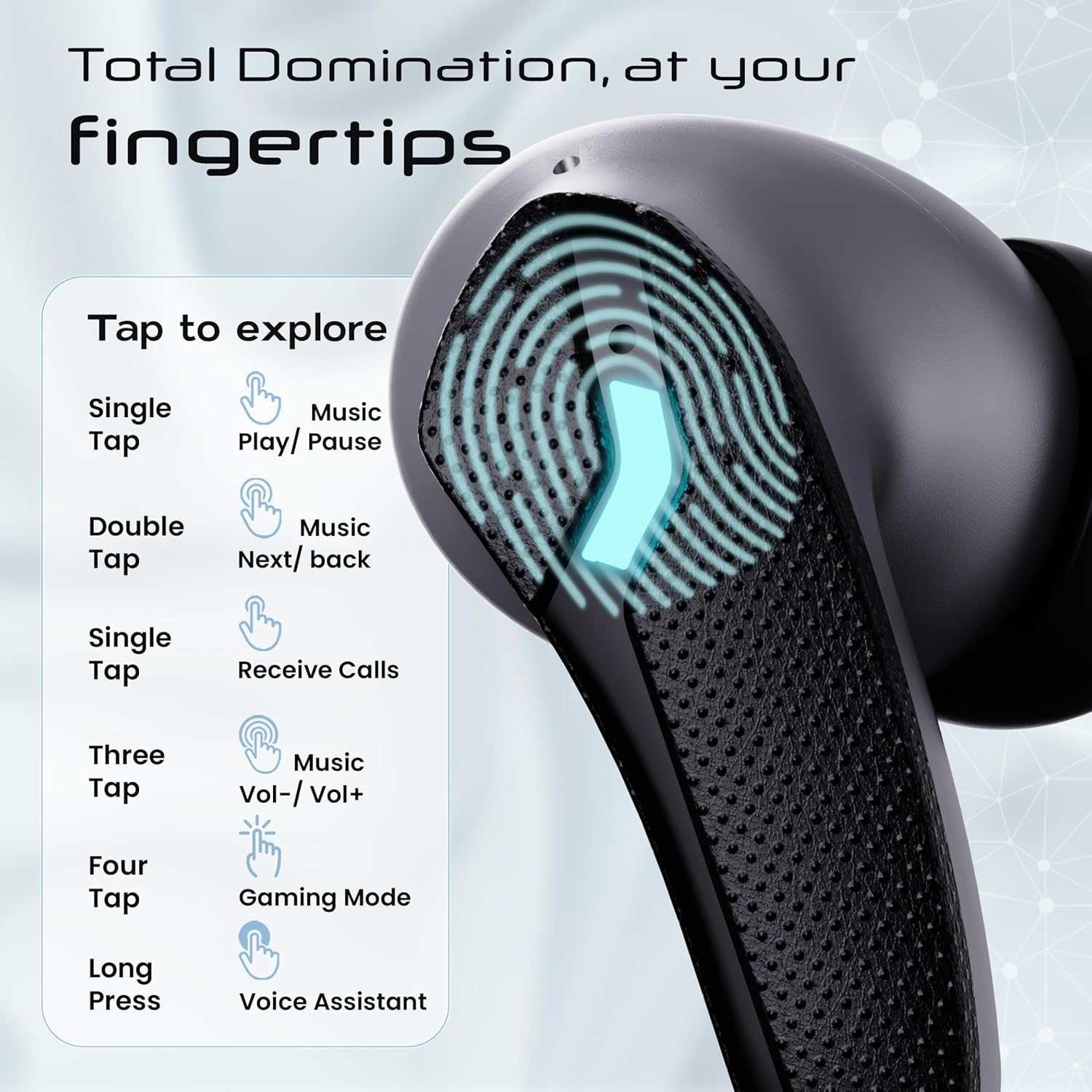
Image: GOBOULT Astra Neo Touch Controls Guide. This graphic details the various touch gestures for controlling music, calls, gaming mode, and voice assistant.
- ທໍ່ດຽວ: Play/Pause music, Receive Calls.
- ແຕະສອງເທື່ອ: Music Next/Back (specific earbud for each function).
- Three Tap: Music Volume Up/Down (specific earbud for each function).
- Four Tap: Activate Gaming Mode.
- ຂ່າວຍາວ: Activate Voice Assistant (Google Assistant/Siri).
6.2 Gaming Mode (40ms Low Latency)
Activate Gaming Mode for a synchronized audio experience during gameplay, reducing audio delay to 40ms.
- To activate: Four tap on either earbud.
- To deactivate: Four tap again on either earbud.

Image: GOBOULT Astra Neo Gaming Mode with 40ms Low Latency. This image depicts a user playing a mobile game with the earbuds, highlighting the ultra-low latency feature for an immersive gaming experience.
6.3 ZEN Quad Mic ENC for Calls
The ZEN Quad Mic Environmental Noise Cancellation (ENC) system ensures clear voice calls by filtering out background noise.

Image: GOBOULT Astra Neo ZEN Quad Mic ENC Technology. This image illustrates the internal components and the function of the 4 microphones for clear in-game communication and crystal-clear calling with Acoustic Echo Cancellation (AEC).
6.4 ໂໝດ EQ
The Astra Neo earbuds support 4 EQ modes for customized audio experiences. Refer to the product packaging or official GOBOULT website for specific instructions on how to switch between these modes, as this functionality is typically managed via a companion app or specific touch gestures not detailed here.
7. ບໍາລຸງຮັກສາ
7.1 ການທໍາຄວາມສະອາດ
- ເຊັດຫູຟັງຫູຟັງ ແລະ ກະເປົ໋າສາກໄຟດ້ວຍຜ້າແພອ່ອນໆ, ແຫ້ງ, ບໍ່ມີເຈັ້ຍ.
- ຢ່າໃຊ້ສານເຄມີທີ່ຮຸນແຮງ, ສານລະລາຍທໍາຄວາມສະອາດ, ຫຼືຢາຊັກຟອກທີ່ເຂັ້ມແຂງ.
- ເຮັດຄວາມສະອາດແຜ່ນຕິດຕໍ່ການສາກໄຟຢູ່ທັງຫູຟັງເອຍບັດ ແລະເຄສຢ່າງເປັນປົກກະຕິເພື່ອຮັບປະກັນການສາກໄຟຢ່າງຖືກຕ້ອງ.
7.2 ກັນນ້ຳ (IPX5)
The Astra Neo earbuds are IPX5 water-resistant, meaning they are protected against sweat, rain, and splashes. They are not designed for submersion in water.
- ຢ່າຕັ້ງຫູຟັງຫູຟັງໃນນໍ້າໂດຍເຈດຕະນາ.
- If exposed to sweat or rain, wipe them dry before placing them back in the charging case.

Image: GOBOULT Astra Neo IPX5 Water Resistance and Voice Assistant. This image highlights the earbuds' sweatproof, rainproof, and splashproof capabilities, along with compatibility with Google Assistant and Hey Siri.
7.3 ການເກັບຮັກສາ
ເມື່ອບໍ່ໄດ້ໃຊ້, ໃຫ້ເກັບຫູຟັງເອຍບັດໃສ່ໃນກະເປົ໋າສາກໄຟເພື່ອປົກປ້ອງພວກມັນ ແລະ ສືບຕໍ່ສາກໄຟ.
8. ການແກ້ໄຂບັນຫາ
- ຫູຟັງບໍ່ຈັບຄູ່: Ensure both earbuds are in the charging case, then open the lid to re-enter pairing mode. Check your device's Bluetooth settings and try reconnecting.
- ຫູຟັງຫູຟັງອັນດຽວທີ່ເຮັດວຽກ: ວາງຫູຟັງຫູຟັງທັງສອງໃສ່ໃນກໍລະນີ, ປິດຝາປິດ, ລໍຖ້າສອງສາມວິນາທີ, ຈາກນັ້ນເປີດມັນອີກຄັ້ງ. ນີ້ມັກຈະຊິ້ງພວກມັນຄືນໃໝ່.
- ບໍ່ມີສຽງ: ກວດເບິ່ງລະດັບສຽງໃນທັງອຸປະກອນຂອງທ່ານ ແລະຫູຟັງ. ກວດໃຫ້ແນ່ໃຈວ່າຫູຟັງເອຍບັດຖືກເຊື່ອມຕໍ່ຢ່າງຖືກຕ້ອງກັບອຸປະກອນຂອງທ່ານ.
- ບັນຫາການສາກໄຟ: Clean the charging contacts on the earbuds and inside the case. Ensure the charging cable is securely connected and the power source is active.
- ຄຸນນະພາບການໂທບໍ່ດີ: ໃຫ້ແນ່ໃຈວ່າໄມໂຄຣໂຟນບໍ່ມີສິ່ງກີດຂວາງ. ລອງຍ້າຍໄປຢູ່ໃນສະພາບແວດລ້ອມທີ່ງຽບກວ່າ.
9. ຂໍ້ມູນຈໍາເພາະ
Key technical specifications for the GOBOULT Astra Neo Earbuds:
| ຄຸນສົມບັດ | ຂໍ້ມູນຈໍາເພາະ |
|---|---|
| ຊື່ຕົວແບບ | Astra Neo |
| ລຸ້ນ Bluetooth | 5.4 |
| ເວລາຫຼິ້ນ | ສູງສຸດເຖິງ 70 ຊົ່ວໂມງ (ພ້ອມກ່ອງໃສ່ສາກ) |
| ການສາກໄວ | ຄ່າບໍລິການ 10 ນາທີ = ເວລາຫຼິ້ນ 100 ນາທີ |
| ການຕອບສະໜອງຕໍ່າ | 40ms (ໂໝດເກມ) |
| ຂະໜາດຄົນຂັບ | 13mm BoomX Drivers |
| ໄມໂຄຣໂຟນ | ZEN Quad Mic ENC |
| ການຕໍ່ຕ້ານນ້ໍາ | IPX5 |
| ວິທີການຄວບຄຸມ | ແຕະ |
| ເຕັກໂນໂລຊີການເຊື່ອມຕໍ່ | Bluetooth, Wireless |
| Jack ຫູຟັງ | ຊ່ອງສຽບສາກໄຟໄວ Type-C |
| ນ້ໍາຫນັກລາຍການ | 47 ກຣາມ |
| ຂະໜາດສິນຄ້າ | 6.2 x 5.3 x 3.2 cm |
| ປະເພດຫມໍ້ໄຟ | ລີໂທມໂພລີເມີ |
| ຊ່ວງ Bluetooth | 10 ແມັດ |
| impedance | 32 ໂອມ |

Image: GOBOULT Astra Neo 13mm BoomX Drivers. This image highlights the 13mm BoomX drivers, emphasizing crystal clear sound and support for MSBC, SBC, and AAC codecs.
10. ການຮັບປະກັນແລະການສະຫນັບສະຫນູນ
The GOBOULT Astra Neo Earbuds come with a ການຮັບປະກັນຜູ້ຜະລິດ 1 ປີ from the date of purchase. This warranty covers manufacturing defects. For warranty claims or technical support, please refer to the contact information provided on your warranty card or visit the official GOBOULT webເວັບໄຊ.


