1. ບົດແນະນຳ
The ALIGATOR AZA930B is a mobile phone designed with ease of use in mind, particularly for seniors. It features a large keypad, a clear 2.8-inch color display, and essential safety functions such as an SOS button and SOS locator. This manual provides detailed instructions on how to set up, operate, maintain, and troubleshoot your device to ensure optimal performance and safety.
2. ຂໍ້ມູນຄວາມປອດໄພ
Please read this section carefully before using your phone to ensure safe and proper operation.
- ຄວາມປອດໄພຫມໍ້ໄຟ: Use only ALIGATOR approved batteries and chargers. Do not short-circuit, puncture, or expose the battery to extreme temperatures. Dispose of batteries properly.
- ການສາກໄຟ: The phone does not include a charger. Use a compatible USB-C charger (recommended model ALIGATOR CHA0047) with a power output of 2.5-3W. Avoid charging in damp ເງື່ອນໄຂ.
- ການປ້ອງກັນການໄດ້ຍິນ: ຫຼີກເວັ້ນການຟັງດົນໆໃນລະດັບສຽງສູງເພື່ອປ້ອງກັນຄວາມເສຍຫາຍຂອງການໄດ້ຍິນ.
- ຄວາມປອດໄພໃນການຂັບຂີ່: Always prioritize driving safety. Use hands-free accessories and obey all local laws and regulations regarding mobile phone use while driving.
- ອຸປະກອນການແພດ: Maintain a safe distance between the phone and medical devices such as pacemakers. Consult your physician and the medical device manufacturer for specific guidelines.
- ຄວາມຕ້ານທານນ້ໍາ: ໂທລະສັບນີ້ບໍ່ກັນນໍ້າ. ຫຼີກລ່ຽງການສຳຜັດກັບຂອງແຫຼວ.
3. ເນື້ອໃນຊຸດ
ກວດສອບວ່າລາຍການທັງຫມົດແມ່ນມີຢູ່ໃນຊຸດຜະລິດຕະພັນຂອງທ່ານ:
- ALIGATOR AZA930B Mobile Phone
- ບ່ອນສາກ
- ຄູ່ມືຜູ້ໃຊ້ (ເອກະສານນີ້)
- ໝາຍເຫດ: ເຄື່ອງສາກບໍ່ໄດ້ລວມຢູ່ ແລະ ຕ້ອງຊື້ແຍກຕ່າງຫາກ.
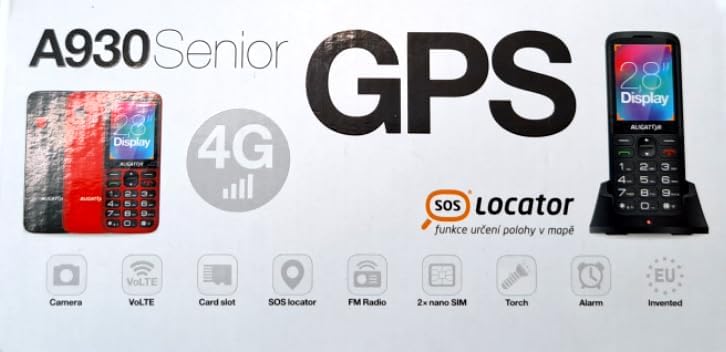
Figure 3.1: Product packaging illustrating the phone, charging dock, and various features such as 4G connectivity, GPS, SOS Locator, camera, VoLTE, card slot, FM radio, torch, and alarm. The box also indicates the 2.8-inch display.
4. ຕັ້ງຄ່າ
4.1. ການໃສ່ຊິມກາດ
The ALIGATOR AZA930B supports Dual SIM (2 x Nano SIM) functionality. To insert SIM cards:
- ປິດໂທລະສັບ.
- ຖອດຝາປິດຫຼັງ ແລະແບັດເຕີຣີອອກ.
- Locate the SIM card slots. Insert your Nano SIM cards into the designated slots, ensuring the gold contacts face down and the cut corner aligns correctly.
- ປ່ຽນແບັດ ແລະຝາຫຼັງ.
4.2. ການໃສ່ກາດ Micro SD
The phone supports a Micro SD memory card up to 256 GB for additional storage.
- Follow steps 1 and 2 from "4.1. Inserting SIM Cards".
- Locate the Micro SD card slot. Insert the Micro SD card with the gold contacts facing down until it clicks into place.
- ປ່ຽນແບັດ ແລະຝາຫຼັງ.
4.3. ການສາກໄຟເບື້ອງຕົ້ນ
Before first use, fully charge the phone's 1700 mAh Li-ion battery.
- Connect the USB-C cable (not included) to the phone's USB-C port or place the phone in the charging dock.
- Connect the other end of the cable to a compatible charger (e.g., ALIGATOR CHA0047, 2.5-3W) or a powered USB port.
- The charging indicator will illuminate. A full charge may take several hours.

Figure 4.1: The ALIGATOR AZA930B phone placed in its dedicated charging dock. The phone's screen shows the current time and network signal indicators.

Figure 4.2: Detail from the product box, explicitly showing an icon indicating that a charger is not included and specifying a recommended charger power of 2.5-3W.
5. ຄໍາແນະນໍາການດໍາເນີນງານ
5.1. ເປີດ/ປິດ
- ເພື່ອເປີດເຄື່ອງ: Press and hold the Power/End Call button (red button) until the screen lights up.
- ປິດເຄື່ອງ: Press and hold the Power/End Call button until the power off options appear, then select "Power off".
5.2. ຟັງຊັນການໂທພື້ນຖານ
- ໂທອອກ: Enter the phone number using the large keypad and press the Call button (green button).
- ຕອບການໂທ: ເມື່ອໂທລະສັບດັງຂຶ້ນ, ໃຫ້ກົດປຸ່ມໂທ (ປຸ່ມສີຂຽວ).
- ສິ້ນສຸດການໂທ: Press the Power/End Call button (red button).
- ແຮນຟຣີ: During a call, activate hands-free mode via the on-screen option or a dedicated button if available.
5.3. SOS Button and SOS Locator
The SOS button is a critical safety feature, allowing quick contact in emergencies.
- ປຸ່ມ SOS: Located on the back of the phone (often red). Press and hold this button to activate the emergency sequence.
- SOS Presets: You can set up to 5 preset emergency contacts. When the SOS button is pressed, the phone will automatically call these numbers in sequence and send an emergency SMS.
- SOS Locator: This function sends the phone's location via SMS to the emergency contacts after the SOS button is pressed. The recipient can then view the location on a map via a web link provided in the SMS. This feature utilizes both GSM and GPS for location accuracy.

ຮູບ 5.1: ດ້ານຫລັງ view of the ALIGATOR AZA930B, showing the prominent red SOS button and the speaker grille for clear audio.

ຮູບ 5.2: ດ້ານຫລັງ view of the ALIGATOR AZA930B, demonstrating the activated flashlight feature.
5.4. "Zachranka" Rescue Application
The "Zachranka" application is a mobile emergency call application pre-installed on the device.
- It provides quick contact with emergency medical services or mountain rescue.
- The application is valid in Austria, Hungary, the Czech Republic, and in the territories of the Slovak mountains.
- For more information, refer to the "Zachranka" app's official resources.

ຮູບ 5.3: ດ້ານຫນ້າແລະດ້ານຫລັງ views of the ALIGATOR AZA930B, accompanied by the "Zachranka" rescue application logo, indicating its integration with the device.
5.5. ລັກສະນະອື່ນໆ
- ປຶ້ມໂທລະສັບ: Store up to 500 contacts.
- ການສົ່ງຂໍ້ຄວາມ: Send and receive SMS messages (memory for 100 SMS). Supports sending photos via MMS.
- ມັນຕິມີເດຍ:
- ວິທະຍຸ FM: ຟັງສະຖານີວິທະຍຸ FM.
- Media Player: ຫຼິ້ນສຽງ ແລະວິດີໂອ files stored on the phone or Micro SD card.
- ເຄື່ອງບັນທຶກສຽງ: Record voice memos.
- ໄຟສາຍ: ເປີດໃຊ້ໄຟສາຍໃນຕົວເພື່ອໃຫ້ແສງສະຫວ່າງສ່ອງເຖິງ.
- ເຄື່ອງມື: Includes Alarm, Calculator, and SIM toolkit support.
- Bluetooth: ເຊື່ອມຕໍ່ກັບຊຸດຫູຟັງ Bluetooth ຫຼືອຸປະກອນອື່ນໆ.
- ສັນຍານການສັ່ນສະເທືອນ: Set the phone to vibrate for incoming calls or notifications.
- ເນື້ອເພງ: Choose from 10+1 pre-installed melodies.
- ການປັບເວລາອັດຕະໂນມັດ: The phone can automatically adjust its time.

ຮູບ 5.4: ດ້ານຫນ້າ view of the ALIGATOR AZA930B, highlighting its user-friendly large keypad and vibrant color display.
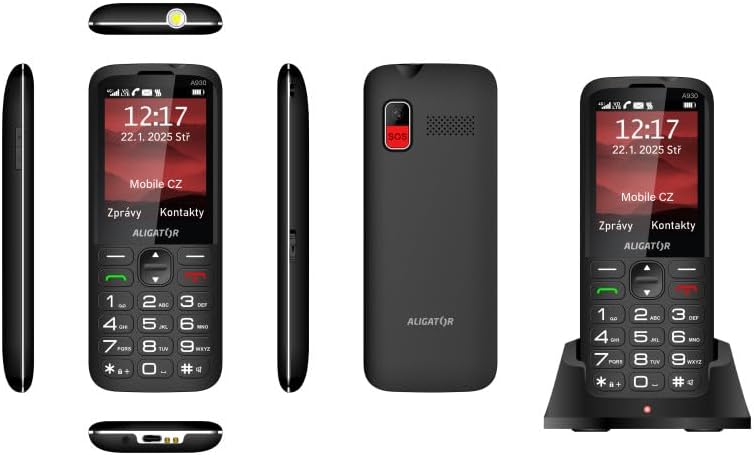
Figure 5.5: Comprehensive views of the ALIGATOR AZA930B, illustrating its design from the top, sides, front, back, and when seated in its charging dock.
6. ບໍາລຸງຮັກສາ
- ທໍາຄວາມສະອາດ: ໃຊ້ຜ້າປຽກແຫ້ງເພື່ອເຮັດຄວາມສະອາດພື້ນຜິວຂອງໂທລະສັບ. ຫຼີກເວັ້ນການນໍາໃຊ້ສານເຄມີທີ່ຮຸນແຮງຫຼືວັດສະດຸຂັດ.
- ການດູແລຫມໍ້ໄຟ: To prolong battery life, avoid fully discharging the battery frequently. Store the phone in a cool, dry place if not used for extended periods.
- ການເກັບຮັກສາ: ເກັບຮັກສາໂທລະສັບໃຫ້ຫ່າງຈາກອຸນຫະພູມທີ່ຮຸນແຮງ, ແສງແດດໂດຍກົງ, ແລະ ສະພາບແວດລ້ອມທີ່ມີຝຸ່ນ.
7. ການແກ້ໄຂບັນຫາ
| ບັນຫາ | ສາເຫດທີ່ເປັນໄປໄດ້ | ການແກ້ໄຂ |
|---|---|---|
| ໂທລະສັບບໍ່ເປີດ. | ແບັດເຕີຣີໝົດ ຫຼື ໃສ່ບໍ່ຖືກຕ້ອງ. | ສາກແບັດເຕີຣີ. ກວດໃຫ້ແນ່ໃຈວ່າໃສ່ແບັດເຕີຣີຢ່າງຖືກຕ້ອງ. |
| ບໍ່ມີສັນຍານເຄືອຂ່າຍ. | ບໍ່ໄດ້ໃສ່ຊິມກາດຢ່າງຖືກຕ້ອງ ຫຼື ບໍ່ໄດ້ຢູ່ໃນຂອບເຂດຂອງເຄືອຂ່າຍ. | ໃສ່ຊິມກາດຄືນໃໝ່. ຍ້າຍໄປບ່ອນທີ່ມີສັນຍານເຄືອຂ່າຍດີກວ່າ. |
| ບໍ່ສາມາດໂທ ຫຼືຮັບສາຍໄດ້. | No credit, SIM card issue, or network problem. | Check your account balance. Verify SIM card insertion. Contact your network provider. |
| ປຸ່ມ SOS ບໍ່ເຮັດວຽກ. | ໝາຍເລກ SOS ບໍ່ໄດ້ຕັ້ງ ຫຼື ບໍ່ຖືກຕ້ອງ. | Ensure SOS numbers are correctly configured in settings. Check network signal. |
| ແບັດເຕີຣີໝົດໄວ. | High usage, background apps, or aging battery. | Reduce screen brightness. Close unnecessary applications. Consider replacing the battery if it's old. |
8. ຂໍ້ມູນຈໍາເພາະ
| ຄຸນສົມບັດ | ລາຍລະອຽດ |
|---|---|
| ໝາຍເລກຕົວແບບ | AZA930B |
| ຈໍສະແດງຜົນ | ຈໍສະແດງຜົນສີ TFT ຂະໜາດ 2.8 ນິ້ວ |
| ຊ່ອງໃສ່ຊິມກາດ | Dual SIM (2 x Nano SIM) |
| ຮອງຮັບກາດຫນ່ວຍຄວາມຈໍາ | Micro SD ສູງສຸດ 256 GB |
| ແບັດເຕີຣີ | 1700 mAh Li-ion |
| ເວລາສົນທະນາ | ເຖິງ 480 ນາທີ |
| ເວລາສະແຕນບາຍ | ສູງສຸດ 10 ມື້ |
| ກ້ອງຖ່າຍຮູບ | 1.9 MP |
| ການເຊື່ອມຕໍ່ | 4G/LTE/VoLTE, Bluetooth |
| ພອດສາກໄຟ | USB-C |
| Jack ຫູຟັງ | 3.5 ມມ |
| ຂະໜາດ | 14.3 x 5.8 x 1.36 cm |
| ນ້ຳໜັກ | 95 g |
| ລະບົບປະຕິບັດການ | ຊິມບຽນ 9.1 |
| ສີ | ດຳ |
ຫມາຍເຫດ: ຂໍ້ມູນຈໍາເພາະແມ່ນມີການປ່ຽນແປງໂດຍບໍ່ມີການແຈ້ງລ່ວງຫນ້າ.
9. ການຮັບປະກັນແລະການສະຫນັບສະຫນູນ
ALIGATOR products are designed and manufactured to the highest quality standards. For detailed warranty information, including terms, conditions, and duration, please refer to the warranty card included with your product or visit the official ALIGATOR webເວັບໄຊ.
For technical support, service, or inquiries regarding your ALIGATOR AZA930B mobile phone, please contact ALIGATOR customer service or visit their official support channels. Keep your purchase receipt and product serial number (IMEI) handy when seeking support.
- IMEI 1: 357140835088496
- IMEI 2: 357140835088504
- Barcode/UPC: 8596426108267


