1. ບົດແນະນຳ
This manual provides essential information for the proper use and maintenance of your HOTWAV R9 Pro Rugged Tablet. Please read it thoroughly before operating the device to ensure optimal performance and longevity.

ຮູບພາບ: ດ້ານຫນ້າແລະດ້ານຫລັງ view of the HOTWAV R9 Pro Rugged Tablet, highlighting its robust design and 11-inch display.
2. ສິ່ງທີ່ຢູ່ໃນກ່ອງ
ກວດສອບວ່າລາຍການທັງຫມົດແມ່ນມີຢູ່ໃນການຫຸ້ມຫໍ່:
- 1x HOTWAV R9 Pro Rugged Tablet
- 1x Manual (this document)
- 1x ກ່ອງບັນຈຸ
- 1x Explosion-proof Film
- 1x ສາຍ USB Type-C
- 1x OTG Cable
3. ຜະລິດຕະພັນເກີນview ແລະຄຸນນະສົມບັດທີ່ສໍາຄັນ
3.1. Rugged Design and Durability
The HOTWAV R9 Pro is engineered for extreme environments, featuring IP68/IP69K waterproof and dustproof ratings, and MIL-STD-810H certification for shock resistance. Its construction includes a double-shot TPU+PC+glass fiber back cover for enhanced protection.

Image: Visual representation of the tablet's ruggedness, showing it submerged in water, covered in dust, and surviving a drop, alongside its LED camping light in use.
3.2. ຫມໍ້ໄຟແລະການສາກໄຟ
Equipped with a large 20080mAh battery, the R9 Pro offers extended usage times. It supports 20W fast charging to quickly replenish power.

Image: Diagram illustrating the 20080mAh battery capacity and 20W fast charging capability of the tablet.
3.3. ຈໍສະແດງຜົນ
The tablet features an 11-inch FHD+ display with a resolution of 1200x1920 pixels and 450cd/m² brightness. It is protected by Corning Glass 3 and supports glove touch functionality, making it suitable for outdoor use.

Image: The tablet's 11-inch display showing various applications, alongside icons indicating FHD+ resolution, 60Hz refresh rate, and dual SIM support.
3.4. ປະສິດທິພາບແລະການເກັບຮັກສາ
Powered by an Octa-Core Unisoc T606 processor, the R9 Pro includes 20GB RAM (6GB physical + 14GB virtual) and 256GB internal storage. Storage can be expanded up to 2TB using a T-flash card.

Image: A visual representation of the Unisoc T606 octa-core chipset, detailing 20GB RAM and 256GB ROM with 2TB expandable memory.
3.5. ລະບົບກ້ອງຖ່າຍຮູບ
The tablet features a 64MP rear camera with PDAF and f/1.8 aperture, and a 16MP front camera for photography and video calls.

ຮູບພາບ: Examples of photos taken with the 64MP rear camera and the 16MP front camera, demonstrating their capabilities.
3.6. Integrated Camping ແສງສະຫວ່າງ
A unique 6W camping light with 350 lumens and 246 LEDs is integrated into the tablet, providing illumination for various outdoor activities or emergencies.
4. ຕັ້ງຄ່າ
4.1. ການສາກແທັບເລັດ
Before first use, fully charge the tablet using the provided USB Type-C cable and a compatible 20W power adapter (not included). Connect the cable to the tablet's USB-C port and the adapter to a power outlet. The charging indicator will show the charging status.
4.2. Installing SIM and T-flash Cards
The tablet supports dual SIM cards and a T-flash (microSD) card for expandable storage.
- ຊອກຫາຖາດແຜ່ນ SIM/SD ຢູ່ດ້ານຂ້າງຂອງແທັບເລັດ.
- ໃຊ້ເຄື່ອງມືຖອດຊິມທີ່ສະໜອງໃຫ້ເພື່ອເປີດຖາດ.
- Carefully place your Nano-SIM cards and/or T-flash card into the designated slots. Ensure correct orientation.
- ຍູ້ຖາດກັບໄປໃສ່ແທັບເລັດຄ່ອຍໆ ຈົນກວ່າມັນຈະກົດໃສ່ບ່ອນ.
4.3. ເປີດ / ປິດພະລັງງານ
- ເພື່ອເປີດເຄື່ອງ: Press and hold the Power button until the HOTWAV logo appears.
- ປິດເຄື່ອງ: ກົດປຸ່ມເປີດປິດຄ້າງໄວ້ຈົນກວ່າເມນູຕົວເລືອກພະລັງງານຈະປາກົດ, ຈາກນັ້ນເລືອກ "ປິດເຄື່ອງ".
- ເພື່ອເລີ່ມຕົ້ນໃໝ່: ກົດປຸ່ມເປີດປິດຄ້າງໄວ້ຈົນກ່ວາເມນູຕົວເລືອກພະລັງງານຈະປາກົດ, ຈາກນັ້ນເລືອກ "Restart".
5. ຄໍາແນະນໍາການດໍາເນີນງານ
5.1. ລະບົບປະຕິບັດການ Android 14
The HOTWAV R9 Pro runs on Android 14, offering a user-friendly interface and access to a wide range of applications via the Google Play Store.
5.2. ການນໍາທາງ
Navigate the tablet using touch gestures:
- ແຕະ: ເລືອກລາຍການ.
- ປັດ: ເລື່ອນຜ່ານໜ້າຈໍ ຫຼືລາຍການຕ່າງໆ.
- ເມື່ອເຂົ້າຕາຈົນ: ຊູມເຂົ້າ ຫຼືອອກໃນຮູບພາບ ແລະ web ໜ້າ.
- ຂ່າວຍາວ: ເຂົ້າເຖິງເມນູບໍລິບົດ ຫຼືຍ້າຍໄອຄອນ.
5.3. Glove Touch Mode
The display supports glove touch, allowing you to operate the tablet while wearing gloves. This feature is automatically enabled.
5.4. ປົດລັອກດ້ວຍໜ້າ
ເພື່ອການປົດລັອກທີ່ສະດວກ ແລະ ປອດໄພ, ໃຫ້ຕັ້ງຄ່າການປົດລັອກດ້ວຍໃບໜ້າ:
- ໄປທີ່ ການຕັ້ງຄ່າ > ຄວາມປອດໄພ & ຄວາມເປັນສ່ວນຕົວ > ປົດລັອກດ້ວຍໜ້າ.
- ປະຕິບັດຕາມຄໍາແນະນໍາໃນຫນ້າຈໍເພື່ອລົງທະບຽນໃບຫນ້າຂອງທ່ານ.
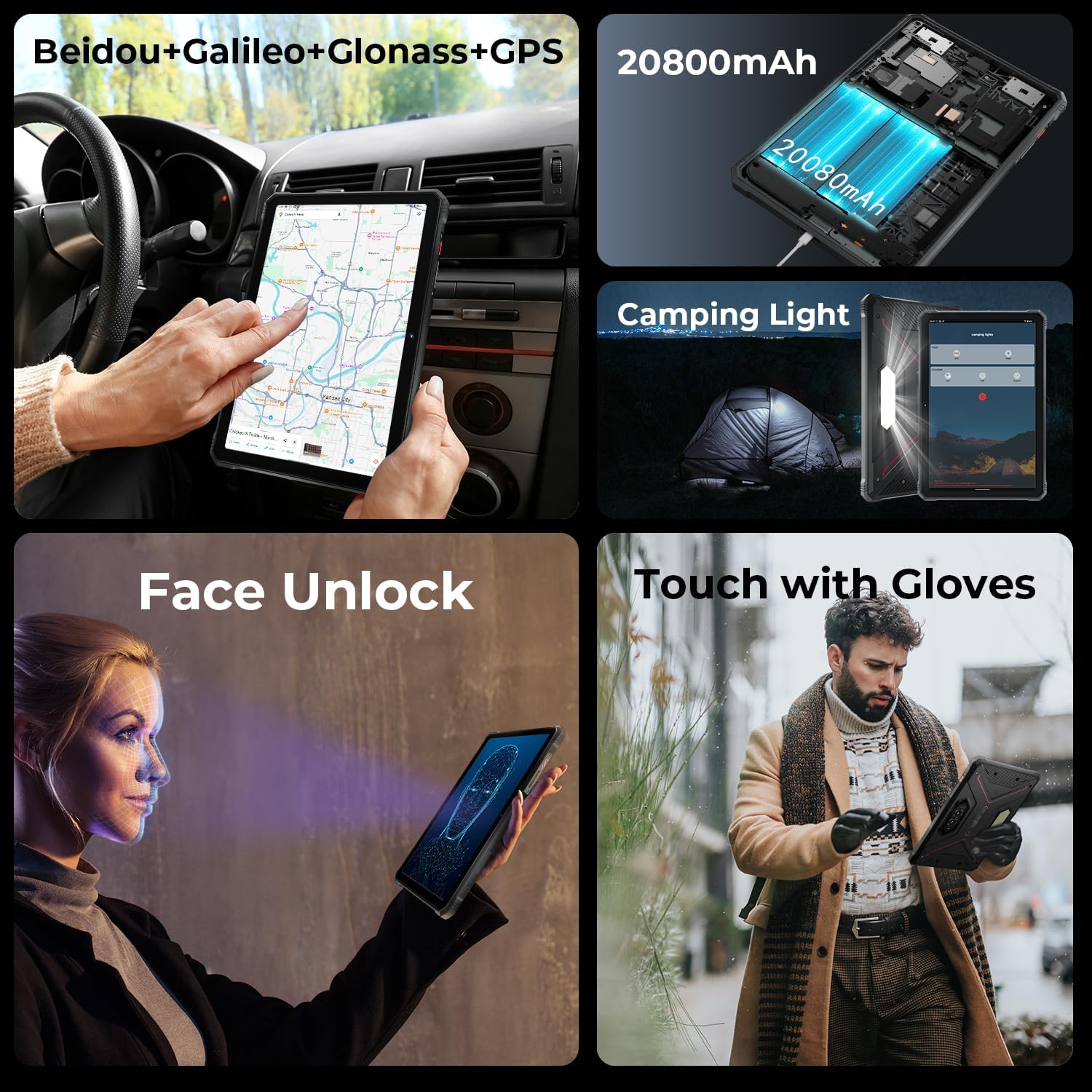
Image: A collage showing the tablet's GPS navigation, camping light in action, face unlock in progress, and a user operating the tablet with gloves.
5.5. ຟັງຊັນຊິມຄູ່
The tablet supports two SIM cards, allowing you to manage two different phone numbers or network providers simultaneously. You can configure preferred SIM for calls, messages, and data in ການຕັ້ງຄ່າ > ເຄືອຂ່າຍ ແລະອິນເຕີເນັດ > ຊິມ.
6. ການນໍາໃຊ້ກ້ອງຖ່າຍຮູບ
The HOTWAV R9 Pro is equipped with a 64MP rear camera and a 16MP front camera.
- ການເປີດກ້ອງຖ່າຍຮູບ: Tap the Camera icon on the home screen or app drawer.
- ການປ່ຽນກ້ອງຖ່າຍຮູບ: ແຕະໄອຄອນສະຫຼັບກ້ອງຖ່າຍຮູບເພື່ອສະຫຼັບລະຫວ່າງກ້ອງໜ້າ ແລະກ້ອງຫຼັງ.
- ຖ່າຍຮູບ: ແຕະປຸ່ມຊັດເຕີເພື່ອຖ່າຍຮູບ.
- ບັນທຶກວິດີໂອ: ສະລັບໄປໃຊ້ໂໝດວິດີໂອ ແລະ ແຕະປຸ່ມບັນທຶກເພື່ອເລີ່ມ/ຢຸດການບັນທຶກ.
- ການຕັ້ງຄ່າກ້ອງຖ່າຍຮູບ: Access various settings like resolution, flash, and modes from within the camera app.
7. ຄamping Light Functionality
The integrated 6W camping light provides powerful illumination.
- Activating the Light: ຄamping light can typically be activated via a dedicated button (if present) or through a quick settings toggle in the notification panel.
- Adjusting Brightness/Modes: Some models may offer adjustable brightness levels or different lighting modes. Refer to the on-screen controls once the light is activated.
8. ການເຊື່ອມຕໍ່
- Wi-Fi: ເຊື່ອມຕໍ່ກັບເຄືອຂ່າຍໄຮ້ສາຍຜ່ານ ການຕັ້ງຄ່າ > ເຄືອຂ່າຍ ແລະອິນເຕີເນັດ > ອິນເຕີເນັດ.
- Bluetooth: Pair with Bluetooth devices (headphones, speakers) via ການຕັ້ງຄ່າ > ອຸປະກອນທີ່ເຊື່ອມຕໍ່ > ການຕັ້ງຄ່າການເຊື່ອມຕໍ່ > Bluetooth.
- GPS: The tablet supports Beidou, Galileo, Glonass, and GPS for accurate location services. Ensure location services are enabled in ການຕັ້ງຄ່າ > ສະຖານທີ່.
9. ບໍາລຸງຮັກສາ
- ທໍາຄວາມສະອາດ: ໃຊ້ອ່ອນ, ງamp cloth to clean the tablet's surface. Avoid harsh chemicals or abrasive materials.
- ການເປີດເຜີຍນ້ໍາ: While waterproof, ensure all ports are securely closed before exposing the tablet to water. After water exposure, dry the tablet thoroughly, especially the charging port, before charging.
- ອຸນຫະພູມ: Avoid exposing the tablet to extreme temperatures (hot or cold) for prolonged periods.
- ການເກັບຮັກສາ: ເມື່ອບໍ່ໄດ້ໃຊ້ເປັນເວລາດົນ, ໃຫ້ເກັບຮັກສາແທັບເລັດໄວ້ໃນບ່ອນທີ່ເຢັນແລະແຫ້ງ.
10. ການແກ້ໄຂບັນຫາ
| ບັນຫາ | ການແກ້ໄຂທີ່ເປັນໄປໄດ້ |
|---|---|
| ແທັບເລັດບໍ່ເປີດ. | Ensure the battery is charged. Connect to a charger for at least 30 minutes. If still unresponsive, perform a forced restart by holding the Power button for 10-15 seconds. |
| ການປະຕິບັດຊ້າ. | Close unused applications. Clear cache regularly. Consider uninstalling unnecessary apps. Restart the tablet. |
| ບັນຫາການເຊື່ອມຕໍ່ Wi-Fi. | ປິດ/ເປີດ Wi-Fi. ຣີສະຕາດ router ຂອງທ່ານ. ລືມເຄືອຂ່າຍ ແລະເຊື່ອມຕໍ່ຄືນໃໝ່. |
| ແບັດເຕີຣີໝົດໄວ. | Reduce screen brightness. Close background apps. Disable unused features like GPS, Bluetooth, or Wi-Fi when not needed. Check battery usage in settings to identify power-hungry apps. |
| ກ້ອງຖ່າຍຮູບບໍ່ເຮັດວຽກ. | Ensure the camera app has necessary permissions. Restart the tablet. Clear the camera app's cache and data in ການຕັ້ງຄ່າ > ແອັບ. |
11. ຂໍ້ມູນຈໍາເພາະ
| ຄຸນສົມບັດ | ລາຍລະອຽດ |
|---|---|
| ຕົວແບບ | R9 Pro |
| ລະບົບປະຕິບັດການ | Android 14 |
| ຂະຫນາດຈໍສະແດງຜົນ | 11 ນິ້ວ |
| ຄວາມລະອຽດໜ້າຈໍ | 1200 x 1920 ພິກເຊວ (FHD+) |
| ໂຮງງານຜະລິດ | Unisoc T606 Octa-Core (1.6 GHz) |
| Graphics Coprocessor | Mali G57 MP1@650MHz |
| RAM | 20GB (6GB ທາງກາຍະພາບ + 14GB virtual) |
| ການເກັບຮັກສາພາຍໃນ | 256GB |
| ການເກັບຮັກສາທີ່ຂະຫຍາຍໄດ້ | Up to 2TB (T-flash card) |
| ກ້ອງຫຼັງ | 64MP (PDAF, f/1.8 aperture) |
| ກ້ອງໜ້າ | 16MP |
| ຄວາມອາດສາມາດຫມໍ້ໄຟ | 20080mAh |
| ກຳລັງສາກໄຟ | ສາກໄວ 20W |
| ຄວາມທົນທານ | IP68/IP69K Waterproof & Dustproof, MIL-STD-810H |
| ການເຊື່ອມຕໍ່ | Dual SIM, Wi-Fi, Bluetooth, GPS (Beidou, Galileo, Glonass) |
| Camping ແສງສະຫວ່າງ | 6W (350 lumens, 246 LEDs) |
| ຂະໜາດ (LxWxH) | 10.61 x 0.7 x 7.16 ນິ້ວ |
| ນ້ຳໜັກ | 2.35 ປອນ |
12. ການຮັບປະກັນແລະການສະຫນັບສະຫນູນ
HOTWAV offers comprehensive after-sales service for the R9 Pro Rugged Tablet:
- ນະໂຍບາຍການສົ່ງຄືນ: 30-day no-reason return.
- ການຮັບປະກັນ: ຮັບປະກັນ 2 ປີຟຣີ.
- ສະຫນັບສະຫນູນດ້ານວິຊາການ: ສະຫນັບສະຫນູນດ້ານວິຊາການຕະຫຼອດຊີວິດ.
- ບໍລິການອອນໄລນ໌: ບໍລິການລູກຄ້າອອນໄລນ໌ 24/7.
For support, please contact HOTWAV customer service through their official channels or visit their webເວັບໄຊ.


