1. ບົດແນະນຳ
This manual provides detailed instructions for the setup, operation, and maintenance of your Thundeal TD93 Pro Mini Projector. Please read this manual thoroughly before using the product to ensure proper functionality and to extend its lifespan.

Image 1.1: Thundeal TD93 Pro Mini Projector overview.
2. ສິ່ງທີ່ຢູ່ໃນກ່ອງ
ກວດສອບວ່າລາຍການທັງຫມົດທີ່ລະບຸໄວ້ຂ້າງລຸ່ມນີ້ແມ່ນລວມຢູ່ໃນຊຸດຂອງທ່ານ:
- Thundeal TD93 Pro Projector
- ການຄວບຄຸມໄລຍະໄກ
- ສາຍໄຟ
- ຄູ່ມືຜູ້ໃຊ້ (ເອກະສານນີ້)
- ສາຍ AV
- ສາຍ HDMI
- ການປົກຫຸ້ມຂອງເລນໂປເຈັກເຕີ

Image 2.1: Package contents of the TD93 Pro Projector.
3. Product Specifications and Features
3.1. ຂໍ້ກໍານົດດ້ານວິຊາການ
| ໝາຍເລກຕົວແບບ | TD93 Pro (Item Model Number: TD97) |
| ຄວາມລະອຽດເດີມ | 1920 x 1080 (Full HD) |
| ຮອງຮັບຄວາມລະອຽດສູງສຸດ | 2K 4K UHD (from HD Signal) |
| ຄວາມສະຫວ່າງ | 12000 Lumens |
| ອັດຕາສ່ວນກົງກັນຂ້າມ | 15000:1 |
| ອັດຕາສ່ວນ | 4:3 / 16:9 / ອັດຕະໂນມັດ |
| ລະບົບປະຕິບັດການ | ລະບົບປະຕິບັດການ Android 9.0 |
| ການເຊື່ອມຕໍ່ໄຮ້ສາຍ | 2.4G / 5G WiFi, Bluetooth-compatible |
| ຄວາມຊົງຈໍາ | RAM 1G DDR3 + ROM 8G |
| ການແກ້ໄຂ Keystone | 6D Keystone (4-point corner +/- 60°, Vertical +/- 60°) |
| Function ຊູມ | 50-100% Proportional Reduction |
| ຂະໜາດການຄາດຄະເນ | 49 to 300 inches (recommended 93-150 inches) |
| ໄລຍະການຄາດຄະເນ | 1.6 to 6.5 meters (recommended 3-5 meters) |
| Lamp ຕະຫຼອດຊີວິດ | 50,000 ຊົ່ວໂມງ |
| ສຽງ | Built-in 5W stereo speakers with SRS sound system |
| ຄຸນນະສົມບັດພິເສດ | 3D-Ready (Red-Blue 3D), Auto Horizontal Keystone, Built-In Wi-Fi, Portable, Dust Removal Net |
3.2. ຄຸນນະສົມບັດທີ່ສໍາຄັນ
- High Definition Visuals: Native 1080P resolution with support for 2K/4K UHD signals, delivering clear and vibrant images.
- Smart Android OS: Integrated Android 9.0 operating system allows direct app downloads and streaming.
- Dual-Band WiFi: 2.4G and 5G WiFi connectivity for stable and fast wireless streaming and screen mirroring.
- ການເຊື່ອມຕໍ່ Bluetooth: ເຊື່ອມຕໍ່ລຳໂພງ Bluetooth ພາຍນອກ ຫຼືຫູຟັງສຳລັບສຽງທີ່ປັບປຸງດີຂຶ້ນ.
- ການແກ້ໄຂຮູບພາບຂັ້ນສູງ: 6D Keystone correction (4-point and vertical) for flexible placement and precise image alignment.
- ການຄາດຄະເນແບບຍືດຫຍຸ່ນ: Adjustable zoom from 50% to 100% and support for screen sizes up to 300 inches.
- ຍາວ Lamp: ໄຟ LED lamp designed for up to 50,000 hours of operation.
- Multi-Media Compatibility: Supports various input sources including HDMI, USB, AV, and direct office file ຫຼິ້ນຄືນຜ່ານ USB.

Image 3.1: Visual comparison of projector brightness and resolution.
4. ຄູ່ມືການຕິດຕັ້ງ
4.1. ການຈັດວາງໂປຣເຈັກເຕີ
The projector can be placed in various positions to suit your viewສະພາບແວດລ້ອມການເຂົ້າ:
- ຢູ່ເທິງໂຕະ: ວາງໂປເຈັກເຕີຢູ່ເທິງພື້ນທີ່ຮາບພຽງທີ່ຫມັ້ນຄົງ.
- ໃນ Tripod: Utilize the 6mm screw hole on the bottom for tripod mounting.
- Ceiling Hoisting: Mount the projector to the ceiling using a compatible hanger.
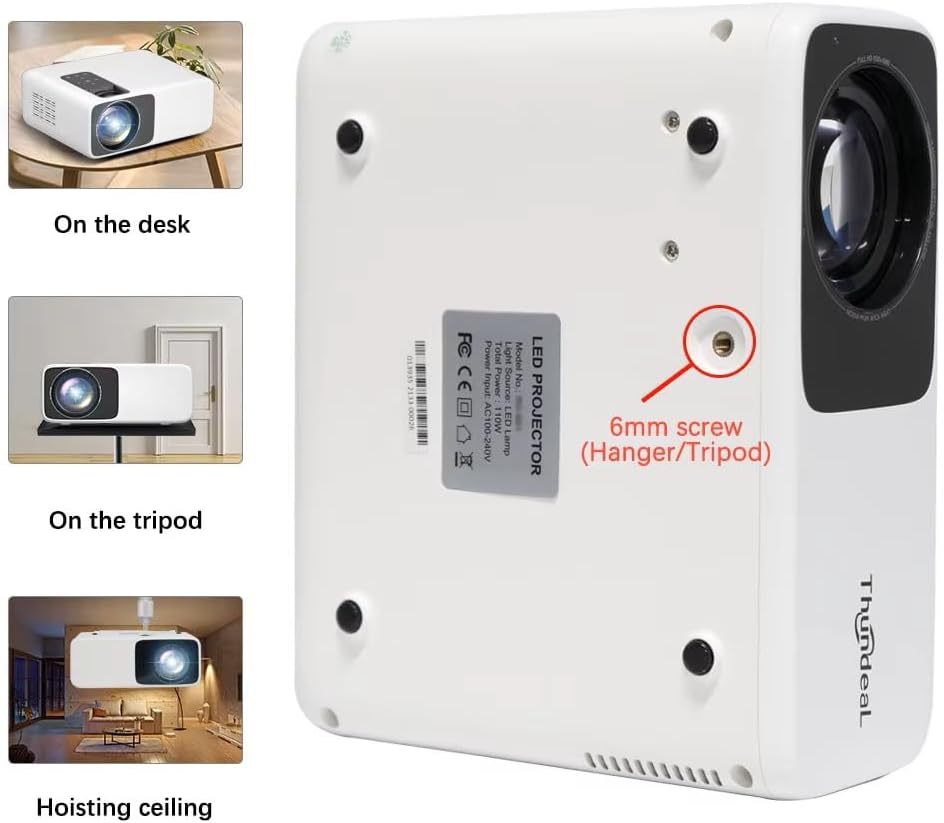
Image 4.1: Projector placement options and mounting point.
ສໍາລັບທີ່ດີທີ່ສຸດ viewing, ensure the projector is positioned perpendicular to the screen or wall. Adjust the projection distance (1.6 to 6.5 meters) to achieve your desired screen size (49 to 300 inches). A distance of 3-5 meters for a 93-150 inch screen is recommended for eye comfort.
4.2. ການເຊື່ອມຕໍ່ພະລັງງານ
- ເຊື່ອມຕໍ່ສາຍໄຟເຂົ້າກັບພອດປ້ອນຂໍ້ມູນພະລັງງານຂອງໂປເຈັກເຕີ.
- ສຽບປາຍອີກດ້ານໜຶ່ງຂອງສາຍໄຟເຂົ້າກັບປລັກໄຟຟ້າມາດຕະຖານ.
- ກົດປຸ່ມເປີດປິດຢູ່ໂປເຈັກເຕີ ຫຼືຣີໂໝດຄວບຄຸມເພື່ອເປີດມັນ.
5. ຄໍາແນະນໍາການດໍາເນີນງານ
5.1. Multi-Media Connections
The TD93 Pro projector offers various ports for connecting external devices:
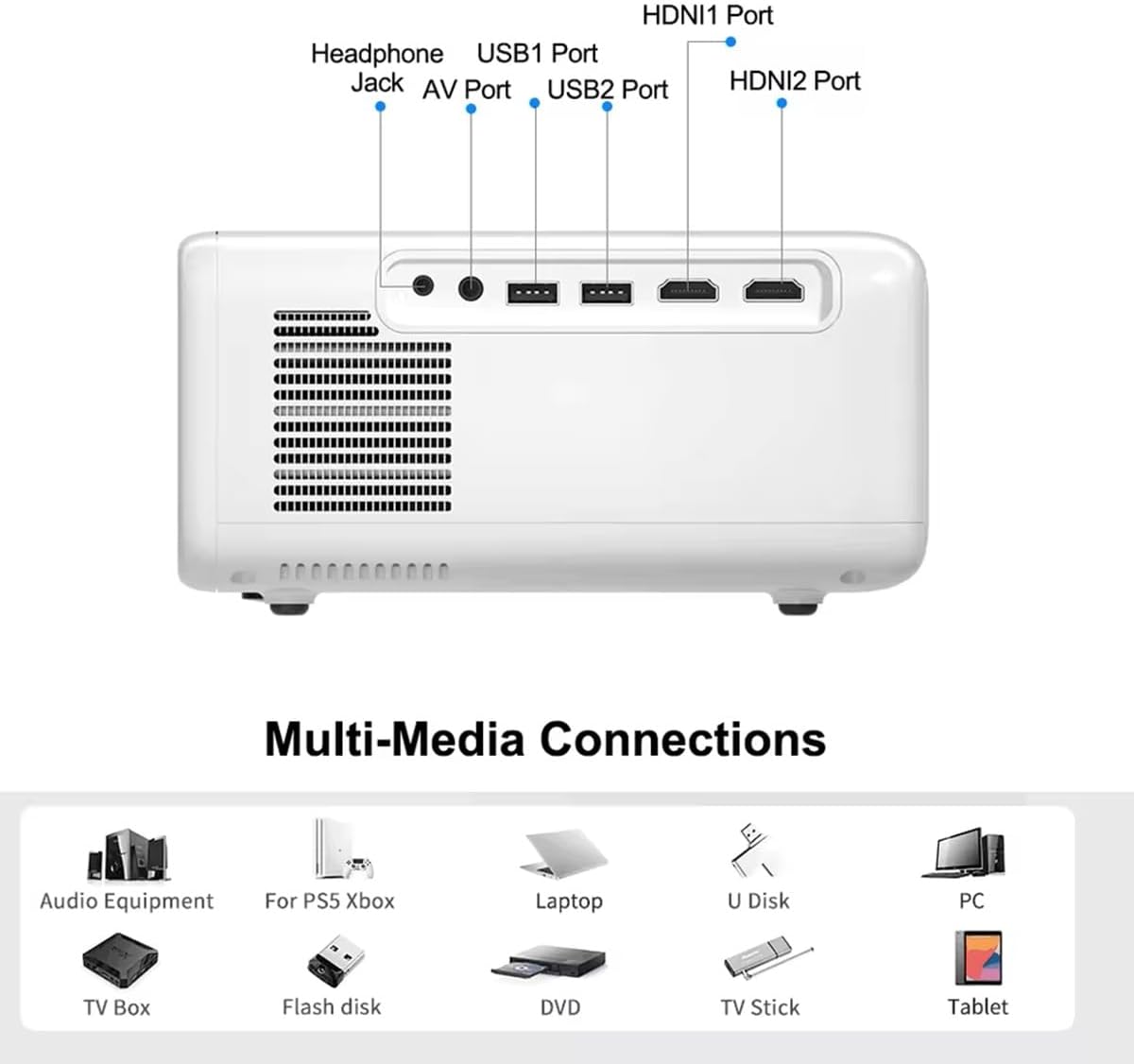
Image 5.1: Available multimedia connection ports.
- ຜອດ HDMI (HDMI1, HDMI2): Connect devices such as TV boxes, gaming consoles (PS5, Xbox), laptops, or Blu-ray players.
- ພອດ USB (USB1, USB2): Connect USB flash drives for direct media playback (photos, videos, office documents).
- ພອດ AV: ເຊື່ອມຕໍ່ອຸປະກອນເກົ່າໂດຍໃຊ້ສາຍ AV ທີ່ສະໜອງໃຫ້.
- Jack ຫູຟັງ (3.5mm): ເຊື່ອມຕໍ່ຫູຟັງ ຫຼືລຳໂພງພາຍນອກ.
To switch input sources, use the "Source" button on the remote control or the projector's control panel and select the desired input (HDMI1, HDMI2, AV, USB).
5.2. ການເຊື່ອມຕໍ່ໄຮ້ສາຍ
5.2.1. WiFi Connection (2.4G/5G)
The projector supports dual-band WiFi for internet access and network features:
- Navigate to the "Settings" menu on the projector's Android interface.
- ເລືອກ "ເຄືອຂ່າຍ ແລະ ອິນເຕີເນັດ" ແລະຫຼັງຈາກນັ້ນ "Wi-Fi".
- ເປີດ Wi-Fi ແລະເລືອກເຄືອຂ່າຍທີ່ທ່ານຕ້ອງການຈາກລາຍຊື່.
- ໃສ່ລະຫັດຜ່ານຖ້າຖືກຖາມ ແລະ ເຊື່ອມຕໍ່.
5.2.2. ການເຊື່ອມຕໍ່ບູທູດ
Connect Bluetooth-compatible audio devices like speakers or headphones:
- Go to "Settings" > "Connected devices" > "Bluetooth".
- ເປີດ Bluetooth.
- ເອົາອຸປະກອນ Bluetooth ຂອງທ່ານເຂົ້າໄປໃນຮູບແບບການຈັບຄູ່.
- ເລືອກອຸປະກອນຂອງທ່ານຈາກລາຍຊື່ອຸປະກອນທີ່ມີຢູ່ເພື່ອຈັບຄູ່.
5.3. Screen Mirroring (Airplay/WiFi-Display)
Wirelessly display content from your Android or iOS phone:

Image 5.2: Screen mirroring from iOS and Android devices.
- Ensure both your projector and mobile device are connected to the same Wi-Fi network.
- On the projector's main interface, select the "Screen Mirroring" or "Airplay/WiFi-Display" application.
- For iOS devices: Open Control Center, tap "Screen Mirroring" or "AirPlay Mirroring", and select the projector from the list.
- For Android devices: Open the notification panel, find "Cast", "Smart View", "Wireless Display", or similar function, and select the projector.
5.4. ການປັບຮູບ
5.4.1. Keystone Correction (6D)
The projector features 6D keystone correction to adjust image shape:
- Vertical Keystone: Adjust +/- 60 degrees vertically using the remote control.
- 4-Point Corner Keystone: Adjust each of the four corners independently by +/- 60 degrees for side projection or irregular surfaces. This allows for precise rectangular image alignment.
Access keystone settings via the projector's menu or dedicated buttons on the remote.
5.4.2. ຟັງຊັນຊູມ
Adjust the display size from 50% to 100% proportionally without moving the projector. This feature is useful for fine-tuning the image size to fit your screen or wall.
Access the zoom function through the projector's menu settings.
5.5. Android OS and App Usage
The integrated Android 9.0 OS allows you to download and install applications directly from the Play Store. Ensure the projector is connected to Wi-Fi to access online services and apps.
- Play Store: Access the Google Play Store to download streaming apps, games, and utilities.
- ການຫຼິ້ນສື່: Use pre-installed media players or download alternatives (e.g., VLC player for AC3 audio support).
6. ບໍາລຸງຮັກສາ
6.1. ການກໍາຈັດຝຸ່ນ
The projector is equipped with a built-in dust net for easy cleaning. Regularly clean the dust net to maintain optimal performance and prevent overheating. Press to pop out the dust net for cleaning.
6.2. ລະບົບເຮັດຄວາມເຢັນ
The advanced cooling system is designed to dissipate heat efficiently and extend the lamp's lifespan. Ensure proper ventilation around the projector and avoid blocking air vents during operation.
6.3. ລamp ຕະຫຼອດຊີວິດ
ໄຟ LED lamp has an estimated lifespan of 50,000 hours. No lamp replacement is typically required during the product's operational life under normal usage conditions.
7. ການແກ້ໄຂບັນຫາ
7.1. No Image Displayed
- ກວດເບິ່ງວ່າໂປເຈັກເຕີເປີດຢູ່.
- Verify the input source is correctly selected (e.g., HDMI1, USB).
- ກວດໃຫ້ແນ່ໃຈວ່າສາຍທັງໝົດຖືກເຊື່ອມຕໍ່ຢ່າງປອດໄພ.
- ປັບໂຟກັສ ແລະ ການແກ້ໄຂ keystone.
7.2. ບໍ່ມີສຽງ
- ກວດເບິ່ງລະດັບສຽງໃນໂປເຈັກເຕີແລະອຸປະກອນແຫຼ່ງທີ່ເຊື່ອມຕໍ່.
- Ensure external speakers or headphones are properly connected and powered on if used.
- If using an external source, verify its audio output settings.
- For AC3 audio, ensure you are using a compatible player like VLC.
7.3. Connectivity Issues (WiFi/Bluetooth)
- Ensure WiFi is enabled and you are connected to the correct network.
- Restart the projector and your router/Bluetooth device.
- For screen mirroring, confirm both devices are on the same Wi-Fi network.
7.4. ຮູບພາບແມ່ນມົວຫຼືບິດເບືອນ
- ປັບວົງການໂຟກັສໃສ່ເລນໂປເຈັກເຕີ.
- Use the keystone correction features to correct any trapezoidal distortion.
- ໃຫ້ແນ່ໃຈວ່າພື້ນຜິວການຄາດຄະເນແມ່ນຮາບພຽງແລະລຽບ.
8. ການຮັບປະກັນແລະການສະຫນັບສະຫນູນ
ສໍາລັບຂໍ້ມູນການຮັບປະກັນແລະການສະຫນັບສະຫນູນດ້ານວິຊາການ, ກະລຸນາເບິ່ງເອກະສານທີ່ສະຫນອງໃຫ້ໃນເວລາຊື້ຫຼືຕິດຕໍ່ຮ້ານຂາຍຍ່ອຍຂອງທ່ານ. ຮັກສາໃບຮັບເງິນການຊື້ຂອງທ່ານໄວ້ເປັນຫຼັກຖານການຊື້.


