1. ບົດແນະນຳ
The IRRADIO IR-M3 Classic is a compact and powerful wireless speaker designed for versatile audio experiences. Featuring a 50mm full-range driver and a passive subwoofer, it delivers rich, balanced sound with a nominal power of 10W and musical power of 15W. Its frequency response of 85 Hz-20 KHz ensures deep bass and clear highs, making it suitable for various music genres. This portable Bluetooth speaker is perfect for on-the-go use, offering up to 10 hours of continuous playback thanks to its 2000 mAh battery. Its IPX7 waterproof rating makes it resistant to rain and short immersions, ideal for outdoor adventures. The True Wireless Stereo function allows you to connect two speakers for a complete stereo experience. Additionally, the RGB LED lighting adds a stylish touch, creating engaging atmospheres, while MP3 and WAV file compatibility and USB playback enhance its versatility.
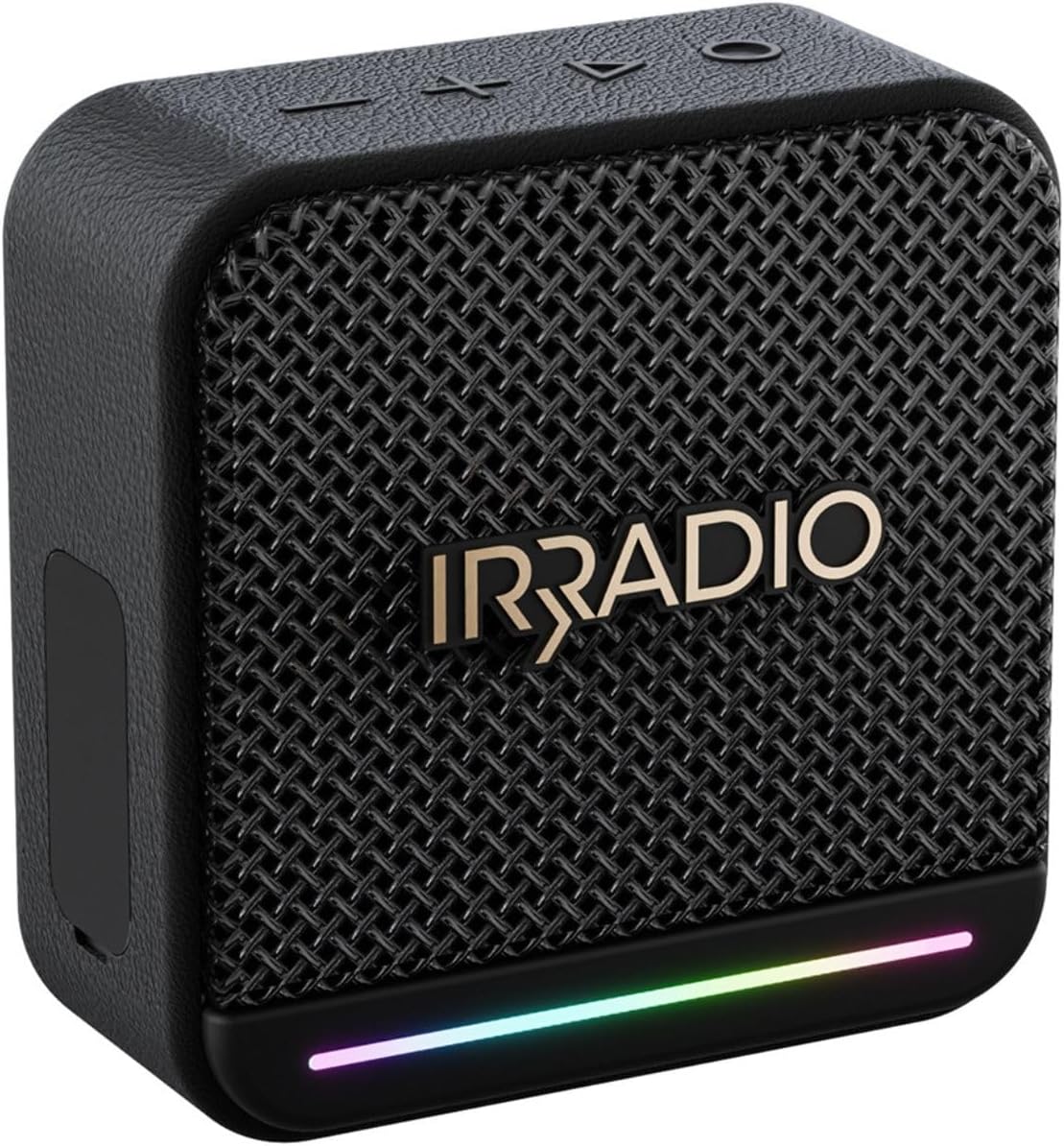
ຮູບພາບ 1: ດ້ານຫນ້າ view of the IRRADIO IR-M3 Classic Bluetooth Speaker, showcasing its compact design and RGB LED light strip.
2. ສິ່ງທີ່ຢູ່ໃນກ່ອງ
Upon unboxing your IRRADIO IR-M3 Classic Bluetooth Speaker, please ensure all components are present:
- IRRADIO IR-M3 Classic Bluetooth Speaker
- Charger (USB-C cable)
3. ຄຸນລັກສະນະຂອງຜະລິດຕະພັນ
- ຄຸນນະພາບສຽງທີ່ດີກວ່າ: Equipped with a 50mm full-range driver and integrated passive subwoofer, delivering 10W nominal power and 15W musical power. Frequency response of 85 Hz-20 KHz for deep bass and clear highs.
- ກະທັດຮັດ ແລະ ແບບພົກພາ: Measuring 10.1 x 10.2 x 4.8 cm and weighing only 306g, it is easy to transport.
- ແບດເຕີຣີທີ່ຍາວນານ: Integrated 2000 mAh battery provides up to 10 hours of continuous playback. Full recharge in approximately 3.5 hours.
- ການອອກແບບກັນນ້ໍາ: IPX7 waterproof rating ensures resistance to rain and short immersions, making it suitable for outdoor use.
- ການເຊື່ອມຕໍ່ຂັ້ນສູງ: Supports Bluetooth 5.4 for quick and stable connections up to 10 meters.
- True Wireless Stereo (TWS): Connect two IR-M3 Classic devices for an immersive stereo sound experience.
- ການຫຼິ້ນອະເນກປະສົງ: Compatible with MP3 and WAV file formats, and supports music playback from an external USB drive.
- Dynamic RGB LED Lighting: Customizable LED lighting adds visual flair and atmosphere to your music.

Image 2: Visual representation of key features including True Wireless Stereo, RGB LED lighting, and 10W power output.

Image 3: The IRRADIO IR-M3 Classic speaker shown with its compact dimensions for easy portability.
4. ຕັ້ງຄ່າ
- ກຳລັງສາກລຳໂພງ: Before first use, fully charge the speaker using the provided USB-C cable. Connect the USB-C end to the speaker's charging port and the other end to a compatible USB power adapter (not included). The charging indicator will show the charging status.
- ກຳລັງເປີດ: Press and hold the power button (usually marked with a power symbol) for a few seconds until you hear an audible cue or see the LED indicator light up.
- ການຈັບຄູ່ Bluetooth: Once powered on, the speaker will automatically enter Bluetooth pairing mode. The LED indicator will typically flash to indicate it's ready to pair.
- ເຊື່ອມຕໍ່ກັບອຸປະກອນຂອງທ່ານ: ໃນໂທລະສັບສະຫຼາດ, ແທັບເລັດ, ຫຼືຄອມພິວເຕີຂອງທ່ານ, ໄປທີ່ການຕັ້ງຄ່າ Bluetooth. ຊອກຫາ 'IR-M3 Classic' in the list of available devices and select it to connect. A confirmation sound or steady LED light will indicate a successful connection.
- ການຈັບຄູ່ສະເຕີລິໂອໄຮ້ສາຍແທ້ (TWS) (ທາງເລືອກ): To connect two IR-M3 Classic speakers for stereo sound, ensure both speakers are powered on and in pairing mode. On one speaker, press and hold the TWS button (if available, refer to specific button layout) until they connect. Then, pair your device to the primary speaker.

Image 4: Close-up of the speaker's side panel revealing the protected ports for USB-C charging, USB-A for external drives, AUX-in, and TF card slot.
5. ຄໍາແນະນໍາການດໍາເນີນງານ
ການຄວບຄຸມພື້ນຖານ:
- ເປີດ/ປິດ: ກົດປຸ່ມເປີດປິດຄ້າງໄວ້.
- ປະລິມານຂຶ້ນ/ລົງ: ໃຊ້ປຸ່ມ '+' ແລະ '-'.
- ຫຼິ້ນ/ຢຸດ: ກົດປຸ່ມຫຼິ້ນ/ຢຸດຊົ່ວຄາວ.
- ຕິດຕາມຕໍ່ໄປ / ກ່ອນ ໜ້າ ນີ້: ໃຊ້ປຸ່ມໄປໜ້າ/ກັບຫຼັງ.
- ການເລືອກໂໝດ: If available, press the 'M' button to switch between Bluetooth, USB, AUX, or TF card modes.
ໄຟ LED RGB:
The speaker features dynamic RGB LED lighting. Refer to the specific button layout for controls to change lighting modes or turn them off/on. The lights can synchronize with the music, enhancing the listening experience.

Image 5: The IRRADIO IR-M3 Classic speaker displaying its colorful RGB LED lighting feature.
6. ບໍາລຸງຮັກສາ
- ທໍາຄວາມສະອາດ: ໃຊ້ຜ້າອ່ອນໆແຫ້ງເພື່ອທຳຄວາມສະອາດລຳໂພງ. ສຳລັບຝຸ່ນທີ່ຝັງແໜ້ນ, ໃຫ້ເຊັດອອກເລັກນ້ອຍamp ຜ້າສາມາດນໍາໃຊ້ໄດ້. ຢ່າໃຊ້ສານເຄມີທີ່ຮຸນແຮງຫຼືເຄື່ອງເຮັດຄວາມສະອາດຂັດ.
- ຄວາມຕ້ານທານນ້ໍາ: The IPX7 rating means the speaker can withstand immersion in water up to 1 meter for 30 minutes. Ensure all port covers are securely closed before exposing the speaker to water. After exposure to water, dry the speaker thoroughly before charging or opening any ports.
- ການເກັບຮັກສາ: ເກັບຮັກສາລຳໂພງໄວ້ໃນບ່ອນທີ່ເຢັນ, ແຫ້ງ, ຫ່າງຈາກແສງແດດໂດຍກົງ ແລະ ອຸນຫະພູມທີ່ຮ້າຍກາດ.
- ການດູແລຫມໍ້ໄຟ: ເພື່ອຍືດອາຍຸການໃຊ້ງານຂອງແບັດເຕີຣີ, ໃຫ້ຫຼີກລ່ຽງການສາກແບັດເຕີຣີຈົນໝົດເລື້ອຍໆ. ໃຫ້ສາກໄຟເປັນປະຈຳ, ເຖິງແມ່ນວ່າຈະບໍ່ໄດ້ໃຊ້ເປັນເວລາດົນກໍຕາມ.
7. ການແກ້ໄຂບັນຫາ
- ບໍ່ມີພະລັງງານ: Ensure the battery is charged. Connect the speaker to a power source using the USB-C cable and try turning it on again.
- ບໍ່ມີສຽງ: Check the volume level on both the speaker and your connected device. Ensure the speaker is correctly paired via Bluetooth or the AUX cable is properly connected.
- ບັນຫາການຈັບຄູ່ Bluetooth: Make sure the speaker is in pairing mode (LED flashing). Turn off Bluetooth on your device and turn it back on. Try unpairing and re-pairing the speaker. Ensure no other devices are connected to the speaker.
- ສຽງບິດເບືອນ: ຫຼຸດລະດັບສຽງທັງໃນລຳໂພງ ແລະ ອຸປະກອນຂອງທ່ານ. ໃຫ້ແນ່ໃຈວ່າແຫຼ່ງສຽງມີຄຸນນະພາບດີ.
- USB/TF Card Playback Issues: ຮັບປະກັນສຽງ files are in MP3 or WAV format. Check that the USB drive or TF card is inserted correctly and is not corrupted.
8. ຂໍ້ມູນຈໍາເພາະ
| ຄຸນສົມບັດ | ຂໍ້ມູນຈໍາເພາະ |
|---|---|
| ຍີ່ຫໍ້ | ໄອຣຣາດິໂອ |
| ໝາຍເລກຕົວແບບ | IR-M3 |
| ຂະໜາດສິນຄ້າ | 101P x 48l x 102H mm (10.1 x 4.8 x 10.2 cm) |
| ຂະຫນາດລໍາໂພງ | 10.1 ຊັງຕີແມັດ |
| ເຕັກໂນໂລຊີການສື່ສານໄຮ້ສາຍ | Bluetooth 5.4 |
| ຊ່ວງສູງສຸດ | 10 ແມັດ |
| ແຫຼ່ງພະລັງງານ | ພະລັງງານຫມໍ້ໄຟ |
| ຄວາມອາດສາມາດຫມໍ້ໄຟ | 2000 mAh |
| ເວລາຫຼິ້ນ | ສູງສຸດເຖິງ 10 ຊົ່ວໂມງ (ໃນລະດັບສຽງ 50%) |
| ເວລາສາກໄຟ | 3.5 ຊົ່ວໂມງ |
| ການປະເມີນກັນນ້ໍາ | IPX7 |
| ຮູບແບບການອອກສຽງ | ສະເຕຣິໂອ |
| ການນໍາໃຊ້ທີ່ແນະນໍາ | For smartphones or tablets, For computers, For televisions |
| ອຸປະກອນທີ່ເຂົ້າກັນໄດ້ | ແລັບທັອບ, ເຄື່ອງຫຼິ້ນ MP3, ໂທລະສັບສະຫຼາດ, ແທັບເລັດ, ໂທລະພາບ |
| ອົງປະກອບລວມ | Charger (USB-C cable) |
9. ການຮັບປະກັນແລະການສະຫນັບສະຫນູນ
The IRRADIO IR-M3 Classic Bluetooth Speaker comes with a limited warranty. For specific details regarding warranty coverage, duration, and terms, please refer to the warranty card included in your product packaging or contact IRRADIO customer support directly. Keep your proof of purchase for warranty claims.
For further assistance, technical support, or service inquiries, please visit the official IRRADIO website or contact their customer service department. Contact information can typically be found in the product packaging or on the brand's official webເວັບໄຊ.


