1. ບົດແນະນຳ
Thank you for choosing the EF ECOFLOW WAVE 3 Portable Air Conditioner and Heater. This versatile unit provides powerful cooling (1800W/6100 BTU) and heating (2000W/6800 BTU) for various environments, including camping, RVs, and vanlife. With its optional 1024Wh add-on battery, fast charging capabilities, and smart app control, the WAVE 3 offers reliable climate control wherever you need it. This manual provides essential information for safe and efficient operation.
2. ຂໍ້ມູນຄວາມປອດໄພ
- ອ່ານຄໍາແນະນໍາທັງຫມົດກ່ອນທີ່ຈະໃຊ້ເຄື່ອງໃຊ້.
- ຮັກສາເຄື່ອງໃຊ້ໃຫ້ຫ່າງຈາກນ້ໍາແລະຄວາມຊຸ່ມຊື່ນ.
- ຮັບປະກັນການລະບາຍອາກາດທີ່ເຫມາະສົມໃນລະຫວ່າງການປະຕິບັດງານເພື່ອປ້ອງກັນຄວາມຮ້ອນເກີນ.
- ຫ້າມປິດທາງເຂົ້າຫຼືຊ່ອງອອກອາກາດ.
- Use only manufacturer-approved accessories and parts.
- Avoid tilting or laying the unit on its side for more than 10 minutes. If tilted, allow it to stand upright for at least 2 hours before use.
- The device may produce water. Ensure proper drainage to prevent overflow.
- ຮັກສາໃຫ້ໄກຈາກເດັກນ້ອຍ ແລະສັດລ້ຽງ.
3. ເນື້ອໃນຊຸດ
3.1. EF ECOFLOW WAVE 3 Unit
- EF ECOFLOW Wave 3 Portable Air Conditioner and Heater
- Insulated Exhaust Duct (2)
- ຝາປິດຕົວປັບທໍ່ໄອເສຍ (A, B, C)
- ທໍ່ລະບາຍນ້ໍາ
- ລົມ
- ແມ່ແບບຂະຫນາດທໍ່
- ຄຳແນະນຳດ້ານຄວາມປອດໄພ, ຄູ່ມືເລີ່ມຕົ້ນດ່ວນ, ບັດບໍລິການ
3.2. Add-on Battery (if included)
- ແບັດເຕີຣີເສີມ EcoFlow WAVE 3
- Add-on Battery Cable
- ສາຍສາກລົດ
- ຄຳແນະນຳດ້ານຄວາມປອດໄພ, ຄູ່ມືເລີ່ມຕົ້ນດ່ວນ, ບັດບໍລິການ

Figure 1: EF ECOFLOW WAVE 3 and Add-on Battery Package Contents
4. ການຕິດຕັ້ງແລະການຕິດຕັ້ງ
4.1. Attaching Hoses
The WAVE 3 comes with insulated exhaust ducts and adapter covers for directing airflow. Attach the appropriate adapter covers to the air inlets/outlets on the unit, then connect the insulated ducts. Ensure a secure fit to maximize efficiency.
4.2. Attaching Add-on Battery
If using the add-on battery, align it with the base of the WAVE 3 unit and slide it into place until it clicks securely. Connect the add-on battery cable between the unit and the battery. This provides extended cordless operation.
Video 1: Demonstrating the setup and use of the EcoFlow Wave 3 with its add-on battery, including hose attachment and basic operation.
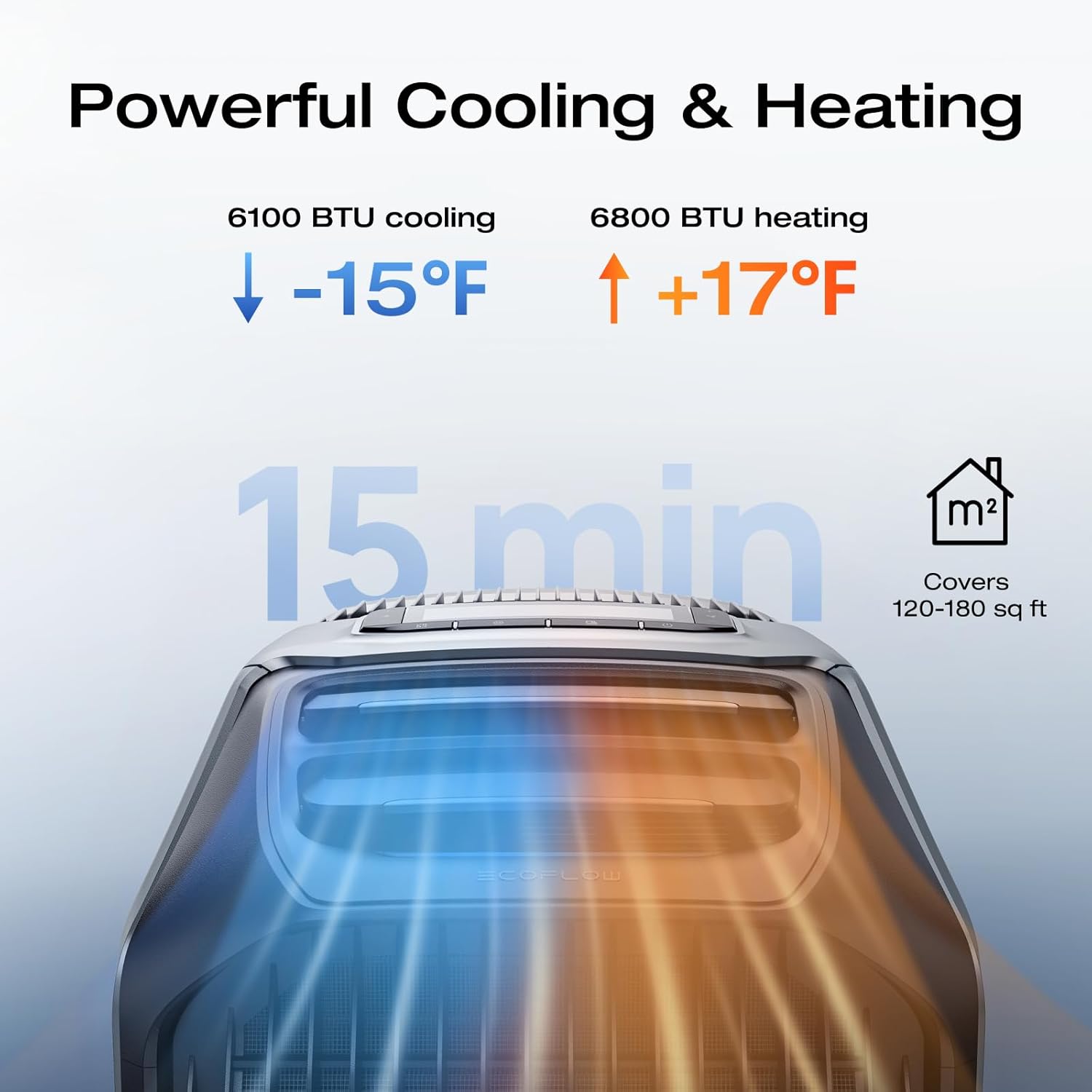
Figure 2: Attaching an insulated exhaust duct to the WAVE 3 unit.
5. ຄໍາແນະນໍາການດໍາເນີນງານ
5.1. ເປີດ / ປິດພະລັງງານ
Press and hold the power button on the unit's control panel to turn the WAVE 3 on or off. The display will illuminate, showing current settings.
5.2. Mode Selection (Cooling, Heating, Fan, Dehumidification)
Use the mode button on the control panel or the EcoFlow app to cycle through available modes: Cooling, Heating, Fan, and Dehumidification. The unit features an automatic function that maintains optimal temperature by switching between cooling and heating as needed.

Figure 3: Powerful Cooling and Heating Performance
5.3. ການປັບອຸນຫະພູມ ແລະຄວາມໄວພັດລົມ
Adjust the desired temperature and fan speed using the dedicated buttons on the control panel. The display will show the set temperature and current fan level.
5.4. ການຄວບຄຸມແອັບ
Download the EcoFlow app to remotely control the WAVE 3. The app allows you to monitor real-time power consumption, adjust temperature and modes, set timers, and receive water and power alerts.

Figure 4: Seamless Control with the EcoFlow App
5.5. ຕົວເລືອກການສາກໄຟ
The WAVE 3 and its add-on battery can be charged via multiple methods:
- ປ່ຽງ AC: Fast charging (1000W) in approximately 75 minutes.
- EcoFlow Alternator Charger: Efficient charging while on the go.
- Car Power Outlet: Convenient charging from your vehicle.
- ແຜງແສງຕາເວັນ: Environmentally friendly charging using solar energy.

Figure 5: Various Charging Options for the WAVE 3
5.6. ຄຸນສົມບັດພິເສດ
- ຮູບແບບການນອນ: ເຮັດວຽກດ້ວຍສຽງທີ່ງຽບສະຫງົບ 44dB ສຳລັບການພັກຜ່ອນທີ່ສະຫງົບສຸກ.
- Pet Care Mode: Automatically activates cooling if the cabin temperature exceeds a set limit, protecting pets left in vehicles.
- ຟັງຊັນການລະບາຍຄວາມຊຸ່ມຊື່ນ: Adjusts humidity to your desired level.

Figure 6: Multi-Modes for Every Adventure
6. ບໍາລຸງຮັກສາ
6.1. ການລະບາຍນ້ຳ
The WAVE 3 may produce condensation during operation. When the internal water tank is full, a water drain alert will be triggered (via app or unit display). Connect the provided drain pipe to the drainage port and direct the water away from the unit.
6.2. ທໍາຄວາມສະອາດ
Regularly clean the air filters and exterior of the unit to ensure optimal performance. Refer to the detailed cleaning instructions in the full user manual for specific procedures.
7. ການແກ້ໄຂບັນຫາ
If you encounter issues with your EF ECOFLOW WAVE 3, please refer to the following common troubleshooting steps:
- ໜ່ວຍບໍ່ເປີດ: Ensure the unit is properly connected to a power source or that the add-on battery is charged and securely attached. Check the power button.
- ຄວາມເຢັນ/ການທຳຄວາມຮ້ອນບໍ່ພຽງພໍ: Verify that air inlets and outlets are not obstructed. Ensure the unit is in the correct mode (Cooling/Heating) and the temperature setting is appropriate. Check for proper hose installation.
- Water Leakage/Drainage Issues: Confirm the drain pipe is correctly attached and not blocked. Ensure the unit is on a level surface.
- ບັນຫາການເຊື່ອມຕໍ່ແອັບ: Check your device's Bluetooth/Wi-Fi connection and ensure the EcoFlow app is updated to the latest version.
- ສິ່ງລົບກວນທີ່ຜິດປົກກະຕິ: If the unit produces abnormal sounds, power it off immediately and contact customer support.
ວິດີໂອທີ 2: ຈົບແລ້ວview of the EF ECOFLOW WAVE 3's features and performance, which may assist in understanding normal operation versus potential issues.
8. ຂໍ້ມູນຈໍາເພາະ
| ຄຸນສົມບັດ | ຂໍ້ມູນຈໍາເພາະ |
|---|---|
| ຜູ້ຜະລິດ | EcoFlow |
| ໝາຍເລກຕົວແບບ | Wave 3 + EB |
| ນ້ໍາຫນັກລາຍການ | 33.7 ປອນ |
| ຂະໜາດສິນຄ້າ | 20 x 13 x 12 inches (51.8D x 33.5W x 29.7H cm) |
| ສີ | ສີເທົາ |
| ສະບັບtage | 120 ໂວນ |
| ວັດtage | 1159 ວັດ |
| ຄວາມອາດສາມາດເຮັດຄວາມເຢັນ | 6100 ໜ່ວຍຄວາມຮ້ອນອັງກິດ (1800W) |
| ຄວາມອາດສາມາດເຮັດຄວາມຮ້ອນ | 6800 ໜ່ວຍຄວາມຮ້ອນອັງກິດ (2000W) |
| ພື້ນທີ່ຄອບຄຸມພື້ນ | 120-180 sq ft (11-17 m²) |
| ລະດັບສຽງ | 44 Decibels (Sleep Mode) |
| Battery Type (Add-on) | 1024Wh LFP (LiFePO4) |
| ຊີວິດວົງຈອນຫມໍ້ໄຟ | 4,000 ຮອບວຽນເຖິງ 80% ຄວາມອາດສາມາດ |
| ຄຸນນະສົມບັດພິເສດ | Remote Controlled (App), Sleep Mode, PetCare, Dehumidification |
9. ການຮັບປະກັນແລະການສະຫນັບສະຫນູນ
9.1. ຂໍ້ມູນການຮັບປະກັນ
The EF ECOFLOW WAVE 3 comes with a ການຮັບປະກັນຜູ້ຜະລິດ 2 ປີ. ກະລຸນາຮັກສາຫຼັກຖານການຊື້ຂອງທ່ານສໍາລັບການຮຽກຮ້ອງການຮັບປະກັນ.
9.2. ການຊ່ວຍເຫຼືອລູກຄ້າ
For technical assistance, warranty inquiries, or further information, please visit the official EF ECOFLOW website or contact their customer support team. You can find contact details on the service card included in your package or on the brand's official webເວັບໄຊ.


