1. ບົດແນະນຳ
Thank you for choosing the Infiniity DM56 Sport Smartwatch. This device is designed to enhance your active lifestyle with advanced fitness tracking, health monitoring, and smart connectivity features. Equipped with a vibrant 1.43-inch AMOLED display, built-in GPS, and comprehensive health sensors, the DM56 is your reliable companion for both daily wear and intense workouts.
This manual provides detailed instructions on how to set up, operate, maintain, and troubleshoot your smartwatch to ensure optimal performance and longevity.

ຮູບພາບ 1.1: ດ້ານຫນ້າ view of the Infiniity DM56 Sport Smartwatch, showcasing its round AMOLED display and rugged design.
2. ສິ່ງທີ່ຢູ່ໃນກ່ອງ
Upon opening your Infiniity DM56 Sport Smartwatch package, please ensure all the following items are present:
- Infiniity DM56 Sport Smartwatch
- ສາຍສາກ
- ຄູ່ມືຜູ້ໃຊ້ (ເອກະສານນີ້)
3. ຕັ້ງຄ່າ
3.1 ການສາກ Smartwatch
Before first use, fully charge your DM56 smartwatch. A full charge typically takes approximately 2 hours.
- Connect the magnetic charging cable to the charging contacts on the back of the smartwatch. Ensure the pins align correctly.
- ສຽບປາຍສາຍ USB ຂອງສາຍສາກໄຟເຂົ້າກັບອະແດບເຕີໄຟ USB ມາດຕະຖານ (ແນະນຳ 5V/1A) ຫຼື ພອດ USB ຂອງຄອມພິວເຕີ.
- The watch display will show a charging indicator. Once fully charged, the indicator will change or disappear.
3.2 ການຈັບຄູ່ກັບໂທລະສັບສະຫຼາດຂອງທ່ານ
To unlock the full potential of your DM56 smartwatch, you need to pair it with your smartphone via Bluetooth using the dedicated companion application. The DM56 is compatible with Android 5.0+ and iOS 11 and above.
- ດາວໂຫລດ App ໄດ້: ຊອກຫາ the official Infiniity companion app (refer to the packaging or quick start guide for the exact app name) on the Google Play Store (for Android) or Apple App Store (for iOS) and install it.
- ເປີດໃຊ້ Bluetooth: ໃຫ້ແນ່ໃຈວ່າ Bluetooth ຖືກເປີດໃຊ້ຢູ່ໃນໂທລະສັບສະຫຼາດຂອງທ່ານ.
- ເປີດ App ໄດ້: Launch the companion app on your smartphone and follow the on-screen instructions to create an account or log in.
- ເພີ່ມອຸປະກອນ: Within the app, navigate to the 'Add Device' or 'Pair Device' section. The app will search for available smartwatches.
- Select DM56: Select 'DM56' from the list of found devices. A pairing request may appear on both your phone and the watch. Confirm the pairing on both devices.
- ສຳເລັດການຕິດຕັ້ງ: Once paired, the app will guide you through initial settings, such as profile information, notification permissions, and data synchronization.
4. ການໃຊ້ງານ Smartwatch
4.1 ການນໍາທາງພື້ນຖານ
The DM56 features a responsive touchscreen and physical buttons for intuitive control.
- ໜ້າຈໍສຳຜັດ: ປັດຂຶ້ນ, ລົງ, ຊ້າຍ, ຫຼືຂວາເພື່ອນຳທາງຜ່ານເມນູ ແລະການແຈ້ງເຕືອນ. ແຕະເພື່ອເລືອກລາຍການ.
- ປຸ່ມທາງດ້ານຮ່າງກາຍ: The watch has multiple buttons, typically labeled 'SPORT', 'SEL', 'BACK', and a dedicated 'GPS' button. Their functions may vary depending on the current screen or mode.
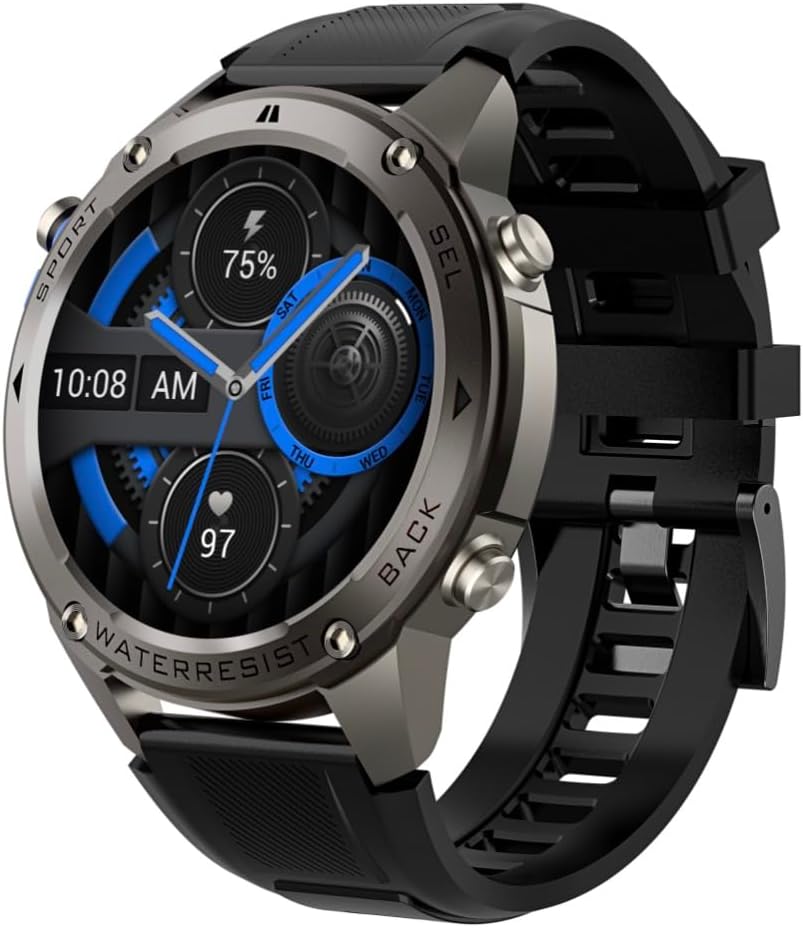
ຮູບພາບ 4.1: ຂ້າງ view of the Infiniity DM56 Sport Smartwatch, highlighting the physical control buttons.
4.2 ຄຸນສົມບັດການສະແດງ
The 1.43-inch AMOLED display offers vibrant colors and deep blacks with a resolution of 466x466 pixels.
- ຈໍສະແດງຜົນຕະຫຼອດ: The DM56 supports Always-On Display functionality, allowing you to see the time and essential information at a glance without needing to raise your wrist or press a button. This feature can be configured in the watch settings.

Image 4.2: The Infiniity DM56 Sport Smartwatch display, showcasing a typical watch face with various data points.
4.3 Built-in GPS & Compass
The DM56 features dual-frequency GPS (L1+L5) and supports multiple satellite systems (GPS, GLONASS, BDS, Galileo, NAVIC, QZSS) for precise outdoor tracking. A built-in compass further aids navigation.
- GPS ຕິດຕາມ: When starting an outdoor activity (e.g., running, cycling), the watch will automatically attempt to acquire a GPS signal. Ensure you are in an open area for faster signal acquisition. Your route, distance, and pace will be recorded.
- ເຂັມທິດ: Access the compass feature from the watch's menu to get real-time directional information.

Image 4.3: The Infiniity DM56 Sport Smartwatch from an angle, highlighting the dedicated GPS button on the side.

ຮູບພາບທີ 4.4: ເປັນການປິດ view of the GPS button on the Infiniity DM56 Sport Smartwatch, indicating its function.
4.4 ການຕິດຕາມສຸຂະພາບຕະຫຼອດມື້
The DM56 is equipped with the VC30F sensor for continuous health monitoring.
- ການກວດສອບອັດຕາການເຕັ້ນຫົວໃຈ: Track your heart rate in real-time throughout the day. View your current heart rate on the watch face or in the dedicated heart rate app.
- ການຕິດຕາມອົກຊີເຈນໃນເລືອດ (SpO2): ວັດແທກລະດັບຄວາມອີ່ມຕົວຂອງອົກຊີໃນເລືອດຂອງທ່ານ.
- ການຕິດຕາມການນອນ: The watch automatically monitors your sleep patterns, including deep sleep, light sleep, and awake times. View ການວິເຄາະການນອນລະອຽດໃນແອັບເສີມ.
- ການຕິດຕາມຄວາມກົດດັນ: ຕິດຕາມລະດັບຄວາມຕຶງຄຽດຂອງທ່ານຕະຫຼອດມື້.
- Pedometer: Counts your daily steps, distance, and estimated calories burned.
Note: The Infiniity DM56 Smartwatch is NOT A MEDICAL DEVICE. All health monitoring data is for reference only and should not be used for medical diagnosis or treatment.
4.5 ໂໝດກິລາ
The DM56 offers over 170 customizable sports modes, with 14 built-in modes such as outdoor running, cycling, and swimming. You can add up to 10 additional modes manually via the companion app.
- ການເລີ່ມຕົ້ນກິດຈະກໍາ: Navigate to the 'Workout' or 'Sports' menu on the watch, select your desired activity, and tap to start.
- ໃນລະຫວ່າງການເຄື່ອນໄຫວ: The watch will display real-time metrics such as duration, distance, heart rate, and calories burned.
- Ending Activity: Swipe or press the designated button to pause or end the activity. Your workout data will be saved and synchronized with the app.
4.6 Smart Notifications & Calls
Once paired with your smartphone, the DM56 can receive notifications and handle calls directly on your wrist.
- ການແຈ້ງເຕືອນ: Receive alerts for incoming calls, SMS messages, and app notifications (e.g., social media, email). Configure which app notifications you want to receive in the companion app.
- Make/Answer Call: The DM56 allows you to make and answer calls directly from the watch, utilizing its built-in microphone and speaker. Ensure the watch is connected to your phone via Bluetooth.
5. ບໍາລຸງຮັກສາ
5.1 ລະດັບການກັນນ້ຳ
The DM56 has a 5ATM waterproof rating, meaning it can withstand water pressures equivalent to a depth of 50 meters. This makes it suitable for swimming, showering, and other water-based activities. However, it is not recommended for diving or high-pressure water activities.
- Avoid exposing the watch to hot water, steam, or strong detergents.
- ຫຼັງຈາກການສໍາຜັດກັບນ້ໍາເຄັມ, rinsed ໂມງດ້ວຍນ້ໍາສົດແລະຕາກໃຫ້ແຫ້ງມັນຢ່າງລະອຽດ.
5.2 ທໍາຄວາມສະອາດແລະດູແລ
ເພື່ອຮັກສາຮູບລັກສະນະ ແລະ ໜ້າທີ່ການເຮັດວຽກຂອງໂມງອັດສະລິຍະຂອງທ່ານ:
- ອະນາໄມຕົວໂມງ ແລະສາຍເປັນປະຈຳດ້ວຍຜ້າອ່ອນ, ງamp ຜ້າ.
- ໃຫ້ແນ່ໃຈວ່າແຜ່ນຕິດຕໍ່ການສາກໄຟຢູ່ດ້ານຫຼັງຂອງໂມງນັ້ນສະອາດ ແລະແຫ້ງກ່ອນການສາກໄຟ.
- ຫຼີກເວັ້ນການນໍາໃຊ້ເຄື່ອງເຮັດຄວາມສະອາດຂັດຫຼືສານລະລາຍ.
5.3 ການເພີ່ມປະສິດທິພາບຂອງຊີວິດຫມໍ້ໄຟ
The DM56 is powered by a 500mAh high-voltage battery, offering extended usage. To maximize battery life:
- Adjust screen brightness to a lower level.
- Limit the use of Always-On Display if not essential.
- ປິດການແຈ້ງເຕືອນທີ່ບໍ່ຈໍາເປັນ.
- ປິດການຕິດຕາມການຕິດຕາມອັດຕາການເຕັ້ນຂອງຫົວໃຈຕໍ່ເນື່ອງຖ້າຫາກວ່າບໍ່ຕ້ອງການ 24/7.
6. ການແກ້ໄຂບັນຫາ
If you encounter issues with your Infiniity DM56 smartwatch, try the following common solutions:
- ໂມງບໍ່ເປີດ: ກວດໃຫ້ແນ່ໃຈວ່າໂມງຖືກສາກເຕັມແລ້ວ. ເຊື່ອມຕໍ່ມັນກັບສາຍສາກ ແລະລໍຖ້າສອງສາມນາທີກ່ອນທີ່ຈະພະຍາຍາມເປີດມັນອີກຄັ້ງ.
- ບໍ່ສາມາດຈັບຄູ່ກັບໂທລະສັບໄດ້:
- ກວດໃຫ້ແນ່ໃຈວ່າ Bluetooth ເປີດຢູ່ໃນໂທລະສັບ ແລະໂມງຂອງທ່ານ.
- ໃຫ້ແນ່ໃຈວ່າໂມງຢູ່ໃນຂອບເຂດ Bluetooth ຂອງໂທລະສັບຂອງທ່ານ.
- ຣີສະຕາດທັງໂມງ ແລະໂທລະສັບຂອງທ່ານ.
- ລຶບລ້າງແຄດ Bluetooth ໃນໂທລະສັບຂອງທ່ານ (Android) ຫຼືລືມອຸປະກອນ ແລະຈັບຄູ່ຄືນໃໝ່.
- ໃຫ້ແນ່ໃຈວ່າແອັບຊ່ວຍເຫຼືອໄດ້ຮັບການອັບເດດເປັນເວີຊັນລ່າສຸດແລ້ວ.
- ຂໍ້ມູນສຸຂະພາບບໍ່ຖືກຕ້ອງ:
- ໃຫ້ແນ່ໃຈວ່າໂມງຖືກໃສ່ຢູ່ໃນຂໍ້ມືຂອງເຈົ້າຢ່າງສະບາຍ, ບໍ່ແຫນ້ນເກີນໄປຫຼືວ່າງເກີນໄປ.
- ເຮັດຄວາມສະອາດເຊັນເຊີຢູ່ດ້ານຫຼັງຂອງໂມງ.
- Note that environmental factors and individual physiology can affect readings. Remember, it is not a medical device.
- ບໍ່ໄດ້ຮັບການແຈ້ງເຕືອນ:
- ກວດເບິ່ງການຕັ້ງຄ່າການແຈ້ງເຕືອນໃນແອັບຄູ່.
- Ensure the app has necessary permissions on your phone (e.g., notification access).
- ກວດສອບວ່າໂມງໄດ້ເຊື່ອມຕໍ່ກັບໂທລະສັບຂອງທ່ານແລ້ວ.
- ຊີວິດຫມໍ້ໄຟສັ້ນ: ເບິ່ງພາກ 5.3 ສໍາລັບຄໍາແນະນໍາການເພີ່ມປະສິດທິພາບຫມໍ້ໄຟ.
ຖ້າບັນຫາຍັງຄົງຢູ່ຫຼັງຈາກພະຍາຍາມຂັ້ນຕອນເຫຼົ່ານີ້, ກະລຸນາຕິດຕໍ່ຝ່າຍຊ່ວຍເຫຼືອລູກຄ້າເພື່ອຂໍຄວາມຊ່ວຍເຫຼືອເພີ່ມເຕີມ.
7. ຂໍ້ມູນຈໍາເພາະ
| ຄຸນສົມບັດ | ຂໍ້ມູນຈໍາເພາະ |
|---|---|
| ໝາຍເລກຕົວແບບ | DM 56 |
| ຈໍສະແດງຜົນ | 1.43-inch AMOLED, 466x466 pixels |
| ເຊັນເຊີ | Heart Rate (VC30F), Accelerometer (STK8321), Magnetometer (Compass), Barometer+Altitude (SPL07-03) |
| ການເຊື່ອມຕໍ່ | Bluetooth 5.3 |
| ຄວາມອາດສາມາດຫມໍ້ໄຟ | 500mAh |
| ລະດັບກັນນໍ້າ | 5ATM |
| ຄວາມເຂົ້າກັນໄດ້ | Android 5.0+ and iOS 11 and above |
| ນ້ໍາຫນັກລາຍການ | 3 ອອນ |
| ຂະໜາດແພັກເກັດ | 4.25 x 4.25 x 2.8 ນິ້ວ |
| ລະບົບປະຕິບັດການ | Android Wear 2.7 (Note: This refers to the underlying OS, not necessarily full Android Wear functionality) |
| GPS | Built-in GPS (L1+L5 dual-frequency) |
| ຮູບຮ່າງ | ຮອບ |
| ປະເພດຫມໍ້ໄຟ | Nonstandard Battery, Lithium Ion |
8. ການຮັບປະກັນແລະການສະຫນັບສະຫນູນ
The Infiniity DM56 Sport Smartwatch comes with a standard manufacturer's warranty. Please refer to the warranty card included in your product packaging for specific terms and conditions, including warranty duration and coverage details.
For technical support, troubleshooting assistance beyond what is covered in this manual, or warranty claims, please contact Infiniity customer service through the contact information provided on the product packaging or the official Infiniity webເວັບໄຊ.
ກະລຸນາຮັກສາຫຼັກຖານການຊື້ຂອງທ່ານໄວ້ເພື່ອຈຸດປະສົງການຮັບປະກັນ.


