1. ບົດແນະນຳ
This manual provides essential information for the installation, operation, and maintenance of your FSP VITA GM 650W ATX 3.1 PC Power Supply. Please read this manual thoroughly before installation to ensure proper and safe usage of the product. The FSP VITA GM 650W is designed to deliver stable and efficient power to your computer system, adhering to the ATX 3.1 and PCIe Gen 5.1 specifications.
2. ຂໍ້ມູນຄວາມປອດໄພ
ປະຕິບັດຕາມຄວາມລະມັດລະວັງດ້ານຄວາມປອດໄພຕໍ່ໄປນີ້ສະເໝີເພື່ອປ້ອງກັນການບາດເຈັບ ຫຼືຄວາມເສຍຫາຍຕໍ່ອຸປະກອນຂອງທ່ານ:
- ຢ່າເປີດຫົວຫນ່ວຍສະຫນອງພະລັງງານ. ສູງ voltages are present inside, and opening the casing voids the warranty and poses a risk of electric shock.
- ຕິດຕັ້ງແຫຼ່ງຈ່າຍໄຟໃນພື້ນທີ່ທີ່ມີລະບາຍອາກາດດີ, ຫ່າງຈາກແຫຼ່ງຄວາມຮ້ອນ, ແສງແດດໂດຍກົງ, ແລະ ຄວາມຊຸ່ມ.
- Ensure the power supply is correctly installed and secured in your PC case.
- Use only the modular cables provided with the power supply. Using incompatible cables can cause damage.
- Connect the power supply to a grounded electrical outlet.
- Disconnect the AC power cord from the wall outlet before installing or removing the power supply or any other components.
- ຫຼີກລ່ຽງການວາງວັດຖຸໜັກໄວ້ເທິງແຫຼ່ງຈ່າຍໄຟ ຫຼື ສາຍໄຟ.
- If the power supply is damaged or malfunctioning, discontinue use immediately and contact FSP support.
3. ເນື້ອໃນຊຸດ
ກວດສອບວ່າລາຍການທັງຫມົດແມ່ນມີຢູ່ໃນຊຸດຂອງທ່ານ:
- FSP VITA GM 650W ATX 3.1 PC Power Supply
- Modular Cable Set (Motherboard, CPU, PCIe, SATA, Peripheral)
- ສາຍໄຟ AC
- screws ການຕິດຕັ້ງ
- ຄູ່ມືຜູ້ໃຊ້ (ເອກະສານນີ້)
4. ຜະລິດຕະພັນເກີນview
The FSP VITA GM 650W is a high-efficiency power supply designed for modern PC systems. It features:
- ການປະຕິບັດຕາມ ATX 3.1: Designed to meet the latest Intel Power Design Guide ATX 3.1 specifications, ensuring compatibility with future hardware.
- PCIe Gen 5.1 Support: Ready for next-generation graphics cards.
- ການຮັບຮອງ 80 PLUS Gold: Achieves high efficiency, reducing power dissipation, heat, and noise.
- Synchronous Rectifier LLC Resonance Converter Topology: Reduces switching loss and enhances efficiency.
- +5V & 3.3V DC to DC Circuit Design: Improves efficiency and stabilizes output voltage.
- 105°C Japanese Bulk Capacitor: Ensures reliability and extended lifespan.

ຮູບທີ 4.1: ດ້ານໜ້າ view of the FSP VITA GM 650W Power Supply, showcasing its compact design and fan grille.
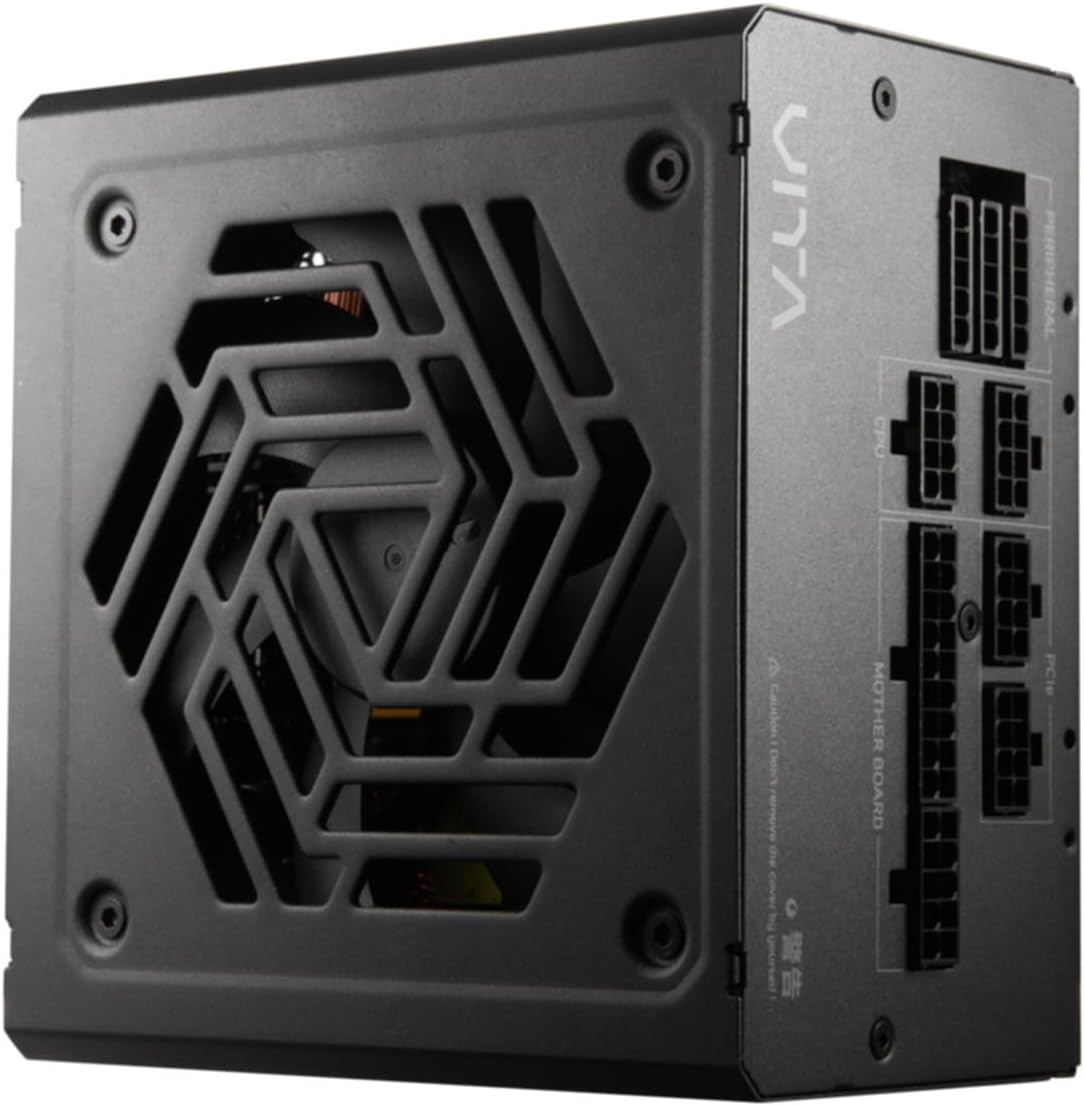
ຮູບ 4.2: ເທິງລົງລຸ່ມ view of the FSP VITA GM 650W Power Supply, highlighting the fan and ventilation design.

ຮູບ 4.3: ຂ້າງ view of the FSP VITA GM 650W Power Supply, showing the FSP branding and VITA model name.
5. ການຕິດຕັ້ງແລະການຕິດຕັ້ງ
Follow these steps to install your FSP VITA GM 650W power supply:
- ການກະກຽມ:
- ປິດຄອມພິວເຕີຂອງທ່ານ ແລະ ຖອດສາຍໄຟ AC ອອກຈາກປລັກສຽບທີ່ຝາ.
- ເປີດກໍລະນີຄອມພິວເຕີຂອງທ່ານ.
- ຖ້າປ່ຽນແຫຼ່ງຈ່າຍໄຟທີ່ມີຢູ່ແລ້ວ, ໃຫ້ຖອດສາຍໄຟທັງໝົດອອກຈາກ PSU ເກົ່າ ແລະ ເອົາອອກຈາກເຄສ.
- ການຕິດຕັ້ງ PSU:
- Carefully place the FSP VITA GM 650W into the power supply bay of your PC case.
- ຈັດລຽນຮູສະກູຢູ່ເທິງ PSU ໃຫ້ກົງກັບຮູຢູ່ເທິງເຄສ.
- ຮັບປະກັນການສະຫນອງພະລັງງານໂດຍໃຊ້ screws mounting ສະຫນອງໃຫ້.
- ເຊື່ອມຕໍ່ສາຍໂມດູລາ:
The FSP VITA GM 650W is a modular power supply. Connect only the cables required for your system components.

Figure 5.1: Modular cable connection panel. Ensure cables are firmly seated.
- ພະລັງງານຂອງເມນບອດ: ເຊື່ອມຕໍ່ສາຍເຂັມ ATX 24-pin ກັບ motherboard.
- ພະລັງງານ CPU: Connect the 4+4-pin or 8-pin EPS/ATX12V cable(s) to the CPU power connector(s) on your motherboard.
- ພະລັງງານ PCIe: Connect the 6+2-pin PCIe cables to your graphics card(s).
- ພະລັງງານ SATA: Connect SATA power cables to SSDs, HDDs, and optical drives.
- ພະລັງງານອຸປະກອນຕໍ່ພ່ວງ: Connect 4-pin Molex cables to other peripherals as needed.
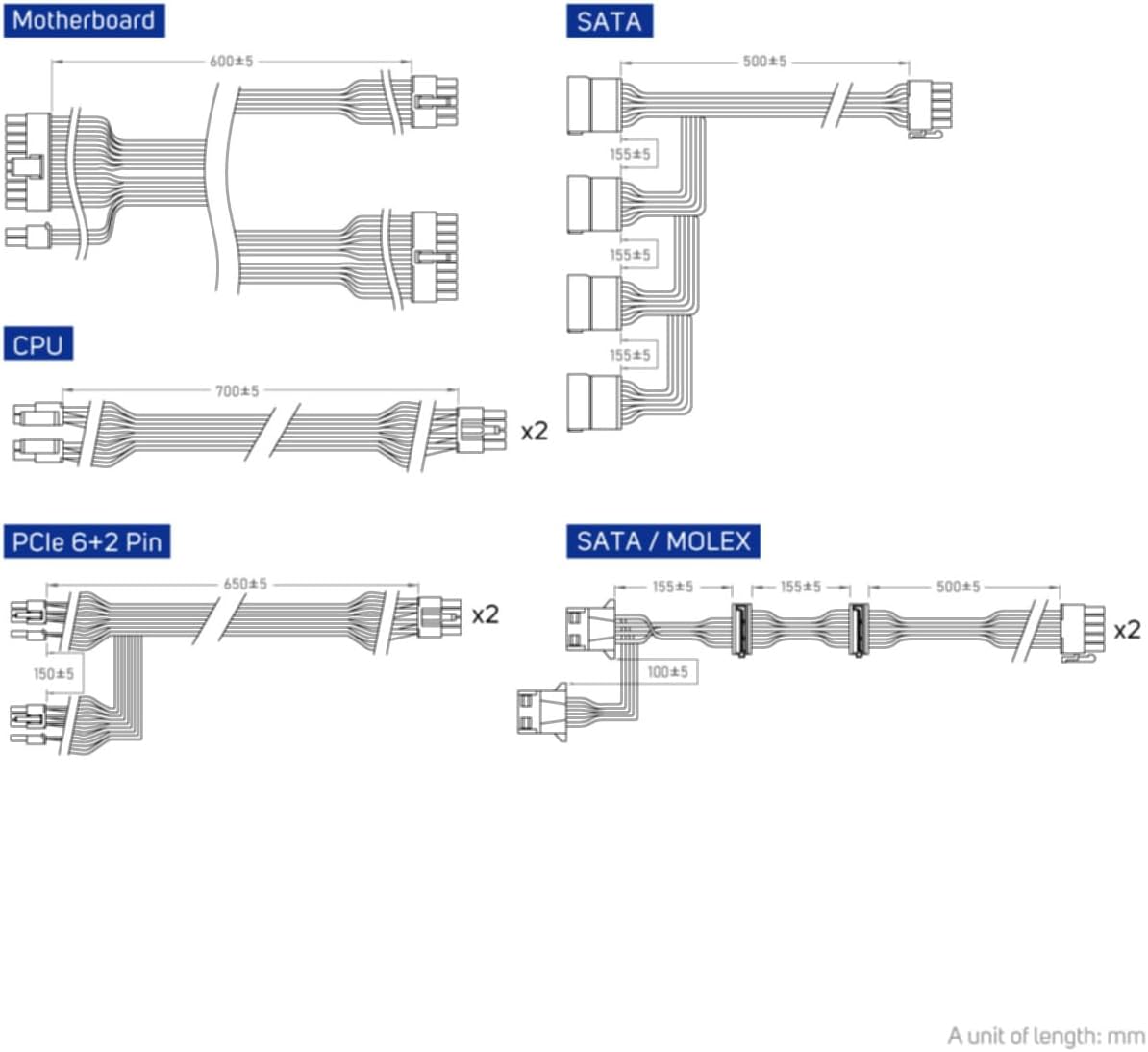
Figure 5.2: Diagram illustrating the various modular cables included and their approximate lengths (in mm).
- ການກວດສອບຄັ້ງສຸດທ້າຍ:
- Ensure all cables are securely connected and routed to avoid obstructing airflow.
- ປິດກໍລະນີຄອມພິວເຕີຂອງທ່ານ.
- Connect the AC power cord to the power supply and then to a grounded wall outlet.
6. ຄໍາແນະນໍາການດໍາເນີນງານ
After installation, you can power on your system:
- Ensure the power switch on the back of the power supply is in the "ON" (I) position.
- ກົດປຸ່ມເປີດປິດໃນກໍລະນີຄອມພິວເຕີຂອງທ່ານ.
- The power supply will provide stable power to your components.

ຮູບ 6.1: ດ້ານຫລັງ view of the power supply, showing the AC power input and the main power switch.
Bridge Time Importance: The FSP VITA GM 650W adheres to the recommended ATX 3.1 bridge time values. This feature ensures the power supply can maintain a stable output voltage for a critical duration after a power interruption, preventing system instability or damage during sudden power fluctuations or outages.
7. ບໍາລຸງຮັກສາ
ເພື່ອຮັບປະກັນປະສິດທິພາບທີ່ດີທີ່ສຸດ ແລະ ອາຍຸການໃຊ້ງານທີ່ຍາວນານຂອງການສະໜອງພະລັງງານຂອງທ່ານ:
- ທໍາຄວາມສະອາດຂີ້ຝຸ່ນ: ເຮັດຄວາມສະອາດຝຸ່ນຈາກຕາໜ່າງພັດລົມ ແລະ ຊ່ອງລະບາຍອາກາດຂອງແຫຼ່ງຈ່າຍໄຟເປັນໄລຍະໂດຍໃຊ້ລົມອັດ. ໃຫ້ແນ່ໃຈວ່າລະບົບຖືກປິດ ແລະ ຖອດປລັກອອກກ່ອນເຮັດຄວາມສະອາດ.
- ການຄຸ້ມຄອງສາຍໄຟ: Maintain good cable management inside your PC case to ensure proper airflow and prevent overheating.
- ເງື່ອນໄຂສິ່ງແວດລ້ອມ: ໃຊ້ງານແຫຼ່ງຈ່າຍໄຟພາຍໃນຂອບເຂດອຸນຫະພູມ ແລະ ຄວາມຊຸ່ມຊື່ນທີ່ແນະນຳ.
8. ການແກ້ໄຂບັນຫາ
If you encounter issues with your FSP VITA GM 650W power supply, refer to the following common problems and solutions:
| ບັນຫາ | ສາເຫດທີ່ເປັນໄປໄດ້ | ການແກ້ໄຂ |
|---|---|---|
| ລະບົບບໍ່ເປີດ. |
|
|
| ລະບົບເປີດແຕ່ປິດທັນທີ. |
|
|
| ສຽງຜິດປົກກະຕິຈາກ PSU. |
|
|
If the problem persists after trying these solutions, please contact FSP customer support for further assistance.
9. ຂໍ້ມູນຈໍາເພາະ
| ຄຸນສົມບັດ | ລາຍລະອຽດ |
|---|---|
| ໝາຍເລກຕົວແບບ | 790980 |
| ຍີ່ຫໍ້ | FSP |
| ວັດtage | 650W |
| ລຸ້ນ ATX | 3.1 |
| ການຢັ້ງຢືນປະສິດທິພາບ | 80 PLUS ຄໍາ |
| ນ້ໍາຫນັກລາຍການ | 2.72 ກິໂລ (5.98 ປອນ) |
| ຜູ້ຜະລິດ | FSP |
| ວັນທີທໍາອິດທີ່ມີ | ວັນທີ 15 ສິງຫາ 2024 |
10. ການຮັບປະກັນແລະການສະຫນັບສະຫນູນ
For warranty information, technical support, or service inquiries, please refer to the official FSP webເວັບໄຊ ຫຼືຕິດຕໍ່ພະແນກບໍລິການລູກຄ້າຂອງເຂົາເຈົ້າ. ຮັກສາຫຼັກຖານການຊື້ຂອງທ່ານສໍາລັບການຮ້ອງຂໍການຮັບປະກັນ.
FSP Official Webເວັບໄຊ: www.fsp-group.com
11. ການລີໄຊເຄີນ ແລະ ການຖິ້ມຂີ້ເຫຍື້ອ
Please dispose of this product responsibly. Electronic waste should not be disposed of with household waste. Contact your local authorities or recycling center for information on proper disposal methods for electronic components.


