1. ບົດແນະນຳ
The Beafon Silverline ML10 LTE Desk Phone is designed for ease of use and reliability, offering essential communication features with enhanced safety options. This manual provides detailed instructions for setting up, operating, and maintaining your device.
ຄຸນນະສົມບັດທີ່ສໍາຄັນປະກອບມີ:
- 4G LTE Desk Phone connectivity
- Hearing Aid Compatible (HAC M4/T4)
- Programmable SOS emergency numbers with included SOS wristband/necklace (433 MHz range)
- Three quick dial keys for photos or symbols
- Digital announcement when pressing keys
- Extra-large XXL digits on display
- Extra loud ringer (90 dB) and earpiece volume (+40 dB)
- Hands-free function and Bluetooth LE
- SMS functionality and Audio Booster button

2. ຂໍ້ມູນຄວາມປອດໄພທີ່ສໍາຄັນ
Please read all safety instructions before using the device to prevent injury or damage. Keep this manual for future reference.
- ຢ່າໃຫ້ອຸປະກອນຖືກອຸນຫະພູມສູງ ຫຼື ແສງແດດໂດຍກົງ ຫຼື ຄວາມຊຸ່ມ.
- ໃຊ້ອຸປະກອນເສີມ ແລະ ອະແດບເຕີໄຟຟ້າທີ່ໄດ້ຮັບການອະນຸມັດເທົ່ານັ້ນ.
- ຫຼີກລ້ຽງການຫຼຸດລົງຫຼືການອຸປະກອນທີ່ມີຜົນກະທົບທີ່ເຂັ້ມແຂງ.
- ຢ່າພະຍາຍາມຖອດປະກອບ ຫຼືສ້ອມແປງອຸປະກອນດ້ວຍຕົນເອງ. ຕິດຕໍ່ພະນັກງານບໍລິການທີ່ມີຄຸນວຸດທິ.
- Keep the device away from medical devices, such as pacemakers, to avoid interference.
3. ເນື້ອໃນຊຸດ
ໃຫ້ແນ່ໃຈວ່າທຸກລາຍການຢູ່ໃນຊຸດ:
- Beafon Silverline ML10 LTE Desk Phone unit
- ມືຖືແລະສາຍເຊືອກ
- ອະແດັບເຕີພະລັງງານ
- USB charger cable (USB-C)
- SOS wristband
- SOS necklace
- Lithium-ion battery (pre-installed or separate)
- ຄູ່ມືຜູ້ໃຊ້ (ເອກະສານນີ້)
4. ຜະລິດຕະພັນເກີນview
Familiarize yourself with the various parts of your Beafon ML10 desk phone.


5. ຕັ້ງຄ່າ
5.1. ການໃສ່ SIM Card
- Ensure the phone is powered off and disconnected from the power source.
- Locate the SIM card slot, usually on the back or side of the device.
- Insert a Nano SIM card into the designated slot, ensuring correct orientation.
- ປິດຝາປິດຊ່ອງໃສ່ຊິມກາດຢ່າງປອດໄພ.
5.2. ການເຊື່ອມຕໍ່ພະລັງງານ
- Connect the USB-C charger cable to the phone's charging port.
- ສຽບອະແດບເຕີໄຟໃສ່ກັບປລັກສຽບໃສ່ຝາ.
- The phone can operate on battery power via 4G LTE, eliminating the need for a fixed line connection.
5.3. ການເປີດເຄື່ອງເບື້ອງຕົ້ນ ແລະການເລືອກພາສາ
- ກົດປຸ່ມເປີດປິດຄ້າງໄວ້ຈົນກວ່າໜ້າຈໍຈະເປີດ.
- ປະຕິບັດຕາມການເຕືອນໃນຫນ້າຈໍເພື່ອເລືອກພາສາທີ່ທ່ານຕ້ອງການ.
- The phone will automatically search for a 4G LTE network.

6. ຄໍາແນະນໍາການດໍາເນີນງານ
6.1. ເຮັດ ແລະ ຮັບສາຍ
- ໂທອອກ: Lift the handset, dial the number using the large keypad, and press the green call button.
- ຮັບສາຍ: When the phone rings (up to 90 dB), lift the handset or press the hands-free button to answer.
- ຟັງຊັນ Hands-Free: Press the dedicated hands-free button to activate speakerphone during a call.
6.2. Quick Dial Keys
The phone features three programmable quick dial keys (I, II, III) that can be customized with photos or symbols for easy access to frequently called contacts.
- ການຂຽນໂປຣແກຣມ: Navigate to the phone's menu, select 'Quick Dial Settings', and assign a contact number to each key. You can also associate a photo or symbol.
- ການນໍາໃຊ້: Simply press the desired quick dial key to call the assigned contact.
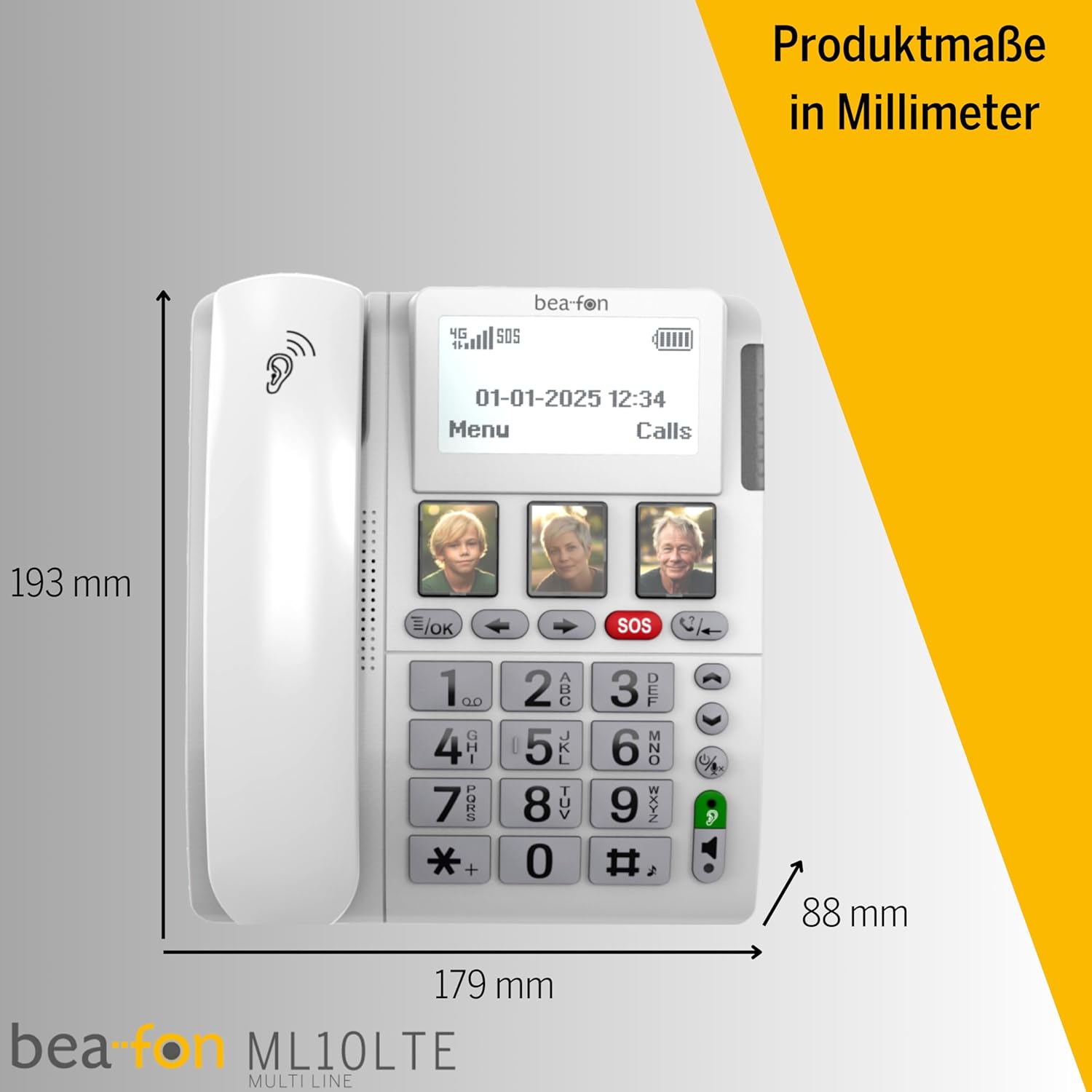
6.3. ຟັງຊັນສຸກເສີນ SOS
The SOS function allows you to quickly contact pre-selected emergency numbers. It includes an SOS button on the phone and a separate SOS wristband/necklace.
- Programming SOS Numbers: Access the 'SOS Settings' in the menu to program up to five emergency contact numbers.
- Activating SOS (Phone): Press and hold the red SOS button on the phone. The phone will automatically call the programmed numbers in sequence until an answer is received.
- Activating SOS (Wristband/Necklace): Press the button on the SOS wristband or necklace. This will trigger the phone to initiate the emergency call sequence. The wristband/necklace has a range of 433 MHz.


6.4. ຫນ້າທີ່ອື່ນໆ
- SMS: The phone supports sending and receiving text messages. Access the 'Messages' menu to compose or read SMS.
- Audio Booster: Press the Audio Booster button during a call to temporarily increase the earpiece volume for clearer audio.
- Bluetooth LE: Use Bluetooth Low Energy to connect compatible wireless accessories.
- HAC Compatibility: The phone is certified HAC M4/T4, making it suitable for users with hearing aids.
7. ບໍາລຸງຮັກສາ
7.1. ທຳ ຄວາມສະອາດອຸປະກອນ
ເພື່ອຮັກສາໂທລະສັບຂອງທ່ານໃຫ້ຢູ່ໃນສະພາບທີ່ດີທີ່ສຸດ:
- ເຊັດພື້ນຜິວຂອງໂທລະສັບໃຫ້ອ່ອນໆ, ງamp ຜ້າ.
- ຢ່າໃຊ້ສານເຄມີທີ່ຮຸນແຮງຫຼືນໍ້າຢາ ທຳ ຄວາມສະອາດທີ່ຫຍາບຄາຍ.
- Ensure no moisture enters openings such as the microphone or speaker.
7.2. ການດູແລຫມໍ້ໄຟ
The phone is powered by a Lithium-ion battery. To prolong battery life:
- ຫຼີກລ້ຽງການປະຈຸຫມໍ້ໄຟຢ່າງເຕັມທີ່ເລື້ອຍໆ.
- Charge the phone regularly, especially if not in use for extended periods.
- ເກັບຮັກສາອຸປະກອນໄວ້ໃນບ່ອນທີ່ເຢັນ, ແຫ້ງເມື່ອບໍ່ໄດ້ໃຊ້.
8. ການແກ້ໄຂບັນຫາ
If you encounter issues with your Beafon ML10, refer to the following common problems and solutions:
| ບັນຫາ | ການແກ້ໄຂທີ່ເປັນໄປໄດ້ |
|---|---|
| ໂທລະສັບບໍ່ເປີດ | Check if the power adapter is correctly connected and the battery is charged. Ensure the battery is properly inserted. |
| ບໍ່ສາມາດໂທ ຫຼືຮັບສາຍໄດ້ | Verify that the SIM card is correctly inserted and activated. Check for network signal strength on the display. Restart the phone. |
| ຟັງຊັນ SOS ບໍ່ເຮັດວຽກ | Ensure SOS numbers are correctly programmed. Check the battery level of the SOS wristband/necklace. Verify the wristband/necklace is within range (433 MHz). |
| ຄຸນະພາບສຽງບໍ່ດີ | Adjust the earpiece volume. Ensure the microphone is not blocked. If using hands-free, ensure you are close to the phone. |
| ຈໍສະແດງຜົນຫວ່າງເປົ່າ ຫຼືຖືກຈຶ້ງ | Try restarting the phone by holding the power button. If unresponsive, disconnect power and re-connect. |
9. ຂໍ້ມູນຈໍາເພາະ
Technical details of the Beafon Silverline ML10 LTE Desk Phone:
| ຄຸນສົມບັດ | ລາຍລະອຽດ |
|---|---|
| ຍີ່ຫໍ້ | Beafon |
| ໝາຍເລກຕົວແບບ | 15031162187 |
| ລະບົບປະຕິບັດການ | RTOS |
| ປະເພດໂທລະສັບ | ນາໂນຊິມ |
| ການເຊື່ອມຕໍ່ | 4G LTE, Bluetooth LE |
| ອົງປະກອບຫມໍ້ໄຟ | Lithium-ion (ລວມເອົາ 1 ອັນ) |
| ແຫຼ່ງພະລັງງານ | ພະລັງງານຫມໍ້ໄຟ |
| ລະດັບສຽງດັງ | ເຖິງ 90 dB |
| Earpiece Volume | +40 dB |
| ຄວາມເຂົ້າກັນໄດ້ຂອງເຄື່ອງຊ່ວຍຟັງ | HAC M4/T4 |
| SOS Wristband/Necklace Range | 433 MHz |
| ນ້ຳໜັກ | 210 ກຣາມ |
| ໝາຍເລກຜູ້ໂທ | ແມ່ນແລ້ວ |
| ການດໍາເນີນງານຫຼາຍແຖວ | ການປະຕິບັດງານແບບສາຍດຽວ |
10. ການຮັບປະກັນແລະການສະຫນັບສະຫນູນ
Information regarding the specific warranty period and detailed support contact information for the Beafon Silverline ML10 LTE Desk Phone is not available in the provided product data. Please refer to the product packaging or the manufacturer's official website for the most current warranty terms and customer support details.


