
1. ຜະລິດຕະພັນເກີນview
The SYSTEMTREFF High-End Gaming PC is engineered for demanding gaming, streaming, and professional applications. It features an AMD Ryzen 7 9800X3D processor, AMD Radeon RX 9070 XT graphics, 32GB DDR5 RAM, and a fast 1TB M.2 NVMe SSD, ensuring exceptional performance and responsiveness. This system comes with Windows 11 Pro pre-installed, ready for immediate use.
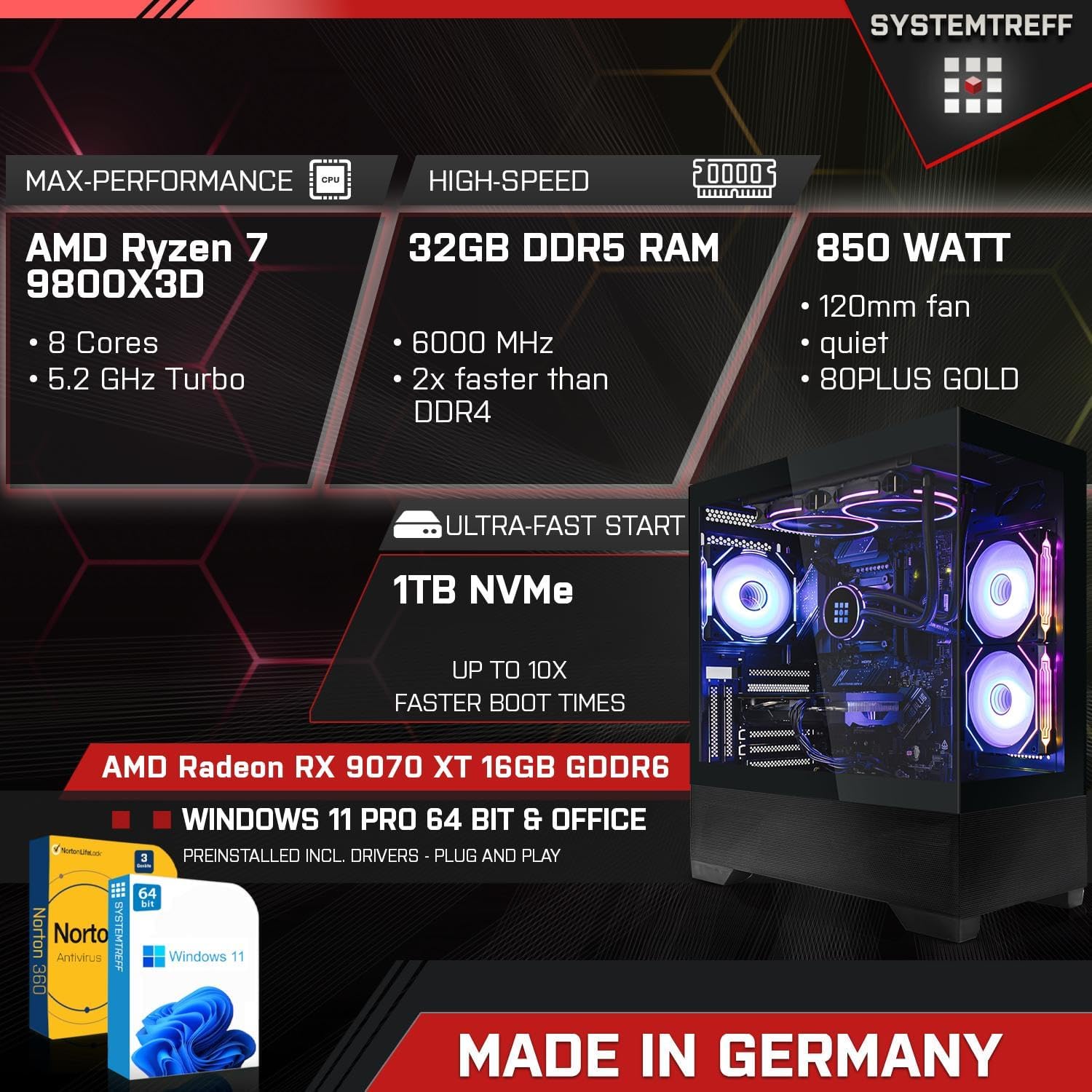
Image: An infographic highlighting the PC's core specifications: AMD Ryzen 7 9800X3D (8 Cores, 5.2GHz Turbo), 32GB DDR5 RAM (6000 MHz), 850 Watt PSU, 1TB NVMe SSD, AMD Radeon RX 9070 XT 16GB GDDR6, Windows 11 Pro, and Norton 360 Security.
2. ຄູ່ມືການຕິດຕັ້ງ
Follow these steps to set up your new SYSTEMTREFF Gaming PC:
- ການຫຸ້ມຫໍ່: Carefully remove the PC from its packaging. Retain all packaging materials for future transport or service.
- ການຈັດວາງ: Place the PC on a stable, flat surface with adequate ventilation around the chassis. Ensure no vents are obstructed.
- ເຊື່ອມຕໍ່ອຸປະກອນຕໍ່ພ່ວງ:
- ເຊື່ອມຕໍ່ຈໍພາບຂອງທ່ານກັບຊ່ອງສຽບ DisplayPort ຫຼື HDMI ຂອງກາດກຣາບຟິກ.
- ສຽບແປ້ນພິມ ແລະເມົ້າຂອງທ່ານໃສ່ພອດ USB ທີ່ມີຢູ່.
- Connect any other peripherals such as speakers, headphones, or external drives.
- ການເຊື່ອມຕໍ່ພະລັງງານ: ເຊື່ອມຕໍ່ສາຍໄຟກັບຫົວຫນ່ວຍສະຫນອງພະລັງງານ (PSU) ຢູ່ດ້ານຫລັງຂອງ PC, ຫຼັງຈາກນັ້ນສຽບປາຍອື່ນໆເຂົ້າໄປໃນເຕົ້າສຽບໄຟຟ້າ.
- ການເຊື່ອມຕໍ່ເຄືອຂ່າຍ: For wired internet, connect an Ethernet cable to the LAN port. For wireless internet, the integrated WLAN module will allow connection after initial setup.

Image: A diagram illustrating the various connectivity options, including front ports (2x USB 3.0, 1x USB-C, Audio & Mic, Power button) and rear ports (DisplayPort 1.4, HDMI 4K HD, USB 3.2 Gen 1, USB 3.2 Gen 2 10Gbps, USB 3.2 Gen 2x2 20Gbps, 2x USB 2.0, Wi-Fi 6E, Gigabit 2.5G LAN, HD 7.1 Sound).
3. ຄໍາແນະນໍາການດໍາເນີນງານ
Your SYSTEMTREFF Gaming PC is designed for high performance and ease of use.
- ເລີ່ມຕົ້ນການເລີ່ມຕົ້ນ: Press the power button located on the front of the chassis. The system will boot into Windows 11 Pro. Follow the on-screen prompts for initial Windows setup.
- ເກມ ແລະມັນຕິມີເດຍ: The AMD Radeon RX 9070 XT 16GB GDDR6 graphics card provides excellent performance for 4K gaming and video editing. The system supports up to three monitors simultaneously.
- ການເຊື່ອມຕໍ່: Utilize the integrated WLAN and Bluetooth for wireless connections. The numerous USB 3.2 ports offer high-speed data transfer for external devices.
- Cooling and Airflow: The chassis features a top cooling system and optimized airflow, supporting up to 9 x 120mm fans for efficient heat dissipation. The RGB lighting can be controlled via a dedicated button on the case.

Image: An illustration showing the PC's capability for high-end gaming in 3D/4K, with examples of games like Elden Ring and Metro Exodus. It also highlights suitability for professional applications (Adobe Illustrator, InDesign, Photoshop, video editing, CAD software) and multimedia/office use (4K streaming, audiobooks, Word, Excel, Teams, AutoCAD).
4. ບໍາລຸງຮັກສາ
Regular maintenance ensures the longevity and optimal performance of your PC:
- ທໍາຄວາມສະອາດ: Regularly clean the exterior of the PC with a soft, dry cloth. Use compressed air to clear dust from vents and fan grilles. Ensure the PC is powered off and unplugged before cleaning.
- ອັບເດດຊອບແວ: Keep your Windows operating system and all drivers updated. Windows Update will handle OS updates, and graphics card drivers can be updated via AMD's official webເວັບໄຊ.
- ການປ້ອງກັນໄວຣັສ: Your system includes Norton 360 Security with Game Optimizer for 1 year. Ensure it is active and performing regular scans to protect against malware.
- ການຄຸ້ມຄອງສາຍໄຟ: While the internal cable management is intuitive, ensure external cables are tidy and not obstructing airflow or ports.

ຮູບພາບ: ພາຍໃນ view of the PC case, emphasizing the top cooling system, intuitive cable management, dual chamber design, and the power button with USB 3.0, USB-C, and mic/headset ports. It also shows the lower part made of mesh for improved airflow.
5. ການແກ້ໄຂບັນຫາ
If you encounter issues, try these basic troubleshooting steps:
- ບໍ່ມີພະລັງງານ:
- ກວດເບິ່ງວ່າສາຍໄຟຖືກເຊື່ອມຕໍ່ຢ່າງປອດໄພກັບທັງ PC ແລະເຕົ້າສຽບຝາ.
- Ensure the power switch on the PSU (at the back of the PC) is in the 'ON' position.
- ລອງປລັກສຽບໄຟອື່ນ.
- ບໍ່ມີການສະແດງຜົນ:
- Verify that the monitor is powered on and the video cable is securely connected to the graphics card (not the motherboard's video outputs).
- ລອງສາຍວິດີໂອອື່ນ ຫຼືຈໍພາບຖ້າມີ.
- ລະບົບຊ້າ:
- ກວດເບິ່ງ Task Manager (Ctrl+Shift+Esc) ສໍາລັບການໃຊ້ CPU, RAM ຫຼື disk ສູງໂດຍແອັບພລິເຄຊັນສະເພາະ.
- ໃຫ້ແນ່ໃຈວ່າໄດເວີ ແລະ Windows ທັງໝົດແມ່ນອັບເດດແລ້ວ.
- ດໍາເນີນການສະແກນລະບົບເຕັມດ້ວຍຊອບແວຕ້ານໄວຣັສຂອງທ່ານ.
- ອຸປະກອນຕໍ່ພ່ວງບໍ່ເຮັດວຽກ:
- ລອງເຊື່ອມຕໍ່ອຸປະກອນຕໍ່ພອດກັບພອດ USB ອື່ນ.
- Reinstall or update the peripheral's drivers.
If these steps do not resolve the issue, please refer to the support section.
6. ຂໍ້ມູນຈໍາເພາະ
Detailed technical specifications for your SYSTEMTREFF Gaming PC:
| ອົງປະກອບ | ຂໍ້ມູນຈໍາເພາະ |
| ໂຮງງານຜະລິດ | AMD Ryzen 7 9800X3D (8 Cores, 4.7 GHz base, up to 5.2 GHz Turbo) |
| CPU Cooler | Corsair Nautilus 240 RS ARGB 240mm (Black) |
| ເມນບອດ | ASUS TUF GAMING B650-E WIFI - AM5 |
| RAM | 32GB DDR5-6000 CL30 Kingston FURY Beast (2x16GB), expandable up to 192GB (4 slots total, 2 free) |
| ບັດກາຟິກ | AMD Radeon RX 9070 XT 16GB GDDR6 (4K, DX12, FSR 3, PCIe 5.0) |
| ການເກັບຮັກສາ | 1000GB M.2 SSD NVMe (5000 MB/s read, 4200 MB/s write) |
| ລະບົບປະຕິບັດການ | Windows 11 Pro (pre-installed with drivers) |
| ຕ້ານໄວຣັສ | Norton 360 Security with Game Optimizer (1 year protection for 3 devices) |
| ເຄືອຂ່າຍ | Realtek 2.5 Gigabit LAN Controller (2500Mbit/s), Integrated WLAN |
| ສຽງ | 7.1-Channel High Definition Audio with Audio Boost |
| Chassis | Systemtreff Gaming Mid Tower AirForce GT1 Black (44.8cm x 21.5cm x 48.8cm), tempered glass window, RGB lighting |
| ການສະຫນອງພະລັງງານ | 850W MSI MAG A850GL PCIE5, 120mm fan, 80 PLUS GOLD (90% efficiency) |
| ນ້ຳໜັກ | 12 ກິໂລກຣາມ |

Image: A visual representation of the PC case dimensions: 44.8 cm (depth), 21.5 cm (width), and 48.8 cm (height).
7. ການຮັບປະກັນແລະການສະຫນັບສະຫນູນ
SYSTEMTREFF is committed to providing high-quality products and excellent customer service.
- ການຮັບປະກັນຄຸນນະພາບ: All SYSTEMTREFF systems are assembled and tested in Germany, ensuring rigorous quality control before delivery.
- ການຮັບປະກັນ: Your SYSTEMTREFF Gaming PC comes with a ຮັບປະກັນ 3 ປີ on all components. Please retain your invoice as proof of purchase.
- ການຊ່ວຍເຫຼືອລູກຄ້າ: For any technical assistance or inquiries, our customer support team is available 24 hours via email. Refer to the contact information provided in your purchase documentation or on the SYSTEMTREFF official webເວັບໄຊ.

Image: An infographic stating "Made in Germany - Assembly & Testing", "Since 2008 on the market", "70,000 satisfied customers", and "3 Years Warranty on all components". It also features a customer support representative and mentions 24-hour email support.