ແນະນຳ
This manual provides comprehensive instructions for the installation, operation, and maintenance of your Vrabocry DC5V-24V Smart Tuya APP LED SPI Controller. This device is designed to control various SPI RGB/RGBW LED strips, offering versatile lighting effects through APP and music synchronization.
ແມ່ນຫຍັງຢູ່ໃນກ່ອງ
ກະລຸນາກວດສອບວ່າອົງປະກອບທັງໝົດມີຢູ່ກ່ອນທີ່ຈະດໍາເນີນການຕິດຕັ້ງ.
- 1 x Tuya SPI RGB/RGBW LED Controller (Colorful-X7)
- 1 x ຄູ່ມືຜູ້ໃຊ້
- Necessary connection cables (as supplied)

Image: The Vrabocry LED SPI Controller, its accompanying cables, and a small screwdriver, laid out next to its packaging and a user manual. This illustrates the complete package contents.
ຂໍ້ມູນຈໍາເພາະ
| ຄຸນສົມບັດ | ລາຍລະອຽດ |
|---|---|
| ຊື່ຜະລິດຕະພັນ | Tuya SPI RGB/RGBW LED Controller |
| ການເຮັດວຽກ Voltage | DC 5 ~ 24V |
| ວິທີການຄວບຄຸມ | APP (Smart Life or Tuya) or Music |
| ການເຊື່ອມຕໍ່ | WiFi-IEEE 802.11b/g/n 2.4GHz, Bluetooth mesh |
| ຜົນຜະລິດ | 4A/Channel (ຜົນຜະລິດສູງສຸດ 12A) |
| Supported LED Strip Types | All SPI RGB LED strips (WS/SK/SM/TX/LPD/TM series) |
| ອຸນຫະພູມເຮັດວຽກ | -20°C ເຖິງ 60°C |
| Max Supported Pixel Number | 1024 ພິກເຊລ |
| ວັດສະດຸ | ພາດສະຕິກ |
| ການນຳໃຊ້ພາຍໃນ/ນອກ | ພາຍໃນ |
ຕັ້ງຄ່າ
1. ການເຊື່ອມຕໍ່ທາງດ້ານຮ່າງກາຍ
Ensure all power is disconnected before making any connections. Refer to the diagram below for proper wiring.
- Connect the DC 5-24V power supply to the controller's power input terminals (DC5-24V).
- Connect the LED strip to the controller's output terminals:
- GND: Ground connection for the LED strip.
- DAT: Data line for the LED strip.
- CLK: Clock line for the LED strip (if applicable for your strip type).
- VCC: Positive power supply for the LED strip.
- The AUX IN port is for external audio input for music synchronization.
- The SET button is used for pairing and mode selection.

ຮູບພາບ: A ລາຍລະອຽດ view of the Vrabocry Colorful-X7 Smart LED Music Controller, highlighting the DC5-24V power input, AUX IN, SET button, and the GND, DAT, CLK, VCC output terminals for LED strip connection.
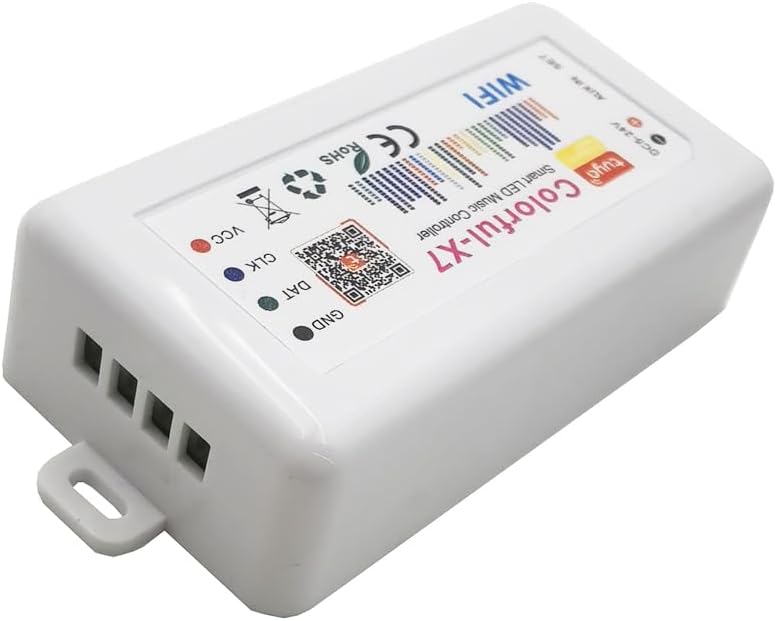
Image: An angled perspective of the Vrabocry Colorful-X7 LED controller, focusing on the output terminals (GND, DAT, CLK, VCC) where the LED strip connects.
2. ການຕິດຕັ້ງແອັບ
Download the "Smart Life" or "Tuya" app from your mobile device's app store (iOS App Store or Google Play Store). Register or log in to your account.
3. ການເຊື່ອມຕໍ່ WiFi
- Power on the LED controller.
- Open the Smart Life or Tuya app.
- ແຕະທີ່ໄອຄອນ "+" ເພື່ອເພີ່ມອຸປະກອນໃໝ່.
- Follow the in-app instructions to connect the controller to your 2.4GHz WiFi network. This typically involves putting the device into pairing mode (often by pressing and holding the SET button until an indicator light flashes).

Image: The Vrabocry LED controller shown alongside a smartphone displaying the Smart Life/Tuya control app interface, and two smart speakers, illustrating its smart home integration capabilities.
ຄໍາແນະນໍາການດໍາເນີນງານ
1. Basic Control via APP
Once connected, you can control the LED strip directly from the Smart Life or Tuya app. The app allows you to:
- ເປີດ/ປິດໄຟ.
- Adjust brightness and color.
- Select from 40 different dynamic lighting modes.
- Add up to 10 customized lighting modes.
2. Music Sync Control
The controller features a built-in microphone for music synchronization. The lights will react to the rhythm and beat of the music playing in the environment. For external audio input, connect an audio source to the AUX IN port.
3. Customization and Advanced Features
The app provides advanced tools for creating personalized lighting effects:
- DIY Dynamic Lighting: Utilize tools like Paint Bucket, Color Pen, and Eraser within the app to design unique lighting patterns.
- Device Name Modification: Rename your controller in the app for easier identification.
- Color Order Correction: Adjust the color order (RGB, GRB, etc.) to match your specific LED strip.
- ຕັ້ງຄ່າໂມງຈັບເວລາ: Schedule your lights to turn on or off at specific times.
ບໍາລຸງຮັກສາ
To ensure the longevity and optimal performance of your LED SPI Controller, follow these maintenance guidelines:
- Keep the controller in a dry environment, away from moisture and extreme temperatures.
- ເຊັດອຸປະກອນດ້ວຍຜ້າອ່ອນແລະແຫ້ງ. ຢ່າໃຊ້ນໍ້າຢາທໍາຄວາມສະອາດ ຫຼື ວັດສະດຸຂັດ.
- ຮັບປະກັນການລະບາຍອາກາດທີ່ເຫມາະສົມຮອບຕົວຄວບຄຸມເພື່ອປ້ອງກັນຄວາມຮ້ອນເກີນ.
- Regularly check connections for any signs of wear or looseness.
ການແກ້ໄຂບັນຫາ
| ບັນຫາ | ສາເຫດທີ່ເປັນໄປໄດ້ | ການແກ້ໄຂ |
|---|---|---|
| ການຄວບຄຸມບໍ່ໄດ້ເປີດ. | ບໍ່ມີແຫຼ່ງຈ່າຍໄຟ; ລະດັບສຽງບໍ່ຖືກຕ້ອງtagອ; ອະແດບເຕີໄຟຟ້າມີຂໍ້ບົກຜ່ອງ. | Check power connections. Ensure power supply is DC 5-24V. Test with a different power adapter if available. |
| LED strip not lighting up. | Incorrect wiring (GND, DAT, CLK, VCC); incompatible LED strip; faulty LED strip. | Verify all wiring connections are correct. Ensure your LED strip is an SPI type. Test the LED strip with another controller if possible. Check color order settings in the app. |
| ບໍ່ສາມາດເຊື່ອມຕໍ່ກັບ WiFi ໄດ້. | Incorrect WiFi password; 5GHz WiFi network; controller not in pairing mode; weak signal. | Double-check WiFi password. Ensure you are connecting to a 2.4GHz network. Put the controller into pairing mode (refer to app instructions). Move controller closer to router. |
| Music sync not working. | No music playing; music too quiet; microphone obstructed; incorrect AUX IN connection. | Ensure music is playing loudly enough near the controller. Check if the microphone port is clear. If using AUX IN, ensure the cable is properly connected and the audio source is active. |
ການຮັບປະກັນແລະການສະຫນັບສະຫນູນ
Vrabocry products are designed for reliability and performance. For warranty information and technical support, please refer to the contact details provided on the product packaging or visit the official Vrabocry webເວັບໄຊ. ຮັກສາໃບຮັບເງິນການຊື້ຂອງທ່ານສໍາລັບການຮ້ອງຂໍການຮັບປະກັນ.


