ແນະນຳ
This manual provides detailed instructions for the setup, operation, and maintenance of your Lotus Smartwatch 50050/4. Please read this manual thoroughly before using your device to ensure proper functionality and to maximize its features.
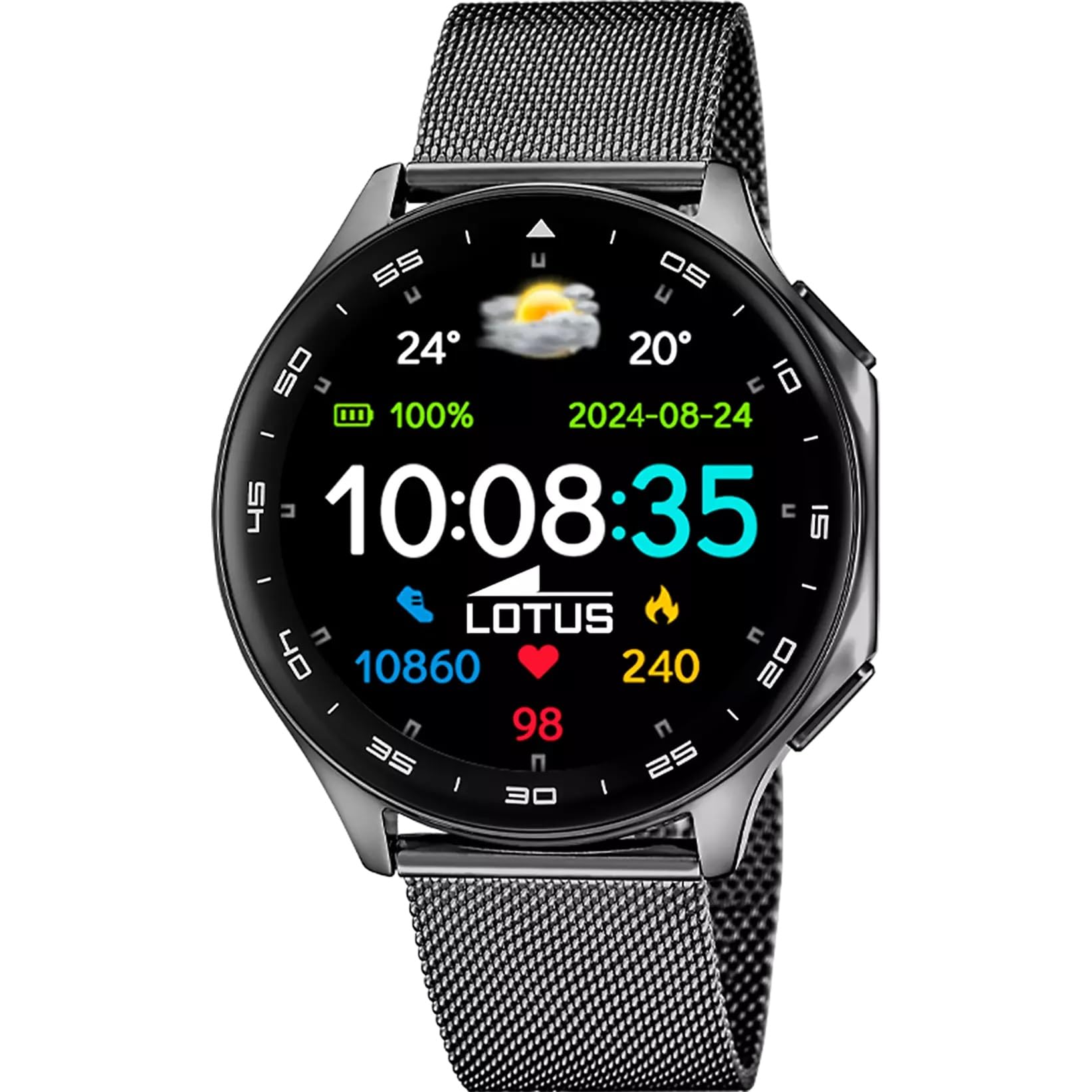
The Lotus Smartwatch 50050/4 is an outdoor sports watch designed for active lifestyles. It features a durable zinc alloy case, a black Milanese steel mesh strap, and a digital display. The watch offers a range of functions including sports tracking, health monitoring, and smart notifications.
ແມ່ນຫຍັງຢູ່ໃນກ່ອງ
- Lotus Smartwatch 50050/4
- ສາຍສາກ
- ຄູ່ມືຜູ້ໃຊ້ (ເອກະສານນີ້)
- ສາຍເສີມເພີ່ມເຕີມ
ຕັ້ງຄ່າ
1. ການສາກ Smartwatch
Before initial use, fully charge your smartwatch. Connect the charging cable to the charging port on the back of the watch and plug the other end into a USB power adapter (not included) or a computer's USB port. The watch display will indicate charging status.
ໝາຍເຫດ: Use a standard 5V/1A USB charger. Overcharging or using incompatible chargers may damage the device.
2. ເປີດ / ປິດພະລັງງານ
- ເພື່ອເປີດເຄື່ອງ: Press and hold the side button for a few seconds until the Lotus logo appears.
- ປິດເຄື່ອງ: ກົດປຸ່ມດ້ານຂ້າງຄ້າງໄວ້, ຈາກນັ້ນເລືອກ "ປິດເຄື່ອງ" ໃນໜ້າຈໍ.
3. ການຕິດຕັ້ງແອັບ ແລະ ການຈັບຄູ່
To unlock the full potential of your smartwatch, download the official Lotus Smartwatch application on your smartphone. The app is compatible with Android devices.
- ຊອກຫາ the "Lotus Smartwatch" app in your smartphone's app store (Google Play Store for Android).
- ຕິດຕັ້ງແອັບພລິເຄຊັນ.
- ເປີດ app ແລະປະຕິບັດຕາມຄໍາແນະນໍາໃນຫນ້າຈໍເພື່ອສ້າງບັນຊີຫຼືເຂົ້າສູ່ລະບົບ.
- ເປີດໃຊ້ Bluetooth ໃນໂທລະສັບສະຫຼາດຂອງທ່ານ.
- In the app, navigate to the device pairing section and select your Lotus Smartwatch 50050/4 from the list of available devices.
- ຢືນຢັນຄຳຮ້ອງຂໍການຈັບຄູ່ໃນສະມາດໂຟນ ແລະ smartwatch ຂອງທ່ານ.
ເມື່ອຈັບຄູ່ແລ້ວ, ໂມງຈະປະສານເວລາ, ວັນທີ ແລະ ການຕັ້ງຄ່າອື່ນໆກັບໂທລະສັບສະຫຼາດຂອງທ່ານ.
ຄໍາແນະນໍາການດໍາເນີນງານ
ການນໍາທາງພື້ນຖານ
- ໜ້າຈໍສຳຜັດ: Swipe left, right, up, or down to navigate through menus and functions. Tap to select an item.
- ປຸ່ມຂ້າງ: Press to return to the previous screen or to the watch face. Press and hold for power options.
ຟັງຊັນຫຼັກ
- ໂໝດກິລາ: Access various sports modes (e.g., running, walking, cycling) to track your activity, including steps, calories burned, and distance.
- ການຕິດຕາມສຸຂະພາບ:
- ອັດຕາການເຕັ້ນຫົວໃຈ: Monitor your heart rate in real-time.
- ອົກຊີໃນເລືອດ: ວັດແທກລະດັບອົກຊີເຈນໃນເລືອດຂອງທ່ານ.
- ການຕິດຕາມການນອນ: ວິເຄາະຮູບແບບການນອນຂອງເຈົ້າ (ການນອນຫຼັບເລິກ, ນອນຫຼັບເບົາ, ເວລາຕື່ນ).
- ອອກກໍາລັງກາຍຫາຍໃຈ: ການຝຶກຫາຍໃຈແບບມີການແນະນຳເພື່ອການຜ່ອນຄາຍ.
- ການແຈ້ງເຕືອນ: Receive notifications for incoming calls, SMS messages, and app alerts directly on your watch. You can reject calls from the watch.
- ການຄວບຄຸມດົນຕີ: Control music playback on your connected smartphone (play, pause, skip tracks).
- ສະພາບອາກາດ: View ສະພາບອາກາດໃນປະຈຸບັນແລະການຄາດຄະເນ.
- ໂມງປຸກ ແລະ ໂມງຈັບເວລາ: Set alarms, use the stopwatch, or set a countdown timer.
- ໄລຍະໄກຂອງກ້ອງ: ໃຊ້ໂມງຂອງທ່ານເປັນຣີໂໝດຊັດເຕີສຳລັບກ້ອງຖ່າຍຮູບໂທລະສັບສະຫຼາດຂອງທ່ານ.
- Video Calculator: Access a video calculator function.
- AI Voice Calculator: Utilize an AI voice-activated calculator.
- ຕົວຊອກຫາໂທລະສັບ: ຊອກຫາສະມາດໂຟນທີ່ຈັບຄູ່ຂອງທ່ານໂດຍການເຮັດໃຫ້ມັນດັງ.
- ໄຟສາຍ: ເປີດໃຊ້ງານໜ້າຈໍເປັນໄຟສາຍ.
- Dial Customization: Change the watch face (dial) through the watch settings or the companion app.
- ອັບເດດເຟີມແວ: Update the watch's software via the companion app to ensure optimal performance and access new features.
- Language, Time, and Date: Adjust these settings through the watch or the companion app.
ບໍາລຸງຮັກສາ
ການທໍາຄວາມສະອາດແລະການດູແລ
- ເຊັດໜ້າຈໍໂມງ ແລະຕົວເຄື່ອງດ້ວຍຜ້າອ່ອນໆ, ແຫ້ງ, ບໍ່ມີສານຂັດ.
- ສໍາລັບ stains stubborn, ເລັກນ້ອຍ dampen ຜ້າທີ່ມີນ້ໍາ. ຢ່າໃຊ້ສານເຄມີທີ່ຮຸນແຮງຫຼືວັດສະດຸຂັດ.
- ກວດໃຫ້ແນ່ໃຈວ່າບ່ອນຕິດຕໍ່ສາກໄຟສະອາດ ແລະແຫ້ງກ່ອນການສາກໄຟ.
ກັນນ້ຳ (IP65)
The Lotus Smartwatch 50050/4 has an IP65 rating, meaning it is protected against dust ingress and low-pressure water jets from any direction. This rating indicates resistance to splashes and light rain. It is not suitable for swimming, showering, or submersion in water. Exposure to high-pressure water or prolonged submersion may cause damage.
ການປ່ຽນສາຍ
The watch comes with an additional strap. To replace the strap, locate the quick-release pins on the underside of the strap where it connects to the watch case. Slide the pin to detach the strap, then align the new strap and slide the pin back into place to secure it.
ການແກ້ໄຂບັນຫາ
ເບິ່ງບໍ່ໄດ້ເປີດ
- ກວດໃຫ້ແນ່ໃຈວ່າໂມງຖືກສາກເຕັມແລ້ວ. ເຊື່ອມຕໍ່ມັນກັບເຄື່ອງສາກຢ່າງໜ້ອຍ 30 ນາທີ.
- ລອງກົດປຸ່ມດ້ານຂ້າງຄ້າງໄວ້ປະມານ 10-15 ວິນາທີເພື່ອບັງຄັບໃຫ້ຣີສະຕາດ.
ບໍ່ສາມາດຈັບຄູ່ກັບໂທລະສັບສະຫຼາດໄດ້
- ໃຫ້ແນ່ໃຈວ່າ Bluetooth ຖືກເປີດໃຊ້ຢູ່ໃນໂທລະສັບສະຫຼາດຂອງທ່ານ.
- Ensure the watch is within range of your smartphone (typically 10 meters).
- ຣີສະຕາດທັງສະມາດໂຟນ ແລະໂມງອັດສະລິຍະຂອງທ່ານ.
- Clear the Bluetooth cache on your smartphone (if applicable) and try pairing again.
- Ensure the Lotus Smartwatch app is updated to the latest version.
ຂໍ້ມູນສຸຂະພາບບໍ່ຖືກຕ້ອງ
- ໃຫ້ແນ່ໃຈວ່າໂມງຖືກໃສ່ຢູ່ໃນຂໍ້ມືຂອງເຈົ້າຢ່າງສະບາຍ, ແຕ່ບໍ່ແຫນ້ນເກີນໄປ.
- ຮັກສາເຊັນເຊີຢູ່ດ້ານຫຼັງຂອງໂມງໃຫ້ສະອາດ ແລະ ບໍ່ມີສິ່ງເສດເຫຼືອ.
- ປັດໃຈສິ່ງແວດລ້ອມແລະສະລີລະວິທະຍາຂອງບຸກຄົນສາມາດສົ່ງຜົນກະທົບຕໍ່ຄວາມຖືກຕ້ອງຂອງເຊັນເຊີ.
ຣີເຊັດເປັນຄ່າໂຮງງານ
If you experience persistent issues, a factory reset may resolve them. This will erase all data on the watch and restore it to its original settings. Consult the watch's settings menu or the companion app for the factory reset option.
ຂໍ້ມູນຈໍາເພາະ
| ໝາຍເລກຕົວແບບ | 50050/4 |
| ຍີ່ຫໍ້ | Lotus |
| ຂະຫນາດຈໍສະແດງຜົນ | 46.7 ມມ |
| ຮູບຮ່າງ | ຮອບ |
| ວັດສະດຸກໍລະນີ | ສັງກະສີໂລຫະປະສົມ |
| ວັດສະດຸສາຍ | Milanese Steel Mesh |
| ການຕໍ່ຕ້ານນ້ໍາ | IP65 (Splash and dust resistant) |
| ການເຊື່ອມຕໍ່ | Bluetooth |
| OS ທີ່ເຂົ້າກັນໄດ້ | Android (for companion app) |
| GPS | ບໍ່ |
| ຄຸນນະສົມບັດພິເສດ | Advanced sport and health functions |
ການຮັບປະກັນແລະການສະຫນັບສະຫນູນ
The Lotus Smartwatch 50050/4 comes with a ຮັບປະກັນ 3 ປີ from the date of purchase. This warranty covers manufacturing defects. It does not cover damage caused by misuse, accidents, unauthorized modifications, or failure to follow the instructions in this manual, including water damage beyond the specified IP65 rating.
For warranty claims or technical support, please contact your authorized Lotus retailer or visit the official Lotus webເວັບໄຊທ໌ສໍາລັບຂໍ້ມູນການບໍລິການລູກຄ້າ.
ນະໂຍບາຍການສົ່ງຄືນ: If purchased from Amazon, the product is subject to a 30-day return policy for refund or replacement, as per Amazon's terms.
ຮູບພາບຜະລິດຕະພັນ