1. ບົດແນະນຳ
ຂອບໃຈສໍາລັບການຊື້asing the Karlsson Vogue Alarm Clock. This versatile device combines a digital alarm clock, a wireless induction charger, and a Bluetooth speaker, designed to enhance your daily routine. Please read this manual carefully before using the product to ensure proper operation and to maximize its lifespan. Keep this manual for future reference.
ຂໍ້ຄວນລະວັງຄວາມປອດໄພ
- ຢ່າປ່ອຍໃຫ້ອຸປະກອນຖືກນ້ໍາຫຼືຄວາມຊຸ່ມຊື່ນຫຼາຍເກີນໄປ.
- ຫຼີກເວັ້ນອຸນຫະພູມທີ່ຮຸນແຮງ.
- ຢ່າຖອດ ຫຼືພະຍາຍາມສ້ອມແປງອຸປະກອນດ້ວຍຕົນເອງ.
- Use only the provided or recommended USB adapter for power.
- ຮັບປະກັນການລະບາຍອາກາດທີ່ເຫມາະສົມຮອບອຸປະກອນໃນລະຫວ່າງການປະຕິບັດງານ.
2. ຜະລິດຕະພັນເກີນview
The Karlsson Vogue Alarm Clock features a sleek design with a fabric-covered front and intuitive controls. Below is an overview ຂອງອົງປະກອບຕົ້ນຕໍແລະການຄວບຄຸມຂອງມັນ.
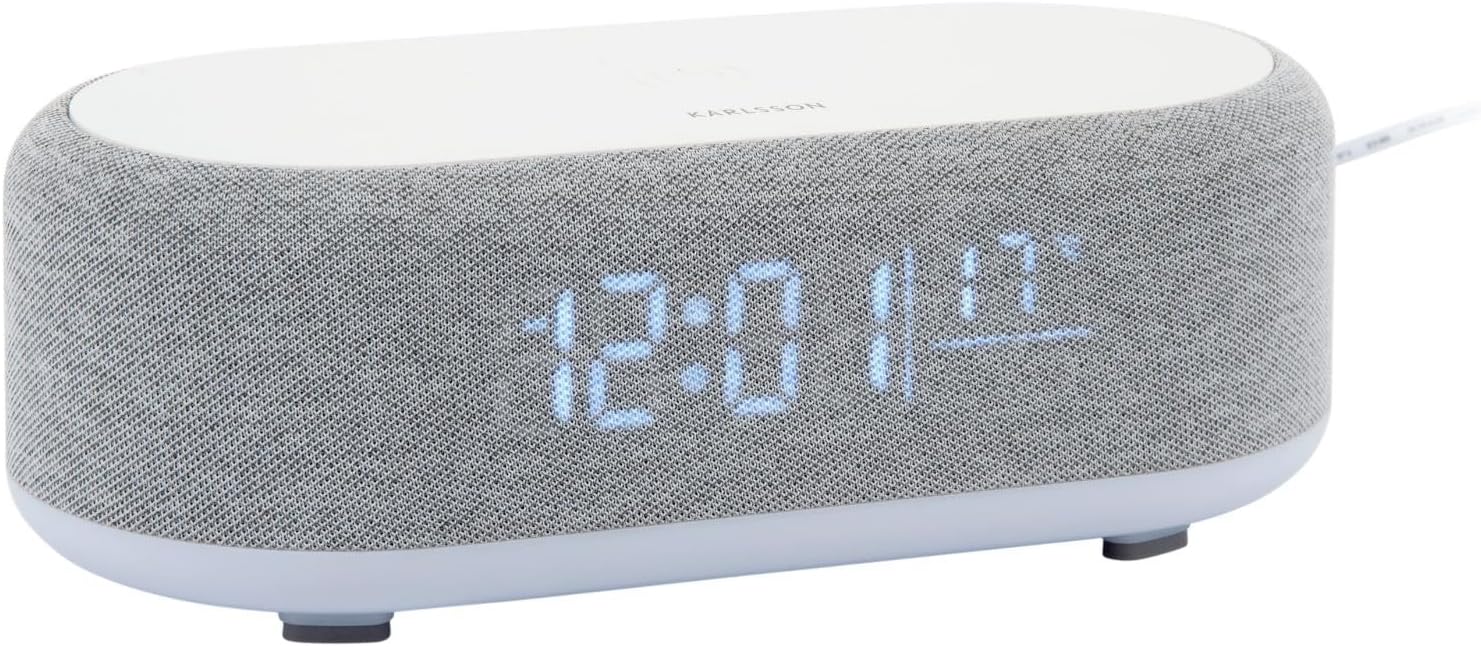
ຮູບ 2.1: ດ້ານຫນ້າ view of the Karlsson Vogue Alarm Clock, displaying the digital time and temperature.
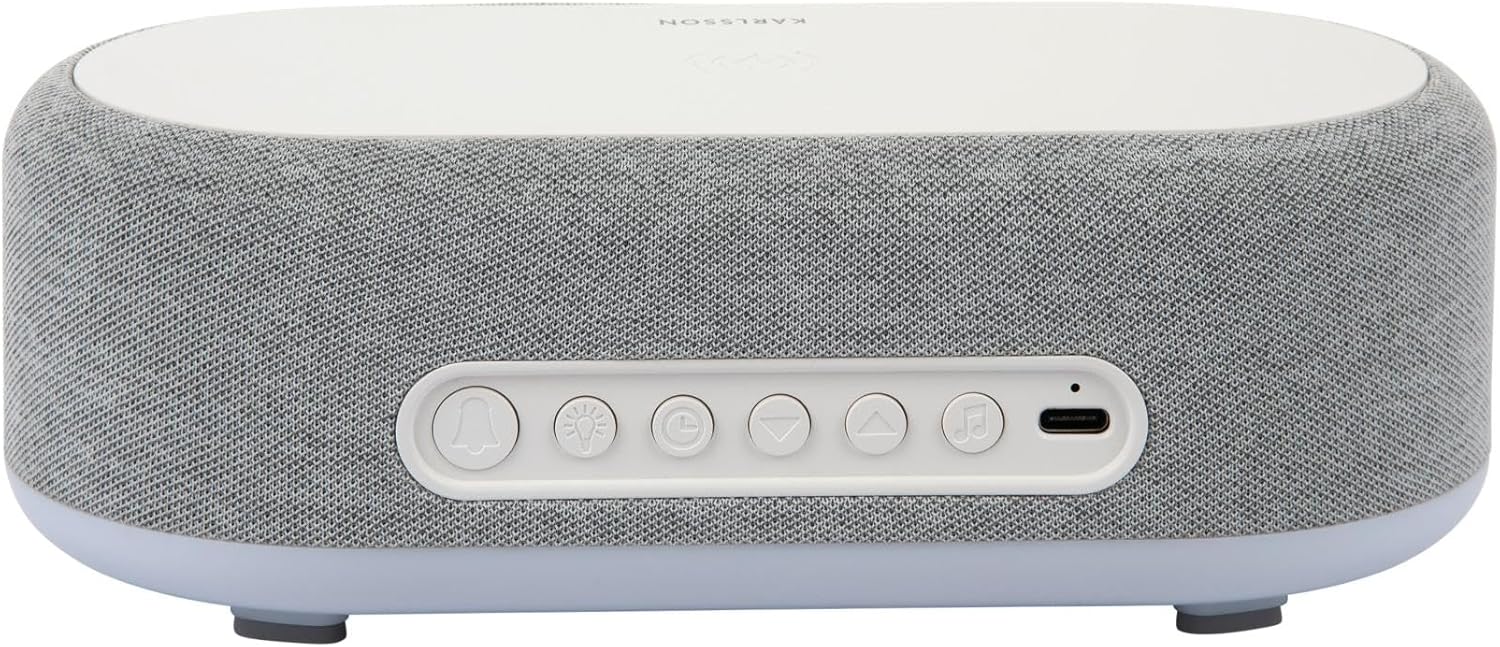
ຮູບ 2.2: ດ້ານຫລັງ view of the alarm clock, highlighting the control buttons and USB-C power input.
Control Buttons (from left to right on rear panel):
- ປຸ່ມປຸກ 1: Press to activate/deactivate Alarm 1. Long press to set Alarm 1 time.
- ປຸ່ມປຸກ 2: Press to activate/deactivate Alarm 2. Long press to set Alarm 2 time.
- Brightness/Snooze Button: Press to adjust display brightness. When alarm sounds, press to snooze.
- ປຸ່ມຕັ້ງເວລາ: ກົດຄ້າງໄວ້ເພື່ອເຂົ້າສູ່ໂໝດການຕັ້ງເວລາ.
- ປຸ່ມລົງ: Decrease values during setting, navigate menus.
- ປຸ່ມ Up: Increase values during setting, navigate menus.
- Bluetooth/Play/Pause Button: Long press to enter Bluetooth pairing mode. Press to play/pause music.
- ການປ້ອນຂໍ້ມູນພະລັງງານ USB-C: ເຊື່ອມຕໍ່ອະແດບເຕີໄຟຢູ່ບ່ອນນີ້.
ກະດານຊັ້ນຍອດ:
- ແຜ່ນສາກໄຮ້ສາຍ: Place compatible devices here for wireless charging.
3. ຕັ້ງຄ່າ
3.1 ການເຊື່ອມຕໍ່ພະລັງງານ
- Connect the provided USB adapter to the USB-C Power Input port on the rear of the alarm clock.
- ສຽບອະແດບເຕີ USB ເຂົ້າກັບປລັກສຽບຝາມາດຕະຖານ.
- ຈໍສະແດງຜົນຈະສະຫວ່າງຂຶ້ນ, ຊີ້ບອກວ່າອຸປະກອນເປີດຢູ່.
3.2 ການຕັ້ງເວລາເບື້ອງຕົ້ນ
- ກົດຄ້າງໄວ້ ປຸ່ມຕັ້ງເວລາ (clock icon) on the rear panel. The hour digits will start flashing.
- ໃຊ້ Up ແລະ ປຸ່ມລົງ ເພື່ອປັບຊົ່ວໂມງ.
- ກົດ ປຸ່ມຕັ້ງເວລາ ອີກເທື່ອ ໜຶ່ງ ເພື່ອຢືນຢັນຊົ່ວໂມງແລະຍ້າຍໄປທີ່ການຕັ້ງຄ່ານາທີ. ຕົວເລກນາທີຈະກະພິບ.
- ໃຊ້ Up ແລະ ປຸ່ມລົງ ເພື່ອປັບນາທີ.
- ກົດ ປຸ່ມຕັ້ງເວລາ one more time to confirm the minute and exit time setting mode.
4. ຄໍາແນະນໍາການດໍາເນີນງານ
4.1 ການຕັ້ງໂມງປຸກ
ອຸປະກອນຮອງຮັບສັນຍານເຕືອນໄພສອງອັນທີ່ເປັນອິດສະຫຼະ (ສັນຍານເຕືອນໄພ 1 ແລະ ສັນຍານເຕືອນໄພ 2).
- ເພື່ອຕັ້ງໂມງປຸກ 1: ກົດຄ້າງໄວ້ ປຸກ 1 ປຸ່ມ (bell icon with '1'). The hour digits for Alarm 1 will flash.
- ໃຊ້ Up ແລະ ປຸ່ມລົງ ເພື່ອປັບໂມງປຸກ.
- ກົດ ປຸກ 1 ປຸ່ມ ອີກຄັ້ງເພື່ອຢືນຢັນຊົ່ວໂມງ ແລະ ຍ້າຍໄປຕັ້ງຄ່ານາທີ.
- ໃຊ້ Up ແລະ ປຸ່ມລົງ ເພື່ອປັບນາທີປຸກ.
- ກົດ ປຸກ 1 ປຸ່ມ one more time to confirm and exit alarm setting. The alarm icon will appear on the display.
- ເພື່ອຕັ້ງໂມງປຸກ 2: Follow the same steps using the ປຸກ 2 ປຸ່ມ (bell icon with '2').
4.2 Activating/Deactivating Alarms
- ກົດຕາມລໍາດັບ ປຸກ 1 ປຸ່ມ or ປຸກ 2 ປຸ່ມ briefly to toggle the alarm on or off. The alarm icon on the display will indicate its status.
4.3 Snooze ຟັງຊັນ
- ເມື່ອມີສຽງປຸກ, ກົດປຸ່ມ Brightness/Snooze Button (light bulb icon) to activate snooze. The alarm will temporarily stop and sound again after approximately 9 minutes.
- To turn off the alarm completely, press any other button on the rear panel.
4.4 ການດໍາເນີນງານລໍາໂພງ Bluetooth
- ການຈັບຄູ່: ກົດຄ້າງໄວ້ Bluetooth/Play/Pause Button (music note icon) until the display shows "BT" and starts flashing, indicating pairing mode.
- On your mobile device, enable Bluetooth and search for "Karlsson Vogue". Select it to connect.
- Once connected, the "BT" indicator will stop flashing. You can now play audio through the alarm clock's speaker.
- ຫຼິ້ນຄືນ: ກົດ Bluetooth/Play/Pause Button briefly to play or pause music.
- Volume control is managed via your connected mobile device.
4.5 Wireless Induction Charging
The top surface of the alarm clock features a wireless charging pad compatible with Qi-enabled devices.
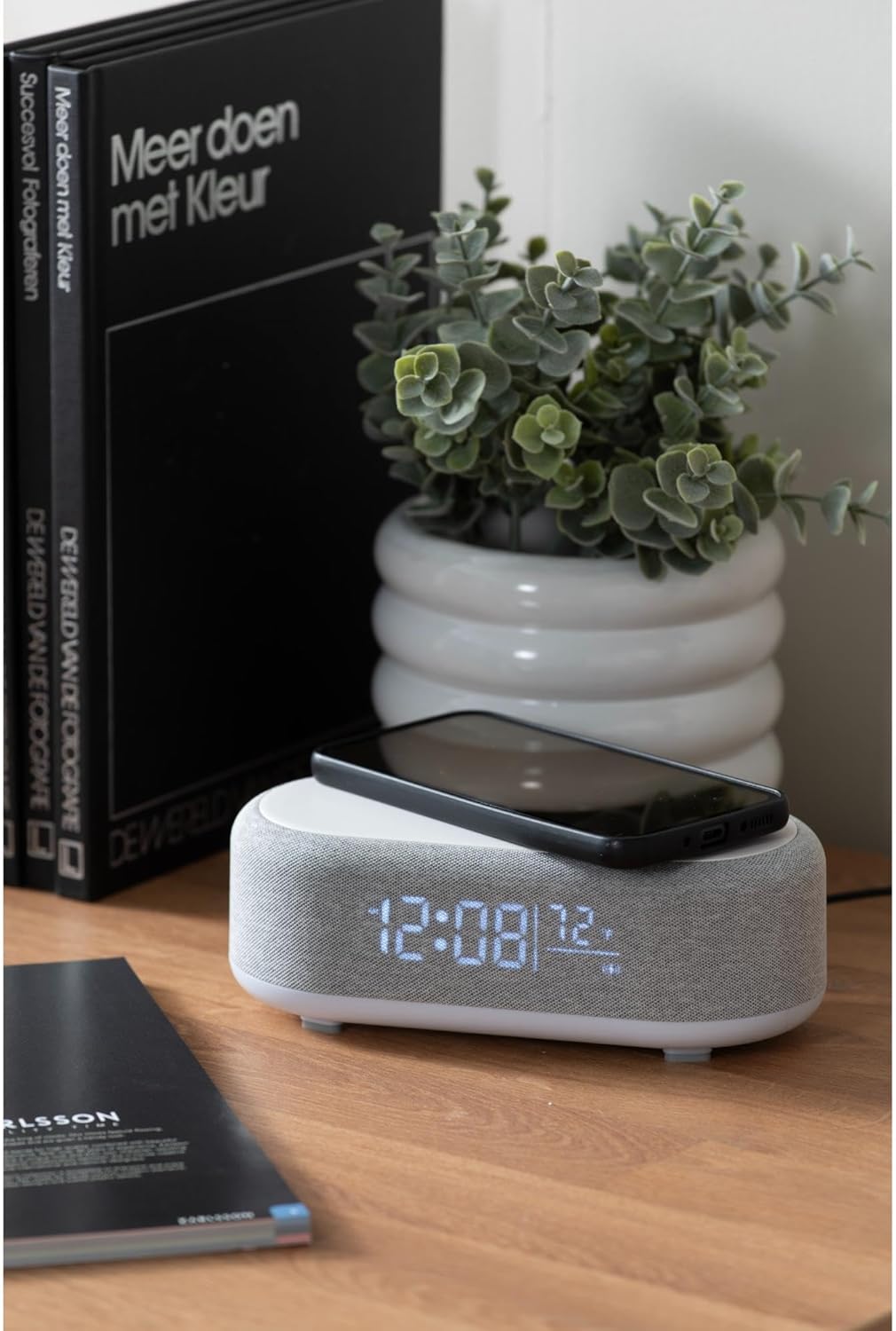
Figure 4.1: A smartphone placed on the wireless charging pad of the alarm clock.
- Place your Qi-compatible smartphone or other device directly onto the center of the top charging pad.
- Ensure the device is properly aligned. A charging indicator (usually on your phone screen) will confirm charging has begun.
- ເອົາອຸປະກອນຂອງທ່ານອອກເມື່ອສາກເຕັມແລ້ວ.
4.6 ການປັບຄວາມສະຫວ່າງຂອງຈໍສະແດງຜົນ
- ກົດ Brightness/Snooze Button (light bulb icon) repeatedly to cycle through different brightness levels for the display.
5. ບໍາລຸງຮັກສາ
5.1 ການທໍາຄວາມສະອາດ
- Before cleaning, disconnect the power adapter.
- Wipe the surface of the alarm clock with a soft, dry, or slightly damp ຜ້າ.
- ຢ່າໃຊ້ນໍ້າຢາເຮັດຄວາມສະອາດທີ່ມີສີຂັດ, ຕົວລະລາຍ ຫຼື ສານເຄມີທີ່ແຮງ ເພາະອາດຈະເຮັດໃຫ້ພື້ນຜິວເສຍຫາຍໄດ້.
5.2 ການເກັບຮັກສາ
- ຖ້າເກັບຮັກສາອຸປະກອນໄວ້ເປັນເວລາດົນ, ໃຫ້ຖອດມັນອອກຈາກແຫຼ່ງຈ່າຍໄຟ.
- ເກັບຮັກສາໄວ້ໃນບ່ອນທີ່ເຢັນ, ແຫ້ງ, ຫ່າງຈາກແສງແດດໂດຍກົງແລະອຸນຫະພູມທີ່ສຸດ.
6. ການແກ້ໄຂບັນຫາ
| ບັນຫາ | ສາເຫດທີ່ເປັນໄປໄດ້ | ການແກ້ໄຂ |
|---|---|---|
| ອຸປະກອນບໍ່ໄດ້ເປີດເຄື່ອງ. | ບໍ່ມີການເຊື່ອມຕໍ່ພະລັງງານຫຼືອະແດບເຕີຜິດພາດ. | Ensure the USB-C cable is securely connected and the adapter is plugged into a working outlet. Try a different outlet. |
| Bluetooth ບໍ່ເຊື່ອມຕໍ່. | Device not in pairing mode; already connected to another device; mobile device Bluetooth off. | Long press the Bluetooth button to enter pairing mode. Ensure no other device is connected. Turn off and on Bluetooth on your mobile device. |
| ການສາກໄຟໄຮ້ສາຍບໍ່ເຮັດວຽກ. | Phone not Qi-compatible; phone not aligned; phone case too thick. | Ensure your device supports Qi wireless charging. Re-position the device on the center of the pad. Remove thick phone cases. |
| ປຸກບໍ່ດັງ. | Alarm deactivated; volume too low (for Bluetooth alarm). | Check if the alarm icon is displayed. Ensure the alarm time is set correctly. If using Bluetooth audio for alarm, ensure phone volume is adequate. |
7. ຂໍ້ມູນຈໍາເພາະ
| ຄຸນສົມບັດ | ລາຍລະອຽດ |
|---|---|
| ຍີ່ຫໍ້ | Karlsson |
| ໝາຍເລກຕົວແບບ | KA6033GY |
| ສີ | ສີເທົາ |
| ວັດສະດຸ | ພາດສະຕິກ (ABS) |
| ຂະໜາດ (L x W x H) | 19.8 x 9.8 x 7 ຊມ (7.8 x 3.86 x 2.76 ນິ້ວ) |
| ນ້ຳໜັກ | 0.46 ກິໂລ (1.01 ປອນ) |
| ການປ້ອນຂໍ້ມູນພະລັງງານ | USB (Adapter included) |
| ການສາກໄຟໄຮ້ສາຍ | Induction (Qi-compatible) |
| ການເຊື່ອມຕໍ່ | Bluetooth |
8. ການຮັບປະກັນແລະການສະຫນັບສະຫນູນ
For warranty information and customer support, please refer to the documentation provided with your purchase or contact your retailer. You may also visit the official Karlsson webສະຖານທີ່ສໍາລັບການຊ່ວຍເຫຼືອເພີ່ມເຕີມ.
Webເວັບໄຊ: Karlsson Official Store


