1. ບົດແນະນຳ
ຂອບໃຈສໍາລັບການຊື້asing the CCGIRU 5000 CFM 16" Oscillating Pedestal Fan. This manual provides important information for the safe and efficient operation of your fan. Please read it thoroughly before assembly, operation, or maintenance, and retain it for future reference.
ຄໍາແນະນໍາຄວາມປອດໄພທີ່ສໍາຄັນ
ເພື່ອຫຼຸດຜ່ອນຄວາມສ່ຽງທີ່ຈະເກີດໄຟຟ້າ, ຊ໊ອກໄຟຟ້າ, ຫຼືບາດເຈັບ, ໃຫ້ສັງເກດການລະມັດລະວັງດ້ານຄວາມປອດໄພດັ່ງຕໍ່ໄປນີ້:
- ຖອດພັດລົມອອກທຸກຄັ້ງກ່ອນທີ່ຈະທໍາຄວາມສະອາດ, ບໍລິການ, ຫຼືຍົກຍ້າຍ.
- ຫ້າມໃຊ້ພັດລົມທີ່ມີສາຍໄຟ ຫຼືປລັກສຽບເສຍຫາຍ. ຖິ້ມພັດລົມ ຫຼືກັບຄືນໄປຫາສະຖານທີ່ບໍລິການທີ່ໄດ້ຮັບອະນຸຍາດເພື່ອກວດ ແລະ/ຫຼືສ້ອມແປງ.
- ຢ່າແລ່ນສາຍໄຟພາຍໃຕ້ຜ້າພົມ. ຫ້າມປົກສາຍດ້ວຍຜ້າປູບ່ອນຖິ້ມ, ເຄື່ອງແລ່ນ, ຫຼືຜ້າປົກທີ່ຄ້າຍຄືກັນ. ຈັດວາງສາຍໄຟໃຫ້ຫ່າງຈາກພື້ນທີ່ຈະລາຈອນ ແລະບ່ອນທີ່ມັນຈະບໍ່ຖືກຂ້າມໄປ.
- ຫ້າມສຽບ ຫຼື ປ່ອຍໃຫ້ນິ້ວມື ຫຼື ສິ່ງຂອງຕ່າງປະເທດເຂົ້າໄປໃນທໍ່ລະບາຍອາກາດ ຫຼື ທໍ່ລະບາຍອາກາດ ເພາະອາດເຮັດໃຫ້ເກີດໄຟຊັອດ ຫຼື ໄຟໄໝ້ ຫຼື ພັດລົມເສຍຫາຍໄດ້.
- ຫ້າມບໍ່ໃຫ້ລະບາຍອາກາດ ຫຼື ລະບາຍອາກາດໃນທຸກລັກສະນະ. ຢ່າໃຊ້ພື້ນຜິວທີ່ອ່ອນນຸ່ມ, ຄືກັບຕຽງນອນ, ບ່ອນທີ່ຊ່ອງເປີດອາດຈະຖືກປິດກັ້ນ.
- ພັດລົມນີ້ແມ່ນສຳລັບໃຊ້ພາຍໃນເທົ່ານັ້ນ. ຫ້າມໃຊ້ກາງແຈ້ງ.
- This fan is designed for industrial and commercial environments. Be aware that it produces significant airflow and associated noise.
- ໃຫ້ແນ່ໃຈວ່າພັດລົມຖືກວາງຢູ່ເທິງພື້ນຜິວທີ່ມີລະດັບຄວາມຫມັ້ນຄົງເພື່ອປ້ອງກັນການບິດ.
- ຮັກສາເດັກນ້ອຍ ແລະສັດລ້ຽງຢູ່ຫ່າງຈາກພັດລົມໃນລະຫວ່າງການປະຕິບັດງານ.
2. ຜະລິດຕະພັນເກີນview ແລະອົງປະກອບ
The CCGIRU 16" Oscillating Pedestal Fan is a heavy-duty unit designed for effective air circulation in commercial, warehouse, and garage settings. It features a powerful motor, three speed settings, oscillation, and adjustable height and tilt.

ຮູບທີ 1: Fully assembled CCGIRU 16-inch Oscillating Pedestal Fan. This image shows the fan head with protective grille, the adjustable stand pole, and the stable round base.
ເນື້ອໃນຊຸດ
ກວດສອບວ່າອົງປະກອບທັງຫມົດແມ່ນມີຢູ່ກ່ອນທີ່ຈະເລີ່ມການປະກອບ:
- Fan Head Assembly (Motor, Blades, Front and Rear Grilles)
- Adjustable Stand Pole (Upper and Lower sections)
- Base with Weighted Insert
- ແຜ່ນປົກ
- Height Adjustment Knob/Collar
- Fasteners and Tools (if applicable)
- ຄູ່ມືການສອນ
3. ການຕິດຕັ້ງແລະການປະກອບ
Assembly is required. Follow these steps carefully to ensure proper and safe setup.
- Attach Base to Stand Pole: Place the weighted base on a flat surface. Insert the lower section of the stand pole into the center opening of the base. Secure it from underneath the base using the provided screws and washers. Ensure it is tightened firmly.
- ຕິດຕັ້ງຝາປິດພື້ນຖານ: Slide the decorative base cover over the lower stand pole, resting it on the weighted base to conceal the fasteners.
- Assemble Adjustable Pole: Insert the upper section of the stand pole into the lower section. Secure it with the height adjustment knob/collar. Do not overtighten yet, as height will be adjusted later.
- Mount Fan Head: Carefully place the fan head assembly onto the top of the adjustable stand pole. Align the mounting holes and secure it with the provided screw or locking mechanism. Ensure the fan head is stable and does not wobble.
- Check Grille and Blades: Verify that the front and rear grilles are securely fastened and that the fan blades are free from obstruction and rotate smoothly by hand.

ຮູບທີ 2: Examples of the CCGIRU Pedestal Fan in use within a warehouse and garage environment, demonstrating its suitability for large spaces.
4. ຄໍາແນະນໍາການດໍາເນີນງານ
Once assembled, your fan is ready for operation. Ensure the fan is plugged into a suitable electrical outlet (AC power).
ການຄວບຄຸມພະລັງງານແລະຄວາມໄວ
The fan features a pull chain switch for power and speed selection.
- ປິດ: ສະຖານະເບື້ອງຕົ້ນ.
- Pull 1: Low Speed (approximately 4300 CFM)
- Pull 2: Medium Speed (approximately 4700 CFM)
- Pull 3: High Speed (approximately 5000 CFM)
- Pull 4: Returns to OFF.
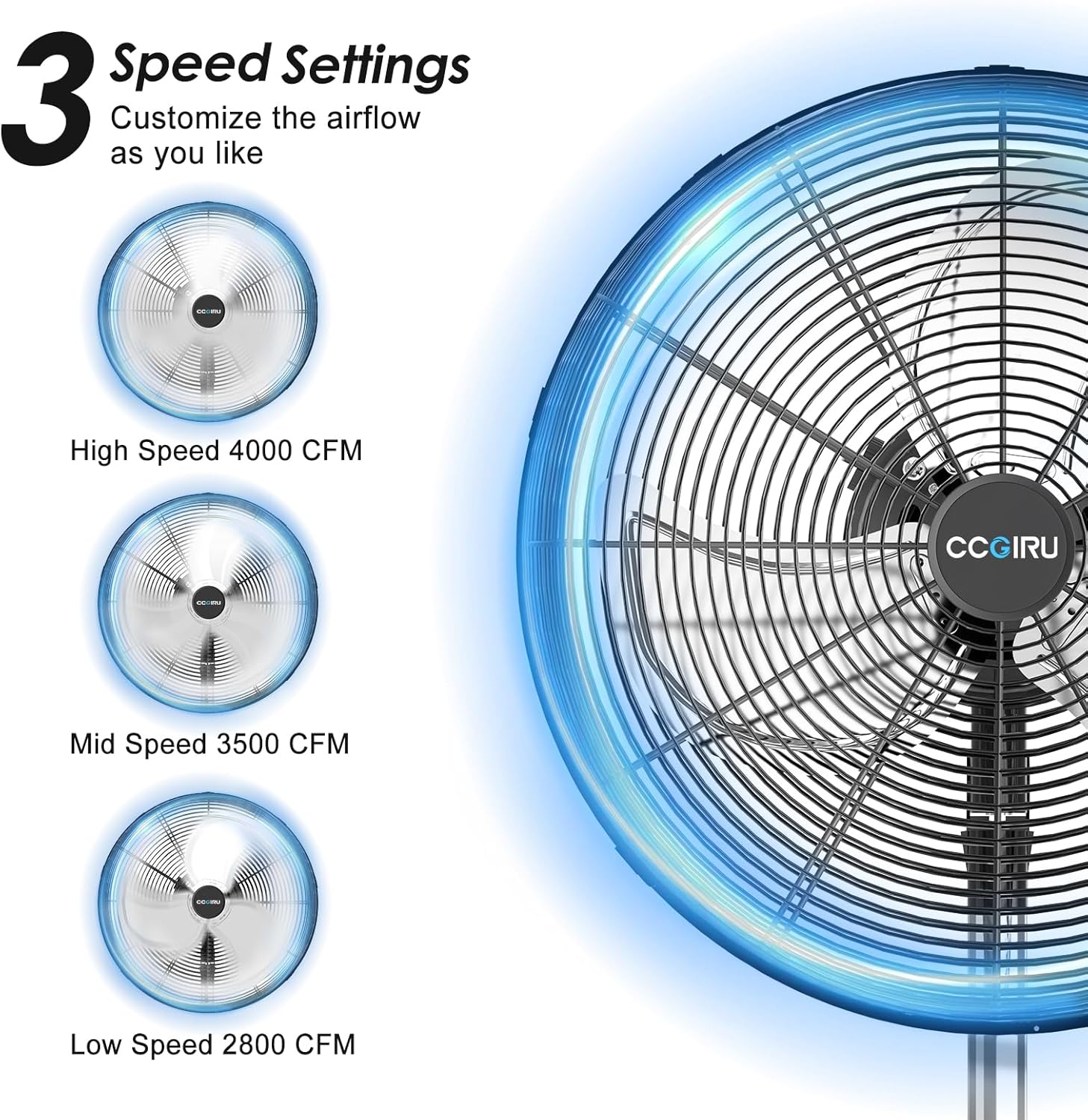
ຮູບທີ 3: Visual representation of the fan's three speed settings: Low, Mid, and High, indicating varying airflow capacities.
ຟັງຊັນ Oscillation
To activate or deactivate the oscillation feature:
- To Oscillate: Locate the oscillation knob on the top-rear of the motor housing. Pull the knob up to engage oscillation. The fan head will sweep approximately 80 degrees from left to right.
- To Stop Oscillation: Push the knob ລົງ to lock the fan head in a stationary position.

ຮູບທີ 4: Illustration of the fan's 80-degree oscillation range and the pull/press mechanism for activating or deactivating this function.
ຄວາມສູງ ແລະ ຄວາມອຽງທີ່ສາມາດປັບໄດ້
Customize the fan's position for optimal airflow:
- ການປັບຄວາມສູງ: Loosen the height adjustment knob/collar on the stand pole. Carefully raise or lower the upper pole section to the desired height (between 38.58" and 51.57"). Tighten the knob firmly to secure the height.
- ການປັບຕົວອຽງ: Loosen the tilting knob located on the side of the fan head assembly. Adjust the fan head vertically to the desired angle (up to 15 degrees). Tighten the knob to secure the tilt.

ຮູບທີ 5: Diagram illustrating the adjustable height feature of the fan, ranging from 38.5 inches to 51.5 inches.

ຮູບທີ 6: Illustration of the fan's 15-degree manual vertical tilt capability and the location of the tilting knob for adjustment.
5. ການດູແລແລະບໍາລຸງຮັກສາ
Regular cleaning and proper maintenance will ensure the longevity and optimal performance of your fan.
- ຖອດພັດລົມອອກສະເໝີກ່ອນທຳຄວາມສະອາດ.
- ການເຮັດຄວາມສະອາດກະจังໜ້າ ແລະ ໃບມີດ: ໃຊ້ອ່ອນ, ງamp cloth to wipe the exterior surfaces. For stubborn dust, the grilles can be removed (refer to assembly steps in reverse) to clean the blades. Ensure all parts are completely dry before reassembling and operating the fan. Do not use abrasive cleaners or solvents.
- ການບໍາລຸງຮັກສາມໍເຕີ: The motor is permanently lubricated and requires no additional oiling. Keep the motor housing clean and free of dust.
- ການເກັບຮັກສາ: ເມື່ອບໍ່ໄດ້ໃຊ້ເປັນເວລາດົນ, ໃຫ້ເກັບຮັກສາພັດລົມໄວ້ໃນບ່ອນທີ່ເຢັນ, ແຫ້ງ, ດີກວ່າຢູ່ໃນການຫຸ້ມຫໍ່ຕົ້ນສະບັບຂອງມັນຫຼືປົກຄຸມເພື່ອປົກປ້ອງມັນຈາກຝຸ່ນ.
6. ຄູ່ມືການແກ້ໄຂບັນຫາ
If you experience issues with your fan, consult the following table before contacting customer support.
| ບັນຫາ | ສາເຫດທີ່ເປັນໄປໄດ້ | ການແກ້ໄຂ |
|---|---|---|
| ພັດລົມບໍ່ເປີດ | ບໍ່ມີການສະຫນອງພະລັງງານ ສາຍໄຟ/ປລັກສຽບເສຍຫາຍ ມໍເຕີເຮັດວຽກຜິດປົກກະຕິ | Ensure fan is plugged into a live outlet. ກວດເບິ່ງເຄື່ອງຕັດວົງຈອນ. Inspect cord and plug for damage. Do not use if damaged. Contact customer support if motor issue is suspected. |
| Fan operates but airflow is weak | Grilles or blades are dirty Fan is too far from area ການຕັ້ງຄ່າຄວາມໄວບໍ່ຖືກຕ້ອງ | Clean grilles and blades (ensure fan is unplugged). Relocate fan closer to the desired area. Select a higher speed setting. |
| ພັດລົມມີສຽງດັງເກີນໄປ | ພາກສ່ວນວ່າງ ການຂັດຂວາງຢູ່ໃນແຜ່ນໃບ Normal industrial fan noise | Check for loose screws or components and tighten. Unplug fan and remove any obstructions from blades. Note that this is an industrial fan and will produce more noise than typical household fans. |
| Oscillation ບໍ່ເຮັດວຽກ | Oscillation knob not engaged correctly | Ensure the oscillation knob on the motor housing is pulled up firmly. |
| Fan head does not tilt or adjust height | Adjustment knobs are too tight or too loose | Loosen the respective knob, adjust, then tighten firmly. |
7. ຂໍ້ມູນຈໍາເພາະຂອງຜະລິດຕະພັນ
Technical details for the CCGIRU 16" Oscillating Pedestal Fan.
| ຄຸນສົມບັດ | ລາຍລະອຽດ |
|---|---|
| ຍີ່ຫໍ້ | CCGIRU |
| ຊື່ຕົວແບບ | FE8-40S3dO(5) |
| ການອອກແບບພັດລົມໄຟຟ້າ | ພັດລົມຊັ້ນ/ພັດລົມຕີນ |
| ຂະໜາດ | 16 ນິ້ວ |
| ຄວາມອາດສາມາດການໄຫຼວຽນຂອງອາກາດ | Up to 5000 Cubic Feet Per Minute (CFM) |
| ຈໍານວນລະດັບພະລັງງານ | 3 (ຕໍ່າ, ກາງ, ສູງ) |
| ການສັ່ນສະເທືອນ | 80 degrees (Left to Right) |
| ປັບຄວາມສູງໄດ້ | 38.58" ຫາ 51.57" |
| ອຽງທີ່ສາມາດປັບໄດ້ | Up to 15 degrees (Manual Vertical) |
| ແຫຼ່ງພະລັງງານ | AC (ໄຟຟ້າມີສາຍ) |
| ວິທີການຄວບຄຸມ | ດຶງລະບົບຕ່ອງໂສ້ |
| ການກໍ່ສ້າງ | Heavy-duty metal, aluminum blades, rust-resistant grilles |
| ການຢັ້ງຢືນຄວາມປອດໄພ | UL ລາຍຊື່ |
| ນ້ໍາຫນັກລາຍການ | 23 ປອນ |
| ການນຳໃຊ້ພາຍໃນ/ນອກ | ພາຍໃນ |
8. ການຮັບປະກັນແລະການສະຫນັບສະຫນູນລູກຄ້າ
For warranty information or if you require assistance with your CCGIRU fan, please refer to the product packaging or contact the retailer where the product was purchased. You may also visit the official CCGIRU webເວັບໄຊສໍາລັບການສະຫນັບສະຫນູນ.


