1. ບົດແນະນຳ
This manual provides essential information for the safe and effective operation of your ION Audio Retro Glow Boombox. This device combines classic audio playback with modern connectivity, featuring an AM/FM radio, cassette player/recorder, Bluetooth 5.3, USB, and SD card playback capabilities. Please read this manual thoroughly before use and retain it for future reference.
2. ຂໍ້ມູນຄວາມປອດໄພ
- ຫ້າມບໍ່ໃຫ້ອຸປະກອນຖືກນ້ຳ ຫຼື ຄວາມຊຸ່ມຊື່ນ.
- ຫຼີກເວັ້ນການວາງເຄື່ອງໄວ້ໃກ້ກັບແຫຼ່ງຄວາມຮ້ອນ ຫຼືຢູ່ໃນແສງແດດໂດຍກົງ.
- ຮັບປະກັນການລະບາຍອາກາດທີ່ເຫມາະສົມ; ຫ້າມປິດຊ່ອງລະບາຍອາກາດໃດໆ.
- ໃຊ້ພຽງແຕ່ໄຟລ໌ແນບ/ອຸປະກອນເສີມທີ່ລະບຸໂດຍຜູ້ຜະລິດ.
- ຖອດປລັກເຄື່ອງໃນເວລາມີພາຍຸຟ້າຜ່າ ຫຼືເມື່ອບໍ່ໄດ້ໃຊ້ເປັນເວລາດົນນານ.
- ອ້າງອີງການບໍລິການທັງໝົດໃຫ້ກັບພະນັກງານບໍລິການທີ່ມີຄຸນວຸດທິ.
3. ມີຫຍັງແດ່
ເມື່ອຖອດຫໍ່ອອກ, ໃຫ້ແນ່ໃຈວ່າລາຍການທັງຫມົດທີ່ລະບຸໄວ້ຂ້າງລຸ່ມນີ້ແມ່ນມີຢູ່ໃນສະພາບທີ່ດີ:
- ION Audio Retro Glow Boombox
- ສາຍໄຟ
- ຄູ່ມືແນະ ນຳ ດ່ວນ
4. ຜະລິດຕະພັນເກີນview
The Retro Glow Boombox features a translucent housing with multi-colored LED lights that synchronize with music. It includes dual full-range speakers for robust audio output.
ແຜງໜ້າ

ຮູບ 1: ດ້ານຫນ້າ view of the Retro Glow Boombox, showcasing the cassette deck, radio tuner, and illuminated dual speakers.
ການຄວບຄຸມສູງສຸດ

ຮູບທີ 2: ລາຍລະອຽດ view of the top panel, including volume, bass, treble controls, cassette function buttons (Pause, Stop/Eject, F.FWD, REW, Play, REC), and mode selectors (Tape, Aux, Radio, Bluetooth/USB/SD).
Side Panel and Rear
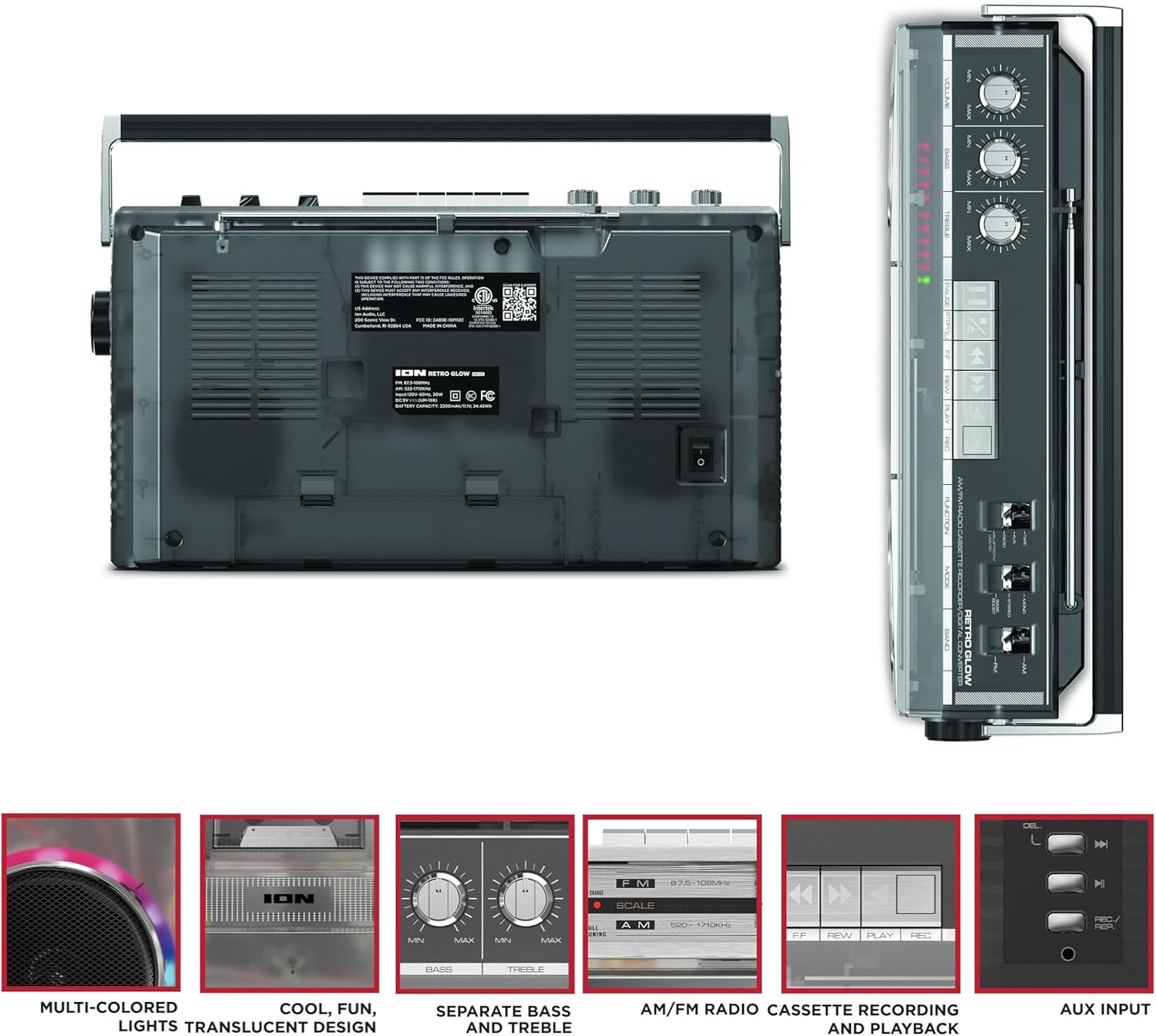
Figure 3: Side panel illustrating the USB port, SD card slot, and playback control buttons. The rear panel includes the power input and battery compartment.
5. ຕັ້ງຄ່າ
Powering the Boombox
The Retro Glow Boombox can be powered via the included AC power cable or by batteries for portable use.
- ໄຟຟ້າ AC: Connect the power cable to the AC input on the rear of the unit and then to a wall outlet.
- ພະລັງງານຫມໍ້ໄຟ: Open the battery compartment on the rear and insert the required batteries (type and quantity specified in specifications).

ຮູບ 4: ດ້ານຫລັງ view of the boombox, highlighting the power input and the battery compartment for portable operation.
6. ຄໍາແນະນໍາການດໍາເນີນງານ
ການດໍາເນີນງານທົ່ວໄປ
- ເປີດ/ປິດ: Use the power switch to turn the unit on or off.
- ການຄວບຄຸມລະດັບສຽງ: Adjust the 'VOLUME' knob on the top panel to increase or decrease the sound level.
- ການຄວບຄຸມໂຕນ: Use the 'BASS' and 'TREBLE' knobs to customize the audio output to your preference.
- ໄຟ LED: The multi-colored LED lights around the speakers dance in sync with the music. Refer to the Quickstart Guide for specific controls to change light modes or turn them off.
ຟັງຊັນວິທະຍຸ
- Switch the 'FUNCTION' selector to 'RADIO'.
- Select 'AM' or 'FM' using the 'BAND' switch.
- ຍືດເສົາອາກາດແບບຍືດໄດ້ເພື່ອໃຫ້ຮັບສັນຍານ FM ໄດ້ດີທີ່ສຸດ. ສຳລັບ AM, ໃຫ້ໝຸນເຄື່ອງເພື່ອໃຫ້ຮັບສັນຍານໄດ້ດີທີ່ສຸດ.
- Use the 'TUNING' knob to scan for stations.
ເຄື່ອງຫຼິ້ນ/ເຄື່ອງບັນທຶກສຽງເທບ
- ຫຼິ້ນຄືນ: Press the 'STOP/EJ' button to open the cassette door. Insert a cassette tape and close the door. Press 'PLAY' to begin playback.
- ການບັນທຶກ: To record from the radio, built-in microphone, or an external source (via Aux input), ensure a blank cassette is inserted. Select the desired source using the 'FUNCTION' switch. Press the 'REC' button (often simultaneously with 'PLAY') to start recording.
- Fast Forward/Rewind: Use the 'F.FWD' and 'REW' buttons for tape navigation.
ການເຊື່ອມຕໍ່ Bluetooth
- Switch the 'FUNCTION' selector to 'BLUETOOTH/USB/SD'. The unit will enter pairing mode.
- On your Bluetooth-enabled device, search for 'Retro Glow Boombox' and select it to pair.
- Once paired, you can stream audio wirelessly to the boombox.
ການຫຼິ້ນ USB ແລະ SD Card
- Insert a USB drive or SD card into the respective slot on the side panel.
- Switch the 'FUNCTION' selector to 'BLUETOOTH/USB/SD'. The unit should automatically detect and begin playing audio files ຈາກສື່ແຊກ.
- Use the playback control buttons (play/pause, skip forward/backward) on the side panel to manage your audio.
ການປ້ອນຂໍ້ມູນຊ່ວຍ
- Connect an external audio device (e.g., smartphone, MP3 player) to the 'AUX' input using a 3.5mm audio cable (not included).
- Switch the 'FUNCTION' selector to 'AUX'. Audio from your external device will play through the boombox speakers.
7. ບໍາລຸງຮັກສາ
- ທໍາຄວາມສະອາດ: ໃຊ້ຜ້າປຽກແຫ້ງເພື່ອເຮັດຄວາມສະອາດດ້ານນອກຂອງເຄື່ອງ. ຢ່າໃຊ້ເຄື່ອງເຮັດຄວາມສະອາດຂັດຫຼືສານລະລາຍ.
- Cassette Deck Care: ເຮັດຄວາມສະອາດຫົວເທບເປັນປະຈໍາ ແລະບີບລູກກິ້ງດ້ວຍຜ້າຝ້າຍເບົາໆ dampປະກອບດ້ວຍເຫຼົ້າ isopropyl ເພື່ອຮັບປະກັນຄຸນນະພາບສຽງທີ່ດີທີ່ສຸດແລະປ້ອງກັນຄວາມເສຍຫາຍຂອງ tape.
- ການເກັບຮັກສາ: When not in use, store the boombox in a cool, dry place away from direct sunlight and extreme temperatures.
8. ການແກ້ໄຂບັນຫາ
ບໍ່ມີພະລັງງານ
- ໃຫ້ແນ່ໃຈວ່າສາຍໄຟໄດ້ເຊື່ອມຕໍ່ກັບທັງເຄື່ອງ ແລະ ປລັກໄຟທີ່ໃຊ້ງານໄດ້ຢ່າງແໜ້ນໜາແລ້ວ.
- ຖ້າໃຊ້ແບັດເຕີຣີ, ໃຫ້ກວດເບິ່ງວ່າພວກມັນຖືກໃສ່ຢ່າງຖືກຕ້ອງ ແລະ ບໍ່ໝົດແລ້ວ.
ບໍ່ມີສຽງ
- Check the volume level on the boombox and the connected audio source (if applicable).
- Ensure the correct function mode (Radio, Tape, Bluetooth, USB/SD, Aux) is selected.
- For cassette playback, verify the tape is inserted correctly and the heads are clean.
ບັນຫາການຈັບຄູ່ Bluetooth
- Make sure the boombox is in Bluetooth pairing mode.
- Ensure your Bluetooth device is within range (typically 30 feet or 10 meters).
- ລອງຍົກເລີກການຈັບຄູ່ ແລະຈັບຄູ່ອຸປະກອນຄືນໃໝ່.
9. ຂໍ້ມູນຈໍາເພາະ
| ຂະໜາດສິນຄ້າ | 9.25 x 16.25 x 5.25 ນິ້ວ |
| ນ້ໍາຫນັກລາຍການ | 8.93 ປອນ |
| ເຕັກໂນໂລຊີການເຊື່ອມຕໍ່ | Bluetooth 5.3, USB, SD Card, Aux Input |
| ປະເພດລຳໂພງ | Stereo, Full-Range |
| ແຫຼ່ງພະລັງງານ | AC Power Cable, Rechargeable Battery (approx. 10-hour life) |
| ຄຸນນະສົມບັດພິເສດ | AM/FM Radio, Cassette Player/Recorder, Multi-colored LED Lights, Retro VU Meters, Separate Bass and Treble Controls |
10. ການຮັບປະກັນແລະການສະຫນັບສະຫນູນ
For warranty information or technical support, please refer to the Quickstart Guide included with your product or visit the official ION Audio webເວັບໄຊທ໌. ຮັກສາໃບຮັບເງິນຊື້ຂອງທ່ານໄວ້ ເພາະວ່າອາດຈະຕ້ອງມີຫຼັກຖານການຊື້ສຳລັບການຮຽກຮ້ອງການຮັບປະກັນ.


