1. ບົດແນະນຳ
This manual provides detailed instructions for the safe and effective use of your TOTAL TMT57026 Laser Distance Meter. Please read this manual thoroughly before operating the device and keep it for future reference. This device is designed for accurate distance measurements up to 70 meters, suitable for various professional and DIY applications.
2. ຄໍາແນະນໍາຄວາມປອດໄພ
- ລັງສີເລເຊີ: This device emits Class 2 laser radiation. Do not stare into the laser beam or direct it at other people or animals.
- ການປົກປ້ອງຕາ: ຫຼີກເວັ້ນການສໍາຜັດກັບຕາໂດຍກົງກັບ beam laser.
- ສະພາບແວດລ້ອມການດໍາເນີນງານ: Do not operate the device in explosive atmospheres or near flammable materials.
- ຄວາມຕ້ານທານນ້ໍາ: ອຸປະກອນນີ້ແມ່ນ ບໍ່ທົນທານຕໍ່ນ້ໍາຫຼີກລ່ຽງການສຳຜັດກັບນໍ້າ ຫຼື ຄວາມຊຸ່ມຊື່ນສູງ.
- ບໍາລຸງຮັກສາ: Only qualified personnel should repair the device.
- ແບັດເຕີຣີ: ໃຊ້ສະເພາະແບັດເຕີຣີ AAA ທີ່ລະບຸໄວ້ເທົ່ານັ້ນ. ຢ່າປະສົມແບັດເຕີຣີເກົ່າ ແລະ ແບັດເຕີຣີໃໝ່ ຫຼື ແບັດເຕີຣີປະເພດຕ່າງໆເຂົ້າກັນ.
3. ຜະລິດຕະພັນເກີນview
Familiarize yourself with the components of your TOTAL TMT57026 Laser Distance Meter.
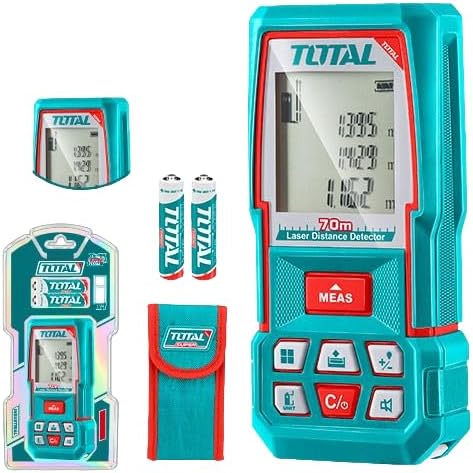
Figure 1: The TOTAL TMT57026 Laser Distance Meter, showing the device itself, two AAA batteries, a carrying pouch, and retail packaging. The device features a digital display and multiple function buttons.
ອົງປະກອບທີ່ສໍາຄັນ:
- Laser Emitter/Receiver: ຕັ້ງຢູ່ເທິງສຸດຂອງອຸປະກອນ.
- ຈໍສະແດງຜົນ: Shows measurements, units, and mode indicators.
- ປຸ່ມ MEAS: Initiates single or continuous measurement.
- ປຸ່ມ UNIT: Changes measurement units (e.g., meters, feet, inches).
- C/O Button: Clears the last measurement or turns the device off.
- ປຸ່ມຟັງຊັນ: For area, volume, addition, subtraction, and other calculations.
- ຊ່ອງໃສ່ຫມໍ້ໄຟ: Located at the rear of the device.
4. ຕັ້ງຄ່າ
4.1 ການຕິດຕັ້ງຫມໍ້ໄຟ
- ຊອກຫາຝາປິດຊ່ອງໃສ່ຫມໍ້ໄຟຢູ່ດ້ານຫຼັງຂອງອຸປະກອນ.
- ເລື່ອນ ຫຼື ຖອດຄລິບອອກເພື່ອເປີດມັນ.
- Insert two (2) AAA 1.5V disposable batteries, ensuring correct polarity (+/-). The device includes two AAA batteries.
- ປິດຝາປິດຊ່ອງໃສ່ຫມໍ້ໄຟຢ່າງປອດໄພ.
4.2 ການເປີດ/ປິດ
- ເພື່ອເປີດເຄື່ອງ: ກົດ MEAS ກົດປຸ່ມເປັນເວລາສັ້ນໆ. ໜ້າຈໍຈະສະຫວ່າງຂຶ້ນ.
- ປິດເຄື່ອງ: ກົດຄ້າງໄວ້ C/O button for approximately 3 seconds. The device will also automatically power off after a period of inactivity to conserve battery life.
5. ຄໍາແນະນໍາການດໍາເນີນງານ
5.1 ການວັດແທກໄລຍະຫ່າງພື້ນຖານ
- ໃຫ້ແນ່ໃຈວ່າອຸປະກອນເປີດຢູ່.
- ຊີ້ແສງເລເຊີຢູ່ດ້ານເປົ້າໝາຍ.
- ກົດ MEAS button once. The laser will activate, and the measurement will appear on the display.
- The measurement will be held on the screen until a new measurement is taken or the device is turned off.
5.2 ການວັດແທກຢ່າງຕໍ່ເນື່ອງ (ການຕິດຕາມ)
- ກົດຄ້າງໄວ້ MEAS ກົດປຸ່ມປະມານ 2 ວິນາທີ.
- The device will enter continuous measurement mode, displaying real-time distance as you move the device.
- ກົດ MEAS ກົດປຸ່ມອີກຄັ້ງເພື່ອຢຸດການວັດແທກຢ່າງຕໍ່ເນື່ອງ ແລະ ຮັກສາຄ່າສຸດທ້າຍໄວ້.
5.3 ການປ່ຽນແປງຫນ່ວຍວັດແທກ
- ກົດ ໜ່ວຍ button repeatedly to cycle through available units: meters (m), feet (ft), and inches (in).
- ຫນ່ວຍງານທີ່ເລືອກຈະຖືກສະແດງຢູ່ໃນຈໍສະແດງຜົນ.
5.4 ການວັດແທກພື້ນທີ່ ແລະ ປະລິມານ
The device supports calculation of area and volume. Refer to the icons on the function buttons for specific modes.
- Press the appropriate function button (e.g., the button with the square icon for area, or cube icon for volume).
- Follow the on-screen prompts to take the required measurements (e.g., length, width for area; length, width, height for volume).
- ຜົນການຄິດໄລ່ຈະໄດ້ຮັບການສະແດງ.
5.5 ການບວກ ແລະ ການລົບ
ໃຊ້ +/- button to add or subtract measurements.
- Take the first measurement.
- ກົດ +/- button to select addition or subtraction mode.
- Take the second measurement. The device will automatically perform the calculation and display the result.
6. ບໍາລຸງຮັກສາ
6.1 ການທໍາຄວາມສະອາດ
- ເຊັດອຸປະກອນດ້ວຍຄວາມອ່ອນ, ງamp ຜ້າ. ຢ່າໃຊ້ເຄື່ອງເຮັດຄວາມສະອາດຂັດຫຼືສານລະລາຍ.
- Clean the laser lens carefully with a soft, lint-free cloth, similar to cleaning camera lenses.
6.2 ການເກັບຮັກສາ
- ເກັບຮັກສາອຸປະກອນໄວ້ໃນບ່ອນແຫ້ງ, ເຢັນ, ຫ່າງຈາກແສງແດດໂດຍກົງ ແລະ ອຸນຫະພູມທີ່ຮ້າຍກາດ.
- ຖ້າເກັບຮັກສາໄວ້ເປັນເວລາດົນ, ເອົາແບັດເຕີລີ່ອອກເພື່ອປ້ອງກັນການຮົ່ວໄຫຼ.
6.3 ການທົດແທນຫມໍ້ໄຟ
- When the battery indicator on the display shows low power, replace both AAA batteries following the instructions in Section 4.1.
7. ການແກ້ໄຂບັນຫາ
| ບັນຫາ | ສາເຫດທີ່ເປັນໄປໄດ້ | ການແກ້ໄຂ |
|---|---|---|
| ອຸປະກອນບໍ່ເປີດ. | ແບດເຕີຣີແມ່ນຕາຍຫຼືຕິດຕັ້ງບໍ່ຖືກຕ້ອງ. | ກວດເບິ່ງຂົ້ວຂອງແບດເຕີຣີ້ ຫຼືປ່ຽນແບັດ AAA ໃໝ່. |
| ການວັດແທກບໍ່ຖືກຕ້ອງ. | Laser lens is dirty; target surface is too reflective/non-reflective; device is unstable. | Clean the laser lens. Measure against a suitable, stable surface. Ensure device is held steady. |
| ລັງສີເລເຊີເບິ່ງບໍ່ເຫັນ. | ແສງອ້ອມຂ້າງສະຫວ່າງ; ເລເຊີປິດຢູ່. | Operate in lower light conditions. Ensure device is powered on and MEAS button is pressed. |
| ຈໍສະແດງຜົນສະແດງລະຫັດຂໍ້ຜິດພາດ. | ການວັດແທກນອກຂອບເຂດ; ຄວາມຜິດພາດພາຍໃນ. | Ensure target is within 0.05m to 70m range. Try restarting the device. If error persists, contact support. |
8. ຂໍ້ມູນຈໍາເພາະ
- ຕົວແບບ: TMT57026
- ຍີ່ຫໍ້: TOTAL
- ໄລຍະການວັດແທກ: 0.05 ຫາ 70 ແມັດ
- ໜ່ວຍວັດແທກ: Meters (m), Feet (ft), Inches (in)
- ຊັ້ນເລເຊີ: ຫ້ອງຮຽນ 2
- ແບັດເຕີຣີ: 2 x AAA, 1.5V (included)
- ປະເພດຫມໍ້ໄຟ: ໃຊ້ຖິ້ມໄດ້
- Automatic Laser Shut-off: Yes (after inactivity)
- Automatic Device Shut-off: Yes (after inactivity)
- ຂະໜາດຜະລິດຕະພັນ: ຂະໜາດປະມານ 17 x 5 x 0.1 cm
- ນ້ໍາຫນັກລາຍການ: ປະມານ 160 ກຣາມ (0.16 ກິໂລກຣາມ)
- ວັດສະດຸ: ພາດສະຕິກ
- ສີ: Turquoise
- ລະດັບຄວາມຕ້ານທານນ້ໍາ: ບໍ່ທົນທານຕໍ່ນ້ໍາ
- ຜູ້ຜະລິດ: ທັງໝົດ
- ປະເທດຕົ້ນກໍາເນີດ: ຈີນ
9. ການຮັບປະກັນແລະການສະຫນັບສະຫນູນ
For warranty information and technical support, please contact TOTAL customer service. Keep your purchase receipt as proof of purchase.
For further assistance, please refer to the official TOTAL webສະຖານທີ່ຫຼືຕິດຕໍ່ຜູ້ຈັດຈໍາຫນ່າຍທ້ອງຖິ່ນຂອງທ່ານ.


