1. ບົດແນະນຳ
Thank you for choosing the Oransi AirMend 200HB Air Purifier. This manual provides essential information for the safe and efficient operation, maintenance, and troubleshooting of your new air purifier. Please read it thoroughly before use and retain it for future reference.

Image 1.1: The Oransi AirMend 200HB Air Purifier, showcasing ການອອກແບບທີ່ຫນາແຫນ້ນແລະທັນສະໄຫມຂອງມັນ.
ສິນຄ້າເກີນview
The Oransi AirMend 200HB is a high-efficiency air purifier designed to improve indoor air quality by removing various airborne pollutants. It features a robust filtration system and user-friendly controls, making it suitable for medium-sized rooms.

Image 1.2: Illustration detailing the health benefits of the Oransi AirMend 200HB, including removal of pollen, pet dander, dust, mold spores, smoke particles, and virus particles.
This air purifier is designed, engineered, and responsibly assembled in the USA, ensuring quality and reliability.
2. ຂໍ້ມູນຄວາມປອດໄພທີ່ສໍາຄັນ
To reduce the risk of fire, electric shock, or injury, please read and follow all instructions and warnings before using this appliance.
- ຖອດປລັກເຄື່ອງຟອກອາກາດທຸກເທື່ອກ່ອນທີ່ຈະເຄື່ອນຍ້າຍ, ອະນາໄມ ຫຼື ປະຕິບັດການບຳລຸງຮັກສາ.
- ຫ້າມໃຊ້ອຸປະກອນດ້ວຍສາຍໄຟ ຫຼືປລັກສຽບທີ່ເສຍຫາຍ. ຖ້າສາຍໄຟ ຫຼືປລັກສຽບເສຍຫາຍ, ໃຫ້ຕິດຕໍ່ຝ່າຍຊ່ວຍເຫຼືອລູກຄ້າ.
- ຮັກສາສາຍໄຟໃຫ້ຫ່າງຈາກພື້ນຜິວທີ່ມີຄວາມຮ້ອນ.
- ຫ້າມໃຊ້ເຄື່ອງຟອກອາກາດໃນບ່ອນປຽກ ຫຼື ງamp ສະພາບແວດລ້ອມ, ເຊັ່ນ: ຫ້ອງນ້ໍາຫຼືຫ້ອງຊັກລີດ.
- ຫ້າມໃສ່ນິ້ວມືຫຼືສິ່ງຂອງຕ່າງປະເທດເຂົ້າໄປໃນການເປີດ.
- Ensure the air intake and exhaust vents are not blocked.
- ເຄື່ອງໃຊ້ນີ້ບໍ່ໄດ້ມີຈຸດປະສົງເພື່ອໃຊ້ໂດຍບຸກຄົນ (ລວມທັງເດັກນ້ອຍ) ທີ່ມີຄວາມສາມາດທາງຮ່າງກາຍ, ຄວາມຮູ້ສຶກ, ຫຼືຈິດໃຈທີ່ຫຼຸດລົງ, ຫຼືຂາດປະສົບການ ແລະຄວາມຮູ້, ເວັ້ນເສຍແຕ່ວ່າພວກເຂົາໄດ້ຮັບການຊີ້ນໍາ ຫຼືຄໍາແນະນໍາກ່ຽວກັບການໃຊ້ເຄື່ອງໃຊ້ໂດຍບຸກຄົນທີ່ຮັບຜິດຊອບຄວາມປອດໄພຂອງເຂົາເຈົ້າ. .
- ຖິ້ມການກັ່ນຕອງທີ່ໃຊ້ແລ້ວຕາມກົດລະບຽບທ້ອງຖິ່ນ.
3. ເນື້ອໃນຊຸດ
Carefully unpack your Oransi AirMend 200HB Air Purifier and check that all items are present and in good condition. If any items are missing or damaged, please contact Oransi customer support.
- Oransi AirMend 200HB Air Purifier Unit
- Pre-installed Filter (HEPA + Activated Carbon)
- ສາຍໄຟ
- ການຄວບຄຸມໄລຍະໄກ
- ຄູ່ມືຜູ້ໃຊ້ (ເອກະສານນີ້)
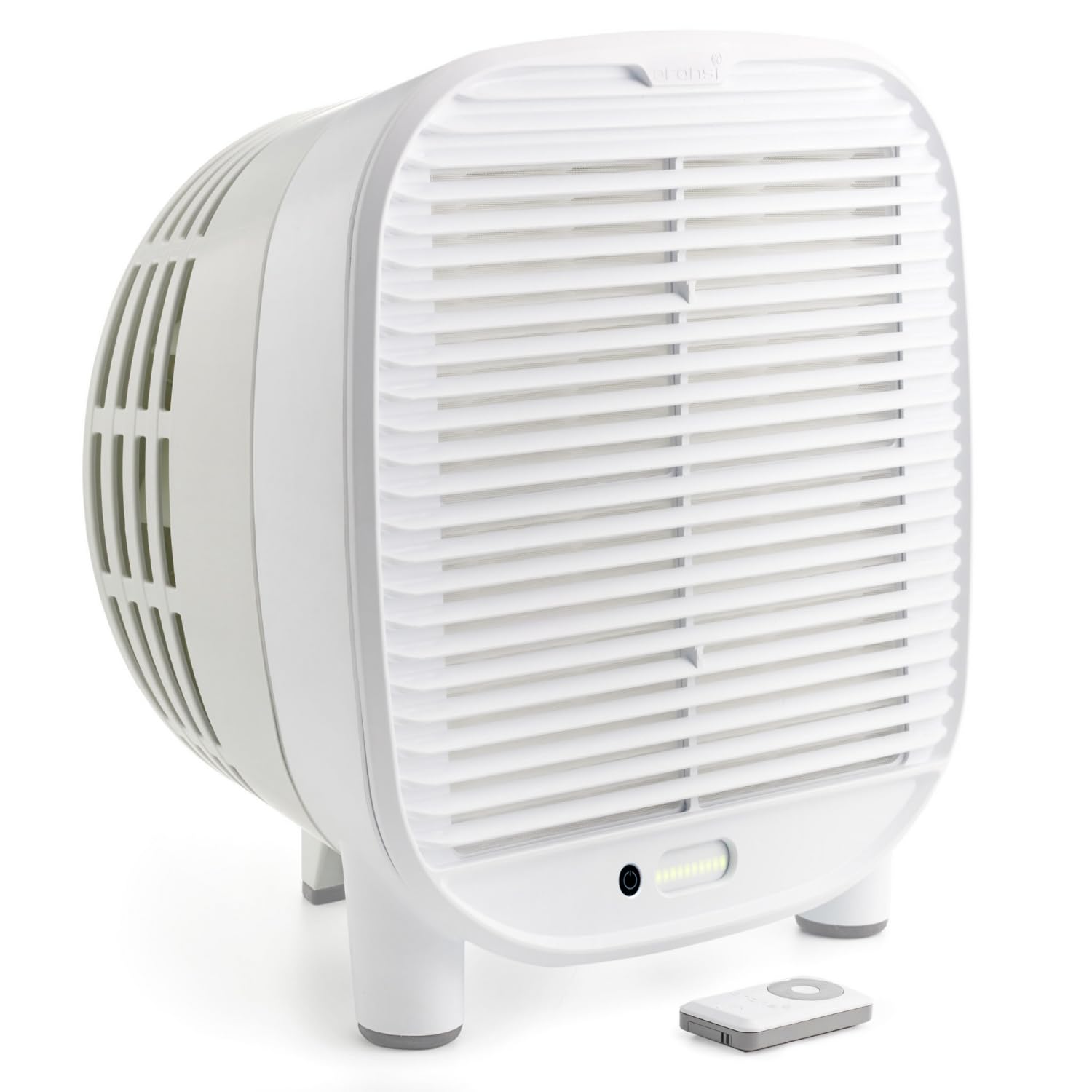
Image 3.1: The Oransi AirMend 200HB Air Purifier shown with its filter removed, illustrating the filter's appearance.
4. ຕັ້ງຄ່າ
Follow these steps to set up your air purifier for first-time use.
- Unpack ຫນ່ວຍງານ: ເອົາເຄື່ອງຟອກອາກາດອອກຈາກເຄື່ອງຫຸ້ມຫໍ່ຂອງມັນ.
- ເອົາການຫຸ້ມຫໍ່ການກັ່ນຕອງອອກ: The filter is pre-installed but may be wrapped in protective plastic. Open the filter compartment (refer to the Maintenance section for instructions on accessing the filter) and remove any plastic packaging from the filter. Reinsert the filter securely.
- ວາງຕຳແໜ່ງເຄື່ອງກອງອາກາດ: Place the unit on a firm, level surface. Ensure there is at least 6 inches (15 cm) of clear space around all sides for optimal airflow. Do not place it directly against a wall or under furniture that obstructs airflow.
- ເຊື່ອມຕໍ່ພະລັງງານ: Plug the power cord into the air purifier and then into a standard electrical outlet.

Image 4.1: The Oransi AirMend 200HB Air Purifier positioned on a table, demonstrating proper placement with clear space around it.
5. ຄໍາແນະນໍາການດໍາເນີນງານ
The Oransi AirMend 200HB is designed for simple operation without the need for complex apps or Wi-Fi connections.

Image 5.1: A visual comparison highlighting the simplicity of setting up the Oransi AirMend 200HB: simply plug it in. In contrast, typical air purifiers often require multiple steps involving apps, accounts, Wi-Fi, and troubleshooting.
ກະດານຄວບຄຸມ
The control panel is located on the top of the unit. It includes buttons for power, fan speed, and other functions. Refer to the diagram below for specific button locations (Note: Diagram not available, refer to product for exact layout).
ການຄວບຄຸມໄລຍະໄກ
The included remote control allows you to operate the air purifier from a distance. Ensure the remote has working batteries (Note: Battery type not specified, check remote for details).
ຟັງຊັນ
- ເປີດ/ປິດ: Press the power button once to turn the unit on, and again to turn it off.
- ຄວາມໄວພັດລົມ: Cycle through available fan speeds (e.g., Low, Medium, High, Turbo) by pressing the fan speed button. Higher speeds provide faster air purification.
- ຮູບແບບການນອນ: Activates a quiet operation mode and dims/turns off LED lights for undisturbed sleep. Press the sleep mode button to activate/deactivate.
- ໂມງຈັບເວລາ: Set the air purifier to operate for a specific duration (e.g., 2, 4, 8 hours) before automatically turning off. Press the timer button to cycle through options.
- ຕົວຊີ້ວັດການປັບຕົວກັ່ນຕອງ: An indicator light will illuminate when it's time to replace the filter. After replacing the filter, press and hold the filter reset button for 3-5 seconds to reset the timer.
6. ບໍາລຸງຮັກສາ
ການບໍາລຸງຮັກສາເປັນປົກກະຕິຮັບປະກັນປະສິດທິພາບທີ່ດີທີ່ສຸດແລະຍືດອາຍຸຊີວິດຂອງເຄື່ອງຟອກອາກາດຂອງທ່ານ.
ການທົດແທນການກັ່ນຕອງ
The high-efficiency filter in your Oransi AirMend 200HB typically lasts up to 12 months with continuous use. The filter indicator light on the control panel will signal when replacement is needed.
- ປິດ ແລະຖອດປລັກ: Always turn off and unplug the air purifier before replacing the filter.
- ຊ່ອງການກັ່ນຕອງການເຂົ້າເຖິງ: Locate the filter access panel, usually on the back or side of the unit. Open it according to the unit's design (e.g., by sliding a latch or removing a cover).
- ເອົາການກັ່ນຕອງເກົ່າອອກ: Carefully pull out the used filter. Dispose of it in a waste bin.
- ໃສ່ຕົວກອງໃໝ່: Remove the new filter from its protective packaging. Insert it into the compartment, ensuring it is seated correctly.
- ຊ່ອງປິດ: ປິດແຜງເຂົ້າເຖິງຕົວກອງຢ່າງປອດໄພ.
- ປັບຕົວຊີ້ບອກການກັ່ນຕອງ: Plug in the air purifier and turn it on. Press and hold the filter reset button on the control panel for 3-5 seconds until the indicator light turns off.
ທໍາຄວາມສະອາດພາຍນອກ
- ເຊັດດ້ານນອກຂອງເຄື່ອງກອງອາກາດດ້ວຍຜ້າອ່ອນແລະແຫ້ງ.
- ຢ່າໃຊ້ເຄື່ອງເຮັດຄວາມສະອາດຂັດ, ຂີ້ເຜີ້ງ, ຫຼືສານລະລາຍ.
- Do not allow water to enter the unit.
7. ການແກ້ໄຂບັນຫາ
ຖ້າທ່ານພົບບັນຫາກັບເຄື່ອງກອງອາກາດຂອງທ່ານ, ໃຫ້ອ້າງອີງເຖິງຕາຕະລາງຕໍ່ໄປນີ້ສຳລັບບັນຫາ ແລະ ວິທີແກ້ໄຂທົ່ວໄປ.
| ບັນຫາ | ສາເຫດທີ່ເປັນໄປໄດ້ | ການແກ້ໄຂ |
|---|---|---|
| ຫນ່ວຍບໍລິການບໍ່ເປີດ | ບໍ່ມີການສະຫນອງພະລັງງານ ສາຍໄຟບໍ່ໄດ້ເຊື່ອມຕໍ່ຢ່າງຖືກຕ້ອງ | ກວດເບິ່ງວ່າເຄື່ອງໄດ້ສຽບໃສ່ປລັກສຽບທີ່ເຮັດວຽກຫຼືບໍ່. Ensure the power cord is securely connected to both the unit and the outlet. |
| ກະແສລົມອ່ອນເພຍ ຫຼືມີສຽງດັງ | ການກັ່ນຕອງເປື້ອນຫຼືອຸດຕັນ ທໍ່ລະບາຍອາກາດ/ທໍ່ໄອເສຍຖືກອຸດຕັນ | ປ່ຽນຕົວກອງ. Ensure there is clear space around the air intake and exhaust vents. |
| ໄຟຕົວຊີ້ວັດການກັ່ນຕອງຍັງຄົງເປີດຫຼັງຈາກການປ່ຽນແທນ | ບໍ່ໄດ້ປະຕິບັດການຣີເຊັດການກັ່ນຕອງ | After replacing the filter, press and hold the filter reset button for 3-5 seconds. |
| ການຄວບຄຸມໄລຍະໄກບໍ່ເຮັດວຽກ | ຫມໍ້ໄຟທີ່ຕາຍແລ້ວ ສິ່ງກີດຂວາງລະຫວ່າງຣີໂໝດ ແລະ ເຄື່ອງ | ປ່ຽນແບັດໃນຣີໂມດຄວບຄຸມ. ໃຫ້ແນ່ໃຈວ່າມີເສັ້ນສາຍຕາທີ່ຊັດເຈນລະຫວ່າງຣີໂໝດ ແລະ ເຊັນເຊີຂອງເຄື່ອງ. |
If the problem persists after trying these solutions, please contact Oransi customer support.
8. ຂໍ້ມູນຈໍາເພາະ
| ຄຸນສົມບັດ | ລາຍລະອຽດ |
|---|---|
| ໝາຍເລກຕົວແບບ | AMD-200HB |
| ຂະໜາດສິນຄ້າ (ກວ້າງ x ຍາວ x ສູງ) | 8.35" x 12.9" x 14" |
| ນ້ໍາຫນັກລາຍການ | 7 ປອນ |
| ແຫຼ່ງພະລັງງານ | AC |
| ປະເພດການກັ່ນຕອງ | High-efficiency HEPA + Activated Carbon |
| ການກັ່ນຕອງຊີວິດ | Up to 12 months (continuous use) |
| CADR (ອັດຕາການຈັດສົ່ງອາກາດສະອາດ) | 208 (verified) |
| Coverage Area (60 minutes) | 1,560 ຕາແມັດ |
| Coverage Area (30 minutes) | 780 ຕາແມັດ |
| Coverage Area (12.5 minutes) | 322 ຕາແມັດ |

Image 8.1: Graphic illustrating the cleaning power of the Oransi AirMend 200HB, showing square footage cleaned over various timeframes based on its CADR.

Image 8.2: Visual representation of the Oransi AirMend 200HB's compliance with industry standards, featuring logos for AHAM Verifide and California Air Resources Board.
9. ການຮັບປະກັນແລະການສະຫນັບສະຫນູນລູກຄ້າ
Oransi stands behind the quality of its products. For warranty information, please refer to the warranty card included with your purchase or visit the official Oransi website. For technical assistance, replacement parts, or general inquiries, please contact Oransi customer support:
- Webເວັບໄຊ: www.oransi.com
- ອີເມວ: ອ້າງເຖິງ webເວັບໄຊທ໌ສໍາລັບແບບຟອມຕິດຕໍ່ຫຼືທີ່ຢູ່ອີເມວ.
- ໂທລະສັບ: ອ້າງເຖິງ website for phone number.
Please have your model number (AMD-200HB) and purchase date available when contacting support.


