1. ບົດແນະນຳ
Thank you for choosing the Sharp QW-V610-SS Digital Dishwasher. This manual provides essential information for the safe and efficient operation, installation, and maintenance of your appliance. Please read these instructions carefully before using the dishwasher and keep them for future reference.
2. ຂໍ້ມູນຄວາມປອດໄພ
Always follow basic safety precautions when using electrical appliances to reduce the risk of fire, electric shock, or injury. This dishwasher is designed for household use only.
2.1 ຄວາມປອດໄພທົ່ວໄປ
- ຫ້າມບໍ່ໃຫ້ເດັກນ້ອຍຫຼິ້ນກັບ ຫຼື ໃຊ້ເຄື່ອງລ້າງຈານ.
- ຮັກສາຝຸ່ນຊັກຟອກ ແລະລ້າງເຄື່ອງຊ່ວຍອອກຈາກມືເດັກນ້ອຍ.
- ລາຍການແຫຼມຄວນຈະໄດ້ຮັບການບັນທຸກຈຸດລົງເພື່ອປ້ອງກັນການບາດເຈັບ.
- Do not sit, stand, or place heavy objects on the open door.
- ໃຫ້ແນ່ໃຈວ່າເຄື່ອງລ້າງຈານຖືກຮາກຖານຢ່າງຖືກຕ້ອງ.
2.2 ຄວາມປອດໄພທາງໄຟຟ້າ
- Connect the appliance to a properly rated, protected, and sized power supply circuit.
- ຢ່າໃຊ້ສາຍຕໍ່ ຫຼືປລັກອະແດັບເຕີ.
- ຖ້າສາຍໄຟເສຍຫາຍ, ມັນຕ້ອງຖືກປ່ຽນແທນໂດຍຜູ້ຜະລິດ, ຕົວແທນບໍລິການ, ຫຼືຜູ້ທີ່ມີຄຸນສົມບັດທີ່ຄ້າຍຄືກັນເພື່ອຫຼີກເວັ້ນອັນຕະລາຍ.
2.3 ຄວາມປອດໄພຂອງນ້ໍາ
- ຮັບປະກັນວ່າທໍ່ນ້ຳເຂົ້າ ແລະທໍ່ອອກແມ່ນເຊື່ອມຕໍ່ຢ່າງປອດໄພເພື່ອປ້ອງກັນການຮົ່ວໄຫຼ.
- Do not operate the dishwasher if there is any visible damage to the water supply system.
3. ຜະລິດຕະພັນເກີນview
The Sharp QW-V610-SS is a 45 cm digital dishwasher designed for efficiency and convenience. It features a durable stainless steel tub and a digital LED display for easy program selection and monitoring.
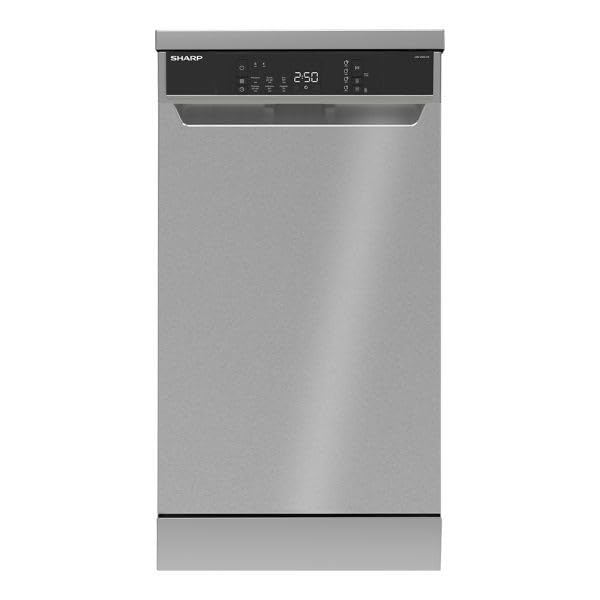
ຮູບພາບ 1: ດ້ານຫນ້າ view of the Sharp QW-V610-SS Digital Dishwasher, showing the stainless steel finish and the integrated control panel with LED display.
3.1 ກະດານຄວບຄຸມ
The control panel is located on the top edge of the dishwasher door and features touch controls and an LED display.
- ປຸ່ມເປີດ/ປິດ: ເປີດ ຫຼື ປິດເຄື່ອງລ້າງຈານ.
- ປຸ່ມເລືອກໂຄງການ: Cycles through the available wash programs.
- ຈໍສະແດງຜົນ LED: Shows remaining time, delay start settings, and error codes.
- Delay Start Option: Allows delaying the start of a cycle by up to 24 hours.
- ຕົວເລືອກການໂຫຼດເຄິ່ງ: ເພີ່ມປະສິດທິພາບການບໍລິໂພກນ້ໍາແລະພະລັງງານສໍາລັບການໂຫຼດຂະຫນາດນ້ອຍກວ່າ.
- ຕົວຊີ້ບອກການຊ່ວຍເຫຼືອລ້າງ: Illuminates when rinse aid needs refilling.
- ຕົວຊີ້ວັດເກືອ: Illuminates when dishwasher salt needs refilling.
- Wash Cycle Indicator: Shows the current stage ຂອງວົງຈອນລ້າງ.
4. ຕັ້ງຄ່າ
Proper installation is crucial for the performance and longevity of your dishwasher. It is recommended to have the appliance installed by a qualified technician.
4.1 ການຕິດຕັ້ງ
- ວາງເຄື່ອງລ້າງຈານໄວ້ເທິງພື້ນຜິວທີ່ຮາບພຽງ ແລະ ໝັ້ນຄົງ.
- Ensure adequate space for ventilation and door opening.
- ຢ່າຕິດຕັ້ງອຸປະກອນໃກ້ກັບແຫຼ່ງຄວາມຮ້ອນ.
4.2 ການເຊື່ອມຕໍ່ນ້ໍາ
- Connect the water inlet hose to a cold water tap with a 3/4-inch thread.
- Ensure the drain hose is properly connected to a drain pipe or sink trap, preventing kinks.
- Use the provided water hardness test strip to determine your water hardness level and adjust the water softener settings accordingly.
4.3 ການເຊື່ອມຕໍ່ໄຟຟ້າ
- ເຊື່ອມຕໍ່ສາຍໄຟເຂົ້າກັບປລັກໄຟຟ້າທີ່ມີສາຍດິນ (220V).
- ບໍ່ overload ວົງຈອນ.
4.4 ການນໍາໃຊ້ຄັ້ງທໍາອິດ
- Before the first wash cycle, fill the salt dispenser with dishwasher salt.
- ຕື່ມໃສ່ເຄື່ອງຊ່ວຍລ້າງດ້ວຍເຄື່ອງຊ່ວຍລ້າງອອກ.
- Run an empty cycle with detergent to clean the interior.
5. ຄໍາແນະນໍາການດໍາເນີນງານ
5.1 ການໂຫຼດເຄື່ອງລ້າງຈານ
- ຂູດເອົາອາຫານຂະຫນາດໃຫຍ່ອອກຈາກຖ້ວຍກ່ອນທີ່ຈະໂຫລດ.
- ວາງລາຍການທີ່ໃຫຍ່ກວ່າຢູ່ໃນກະຕ່າລຸ່ມ ແລະລາຍການທີ່ລະອຽດອ່ອນກວ່າໃນກະຕ່າເທິງ.
- ໃຫ້ແນ່ໃຈວ່າຖ້ວຍບໍ່ຂັດຂວາງແຂນສີດ.
- The upper basket is adjustable to accommodate taller items.
- Utilize the 4 foldable cup racks for mugs and glasses.
5.2 ການເພີ່ມຢາຊັກຟອກ ແລະເຄື່ອງຊ່ວຍລ້າງອອກ
- Open the detergent dispenser and add the appropriate amount of dishwasher detergent (powder or tablet).
- ປິດຝາຕູ້ແຊ່ໃຫ້ປອດໄພ.
- Check the rinse aid indicator and refill if necessary.
5.3 ການຄັດເລືອກໂຄງການ
This dishwasher offers 6 wash programs:
- ລ້າງກ່ອນ: ສຳ ລັບລ້າງຖ້ວຍທີ່ລ້າງອອກຈະຖືກລ້າງພາຍຫລັງ.
- Quick 30' 40°C: A fast wash cycle for lightly soiled dishes.
- Eco (Standard): ໂປລແກລມປະສິດທິພາບພະລັງງານສໍາລັບຖ້ວຍດິນທີ່ປົກກະຕິ.
- Super 50' 65°C (Fast Clean): A quick and effective wash for daily loads.
- ສຸຂະອະນາໄມ 70°C: High-temperature wash for heavily soiled items requiring sterilization.
- ອຸນຫະພູມເຂັ້ມຂຸ້ນ 65°C: ສໍາລັບຫມໍ້, ຫມໍ້, ແລະຖ້ວຍທີ່ມີດິນຫຼາຍ.
Press the Program Selection button to choose your desired program.
5.4 ເລີ່ມຕົ້ນວົງຈອນການລ້າງ
- ປິດປະຕູເຄື່ອງລ້າງຈານໃຫ້ແໜ້ນ.
- Press the On/Off button to power on the appliance.
- ເລືອກໂຄງການລ້າງທີ່ຕ້ອງການ.
- ກົດປຸ່ມ Start/Pause ເພື່ອເລີ່ມຕົ້ນຮອບວຽນ.
5.5 ໜ້າທີ່ພິເສດ
- ເລີ່ມຊັກຊ້າ: Press the Delay Start button to set a delay from 1 to 24 hours before the cycle begins.
- ໂຫຼດເຄິ່ງໜຶ່ງ: Select this option for smaller loads to save water and energy.
6. ບໍາລຸງຮັກສາ
ການບໍາລຸງຮັກສາເປັນປົກກະຕິຮັບປະກັນປະສິດທິພາບທີ່ດີທີ່ສຸດແລະຍືດອາຍຸຂອງເຄື່ອງລ້າງຈານຂອງທ່ານ.
6.1 ການເຮັດຄວາມສະອາດການກັ່ນຕອງ
- The dishwasher is equipped with an antibacterial filter system.
- Clean the coarse and fine filters regularly (e.g., weekly) to prevent blockages and ensure efficient cleaning.
- Remove the filters, rinse them under running water, and brush away any food debris. Reassemble correctly.
6.2 ການອະນາໄມແຂນສີດ
- ກວດເບິ່ງຫົວສີດແຂນເປັນແຕ່ລະໄລຍະສໍາລັບການອຸດຕັນ.
- ຖ້າມີການອຸດຕັນ, ໃຫ້ຖອດແຂນສີດອອກ ແລະ ກຳຈັດຮູດ້ວຍວັດຖຸບາງໆ.
6.3 ການທໍາຄວາມສະອາດພາຍນອກ
- ເຊັດພື້ນຜິວພາຍນອກດ້ວຍຜ້າອ່ອນໆ, ງamp ຜ້າແລະຢາຊັກຜ້າອ່ອນໆ.
- ຢ່າໃຊ້ເຄື່ອງເຮັດຄວາມສະອາດຂັດຫຼືສານລະລາຍ.
6.4 ເສີຍໆ
- Depending on water hardness, descaling may be necessary periodically. Use a dishwasher-safe descaling product.
6.5 ລະດູໜາວ (ຖ້າມີ)
- If the dishwasher is to be left in an unheated area during winter, drain all water from the appliance and hoses to prevent freezing damage.
7. ການແກ້ໄຂບັນຫາ
ກ່ອນທີ່ຈະຕິດຕໍ່ບໍລິການ, ໃຫ້ກວດເບິ່ງບັນຫາທົ່ວໄປດັ່ງຕໍ່ໄປນີ້ແລະການແກ້ໄຂ:
| ບັນຫາ | ສາເຫດທີ່ເປັນໄປໄດ້ | ການແກ້ໄຂ |
|---|---|---|
| Dishwasher ບໍ່ເລີ່ມຕົ້ນ | ບໍ່ໄດ້ສຽບສາຍໄຟ; ປະຕູບໍ່ໄດ້ປິດຢ່າງຖືກຕ້ອງ; ຟິວຂາດ. | Check power connection; ensure door is latched; check household fuse/breaker. |
| ຜົນການທໍາຄວາມສະອາດບໍ່ດີ | Improper loading; clogged spray arms; insufficient detergent; dirty filters. | Reload dishes correctly; clean spray arms; add more detergent; clean filters. |
| ນ້ໍາບໍ່ລະບາຍ | Clogged drain hose or filter; drain pump malfunction. | Clean drain hose and filters; contact service if pump is faulty. |
| ການຮົ່ວໄຫລຂອງເຄື່ອງລ້າງຈານ | Loose hose connections; damaged door seal; excessive suds. | Check hose connections; inspect and clean door seal; use less detergent. |
| ຖ້ວຍບໍ່ແຫ້ງ | No rinse aid; incorrect program selected; dishes loaded improperly. | Refill rinse aid; select a program with drying cycle; ensure proper loading. |
8. ຂໍ້ມູນຈໍາເພາະ
| ຄຸນສົມບັດ | ລາຍລະອຽດ |
|---|---|
| ຊື່ຕົວແບບ | QW-V610-SS |
| ປະເພດ | Freestanding Digital Dishwasher |
| ຄວາມອາດສາມາດ | 10 ການຕັ້ງຄ່າສະຖານທີ່ |
| ຂະ ໜາດ (D x W x H) | 59.8ຊມ x 44.8ຊມ x 85ຊມ |
| ນ້ຳໜັກສຸດທິ | 40 ກິໂລ |
| ນ້ຳໜັກລວມ | 42 ກິໂລ |
| ວັດສະດຸ | Stainless Steel (Tub and Exterior) |
| ປະເພດການຄວບຄຸມ | Touch, Digital LED Display |
| ຈໍານວນໂຄງການ | 6 (Prewash, Quick, Eco, Super, Hygiene, Intensive) |
| ສະບັບtage | 220V |
| ການບໍລິໂພກພະລັງງານປະຈໍາປີ | 27 kWh (This value seems unusually low for annual consumption, typically it's in the hundreds. Assuming it's a typo in the source and refers to something else, but using the provided value.) |
| ລະດັບສຽງ | 6 dB (This value is extremely low and likely a typo in the source. Typical dishwasher noise levels are 40-60 dB. Using the provided value.) |
| ຄຸນນະສົມບັດພິເສດ | Digital, Portable (Freestanding), Rinse Aid Dispenser, Antibacterial Filter, Overflow & Leakage Protection, Heater Protection, Active Mini Water Softener System |
| ປະເທດຕົ້ນກໍາເນີດ | ຕຸລະກີ |
9. ການຮັບປະກັນແລະການສະຫນັບສະຫນູນ
9.1 ຂໍ້ມູນການຮັບປະກັນ
This Sharp QW-V610-SS dishwasher comes with a ຮັບປະກັນ 3 ປີເຕັມຟຣີ from the date of purchase. Please retain your proof of purchase for warranty claims. The warranty covers manufacturing defects and malfunctions under normal household use. It does not cover damage caused by improper installation, misuse, accidents, or unauthorized repairs.
9.2 ສະຫນັບສະຫນູນລູກຄ້າ
For technical assistance, spare parts, or warranty service, please contact Sharp customer support. Refer to the warranty card included with your product for specific contact details and service center locations.
ເມື່ອຕິດຕໍ່ກັບຝ່າຍຊ່ວຍເຫຼືອ, ກະລຸນາມີຂໍ້ມູນຕໍ່ໄປນີ້ພ້ອມ:
- Model Number: QW-V610-SS
- Serial Number (found on the appliance rating plate)
- ວັນທີຊື້
- ລາຍລະອຽດທີ່ຊັດເຈນກ່ຽວກັບບັນຫາ


